DJ TechTools
  • Blog
    • DJ Gear
      • DIY Projects
      • Gear Reviews
      • New Products
      • Controllerism
    • Techniques + Tips
      • Beginner DJ
      • Advanced DJ
      • Producer
      • Finger Drummer
    • News + Culture
      • Editorials + Opinions
      • Artist Interviews
      • Performances + Routines
      • How I Play
    • DJ Software Tutorials
      • Serato Tips
        • Traktor Tips
      • CDJ Tips
      • Ableton Live Tips
  • Store
    • Run by real DJs, not a corporation
    • DJ Controllers
      • Midi Fighter Twister
      • Midi Fighter Spectra
      • Midi Fighter 64
      • View All
    • Accessories
      • Chroma USB Drive for DJs
      • Chroma Caps
      • Chroma Cables Audio
      • Chroma Cables USB-A
      • Chroma Cables: USB-C
      • DJTT Gift Card
      • Midi Fighter T-Shirt
      • Keyboard Covers
      • Earplugs by V-Moda
    • Production Gear
    • Soundcards & Mixers
  • Community
    • Popular Forums
      • General Discussion
      • Buy & Sell
      • Reviews
      • Mixes
      • Music Production
      • Show Your Setup
      • Off Topic
    • Handy Links
      • New Posts
      • Private Messages
      • Register
      • Search
    • Midi Maps
      • Traktor
      • Ableton
      • Serato DJ
      • Midi Fighter 3D
      • Midi Fighter Twister
      • Midi Fighter Spectra
  • Midi Fighter
  • Chroma
No Result
View All Result
DJ TechTools
  • Blog
    • DJ Gear
      • DIY Projects
      • Gear Reviews
      • New Products
      • Controllerism
    • Techniques + Tips
      • Beginner DJ
      • Advanced DJ
      • Producer
      • Finger Drummer
    • News + Culture
      • Editorials + Opinions
      • Artist Interviews
      • Performances + Routines
      • How I Play
    • DJ Software Tutorials
      • Serato Tips
        • Traktor Tips
      • CDJ Tips
      • Ableton Live Tips
  • Store
    • Run by real DJs, not a corporation
    • DJ Controllers
      • Midi Fighter Twister
      • Midi Fighter Spectra
      • Midi Fighter 64
      • View All
    • Accessories
      • Chroma USB Drive for DJs
      • Chroma Caps
      • Chroma Cables Audio
      • Chroma Cables USB-A
      • Chroma Cables: USB-C
      • DJTT Gift Card
      • Midi Fighter T-Shirt
      • Keyboard Covers
      • Earplugs by V-Moda
    • Production Gear
    • Soundcards & Mixers
  • Community
    • Popular Forums
      • General Discussion
      • Buy & Sell
      • Reviews
      • Mixes
      • Music Production
      • Show Your Setup
      • Off Topic
    • Handy Links
      • New Posts
      • Private Messages
      • Register
      • Search
    • Midi Maps
      • Traktor
      • Ableton
      • Serato DJ
      • Midi Fighter 3D
      • Midi Fighter Twister
      • Midi Fighter Spectra
  • Midi Fighter
  • Chroma
No Result
View All Result
DJ TechTools

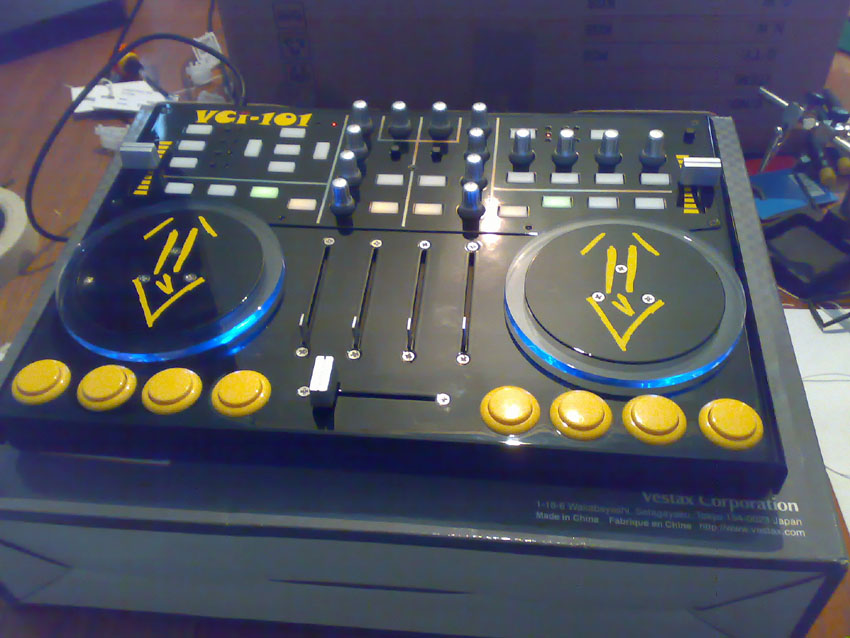
Add arcade buttons to a VCI-100

Ean Golden by Ean Golden
October 15, 2007
in Advanced DJ Tips, Controllerism, DIY Project Tutorials, VCI-100 SE / Arcade, Video Posts
Reading Time: 2 mins read
0
Add arcade buttons to a VCI-100
83
VIEWS
Post on FacebookTweet thisUpvote on Reddit
[youtube]http://www.youtube.com/watch?v=ptcA6VlKK_A[/youtube]

This post and video is outdated. For the updated version please visit this page:

http://djtechtools.com/2009/07/27/vci-100-diy-arcade-mod/

  • your going to need a cut guide for the buttons. Please email ean from the about page and ask for the latest version.
  • There is also a lip on the top/front edge of the VCI-100 base piece that needs to be cut away. I dont have pictures but its fairly obvious. Not the entire lip (the part in front of the cross fader can stay) just the parts that sit where the buttons are going. The lip is only about 1/4 inch wide so its a easy cut.
  • you dont need to shave the lip if you use the Sanwa 24mm snap in buttons
  • }}}Lead wires- 16 about 3-4 inches long (can be cut from microphone cable)
  • }}}Diodes- 8 50 PRV 200ma switching diodes
  • }}}Shrink sleeve- get about 2 feet so you can professionally protect your connections and not do it the ghetto way (like I did) with electrical tape. Shrink Sleeve is a plastic tube that shrinks down to enclose an exposed wire when heat is applied. Some people have heat guns but a match or lighter works fine.
  • }}}Electrical tape
  • }}}8 Arcade switches from Happ controls– they are the shallow micro arcade switches under the pushbutton section.
  • }}}Some spray paint to make it a cool color (auto trim paint works well) SAND THE UNIT FIRST!
  • }}}Phillips screw driver- One medium and one small tip-
  • }}}Wire stripper
  • }}}Solder
  • }}}Solder Iron
  • }}}Find a machinist in your area (there are a lot of them usually) send them the included diagram and say you need these holes cut out of 1/8″ aluminum. Try for around $50 if possible.

thats just about it! Enjoy your custom bad-ass VCI-100 and post photos when its done!

Good Luck,

Ean Golden

Tags: Arcade ButtonsDIY Projectsdj performance tricksDj TutorialsTipsVCI-100 ArticlesVideo Tutorials
Share1Tweet1Share
Previous Post

DJ Numark plays with toys- and they rock

Next Post

A great VCI MOD rolls off the line!

Related Posts

Meet the Koala sampler app: a mobile production powerhouse, now with stems
DJ Gear

Meet the Koala sampler app: a mobile production powerhouse, now with stems

February 7, 2023
Tips for DJing in Extreme Cold: DJTT readers share their advice
DJ Techniques / Tips

Tips for DJing in Extreme Cold: DJTT readers share their advice

January 30, 2023
Returning to IRL DJ gigs? Here’s 7 ways to quell stage anxiety without alcohol.
News + Culture

Returning to IRL DJ gigs? Here’s 7 ways to quell stage anxiety without alcohol.

June 3, 2021
Load More
Next Post
A great VCI MOD rolls off the line!

A great VCI MOD rolls off the line!

Want to reach DJTT's audience here?

Shoot an email to advertising@djtechtools.com

DJTT ads
DJTT newsletter
Midi Fighter
Chat with us
  • ABOUT DJTT
  • CONTACT
  • PRIVACY
  • MIDI FIGHTER HELP
  • ABOUT DJTT
  • JOBS
  • CONTACT US
  • ADVERTISE
  • PRIVACY POLICY
  • ACCESSIBILITY STATEMENT

© 2024 DJ Techtools all rights reserved by DJ TechTools on all content unless otherwise noted.

No Result
View All Result
  • Blog
    • DJ Gear
      • DIY Projects
      • Gear Reviews
      • New Products
      • Controllerism
    • Techniques + Tips
      • Beginner DJ
      • Advanced DJ
      • Producer
      • Finger Drummer
    • News + Culture
      • Editorials + Opinions
      • Artist Interviews
      • Performances + Routines
      • How I Play
    • DJ Software Tutorials
      • Serato Tips
      • CDJ Tips
      • Ableton Live Tips
  • Store
    • Run by real DJs, not a corporation
    • DJ Controllers
      • Midi Fighter Twister
      • Midi Fighter Spectra
      • Midi Fighter 64
      • View All
    • Accessories
      • Chroma USB Drive for DJs
      • Chroma Caps
      • Chroma Cables Audio
      • Chroma Cables USB-A
      • Chroma Cables: USB-C
      • DJTT Gift Card
      • Midi Fighter T-Shirt
      • Keyboard Covers
      • Earplugs by V-Moda
    • Production Gear
    • Soundcards & Mixers
  • Community
    • Popular Forums
      • General Discussion
      • Buy & Sell
      • Reviews
      • Mixes
      • Music Production
      • Show Your Setup
      • Off Topic
    • Handy Links
      • New Posts
      • Private Messages
      • Register
      • Search
    • Midi Maps
      • Traktor
      • Ableton
      • Serato DJ
      • Midi Fighter 3D
      • Midi Fighter Twister
      • Midi Fighter Spectra
  • Midi Fighter
  • Chroma

© 2024 DJ Techtools all rights reserved by DJ TechTools on all content unless otherwise noted.

This website uses cookies. By continuing to use this website you are giving consent to cookies being used. Visit our Privacy and Cookie Policy.