

One of the most common questions asked by new producers and DJs is “what software and VST plug-ins do you use?” The world of audio software can be mysterious when you’re first getting started. With so many DAWs and plug-ins it can really start to add up and drain the bank account. A lot of companies exploit this mystery to create the illusion that you need to spend a lot of money to make fat beats, so in today’s article, I’ll share with you some of my favorite free and low-cost plug-ins and software. Everyone should be able to make beats!
 GET STARTED, GET A DAW
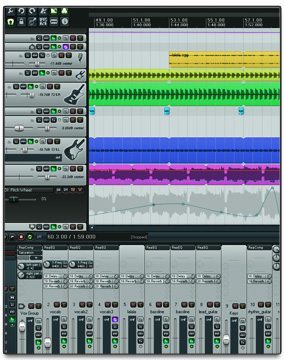
The first (and probably biggest) financial hurdle in getting started making beats is your DAW (digital audio workstation). You’ve probably heard of Ableton, Logic, ProTools, Reason and Cubase – they all do pretty much the same thing, and typically cost more than $500 for the complete feature set. For someone just getting started, this can be a pretty big barrier to entry. What if you want to start producing for free? Beginning producers on a budget, meet Reaper.
Reaper is a low cost and high performance professional quality DAW that sounds amazing and gives you almost all the same core functionality as the other top contenders. In fact, I think the mixing algorithm sounds so good that sometimes I’ll produce a track in Ableton, and then run multi-track into Reaper for the mix down. With full support for VSTs and AUs, it’s a perfect platform for hosting all the awesome plug-ins I’m about to share with you. It also includes hundreds of audio and MIDI processing effects, and you can edit audio, draw automation, layer unlimited tracks, record audio, interface with hardware and MIDI, and much more.
The best part: Reaper has an endless “evaluation” period. That means that you could technically evaluate it forever with full functionality, making it completely free. If you like and are using it, you should buy it for a humble price of just $60, wow!
 WHAT’S A PLUG-IN?
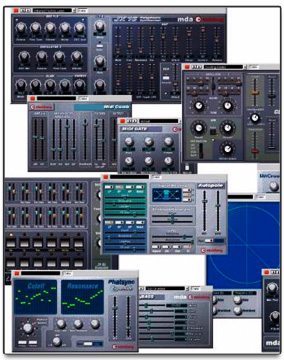
If you already know what a plug-in is you can just go ahead and skip to the next section – for those of you who are new to this world, a plug-in (you might have hear them called by their various flavor, including VST, VSTi, AU, etc.) is a small “program within a program” that you open from within your DAW and can use to either make or modify sounds. (VST stands for Virtual Studio Technology)
For example, you might have a synthesizer plug-in or a delay plug-in. In either case, you’d first open your DAW, then load the plug-in onto an audio or MIDI track and start making noises. Many DAWs include their own “native” synths and effects – think of plug-ins as third party additions for your DAW.
FREE PLUG-INS TO PRODUCE, EFFECT, AND MASTER
In the spirit of freedom, we’ll start with a selection of plugins that are absolutely free! That means you can literally go get them right now and start making hits (technically speaking that is). I’m going to divide them into two categories: synths and FX. For the sake of sanity, I’ve chosen 5 in each category to highlight, with an extended full list at the end of the article.
Round 1: Synthesizers and Instruments!
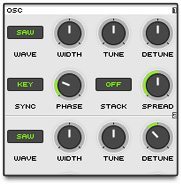
- Synth 1: best for basics, really impressive tone – warm, fat, and punchy!
- TAL Synths: especially the noisemaker and bassline, full featured, dynamic envelope, chorus, fx, very malleable and great tone
- Magic 8-Bit: so much fun, really punky and simple
- Alchemy Player: amazing tone, high budget sound, perfect for epic moments
- Crystal: so many options, envelopes, oscillators, complex evolving sounds
- AutoMat: rager synth award, three oscillators, multiple filters, very clean
Round 2: FX!
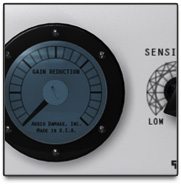 Rough Rider: a violent beast of a compressor. Basically can turn any sound into a sonic missile that will pummel its way through your mix. Has the amazing ability to keep the “level” the same while vastly bumping the perceived volume and punch.
- TAL FX (TAL definitely wins the award for the best overall collection of free synths and effects) – I really like the tube, reverb, chorus, delay, etc.
- SupaTrigga check out bram.smartelectronix.com for a whole ton of cool free plugins – supa trigga is a nice beat slicer
- W1 Limiter: super nice sounding mastering limiter perfect for quick shmasters and maximizing loudness on any track
Not everything can be free, but that doesn’t mean it isn’t affordable. There are quite a few plug-ins that deserve a nod for pairing accessibility with pure rawness. One of my favorites is the Sausage Fattener created by Dada Life, which makes pretty much anything sound nasty and fat. With just two main knobs, it makes creating fat filthiness about as easy as eating a sandwich. Nothing else quite compares and I highly recommend picking it up!
START YOUR PRODUCER ENGINES
So now that you have an awesome DAW loaded full of fat synths and FX, it’s time to get to work. Fortunately you still have money to buy a burrito – after all, it’s hard to be inspired when you’re hungry and broke.
This round up is far from comprehensive, and there are a lot of awesome plugins out there that I didn’t talk about or perhaps have never even heard of! As a Mac user, I focused on plugins I can use, but of course for the PC people there are probably way more awesome options and I envy you. We’d love to hear your opinion in the comments, so go to town and make sure to share links if you’re referencing anything.
Additional Recommended VSTs- TAL plugins – http://kunz.corrupt.ch/Products
- mda plugins – http://mda.smartelectronix.com/
- tweakbench – http://tweakbench.com/monomate
- dblue glitch – http://togeostudios.com/ts-blog/free-resources/dblue-glitch-free-vst-effect/
- DSK Teck – http://www.dskmusic.com/dsk-techsynth/
- Voxengo MSED – http://www.voxengo.com/
- Synth1 – http://www.kvraudio.com/product/synth1-by-ichiro-toda
- Rough Rider – http://www.audiodamage.com/downloads/product.php?pid=ADF002
- QuickQuack – http://www.quikquak.com/Prod_UpStereo.html
- Super Waves – http://www.superwavesynths.co.uk/products.htm
- Ice Cream – http://www.megavst.com/synth/icecream/
- Old Music Box – http://www.megavst.com/idiophone/old-music-box/
- Crystal – http://www.greenoak.com/crystal/dwnld.html
- W1 Limiter – http://www.yohng.com/software/w1limit.html
- automat – http://www.kvraudio.com/product/automat_by_alphakanal
- Tweakbench (PC only) – http://tweakbench.com/monomate
One of the most important parts of making beats is samples: subscribe to our newsletter to get regular sound packs in your email from Mad Zach or check out this Mad Zach tutorial to learn how to make your own samples!



