DJ TechTools
  • Blog
    • DJ Gear
      • DIY Projects
      • Gear Reviews
      • New Products
      • Controllerism
    • Techniques + Tips
      • Beginner DJ
      • Advanced DJ
      • Producer
      • Finger Drummer
    • News + Culture
      • Editorials + Opinions
      • Artist Interviews
      • Performances + Routines
      • How I Play
    • DJ Software Tutorials
      • Serato Tips
        • Traktor Tips
      • CDJ Tips
      • Ableton Live Tips
  • Store
    • Run by real DJs, not a corporation
    • DJ Controllers
      • Midi Fighter Twister
      • Midi Fighter Spectra
      • Midi Fighter 64
      • View All
    • Accessories
      • Chroma USB Drive for DJs
      • Chroma Caps
      • Chroma Cables Audio
      • Chroma Cables USB-A
      • Chroma Cables: USB-C
      • DJTT Gift Card
      • Midi Fighter T-Shirt
      • Keyboard Covers
      • Earplugs by V-Moda
    • Production Gear
    • Soundcards & Mixers
  • Community
    • Popular Forums
      • General Discussion
      • Buy & Sell
      • Reviews
      • Mixes
      • Music Production
      • Show Your Setup
      • Off Topic
    • Handy Links
      • New Posts
      • Private Messages
      • Register
      • Search
    • Midi Maps
      • Traktor
      • Ableton
      • Serato DJ
      • Midi Fighter 3D
      • Midi Fighter Twister
      • Midi Fighter Spectra
  • Midi Fighter
  • Chroma
No Result
View All Result
DJ TechTools
  • Blog
    • DJ Gear
      • DIY Projects
      • Gear Reviews
      • New Products
      • Controllerism
    • Techniques + Tips
      • Beginner DJ
      • Advanced DJ
      • Producer
      • Finger Drummer
    • News + Culture
      • Editorials + Opinions
      • Artist Interviews
      • Performances + Routines
      • How I Play
    • DJ Software Tutorials
      • Serato Tips
        • Traktor Tips
      • CDJ Tips
      • Ableton Live Tips
  • Store
    • Run by real DJs, not a corporation
    • DJ Controllers
      • Midi Fighter Twister
      • Midi Fighter Spectra
      • Midi Fighter 64
      • View All
    • Accessories
      • Chroma USB Drive for DJs
      • Chroma Caps
      • Chroma Cables Audio
      • Chroma Cables USB-A
      • Chroma Cables: USB-C
      • DJTT Gift Card
      • Midi Fighter T-Shirt
      • Keyboard Covers
      • Earplugs by V-Moda
    • Production Gear
    • Soundcards & Mixers
  • Community
    • Popular Forums
      • General Discussion
      • Buy & Sell
      • Reviews
      • Mixes
      • Music Production
      • Show Your Setup
      • Off Topic
    • Handy Links
      • New Posts
      • Private Messages
      • Register
      • Search
    • Midi Maps
      • Traktor
      • Ableton
      • Serato DJ
      • Midi Fighter 3D
      • Midi Fighter Twister
      • Midi Fighter Spectra
  • Midi Fighter
  • Chroma
No Result
View All Result
DJ TechTools

Looping Techniques For DJs: Loop Move Macros

Ean Golden by Ean Golden
January 5, 2014
in Advanced DJ Tips, DJ Techniques / Tips, Traktor Tips
Reading Time: 2 mins read
0
Looping Techniques For DJs: Loop Move Macros
542
VIEWS
Post on FacebookTweet thisUpvote on Reddit

Today’s article is inspired by the king of loops: Mr Richie Hawtin, who masterfully moves around songs, layering loops into an energetic blend of drums that always stay in time. How does he do it? Fortunately for you, I asked him that exact question on the CNTRL tour. Today we’re sharing one important concept from Mr. Hawtin that is critical for DJs looking to play musically with loops.

SEARCHING FOR THE PERFECT LOOP

The basic concept behind this style of loop mixing is that when mixing in a second (or third, or fourth) track, being able to set a loop at a certain part of a phrase (often the beginning) and then moving the loop around the track in 16/32 counts keeps the loop phrased correctly. The process is as follows:

  1. Always start the track on a down beat. I use load markers set on the 1, with Traktor configured to always load to that marker.
  2. Set a loop that starts at that point (I macro-mapped my play button to also loop by default)
  3. Now move around in the track by jumping 16 or 32 counts. This keeps the beginning of the loop always at the start of a musical phrase.
  4. When it comes time to release that track, just release it on the 1 and everything will stay in time.

MAPPING LOOP MACROS
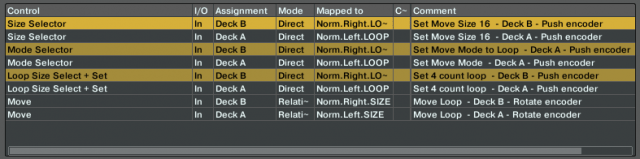
Just a few commands needed to map a loop move macro.

Making a Loop Move macro isn’t very hard – you’ll just need to map four commands in Traktor for it to work.

  • Loop Size Select + Set: (Encoder Press) Sets the first 4 count loop and activates it
  • Size Selector: (Encoder Press) Sets the move distance to 16 counts
  • Mode Selector: (Encoder Press) Sets the move mode to Loop move
  • Move: (Encoder Rotate) Moves the loop 

It’s important to hard code all the mode and size commands so the encoder works every time, even if the Move section was changed to a different type, like beat jump, or length. You want your mapping to consistently give you the same results, even if you’ve clicked around in the transport section.

Here’s an example TSI that has the exact controls above – good for building on top of, or integrating into your own mapping!

Next Tutorial: This technique works well with Ean’s Stage Mixing concept – click to watch. 

Tags: dj phrasingdj techniquesloop jumploop macrosloop moveloop techniquesloopingmappingphrasingtraktor mappingTraktor Tips
Share4Tweet3Share
Previous Post

Documentaries and Tutorials For Producers + DJs: Round 6

Next Post

WeeklyBeats: Make A Track Every Week Of 2014

Related Posts

traktor-pro plus 3.8 pattern player controls
Dj and Production Tutorials

Review: Traktor Pro Plus 3.8 – After 8 months, is the subscription worth it?

April 20, 2023
Traktor Pro 3.6 releases, as well as a feature roadmap…
Breaking News

Traktor Pro 3.6 releases, as well as a feature roadmap…

August 19, 2022
Traktor Pro 3.6 beta and iZotope's Ozone Maximizer side by side
NAMM 2022

Traktor’s new beta cycle has begun: 3.6 to include iZotope products, maybe NKS support?

May 30, 2022
Load More
Next Post
WeeklyBeats: Make A Track Every Week Of 2014

WeeklyBeats: Make A Track Every Week Of 2014

Want to reach DJTT's audience here?

Shoot an email to advertising@djtechtools.com

DJTT ads
DJTT newsletter
Midi Fighter
Chat with us
  • ABOUT DJTT
  • CONTACT
  • PRIVACY
  • MIDI FIGHTER HELP
  • ABOUT DJTT
  • JOBS
  • CONTACT US
  • ADVERTISE
  • PRIVACY POLICY

© 2024 DJ Techtools all rights reserved by DJ TechTools on all content unless otherwise noted.

No Result
View All Result
  • Blog
    • DJ Gear
      • DIY Projects
      • Gear Reviews
      • New Products
      • Controllerism
    • Techniques + Tips
      • Beginner DJ
      • Advanced DJ
      • Producer
      • Finger Drummer
    • News + Culture
      • Editorials + Opinions
      • Artist Interviews
      • Performances + Routines
      • How I Play
    • DJ Software Tutorials
      • Serato Tips
      • CDJ Tips
      • Ableton Live Tips
  • Store
    • Run by real DJs, not a corporation
    • DJ Controllers
      • Midi Fighter Twister
      • Midi Fighter Spectra
      • Midi Fighter 64
      • View All
    • Accessories
      • Chroma USB Drive for DJs
      • Chroma Caps
      • Chroma Cables Audio
      • Chroma Cables USB-A
      • Chroma Cables: USB-C
      • DJTT Gift Card
      • Midi Fighter T-Shirt
      • Keyboard Covers
      • Earplugs by V-Moda
    • Production Gear
    • Soundcards & Mixers
  • Community
    • Popular Forums
      • General Discussion
      • Buy & Sell
      • Reviews
      • Mixes
      • Music Production
      • Show Your Setup
      • Off Topic
    • Handy Links
      • New Posts
      • Private Messages
      • Register
      • Search
    • Midi Maps
      • Traktor
      • Ableton
      • Serato DJ
      • Midi Fighter 3D
      • Midi Fighter Twister
      • Midi Fighter Spectra
  • Midi Fighter
  • Chroma

© 2024 DJ Techtools all rights reserved by DJ TechTools on all content unless otherwise noted.

This website uses cookies. By continuing to use this website you are giving consent to cookies being used. Visit our Privacy and Cookie Policy.