DJ TechTools
  • Blog
    • DJ Gear
      • DIY Projects
      • Gear Reviews
      • New Products
      • Controllerism
    • Techniques + Tips
      • Beginner DJ
      • Advanced DJ
      • Producer
      • Finger Drummer
    • News + Culture
      • Editorials + Opinions
      • Artist Interviews
      • Performances + Routines
      • How I Play
    • DJ Software Tutorials
      • Serato Tips
        • Traktor Tips
      • CDJ Tips
      • Ableton Live Tips
  • Store
    • Run by real DJs, not a corporation
    • DJ Controllers
      • Midi Fighter Twister
      • Midi Fighter Spectra
      • Midi Fighter 64
      • View All
    • Accessories
      • Chroma USB Drive for DJs
      • Chroma Caps
      • Chroma Cables Audio
      • Chroma Cables USB-A
      • Chroma Cables: USB-C
      • DJTT Gift Card
      • Midi Fighter T-Shirt
      • Keyboard Covers
      • Earplugs by V-Moda
    • Production Gear
    • Soundcards & Mixers
  • Community
    • Popular Forums
      • General Discussion
      • Buy & Sell
      • Reviews
      • Mixes
      • Music Production
      • Show Your Setup
      • Off Topic
    • Handy Links
      • New Posts
      • Private Messages
      • Register
      • Search
    • Midi Maps
      • Traktor
      • Ableton
      • Serato DJ
      • Midi Fighter 3D
      • Midi Fighter Twister
      • Midi Fighter Spectra
  • Midi Fighter
  • Chroma
No Result
View All Result
DJ TechTools
  • Blog
    • DJ Gear
      • DIY Projects
      • Gear Reviews
      • New Products
      • Controllerism
    • Techniques + Tips
      • Beginner DJ
      • Advanced DJ
      • Producer
      • Finger Drummer
    • News + Culture
      • Editorials + Opinions
      • Artist Interviews
      • Performances + Routines
      • How I Play
    • DJ Software Tutorials
      • Serato Tips
        • Traktor Tips
      • CDJ Tips
      • Ableton Live Tips
  • Store
    • Run by real DJs, not a corporation
    • DJ Controllers
      • Midi Fighter Twister
      • Midi Fighter Spectra
      • Midi Fighter 64
      • View All
    • Accessories
      • Chroma USB Drive for DJs
      • Chroma Caps
      • Chroma Cables Audio
      • Chroma Cables USB-A
      • Chroma Cables: USB-C
      • DJTT Gift Card
      • Midi Fighter T-Shirt
      • Keyboard Covers
      • Earplugs by V-Moda
    • Production Gear
    • Soundcards & Mixers
  • Community
    • Popular Forums
      • General Discussion
      • Buy & Sell
      • Reviews
      • Mixes
      • Music Production
      • Show Your Setup
      • Off Topic
    • Handy Links
      • New Posts
      • Private Messages
      • Register
      • Search
    • Midi Maps
      • Traktor
      • Ableton
      • Serato DJ
      • Midi Fighter 3D
      • Midi Fighter Twister
      • Midi Fighter Spectra
  • Midi Fighter
  • Chroma
No Result
View All Result
DJ TechTools

TraktorAutoNextSong: Traktor Track Recommendations

Dan White by Dan White
November 9, 2015
in Breaking News, DJ Software Tips, News, Traktor Tips
Reading Time: 3 mins read
0
TraktorAutoNextSong: Traktor Track Recommendations
594
VIEWS
Post on FacebookTweet thisUpvote on Reddit

We’ve wondered ever since Traktor DJ for iOS launched back in 2013 when the desktop Traktor Pro would get the track recommendation functionality that the iPad/iPhone app has. Unfortunately, Native Instruments has kept us waiting – but one independent project brings the functionality to Mac users with a standalone app workflow. Read on for the details of the TraktorAutoNextSong project.

This app is built as an external device to your DJ software – meaning that you’ll have to open it separately and allow it to analyze your Traktor Pro collection on its own. Designed by Anders Fischer-Nielsen, the app is a handy and free way to find good tracks to add to your playlists or to mix into your set in a pinch.

Installing TraktorAutoNextSong

To install the app, you’ll need to have Mono installed – this is an open source framework that allows the application to run. It’s a free download (as is TraktorAutoNextSong) available here.  Run the installer for Mono and then download and install TraktorAutoNextSong as well.

Screen Shot 2015-11-09 at Nov 9.22.46 PM

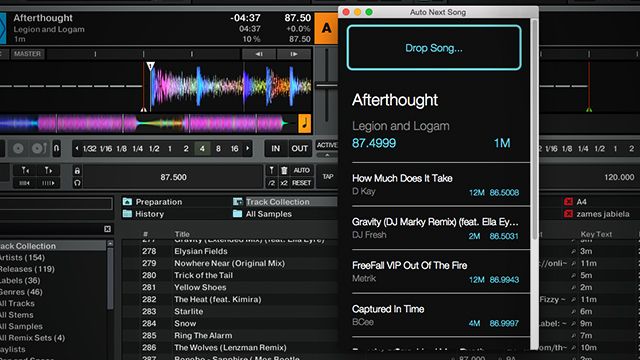
You’ll have to select your Traktor library in your current Traktor folder – it’s called collection.nml and is usually in the current version of Traktor in Documents > Native Instruments.  It’ll quickly analyze your collection and you’re ready to go – now open Traktor and drag songs directly into the app (I found that click-and-holding on a track and then cmd-tabbing over to the TraktorAutoNextSong app works well).

How Well Do The Traktor Track Recommendations Work?
song-recommendations

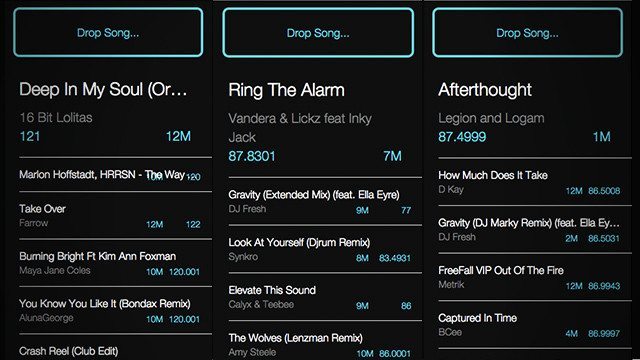
In our testing, the TraktorAutoNextSong app works extremely well. It instantly loads in eight suggested tracks that are similar in BPM and have a key that matches or is close. Since Traktor annoyingly doesn’t do double sorting (that is, sort by BPM second, but Key first), this is incredibly handy and allows using both fields effectively to find good songs to consider.

The results are actually a “weighted graph of every song in a Traktor collection of songs […] the weight is calculated using the BPM of the songs and their different keys”.

One of the drawbacks is that it only reads Traktor’s key own detected field – which historically hasn’t been as accurate as Mixed In Key and others. We’d love to be able to choose our own ID3 tags for Key. A second drawback is that it doesn’t look for halved / doubled BPMs – something that any good DJ knows is a perfectly fine way to look for a good matching track.

Is This “Cheating”?

A common accustation of any tools that help DJs choose tracks is that they’re a form of cheating. In our view, the tool is simply a shortcut to get around a weakness of the software – and as noted above, is the same process as sorting your library by Key and BPM – but in a much faster manner.

If you’re using this in place of selecting good songs that will fit in the moment of the song, you’re of course making a mistake. Trust your ears and choose songs that fit the vibe and energy of your dancefloor. The creator noted in a post on Reddit:

“I plan on using it for preparing sets or maybe for the odd time when I’ve dug myself into a corner during an improv DJ gig.”

Download the current version of TraktorAutoNextSong on GitHub.
Tags: GitHubMonotrack recommendationsTraktor ProTraktor Tipstraktorautonextsong
Share5Tweet3Share
Previous Post

Best DJ Earplugs For The Club

Next Post

V-Moda Zn – Military-Grade In-Ear Headphones

Related Posts

Midi Fighter Twister controlling Traktor Pro 4 Stem decks
DJ Techniques / Tips

Ean’s powerful Midi Fighter Twister mapping for Traktor Pro 4’s Stems + Pattern Player

July 17, 2024
traktor-pro plus 3.8 pattern player controls
Dj and Production Tutorials

Review: Traktor Pro Plus 3.8 – After 8 months, is the subscription worth it?

April 20, 2023
Traktor Pro 3.6 releases, as well as a feature roadmap…
Breaking News

Traktor Pro 3.6 releases, as well as a feature roadmap…

August 19, 2022
Load More
Next Post
V-Moda Zn – Military-Grade In-Ear Headphones

V-Moda Zn - Military-Grade In-Ear Headphones

Want to reach DJTT's audience here?

Shoot an email to advertising@djtechtools.com

DJTT ads
DJTT newsletter
Midi Fighter
Chat with us
  • ABOUT DJTT
  • CONTACT
  • PRIVACY
  • MIDI FIGHTER HELP
  • ABOUT DJTT
  • JOBS
  • CONTACT US
  • ADVERTISE
  • PRIVACY POLICY
  • ACCESSIBILITY STATEMENT

© 2024 DJ Techtools all rights reserved by DJ TechTools on all content unless otherwise noted.

No Result
View All Result
  • Blog
    • DJ Gear
      • DIY Projects
      • Gear Reviews
      • New Products
      • Controllerism
    • Techniques + Tips
      • Beginner DJ
      • Advanced DJ
      • Producer
      • Finger Drummer
    • News + Culture
      • Editorials + Opinions
      • Artist Interviews
      • Performances + Routines
      • How I Play
    • DJ Software Tutorials
      • Serato Tips
      • CDJ Tips
      • Ableton Live Tips
  • Store
    • Run by real DJs, not a corporation
    • DJ Controllers
      • Midi Fighter Twister
      • Midi Fighter Spectra
      • Midi Fighter 64
      • View All
    • Accessories
      • Chroma USB Drive for DJs
      • Chroma Caps
      • Chroma Cables Audio
      • Chroma Cables USB-A
      • Chroma Cables: USB-C
      • DJTT Gift Card
      • Midi Fighter T-Shirt
      • Keyboard Covers
      • Earplugs by V-Moda
    • Production Gear
    • Soundcards & Mixers
  • Community
    • Popular Forums
      • General Discussion
      • Buy & Sell
      • Reviews
      • Mixes
      • Music Production
      • Show Your Setup
      • Off Topic
    • Handy Links
      • New Posts
      • Private Messages
      • Register
      • Search
    • Midi Maps
      • Traktor
      • Ableton
      • Serato DJ
      • Midi Fighter 3D
      • Midi Fighter Twister
      • Midi Fighter Spectra
  • Midi Fighter
  • Chroma

© 2024 DJ Techtools all rights reserved by DJ TechTools on all content unless otherwise noted.

This website uses cookies. By continuing to use this website you are giving consent to cookies being used. Visit our Privacy and Cookie Policy.