DJ TechTools
  • Blog
    • DJ Gear
      • DIY Projects
      • Gear Reviews
      • New Products
      • Controllerism
    • Techniques + Tips
      • Beginner DJ
      • Advanced DJ
      • Producer
      • Finger Drummer
    • News + Culture
      • Editorials + Opinions
      • Artist Interviews
      • Performances + Routines
      • How I Play
    • DJ Software Tutorials
      • Serato Tips
        • Traktor Tips
      • CDJ Tips
      • Ableton Live Tips
  • Store
    • Run by real DJs, not a corporation
    • DJ Controllers
      • Midi Fighter Twister
      • Midi Fighter Spectra
      • Midi Fighter 64
      • View All
    • Accessories
      • Chroma USB Drive for DJs
      • Chroma Caps
      • Chroma Cables Audio
      • Chroma Cables USB-A
      • Chroma Cables: USB-C
      • DJTT Gift Card
      • Midi Fighter T-Shirt
      • Keyboard Covers
      • Earplugs by V-Moda
    • Production Gear
    • Soundcards & Mixers
  • Community
    • Popular Forums
      • General Discussion
      • Buy & Sell
      • Reviews
      • Mixes
      • Music Production
      • Show Your Setup
      • Off Topic
    • Handy Links
      • New Posts
      • Private Messages
      • Register
      • Search
    • Midi Maps
      • Traktor
      • Ableton
      • Serato DJ
      • Midi Fighter 3D
      • Midi Fighter Twister
      • Midi Fighter Spectra
  • Midi Fighter
  • Chroma
No Result
View All Result
DJ TechTools
  • Blog
    • DJ Gear
      • DIY Projects
      • Gear Reviews
      • New Products
      • Controllerism
    • Techniques + Tips
      • Beginner DJ
      • Advanced DJ
      • Producer
      • Finger Drummer
    • News + Culture
      • Editorials + Opinions
      • Artist Interviews
      • Performances + Routines
      • How I Play
    • DJ Software Tutorials
      • Serato Tips
        • Traktor Tips
      • CDJ Tips
      • Ableton Live Tips
  • Store
    • Run by real DJs, not a corporation
    • DJ Controllers
      • Midi Fighter Twister
      • Midi Fighter Spectra
      • Midi Fighter 64
      • View All
    • Accessories
      • Chroma USB Drive for DJs
      • Chroma Caps
      • Chroma Cables Audio
      • Chroma Cables USB-A
      • Chroma Cables: USB-C
      • DJTT Gift Card
      • Midi Fighter T-Shirt
      • Keyboard Covers
      • Earplugs by V-Moda
    • Production Gear
    • Soundcards & Mixers
  • Community
    • Popular Forums
      • General Discussion
      • Buy & Sell
      • Reviews
      • Mixes
      • Music Production
      • Show Your Setup
      • Off Topic
    • Handy Links
      • New Posts
      • Private Messages
      • Register
      • Search
    • Midi Maps
      • Traktor
      • Ableton
      • Serato DJ
      • Midi Fighter 3D
      • Midi Fighter Twister
      • Midi Fighter Spectra
  • Midi Fighter
  • Chroma
No Result
View All Result
DJ TechTools

Using Serato + Traktor DJ Gear With Rekordbox DJ

Marc Santaromana by Marc Santaromana
July 11, 2016
in Rekordbox DJ Tips
Reading Time: 4 mins read
0
Using Serato + Traktor DJ Gear With Rekordbox DJ
60
SHARES
3k
VIEWS
Post on FacebookTweet thisUpvote on Reddit

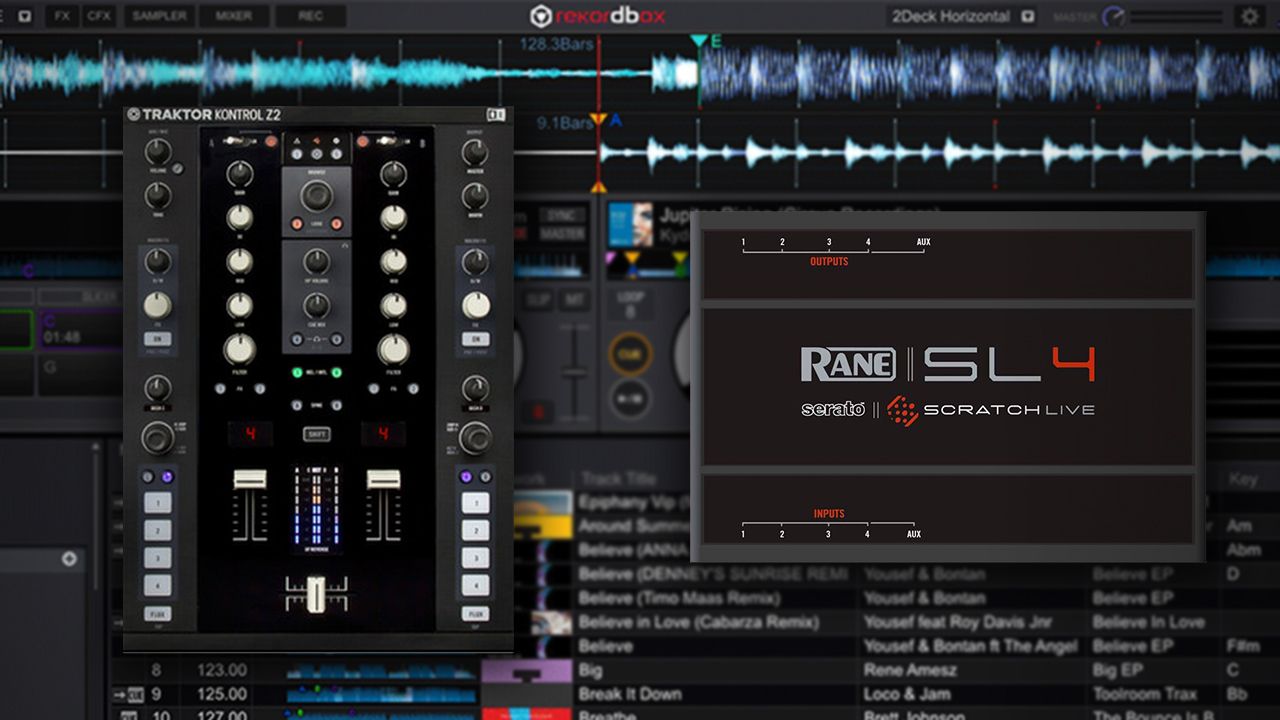
Trying out a new DJ software is never easy. There are many reasons to avoid it – but with Pioneer DJ’s newcomer, Rekordbox DJ, it’s not as difficult as you might expect. Almost any Serato DJ or Traktor Pro gear can be used with the software, without paying extra or hacking.

Why Rekordbox DJ?

The last couple years have been frustrating for several types of DJs:

  • Serato DJs using older legacy audio devices that no longer work with modern OS updates
  • Traktor DJs who have watched the feature sets on Serato and Rekordbox expand while NI focused their attention on Stems (ex: Serato FX packs, Rekordbox release effects)
  • DVS DJs who want to use a piece of gear that isn’t “certified” for use with their software.
    for example: Kontrol Z2 with Serato DJ, without an extra Serato soundcard

Pioneer’s Rekordbox DJ enables a familiar workflow for Serato and Traktor veterans, without the need for new hardware. Rekordbox DJ also solves the issue of incompatibility with the latest operating systems which has plagued many users, particularly on the Serato side.

It has a ton of effects, and has received rapid-fire updates every few months. Pioneer is clearly putting a ton of money into the quick development of the software – remember how it launched only 8 months ago?

What Traktor + Serato Gear Works With Rekordbox?

One of the biggest obstacles in changing DJ software is the concern that you’ll have to spend money buying new gear. But the price structure of Rekordbox DJ (paying up front or buying a subscription) allows Pioneer DJ to justify not restricting what devices you can use with the software. This means that you should be able to use Rekordbox with just about any soundcard that your computer recognizes. See it in action with a Kontrol Z2 and Maschine in the video above.

@DJTechTools I don’t think Rekordbox filters by USB device name. You have to pay for the software so they don’t care what you use.

— Damien Sirkis (@DamienSirkis) July 9, 2016

This goes beyond just MIDI mapping controllers that weren’t designed for Rekordbox use. As Damien points out above, it’s particularly important for audio devices, especially when used with DVS. These often have to be certified for use Serato / Traktor – but that’s not the case with Rekordbox.

Here’s the hardware we’ve tested and confirmed as working with Pioneer DJ’s DVS pack so far (we’ll expand on this list in the next few hours – if you can check any hardware, let us know the results in the comments):

  • Rane SL 2/3/4
  • Traktor Kontrol Z2
  • Traktor Audio 6/8/10
  • Serato control vinyl
  • Pioneer DJ gear (obviously) including any DDJ-unit with inputs, DJMs with built-in sound cards, Rekordbox timecode, etc. Full list here.

It’s worth noting that just because these devices work with Rekordbox DJ now doesn’t mean they will in the future – or that there’s any support for them if anything goes wrong:

“DJ equipment other than those above are not supported for rekordbox dvs function even if it works on it.” – Pioneer DJ’s support page

MIDI Mappings and Other Features

A lot of Traktor and Serato users will also wonder about MIDI mappings. While Rekordbox doesn’t yet have advanced MIDI mapping that uses modifiers and layered logic like Traktor, it does have most basic controls easily mappable. It’s fairly intuitive – watch how one YouTube user, DJ DP, quickly maps a Kontrol X1:

Looking for Rekordbox MIDI maps? There aren’t too many MIDI mappings available for Rekordbox DJ yet – but a growing number can be found on DJTT’s own maps.DJTechtools.com

How To Setup Traktor + Serato Audio Interfaces
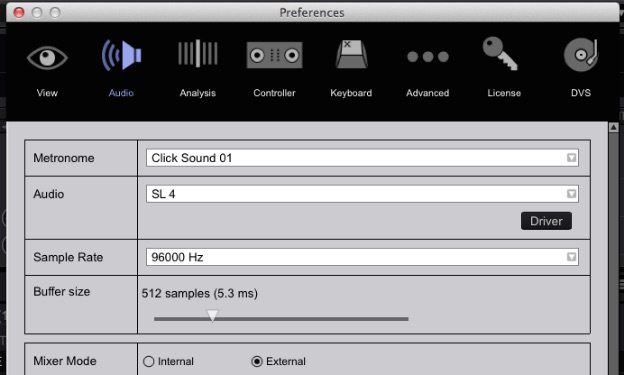
The Rane SL4 in Rekordbox's preferences
The Rane SL4 in Rekordbox’s preferences

Not only does other hardware work, but Serato timecode vinyl and CDs do as well. Setting up audio interfaces to work with Rekordbox DJ is pretty straightforward:

  • Open Rekordbox’s preferences to the audio tab and select the audio interface you have plugged in
  • Make sure the mixer mode is set to external
  • Select the correct inputs and outputs on the soundcard. For example “input 1” on the audio interface will actually be both input 1 and input 2 in the software (two mono inputs).
  • For DVS users, open the DVS Tab and check the control signal.
  • Play back audio on each channel to ensure everything is routed correctly

If you need help setting up your sound card, watch my quick video below explaining it in detail:

Still A Challenge: Metadata

There’s of course one big challenge that’s worth noting for anyone thinking of switching to Rekordbox: your metadata. Right now there’s no way to get your Serato crates / cues / loops / etc from one software to another.

Rekordbuddy 2 will solve this for every software – but it’s still in a beta state. Once it is finalized, we’re excited to see DJs able to freely move from software to software on a whim. After all, it should be the features and performance that cause you to use one piece of software over another – not some restrictions around hardware or your music library.

Learn more about Rekordbox DJ on the official site here –  it comes with a 30 day trial that allows you to use it in full.  Of course, the software is new and not as “mature” as Serato or Traktor, but it’s still well worth looking into.

 

Tags: DVSpioneer DJrekordboxrekordbox djserato DJserato scratch liveswitching dj softwareTraktor Tips
Share24Tweet15Share
Previous Post

Watch 9 Unique Live Shows From DJs + Producers

Next Post

Xone:PX5 Mixer: Allen & Heath’s 4-Channel Mixer For The Masses?

Related Posts

The DJM-V5 from AlphaTheta: 3 channels, 4-band EQ, V10 sound – no Beat FX or crossfader.
Breaking News

The DJM-V5 from AlphaTheta: 3 channels, 4-band EQ, V10 sound – no Beat FX or crossfader.

January 20, 2026
Rekordox Spotify
Breaking News

Spotify (finally) slides into Rekordbox, Serato, and Algoriddim djay (again) – for better or worse?

September 24, 2025
CDJ-3000x player by AlphaTheta
Breaking News

The CDJ-3000X is here: an iterative upgrade of the media player for $3,000 / £2,399

September 9, 2025
Load More
Next Post
Xone:PX5 Mixer: Allen & Heath’s 4-Channel Mixer For The Masses?

Xone:PX5 Mixer: Allen & Heath's 4-Channel Mixer For The Masses?

Want to reach DJTT's audience here?

Shoot an email to advertising@djtechtools.com

DJTT ads
DJTT newsletter
Midi Fighter
Chat with us
  • ABOUT DJTT
  • CONTACT
  • PRIVACY
  • MIDI FIGHTER HELP
  • ABOUT DJTT
  • JOBS
  • CONTACT US
  • ADVERTISE
  • PRIVACY POLICY

© 2024 DJ Techtools all rights reserved by DJ TechTools on all content unless otherwise noted.

No Result
View All Result
  • Blog
    • DJ Gear
      • DIY Projects
      • Gear Reviews
      • New Products
      • Controllerism
    • Techniques + Tips
      • Beginner DJ
      • Advanced DJ
      • Producer
      • Finger Drummer
    • News + Culture
      • Editorials + Opinions
      • Artist Interviews
      • Performances + Routines
      • How I Play
    • DJ Software Tutorials
      • Serato Tips
      • CDJ Tips
      • Ableton Live Tips
  • Store
    • Run by real DJs, not a corporation
    • DJ Controllers
      • Midi Fighter Twister
      • Midi Fighter Spectra
      • Midi Fighter 64
      • View All
    • Accessories
      • Chroma USB Drive for DJs
      • Chroma Caps
      • Chroma Cables Audio
      • Chroma Cables USB-A
      • Chroma Cables: USB-C
      • DJTT Gift Card
      • Midi Fighter T-Shirt
      • Keyboard Covers
      • Earplugs by V-Moda
    • Production Gear
    • Soundcards & Mixers
  • Community
    • Popular Forums
      • General Discussion
      • Buy & Sell
      • Reviews
      • Mixes
      • Music Production
      • Show Your Setup
      • Off Topic
    • Handy Links
      • New Posts
      • Private Messages
      • Register
      • Search
    • Midi Maps
      • Traktor
      • Ableton
      • Serato DJ
      • Midi Fighter 3D
      • Midi Fighter Twister
      • Midi Fighter Spectra
  • Midi Fighter
  • Chroma

© 2024 DJ Techtools all rights reserved by DJ TechTools on all content unless otherwise noted.

This website uses cookies. By continuing to use this website you are giving consent to cookies being used. Visit our Privacy and Cookie Policy.