

DJ TechTools
  • Blog
    • DJ Gear
      • DIY Projects
      • Gear Reviews
      • New Products
      • Controllerism
    • Techniques + Tips
      • Beginner DJ
      • Advanced DJ
      • Producer
      • Finger Drummer
    • News + Culture
      • Editorials + Opinions
      • Artist Interviews
      • Performances + Routines
      • How I Play
    • DJ Software Tutorials
      • Serato Tips
        • Traktor Tips
      • CDJ Tips
      • Ableton Live Tips
  • Store
    • Run by real DJs, not a corporation
    • DJ Controllers
      • Midi Fighter Twister
      • Midi Fighter Spectra
      • Midi Fighter 64
      • View All
    • Accessories
      • Chroma USB Drive for DJs
      • Chroma Caps
      • Chroma Cables Audio
      • Chroma Cables USB-A
      • Chroma Cables: USB-C
      • DJTT Gift Card
      • Midi Fighter T-Shirt
      • Keyboard Covers
      • Earplugs by V-Moda
    • Production Gear
    • Soundcards & Mixers
  • Community
    • Popular Forums
      • General Discussion
      • Buy & Sell
      • Reviews
      • Mixes
      • Music Production
      • Show Your Setup
      • Off Topic
    • Handy Links
      • New Posts
      • Private Messages
      • Register
      • Search
    • Midi Maps
      • Traktor
      • Ableton
      • Serato DJ
      • Midi Fighter 3D
      • Midi Fighter Twister
      • Midi Fighter Spectra
  • Midi Fighter
  • Chroma
No Result
View All Result
DJ TechTools
  • Blog
    • DJ Gear
      • DIY Projects
      • Gear Reviews
      • New Products
      • Controllerism
    • Techniques + Tips
      • Beginner DJ
      • Advanced DJ
      • Producer
      • Finger Drummer
    • News + Culture
      • Editorials + Opinions
      • Artist Interviews
      • Performances + Routines
      • How I Play
    • DJ Software Tutorials
      • Serato Tips
        • Traktor Tips
      • CDJ Tips
      • Ableton Live Tips
  • Store
    • Run by real DJs, not a corporation
    • DJ Controllers
      • Midi Fighter Twister
      • Midi Fighter Spectra
      • Midi Fighter 64
      • View All
    • Accessories
      • Chroma USB Drive for DJs
      • Chroma Caps
      • Chroma Cables Audio
      • Chroma Cables USB-A
      • Chroma Cables: USB-C
      • DJTT Gift Card
      • Midi Fighter T-Shirt
      • Keyboard Covers
      • Earplugs by V-Moda
    • Production Gear
    • Soundcards & Mixers
  • Community
    • Popular Forums
      • General Discussion
      • Buy & Sell
      • Reviews
      • Mixes
      • Music Production
      • Show Your Setup
      • Off Topic
    • Handy Links
      • New Posts
      • Private Messages
      • Register
      • Search
    • Midi Maps
      • Traktor
      • Ableton
      • Serato DJ
      • Midi Fighter 3D
      • Midi Fighter Twister
      • Midi Fighter Spectra
  • Midi Fighter
  • Chroma
No Result
View All Result
DJ TechTools

VCI-100SE Mapping Update

Post on FacebookTweet thisUpvote on Reddit

You may already know that we have a beta list which receives monthly updates of our VCI-100 mapping but I would like to point out the new dedicated mapping page that is now public and can be accessed from the top of the blog. This will be the central place to get information about and download the current beta or public version of our mappings for officially supported controllers. I bring this up because the new beta version 1_7 has several cool midi functions you may want to use on your own controllers.

Easy, Intuitive Loops
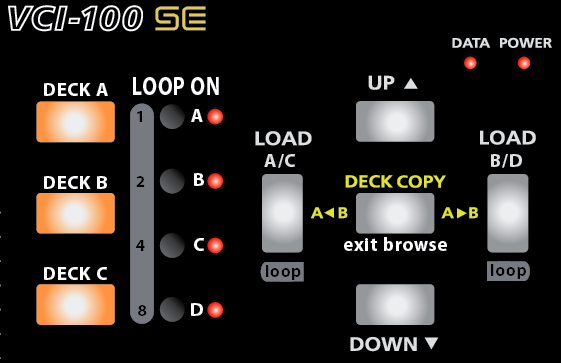
Setting a loop on the SE is easy, just click one of the 4 black buttons to set a 16 count loop. The LED will illuminate indicating that a loop is on and clicking the button again will turn it off. The 3 buttons on the left are shift buttons allowing more loop control over each deck. Holding down shift and the Load < button for example will shorten selected decks loop. You can now use shift plus the 4 small buttons to directly set specific loop lengths of 1,2,4, and 8 beats.

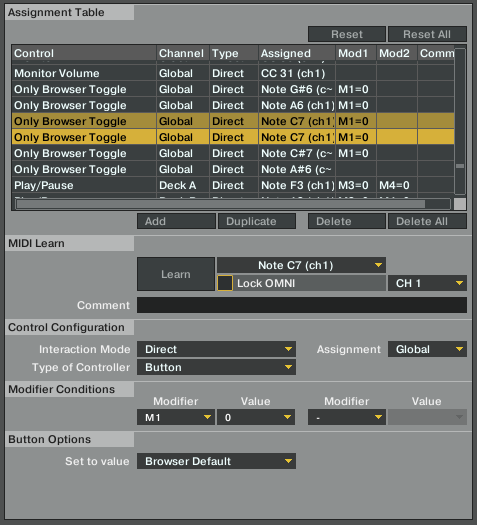
you may also notice that you can now exit browser mode by just pressing the middle button. Finally!

The loop buttons are accomplished through modifiers which have been covered in previous articles.  The exit browse mode is a very simple but elusive mapping trick. Just assign any button in the following manner:
500% Better FX section
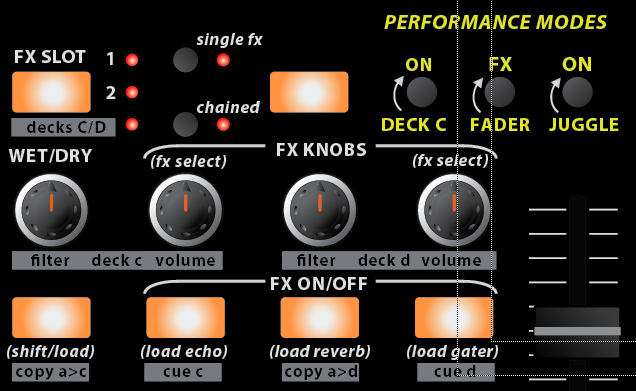
This vastly improved fx section gets a lot of control out of a small space but everything is very intuitive and easy to remember. Here are a few of the main points:

  • Directly select a specific effect (advanced) or a group of effects (chained) by holding the load button and one of the buttons on the right at the same time. The load button can also be used with the knobs to scroll through the fx. The chained effects load in preset groups which work with together offer some very cool sounds. You can customize these groups in the midi editor. Using the FX buttons to load effects presets makes a lot of sense, and I encourage you to try it yourself.
  • Get Deck C/D control on the third page. The Copy A to C buttons makes your life easy by copying deck a to c and also swapping the volume levels so your deck is fully transferred. The button increases the volume of the target deck to %100 and the source to 0 so if you have a fast computer the deck swap will occur with no changes in sound.
  • The FX controls naturally match the traktor layout with wet dry on the left and the 3 parameter knobs on the right.

Hands on Sampler
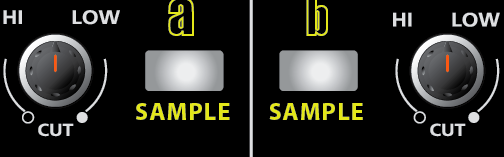
Since you no longer need to turn filters on, those buttons now engage sampler mode which is what I am using in this video demonstration. Each button, loads a beatmasher effect and starts sampling the selected deck instantly so you can record yourself juggling beats or sample a track for loop playback and effect control. These are the only buttons that are still up in the air, so if you have any ideas or suggestions for what they might become please let me know!

Get your Quantize beat Jumps on
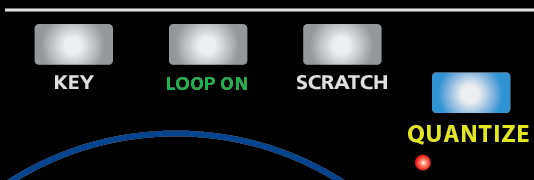
Snap is so 2008. now Quantize is all the rage, so we killed snap and put quantize in its place. This enables quantizing your beatjumps and juggles very nicely so you cant possibly screw up a song drop. While I personally dont like to use it for performance because it quantizes to a whole count, its perfect for re-triggering the start of a song.

Download the mappings yourself

Download Mapping Version 2.2

*Important Note* The new TSI file will only work with the latest update of Traktor Pro, which is 1.1, so make sure you are up to date and running that version. If your not, then the file wont import or may import and not show any values.


Want to reach DJTT's audience here?

Shoot an email to advertising@djtechtools.com

DJTT ads
DJTT newsletter
Midi Fighter
Chat with us
  • ABOUT DJTT
  • CONTACT
  • PRIVACY
  • MIDI FIGHTER HELP
  • ABOUT DJTT
  • JOBS
  • CONTACT US
  • ADVERTISE
  • PRIVACY POLICY
  • ACCESSIBILITY STATEMENT

© 2024 DJ Techtools all rights reserved by DJ TechTools on all content unless otherwise noted.

No Result
View All Result
  • Blog
    • DJ Gear
      • DIY Projects
      • Gear Reviews
      • New Products
      • Controllerism
    • Techniques + Tips
      • Beginner DJ
      • Advanced DJ
      • Producer
      • Finger Drummer
    • News + Culture
      • Editorials + Opinions
      • Artist Interviews
      • Performances + Routines
      • How I Play
    • DJ Software Tutorials
      • Serato Tips
      • CDJ Tips
      • Ableton Live Tips
  • Store
    • Run by real DJs, not a corporation
    • DJ Controllers
      • Midi Fighter Twister
      • Midi Fighter Spectra
      • Midi Fighter 64
      • View All
    • Accessories
      • Chroma USB Drive for DJs
      • Chroma Caps
      • Chroma Cables Audio
      • Chroma Cables USB-A
      • Chroma Cables: USB-C
      • DJTT Gift Card
      • Midi Fighter T-Shirt
      • Keyboard Covers
      • Earplugs by V-Moda
    • Production Gear
    • Soundcards & Mixers
  • Community
    • Popular Forums
      • General Discussion
      • Buy & Sell
      • Reviews
      • Mixes
      • Music Production
      • Show Your Setup
      • Off Topic
    • Handy Links
      • New Posts
      • Private Messages
      • Register
      • Search
    • Midi Maps
      • Traktor
      • Ableton
      • Serato DJ
      • Midi Fighter 3D
      • Midi Fighter Twister
      • Midi Fighter Spectra
  • Midi Fighter
  • Chroma

© 2024 DJ Techtools all rights reserved by DJ TechTools on all content unless otherwise noted.

This website uses cookies. By continuing to use this website you are giving consent to cookies being used. Visit our Privacy and Cookie Policy.