

Cue point juggling is a lot of fun, but unless you’re fine with the 90’s style sample repeats, then it’s critical to introduce musical variation for interesting results. In the video above I showcase 4 techniques useful for creating a wide palette of voicing. These techniques take a simple cue point press and transform it into a expressive instrument that can be voiced just like the quintessential scratch but with digital benefits. In the following article, each of the techniques will be broken down and explained in greater detail.
Cue Point Placement
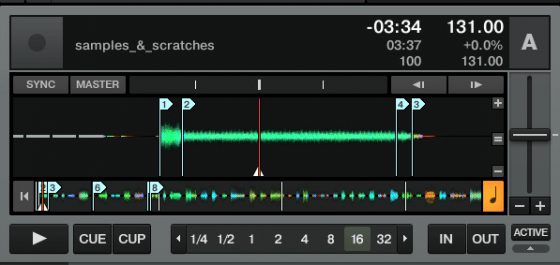
Traditional scratch-sounds, like the “fresssssshhh” sample, are great for cue point juggling. They provide a long section of white noise with an evolving tone. If you place at least 2-4 cue points along the samples at key points it’s possible to jump around within the sample rapidly, and use the natural pitch to create interesting voicing.
Effects for Tone variation

The fundamental reason a scratch is so effective musically is because it allows the DJ to naturally vary the pitch using only hand speed. While the left hand is producing rhythmic variations, the right hand produces pitch modulation and attack changes all with a subtle wrist flick.
In this new concept, I have reversed the paradigm. The right hand is responsible for rhythm while the left hand is producing pitch changes using a range of effects tied to a single fader.
The potential benefits of exploring this are:
• Instant access to multiple sounds with 4 fingers.
• Flexible assignment of the expression control to various tones, sounds and effects.
• Right hand dominant rhythm paradigm.
To achieve the same sound you hear in the video, it is critical to use the right effects and in the same order.
lo-fi > filter lfo 92 > reverb > peak filter
Volume and Filter Sweeps
 The main problem with sample repeats is the consistently sharp attack that comes from a single play point. Turntablists have traditionally used the line fader to soften the attack, creating a variety of voicing including gentle sweeps and swells leading into the down beat. I have also found the filter incredibly useful for cutting off the attack of the sample and changing the way each hit sounds. The line fader is ideal for big sweeps, but the filter works even better for fast cuts and manually changing the attack and sustain curves of a bland sample.
Key knob
 One trick I don’t show in the video involves a clever use of the key knob. With a standard potentiometer mapped to the key knob in your software of choice it is possible to re-tune a sample in real time creating a full musical line out of a single voice. Without a lot of practice it’s really hard to land perfectly on specific notes but big sweeps between octaves are easy to pull off and very effective live.
Scratch n Pitch
this is not the first time I have explored this territory. A few years ago we published the following video, which demonstrated how you could pitch cue points with a jog wheel producing similar but different results.
Try it out!
Download the scratch sample used in the video here.



