

DJ TechTools
  • Blog
    • DJ Gear
      • DIY Projects
      • Gear Reviews
      • New Products
      • Controllerism
    • Techniques + Tips
      • Beginner DJ
      • Advanced DJ
      • Producer
      • Finger Drummer
    • News + Culture
      • Editorials + Opinions
      • Artist Interviews
      • Performances + Routines
      • How I Play
    • DJ Software Tutorials
      • Serato Tips
        • Traktor Tips
      • CDJ Tips
      • Ableton Live Tips
  • Store
    • Run by real DJs, not a corporation
    • DJ Controllers
      • Midi Fighter Twister
      • Midi Fighter Spectra
      • Midi Fighter 64
      • View All
    • Accessories
      • Chroma USB Drive for DJs
      • Chroma Caps
      • Chroma Cables Audio
      • Chroma Cables USB-A
      • Chroma Cables: USB-C
      • DJTT Gift Card
      • Midi Fighter T-Shirt
      • Keyboard Covers
      • Earplugs by V-Moda
    • Production Gear
    • Soundcards & Mixers
  • Community
    • Popular Forums
      • General Discussion
      • Buy & Sell
      • Reviews
      • Mixes
      • Music Production
      • Show Your Setup
      • Off Topic
    • Handy Links
      • New Posts
      • Private Messages
      • Register
      • Search
    • Midi Maps
      • Traktor
      • Ableton
      • Serato DJ
      • Midi Fighter 3D
      • Midi Fighter Twister
      • Midi Fighter Spectra
  • Midi Fighter
  • Chroma
No Result
View All Result
DJ TechTools
  • Blog
    • DJ Gear
      • DIY Projects
      • Gear Reviews
      • New Products
      • Controllerism
    • Techniques + Tips
      • Beginner DJ
      • Advanced DJ
      • Producer
      • Finger Drummer
    • News + Culture
      • Editorials + Opinions
      • Artist Interviews
      • Performances + Routines
      • How I Play
    • DJ Software Tutorials
      • Serato Tips
        • Traktor Tips
      • CDJ Tips
      • Ableton Live Tips
  • Store
    • Run by real DJs, not a corporation
    • DJ Controllers
      • Midi Fighter Twister
      • Midi Fighter Spectra
      • Midi Fighter 64
      • View All
    • Accessories
      • Chroma USB Drive for DJs
      • Chroma Caps
      • Chroma Cables Audio
      • Chroma Cables USB-A
      • Chroma Cables: USB-C
      • DJTT Gift Card
      • Midi Fighter T-Shirt
      • Keyboard Covers
      • Earplugs by V-Moda
    • Production Gear
    • Soundcards & Mixers
  • Community
    • Popular Forums
      • General Discussion
      • Buy & Sell
      • Reviews
      • Mixes
      • Music Production
      • Show Your Setup
      • Off Topic
    • Handy Links
      • New Posts
      • Private Messages
      • Register
      • Search
    • Midi Maps
      • Traktor
      • Ableton
      • Serato DJ
      • Midi Fighter 3D
      • Midi Fighter Twister
      • Midi Fighter Spectra
  • Midi Fighter
  • Chroma
No Result
View All Result
DJ TechTools

NI S2 Video Explained – Demo and Tutorial

Post on FacebookTweet thisUpvote on Reddit

The response to my recent NI demo video featuring a live Depeche Mode remix was great, but a LOT of people asked for the demo on how it was done. The wait is over and we have an exclusive inside look video from my shoot that day. Check out the explanation above and then dig into the article for a deeper look into the details. 

CORE CONCEPT 1: Jog wheels turn on and control the effects.
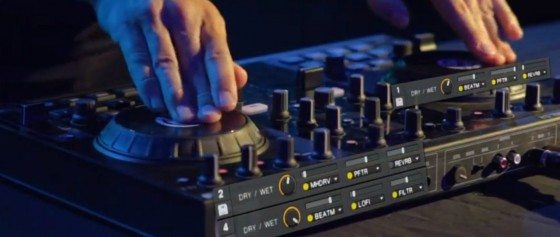
I first introduced this concept in 2008 on the VCI-100 SE but took it to another level with the s2’s high resolution HID connection which gave me very precise control over the range. The accuracy is so tight that I was able to get a nice pitch wobble by barely moving the wheel. Listen to the hihats at the start of the video and see if you can spot it.

  • Pressing down on the jog wheel turns on an effect.
  • Turning it in either direction modifies the values of those effects.

Since the down press engages the Beat Masher, it allows you to reliably “grab” a part of the song and work it in or out.

CORE CONCEPT 2: Combining relative values =  random madness!
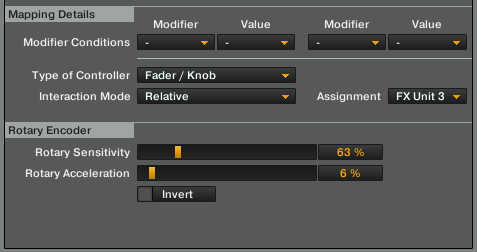

This was the first time I used this trick on a jog wheel, although it does exist in our Midi Fighter ProBeat Masher mapping. Instead of hard mapping one effect to the jog wheel rotation I used the following technique:

  • Each jog wheel is mapped to control the rates of three effects.
  • Each effect is being controlled in a relative fashion.
  • The rate and acceleration on each effect is different so they “compound” at different speeds.

This means that depending on how fast you spin the wheel or how far it is thrown, many random possibilities can occur. For the drums there is less randomness built in so I can reliably play patterns of 1/4 notes or 1/16ths, but for the vocals I invited random magic to creep in. This was especially amazing in the final chorus where the vocal track gets doubled in this eerie harmony that was totally un-scripted.

CORE CONCEPT 3: Create a rhythm system

In addition to turning on an effect, the jog wheel press sets the effect values to a specific musical value. For example, pressing the beat repeat wheel grabs a 1/4 repeat every time. By doing this and tuning the relative values, I can predictably find other notes and start to learn the “instrument”. With the beat repeat, using a combination of the masher and filter allows you to cut in the kick or snare creating some pretty epic fills, all perfectly in time with the track.

  • Pressing the jog wheel at 8-clock sets a 1/4 note moving back to six switches to 1/2 and up to twelve – 16ths.

CORE CONCEPT 4: One shot loops timed to the master clock.
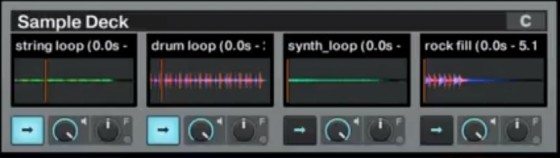
Loops are too repetitive and don’t have a nice soft ending unless you ride a fader. Lame! So, to give things a little more life I mapped my one shots to also sync to the master tempo and cut each one shot with a little trail after 16 counts. In this manner, I can re-trigger the one shot if I want them to loop or just let them play out and fade nicely to black. This work around gave me the best of both worlds- one shot sounds with loop style syncing.

A LITTLE CHALLENGE

Now with a solid insight into the video, watch the performance again and see if you can pick out the techniques with your ears. I will give you a hint – don’t use your eyes, because there are a lot of things happening in the mix that are not shown on camera..


Want to reach DJTT's audience here?

Shoot an email to advertising@djtechtools.com

DJTT ads
DJTT newsletter
Midi Fighter
Chat with us
  • ABOUT DJTT
  • CONTACT
  • PRIVACY
  • MIDI FIGHTER HELP
  • ABOUT DJTT
  • JOBS
  • CONTACT US
  • ADVERTISE
  • PRIVACY POLICY
  • ACCESSIBILITY STATEMENT

© 2024 DJ Techtools all rights reserved by DJ TechTools on all content unless otherwise noted.

No Result
View All Result
  • Blog
    • DJ Gear
      • DIY Projects
      • Gear Reviews
      • New Products
      • Controllerism
    • Techniques + Tips
      • Beginner DJ
      • Advanced DJ
      • Producer
      • Finger Drummer
    • News + Culture
      • Editorials + Opinions
      • Artist Interviews
      • Performances + Routines
      • How I Play
    • DJ Software Tutorials
      • Serato Tips
      • CDJ Tips
      • Ableton Live Tips
  • Store
    • Run by real DJs, not a corporation
    • DJ Controllers
      • Midi Fighter Twister
      • Midi Fighter Spectra
      • Midi Fighter 64
      • View All
    • Accessories
      • Chroma USB Drive for DJs
      • Chroma Caps
      • Chroma Cables Audio
      • Chroma Cables USB-A
      • Chroma Cables: USB-C
      • DJTT Gift Card
      • Midi Fighter T-Shirt
      • Keyboard Covers
      • Earplugs by V-Moda
    • Production Gear
    • Soundcards & Mixers
  • Community
    • Popular Forums
      • General Discussion
      • Buy & Sell
      • Reviews
      • Mixes
      • Music Production
      • Show Your Setup
      • Off Topic
    • Handy Links
      • New Posts
      • Private Messages
      • Register
      • Search
    • Midi Maps
      • Traktor
      • Ableton
      • Serato DJ
      • Midi Fighter 3D
      • Midi Fighter Twister
      • Midi Fighter Spectra
  • Midi Fighter
  • Chroma

© 2024 DJ Techtools all rights reserved by DJ TechTools on all content unless otherwise noted.

This website uses cookies. By continuing to use this website you are giving consent to cookies being used. Visit our Privacy and Cookie Policy.