

DJ TechTools
  • Blog
    • DJ Gear
      • DIY Projects
      • Gear Reviews
      • New Products
      • Controllerism
    • Techniques + Tips
      • Beginner DJ
      • Advanced DJ
      • Producer
      • Finger Drummer
    • News + Culture
      • Editorials + Opinions
      • Artist Interviews
      • Performances + Routines
      • How I Play
    • DJ Software Tutorials
      • Serato Tips
        • Traktor Tips
      • CDJ Tips
      • Ableton Live Tips
  • Store
    • Run by real DJs, not a corporation
    • DJ Controllers
      • Midi Fighter Twister
      • Midi Fighter Spectra
      • Midi Fighter 64
      • View All
    • Accessories
      • Chroma USB Drive for DJs
      • Chroma Caps
      • Chroma Cables Audio
      • Chroma Cables USB-A
      • Chroma Cables: USB-C
      • DJTT Gift Card
      • Midi Fighter T-Shirt
      • Keyboard Covers
      • Earplugs by V-Moda
    • Production Gear
    • Soundcards & Mixers
  • Community
    • Popular Forums
      • General Discussion
      • Buy & Sell
      • Reviews
      • Mixes
      • Music Production
      • Show Your Setup
      • Off Topic
    • Handy Links
      • New Posts
      • Private Messages
      • Register
      • Search
    • Midi Maps
      • Traktor
      • Ableton
      • Serato DJ
      • Midi Fighter 3D
      • Midi Fighter Twister
      • Midi Fighter Spectra
  • Midi Fighter
  • Chroma
No Result
View All Result
DJ TechTools
  • Blog
    • DJ Gear
      • DIY Projects
      • Gear Reviews
      • New Products
      • Controllerism
    • Techniques + Tips
      • Beginner DJ
      • Advanced DJ
      • Producer
      • Finger Drummer
    • News + Culture
      • Editorials + Opinions
      • Artist Interviews
      • Performances + Routines
      • How I Play
    • DJ Software Tutorials
      • Serato Tips
        • Traktor Tips
      • CDJ Tips
      • Ableton Live Tips
  • Store
    • Run by real DJs, not a corporation
    • DJ Controllers
      • Midi Fighter Twister
      • Midi Fighter Spectra
      • Midi Fighter 64
      • View All
    • Accessories
      • Chroma USB Drive for DJs
      • Chroma Caps
      • Chroma Cables Audio
      • Chroma Cables USB-A
      • Chroma Cables: USB-C
      • DJTT Gift Card
      • Midi Fighter T-Shirt
      • Keyboard Covers
      • Earplugs by V-Moda
    • Production Gear
    • Soundcards & Mixers
  • Community
    • Popular Forums
      • General Discussion
      • Buy & Sell
      • Reviews
      • Mixes
      • Music Production
      • Show Your Setup
      • Off Topic
    • Handy Links
      • New Posts
      • Private Messages
      • Register
      • Search
    • Midi Maps
      • Traktor
      • Ableton
      • Serato DJ
      • Midi Fighter 3D
      • Midi Fighter Twister
      • Midi Fighter Spectra
  • Midi Fighter
  • Chroma
No Result
View All Result
DJ TechTools

The Art Of Prep – 5 Principles Every DJ Should Know

Post on FacebookTweet thisUpvote on Reddit

Casual observers of the musical arts assume that most of the creative process happens on stage.  While it may be true that inspiration and improvisation create amazing results in the moment, great preparation tee’s those moments up in the first place. Without a comfortable base created by consistent discipline the creative mind never has the chance to fully play.

Here are five critical areas of disciplined preparation that are one way to form a creative base for expressive DJing. Ultimately everyone needs to find their own system, but these are some timeless principles that might help you get started.

1. Rock Solid Track Import System

I need to make a video that demostrates this more in detail but here are the basics of my system called:

“Never lose a track in your DJ software again” 
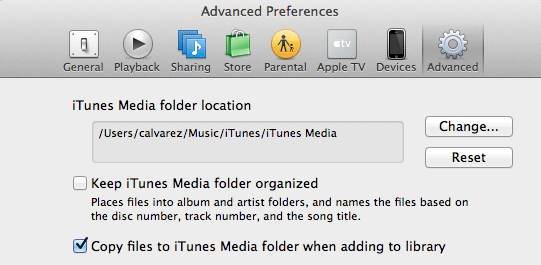
  • Only use iTunes to manage all of your DJ music (lose the folders)
  • Set iTunes to copy all songs into the library on import
  • Turn off “Keep iTunes organized”
  • Every new song is dragged into iTunes (and therefore copied into the database)
  • Songs are analyzed by Mixed In Key before Traktor import
  • Songs are ONLY imported into Traktor or other DJ software through iTunes playlist import or through the software’s iTunes browser

This creates a consistent path for your DJ music that will never be moved or deleted. If you are managing MP3s in various places and keeping them in random folders, things will get moved and then they will go missing at critical points during a set.

2. Regular Track Searching 

Got a big gig on Friday but have not played out in 12 weeks? The last minute addition of 30 new songs to your playlist may achieve the goal of bringing in some “new bangers” but it will be largely counterproductive. Nine times out of ten, it’s more important that the right track be played at the right time – and less important that it be purchased recently. To really know what the right track is – it’s important to really “know” the tracks, and that can only happen after a good amount of plays. I recommend:

  • Setting a time every few days for regular 20 minute digging sessions.
  • This should hopefully add a few tracks a week at a digestible pace while keep the collection fresh.
  • Listening to the songs fully from beginning to end many times (I like to put them on my iPod) to find great mix points and get the feel.

This last point leads to our next principle:

3. Consistent Track Tagging
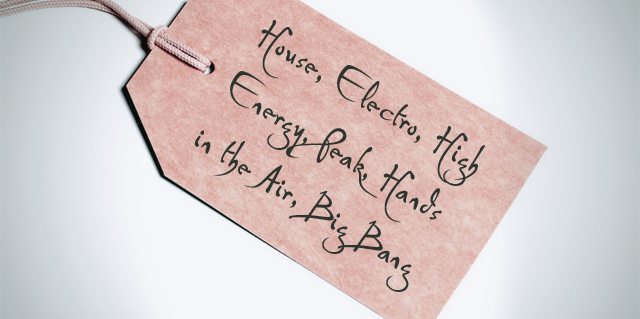

The obvious tip here is to consistently tag the meta tags of your songs with keywords, genres, and other searchable cues so songs can be easily tracked down in the heat of a set. We have covered that extensively in the past. The less obvious is to establish a consistent system of cue point tagging for ALL songs. With this system you may not always remember every detail of a track, but it’s obvious where everything is. Here are my personal favorites:

  1. Load Markers: Always save the down beat so you never have to cue again
  2. Fade Out Markers: Mark the natural mix out spot so it does not sneak up on you
  3. Cue Points: Mark the verse/chorus, or other major changes so they can be recognized before they happen

You may not have time to add your cue point system to every song but make it a rule to always prepare every NEW song with your tagging system.

4. Daily Rhythm, Technique Exercises, and Review
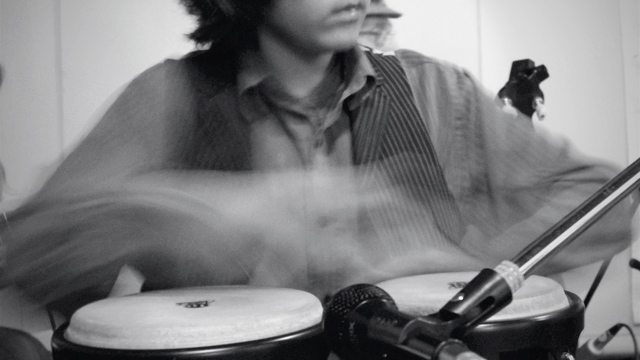

Many musical experts have said that 20 minutes of practice a day produces better long term results than a single two hour practice session once a week. No matter what the technical skill; mix, juggling or scratching, regular daily practice sessions will lead to amazing moments on stage.
Here is one great exercise for beat juggling timing we covered last year.

5. Consistent Recording and Review 
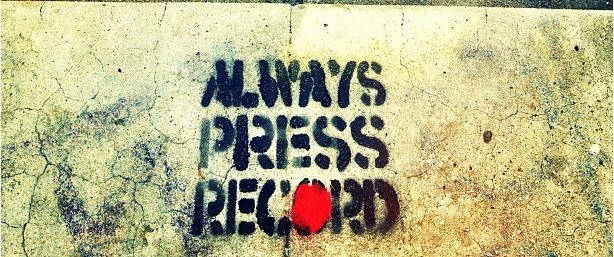

You are probably recording your best sets and saving them but what about the bad ones? Do they ever get listened to? I would suggest that you record and listen to every single practice session and live DJ set. Then, even though it might be painful, force yourself to listen and learn through the entire thing.

Pro athletes employ a rigorous system of self-analysis for a simple reason. The recording won’t lie, and slip-ups are obvious in retrospect. Recording gives you the opportunity to sit in the audiences seat and be your own best critic.

For the Funk Phenomenon routine, I video recorded myself practicing the routine at least twelve times. Watching those tapes helped me see what sections where lagging in energy and which sections looked really interesting.


Want to reach DJTT's audience here?

Shoot an email to advertising@djtechtools.com

DJTT ads
DJTT newsletter
Midi Fighter
Chat with us
  • ABOUT DJTT
  • CONTACT
  • PRIVACY
  • MIDI FIGHTER HELP
  • ABOUT DJTT
  • JOBS
  • CONTACT US
  • ADVERTISE
  • PRIVACY POLICY
  • ACCESSIBILITY STATEMENT

© 2024 DJ Techtools all rights reserved by DJ TechTools on all content unless otherwise noted.

No Result
View All Result
  • Blog
    • DJ Gear
      • DIY Projects
      • Gear Reviews
      • New Products
      • Controllerism
    • Techniques + Tips
      • Beginner DJ
      • Advanced DJ
      • Producer
      • Finger Drummer
    • News + Culture
      • Editorials + Opinions
      • Artist Interviews
      • Performances + Routines
      • How I Play
    • DJ Software Tutorials
      • Serato Tips
      • CDJ Tips
      • Ableton Live Tips
  • Store
    • Run by real DJs, not a corporation
    • DJ Controllers
      • Midi Fighter Twister
      • Midi Fighter Spectra
      • Midi Fighter 64
      • View All
    • Accessories
      • Chroma USB Drive for DJs
      • Chroma Caps
      • Chroma Cables Audio
      • Chroma Cables USB-A
      • Chroma Cables: USB-C
      • DJTT Gift Card
      • Midi Fighter T-Shirt
      • Keyboard Covers
      • Earplugs by V-Moda
    • Production Gear
    • Soundcards & Mixers
  • Community
    • Popular Forums
      • General Discussion
      • Buy & Sell
      • Reviews
      • Mixes
      • Music Production
      • Show Your Setup
      • Off Topic
    • Handy Links
      • New Posts
      • Private Messages
      • Register
      • Search
    • Midi Maps
      • Traktor
      • Ableton
      • Serato DJ
      • Midi Fighter 3D
      • Midi Fighter Twister
      • Midi Fighter Spectra
  • Midi Fighter
  • Chroma

© 2024 DJ Techtools all rights reserved by DJ TechTools on all content unless otherwise noted.

This website uses cookies. By continuing to use this website you are giving consent to cookies being used. Visit our Privacy and Cookie Policy.