DJ TechTools
  • Blog
    • DJ Gear
      • DIY Projects
      • Gear Reviews
      • New Products
      • Controllerism
    • Techniques + Tips
      • Beginner DJ
      • Advanced DJ
      • Producer
      • Finger Drummer
    • News + Culture
      • Editorials + Opinions
      • Artist Interviews
      • Performances + Routines
      • How I Play
    • DJ Software Tutorials
      • Serato Tips
        • Traktor Tips
      • CDJ Tips
      • Ableton Live Tips
  • Store
    • Run by real DJs, not a corporation
    • DJ Controllers
      • Midi Fighter Twister
      • Midi Fighter Spectra
      • Midi Fighter 64
      • View All
    • Accessories
      • Chroma USB Drive for DJs
      • Chroma Caps
      • Chroma Cables Audio
      • Chroma Cables USB-A
      • Chroma Cables: USB-C
      • DJTT Gift Card
      • Midi Fighter T-Shirt
      • Keyboard Covers
      • Earplugs by V-Moda
    • Production Gear
    • Soundcards & Mixers
  • Community
    • Popular Forums
      • General Discussion
      • Buy & Sell
      • Reviews
      • Mixes
      • Music Production
      • Show Your Setup
      • Off Topic
    • Handy Links
      • New Posts
      • Private Messages
      • Register
      • Search
    • Midi Maps
      • Traktor
      • Ableton
      • Serato DJ
      • Midi Fighter 3D
      • Midi Fighter Twister
      • Midi Fighter Spectra
  • Midi Fighter
  • Chroma
No Result
View All Result
DJ TechTools
  • Blog
    • DJ Gear
      • DIY Projects
      • Gear Reviews
      • New Products
      • Controllerism
    • Techniques + Tips
      • Beginner DJ
      • Advanced DJ
      • Producer
      • Finger Drummer
    • News + Culture
      • Editorials + Opinions
      • Artist Interviews
      • Performances + Routines
      • How I Play
    • DJ Software Tutorials
      • Serato Tips
        • Traktor Tips
      • CDJ Tips
      • Ableton Live Tips
  • Store
    • Run by real DJs, not a corporation
    • DJ Controllers
      • Midi Fighter Twister
      • Midi Fighter Spectra
      • Midi Fighter 64
      • View All
    • Accessories
      • Chroma USB Drive for DJs
      • Chroma Caps
      • Chroma Cables Audio
      • Chroma Cables USB-A
      • Chroma Cables: USB-C
      • DJTT Gift Card
      • Midi Fighter T-Shirt
      • Keyboard Covers
      • Earplugs by V-Moda
    • Production Gear
    • Soundcards & Mixers
  • Community
    • Popular Forums
      • General Discussion
      • Buy & Sell
      • Reviews
      • Mixes
      • Music Production
      • Show Your Setup
      • Off Topic
    • Handy Links
      • New Posts
      • Private Messages
      • Register
      • Search
    • Midi Maps
      • Traktor
      • Ableton
      • Serato DJ
      • Midi Fighter 3D
      • Midi Fighter Twister
      • Midi Fighter Spectra
  • Midi Fighter
  • Chroma
No Result
View All Result
DJ TechTools

DIY: How To Add Colored Buttons To Traktor Kontrol X1

Post on FacebookTweet thisUpvote on Reddit

For most DJs, upgrading to the latest controller takes time and money that they don’t have – so today we’re sharing a DJTT reader’s low-tech solution for adding colored buttons to a Traktor Kontrol X1 MK1. Read on to learn how to do it yourself and customize this controller for a fraction of the cost of upgrading – and in just a few minutes!

DJTT Reader Phoenix Kraundler wrote to us at DJTT when sharing his Kontrol X1 light mod project – his steps are below!  

For some time now I’ve wanted to change the color of the buttons on my controllers and put my personal touch into them to make them unique. On the X1, I wanted to put different colors for different buttons for even easier navigation on the controller. The Kontrol X1 MK2 includes colored cue points and different color transport controls – but some home modification on the MK1 generation was all that I needed.

STEP 1: OPEN THE CONTROLLER
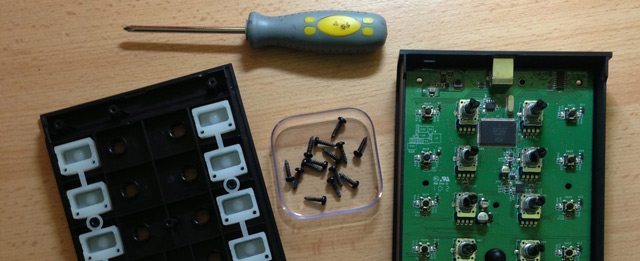
Keep track of all of the screws - use a small bowl or cup!
Keep track of all of the screws – use a small bowl or cup!

Originally I wanted to change the actual backlights behind the buttons by changing them to different colors, but when I opened the controller I realized that it would be harder than imagined. If you don’t have confident soldering experience and spare color LEDs laying about, don’t try to mod the circuit board.

Opening the controller just involves the screws from the back of the X1 – but note that opening a controller like this will likely void any warranty on the unit.

STEP 2: ACQUIRE TINTING PAPER / FOIL / GELS
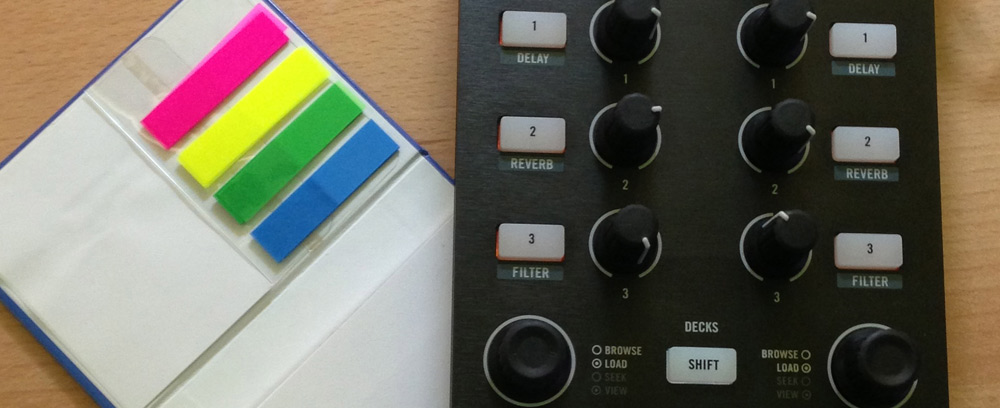
bookmark-paper-tabs-kontrol-x1

post-its-page-markersI decided to put a thin foil in different colors over the existing light to would change the colors of the buttons. I wanted to change my play button to blue, and cue button to pink. For this purpose, I used a small adhesive foil which normally serves for bookmarking the pages in a textbooks. You’ll want to make sure the material isn’t too thick in order to allow light through – so other good options include light gels or cello paper.

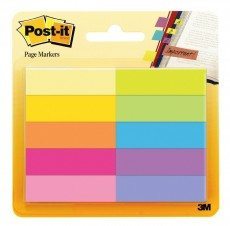
Shopping list: Here’s a set of Post-It bookmarks on Amazon that could work nicely – with loads of color options for just $3

STEP 3: MEASURE, CUT, AND PLACE
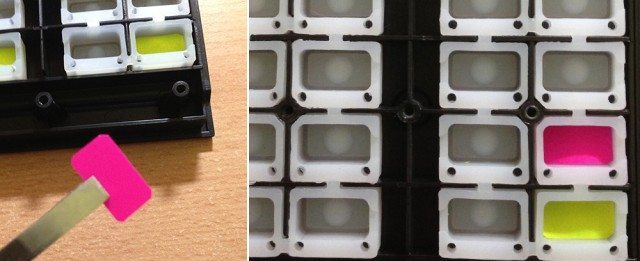
cut-insert-paper-colors-kontrol-x1-2

Cut the paper down to the right size for the button you’re changing – and remember that the inside of the button is smaller than the face of it. I cut the bookmarks into small pieces, and inserted them to fill the rubber space where the button is as shown above.

You’ll still be able to see a slight amount of the original color on the sides, so if you wanted to go above and beyond, you could likely add additional even smaller pieces to fix that – but check the results first and see if it seems necessary.

STEP FOUR: COLORED BUTTONS!
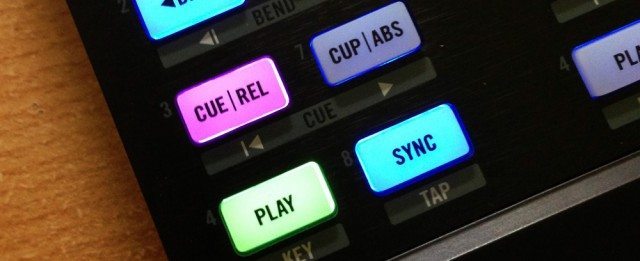
x1-final-result

Close up the the controller, connect it to USB and “voilà”!  In general, this will work with many controllers that have rubber buttons in this style – but be aware that not every controller  has easy to access buttons like the X1 MK1 does.

Have questions about this mod? We’ll answer in the comments – or you can reach out to Phoenix directly on Facebook. 

Want to reach DJTT's audience here?

Shoot an email to advertising@djtechtools.com

DJTT ads
DJTT newsletter
Midi Fighter
Chat with us
  • ABOUT DJTT
  • CONTACT
  • PRIVACY
  • MIDI FIGHTER HELP
  • ABOUT DJTT
  • JOBS
  • CONTACT US
  • ADVERTISE
  • PRIVACY POLICY
  • ACCESSIBILITY STATEMENT

© 2024 DJ Techtools all rights reserved by DJ TechTools on all content unless otherwise noted.

No Result
View All Result
  • Blog
    • DJ Gear
      • DIY Projects
      • Gear Reviews
      • New Products
      • Controllerism
    • Techniques + Tips
      • Beginner DJ
      • Advanced DJ
      • Producer
      • Finger Drummer
    • News + Culture
      • Editorials + Opinions
      • Artist Interviews
      • Performances + Routines
      • How I Play
    • DJ Software Tutorials
      • Serato Tips
      • CDJ Tips
      • Ableton Live Tips
  • Store
    • Run by real DJs, not a corporation
    • DJ Controllers
      • Midi Fighter Twister
      • Midi Fighter Spectra
      • Midi Fighter 64
      • View All
    • Accessories
      • Chroma USB Drive for DJs
      • Chroma Caps
      • Chroma Cables Audio
      • Chroma Cables USB-A
      • Chroma Cables: USB-C
      • DJTT Gift Card
      • Midi Fighter T-Shirt
      • Keyboard Covers
      • Earplugs by V-Moda
    • Production Gear
    • Soundcards & Mixers
  • Community
    • Popular Forums
      • General Discussion
      • Buy & Sell
      • Reviews
      • Mixes
      • Music Production
      • Show Your Setup
      • Off Topic
    • Handy Links
      • New Posts
      • Private Messages
      • Register
      • Search
    • Midi Maps
      • Traktor
      • Ableton
      • Serato DJ
      • Midi Fighter 3D
      • Midi Fighter Twister
      • Midi Fighter Spectra
  • Midi Fighter
  • Chroma

© 2024 DJ Techtools all rights reserved by DJ TechTools on all content unless otherwise noted.

This website uses cookies. By continuing to use this website you are giving consent to cookies being used. Visit our Privacy and Cookie Policy.