

DJ TechTools
  • Blog
    • DJ Gear
      • DIY Projects
      • Gear Reviews
      • New Products
      • Controllerism
    • Techniques + Tips
      • Beginner DJ
      • Advanced DJ
      • Producer
      • Finger Drummer
    • News + Culture
      • Editorials + Opinions
      • Artist Interviews
      • Performances + Routines
      • How I Play
    • DJ Software Tutorials
      • Serato Tips
        • Traktor Tips
      • CDJ Tips
      • Ableton Live Tips
  • Store
    • Run by real DJs, not a corporation
    • DJ Controllers
      • Midi Fighter Twister
      • Midi Fighter Spectra
      • Midi Fighter 64
      • View All
    • Accessories
      • Chroma USB Drive for DJs
      • Chroma Caps
      • Chroma Cables Audio
      • Chroma Cables USB-A
      • Chroma Cables: USB-C
      • DJTT Gift Card
      • Midi Fighter T-Shirt
      • Keyboard Covers
      • Earplugs by V-Moda
    • Production Gear
    • Soundcards & Mixers
  • Community
    • Popular Forums
      • General Discussion
      • Buy & Sell
      • Reviews
      • Mixes
      • Music Production
      • Show Your Setup
      • Off Topic
    • Handy Links
      • New Posts
      • Private Messages
      • Register
      • Search
    • Midi Maps
      • Traktor
      • Ableton
      • Serato DJ
      • Midi Fighter 3D
      • Midi Fighter Twister
      • Midi Fighter Spectra
  • Midi Fighter
  • Chroma
No Result
View All Result
DJ TechTools
  • Blog
    • DJ Gear
      • DIY Projects
      • Gear Reviews
      • New Products
      • Controllerism
    • Techniques + Tips
      • Beginner DJ
      • Advanced DJ
      • Producer
      • Finger Drummer
    • News + Culture
      • Editorials + Opinions
      • Artist Interviews
      • Performances + Routines
      • How I Play
    • DJ Software Tutorials
      • Serato Tips
        • Traktor Tips
      • CDJ Tips
      • Ableton Live Tips
  • Store
    • Run by real DJs, not a corporation
    • DJ Controllers
      • Midi Fighter Twister
      • Midi Fighter Spectra
      • Midi Fighter 64
      • View All
    • Accessories
      • Chroma USB Drive for DJs
      • Chroma Caps
      • Chroma Cables Audio
      • Chroma Cables USB-A
      • Chroma Cables: USB-C
      • DJTT Gift Card
      • Midi Fighter T-Shirt
      • Keyboard Covers
      • Earplugs by V-Moda
    • Production Gear
    • Soundcards & Mixers
  • Community
    • Popular Forums
      • General Discussion
      • Buy & Sell
      • Reviews
      • Mixes
      • Music Production
      • Show Your Setup
      • Off Topic
    • Handy Links
      • New Posts
      • Private Messages
      • Register
      • Search
    • Midi Maps
      • Traktor
      • Ableton
      • Serato DJ
      • Midi Fighter 3D
      • Midi Fighter Twister
      • Midi Fighter Spectra
  • Midi Fighter
  • Chroma
No Result
View All Result
DJ TechTools

DJS-1000: Pioneer DJ Introduces Their DJ-Friendly Standalone Sampler

Post on FacebookTweet thisUpvote on Reddit
  • Product: DJS-1000
  • Manufacturer: Pioneer DJ
  • Availability: Late October (get yours from the DJTT shop)
  • Price: $1,199

DJS-1000: Pioneer’s Standalone Champion?

Over the last few days we’ve seen a _lot_ of hints and speculation about what this new DJS-1000 would look like. Our initial analysis of the photos from Dirtybird Campout seem to be nearly perfect. Pioneer DJ is really targeting DJs who are already using a full CDJ setup and getting them to add a new creative element to their mixes: sampling and sequencing.

Here’s the features in these new units (we slimmed down Pioneer DJ’s press release to make it more readable):

  • Step sequencer: create a new groove by tapping the 16 large, multicolored step input keys. See sequence information on each track with the keys’ changing colors.
  • Multicolored Performance Pads: 16 large rubber pads to trigger the tracks you’ve assigned samples and loops to. Each one has multicolored illumination and highly accurate velocity detection
  • Touch strip: Quickly change the pitch when using the pitch bend feature, or play a drum roll by using the note repeat feature. There are two user modes – customize parameters to your linking.
  • 7-inch full-color touch screen
  • Syncing with various external devices: Clock synchronization with MIDI devices as well as Beat Sync. This can synchronize a performance by beat/bar with a track playing on a CDJ-2000NXS2 or XDJ-1000MK2 set-up using PRO DJ LINK. Use the tempo slider and the nudge buttons to quickly adjust tempo and beat position manually
  • Live Sampling:  Sample input sounds and immediately use them as individual tracks. The sampled sounds are automatically synchronized with the current sequence to play in a loop, so they can be dropped straight into a live remix. You can sample any input source, including audio from a turntable, via your mixer.
  • FX: You can apply FX such as echo, reverb and filter to individual tracks, a group of tracks, or all tracks.
  • The DJS-1000 is designed to fit perfectly alongside the CDJ-2000NXS2 and DJM-900NXS2.
  • Support for USB devices – manage your projects and samples easily
  • Over 2,500 on-board Loopmasters samples – start performing with the DJS-1000 straight out the box
  • Support for DJS-TSP Project Creator 2 – easily create projects and SCENE 3 files on a PC/Mac
  • Support for project files created on the TORAIZ SP-16

Pad Modes

Let’s be clear: most of the features within the DJS-1000 were already present on the TORAIZ SP-16 sampler that launched in April 2016. The big difference on the DJS is that it has a few unique modes that behave a bit differently than the TORAIZ. KiNK talks about them in the above intro video.

What About Routing?
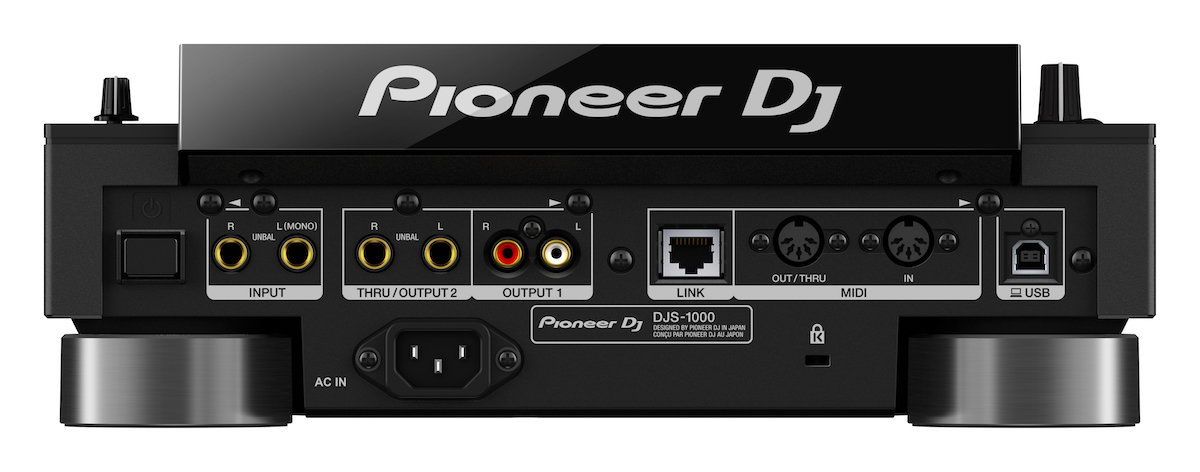
This one is important: to properly integrate a DJS-1000 into a setup, you need a way to send signal into it from any deck. There’s only 1 pair of 1/4: inputs (and two outputs, 1/4″ and RCA). This means the most ideal setup is to have dedicated Send/Return FX on a mixer, allowing you to send any deck to the DJS-1000.

Ready to start remixing? Pre-order your DJS-1000 from the DJTT Shop

Want to reach DJTT's audience here?

Shoot an email to advertising@djtechtools.com

DJTT ads
DJTT newsletter
Midi Fighter
Chat with us
  • ABOUT DJTT
  • CONTACT
  • PRIVACY
  • MIDI FIGHTER HELP
  • ABOUT DJTT
  • JOBS
  • CONTACT US
  • ADVERTISE
  • PRIVACY POLICY
  • ACCESSIBILITY STATEMENT

© 2024 DJ Techtools all rights reserved by DJ TechTools on all content unless otherwise noted.

No Result
View All Result
  • Blog
    • DJ Gear
      • DIY Projects
      • Gear Reviews
      • New Products
      • Controllerism
    • Techniques + Tips
      • Beginner DJ
      • Advanced DJ
      • Producer
      • Finger Drummer
    • News + Culture
      • Editorials + Opinions
      • Artist Interviews
      • Performances + Routines
      • How I Play
    • DJ Software Tutorials
      • Serato Tips
      • CDJ Tips
      • Ableton Live Tips
  • Store
    • Run by real DJs, not a corporation
    • DJ Controllers
      • Midi Fighter Twister
      • Midi Fighter Spectra
      • Midi Fighter 64
      • View All
    • Accessories
      • Chroma USB Drive for DJs
      • Chroma Caps
      • Chroma Cables Audio
      • Chroma Cables USB-A
      • Chroma Cables: USB-C
      • DJTT Gift Card
      • Midi Fighter T-Shirt
      • Keyboard Covers
      • Earplugs by V-Moda
    • Production Gear
    • Soundcards & Mixers
  • Community
    • Popular Forums
      • General Discussion
      • Buy & Sell
      • Reviews
      • Mixes
      • Music Production
      • Show Your Setup
      • Off Topic
    • Handy Links
      • New Posts
      • Private Messages
      • Register
      • Search
    • Midi Maps
      • Traktor
      • Ableton
      • Serato DJ
      • Midi Fighter 3D
      • Midi Fighter Twister
      • Midi Fighter Spectra
  • Midi Fighter
  • Chroma

© 2024 DJ Techtools all rights reserved by DJ TechTools on all content unless otherwise noted.

This website uses cookies. By continuing to use this website you are giving consent to cookies being used. Visit our Privacy and Cookie Policy.
