

DJ TechTools
  • Blog
    • DJ Gear
      • DIY Projects
      • Gear Reviews
      • New Products
      • Controllerism
    • Techniques + Tips
      • Beginner DJ
      • Advanced DJ
      • Producer
      • Finger Drummer
    • News + Culture
      • Editorials + Opinions
      • Artist Interviews
      • Performances + Routines
      • How I Play
    • DJ Software Tutorials
      • Serato Tips
        • Traktor Tips
      • CDJ Tips
      • Ableton Live Tips
  • Store
    • Run by real DJs, not a corporation
    • DJ Controllers
      • Midi Fighter Twister
      • Midi Fighter Spectra
      • Midi Fighter 64
      • View All
    • Accessories
      • Chroma USB Drive for DJs
      • Chroma Caps
      • Chroma Cables Audio
      • Chroma Cables USB-A
      • Chroma Cables: USB-C
      • DJTT Gift Card
      • Midi Fighter T-Shirt
      • Keyboard Covers
      • Earplugs by V-Moda
    • Production Gear
    • Soundcards & Mixers
  • Community
    • Popular Forums
      • General Discussion
      • Buy & Sell
      • Reviews
      • Mixes
      • Music Production
      • Show Your Setup
      • Off Topic
    • Handy Links
      • New Posts
      • Private Messages
      • Register
      • Search
    • Midi Maps
      • Traktor
      • Ableton
      • Serato DJ
      • Midi Fighter 3D
      • Midi Fighter Twister
      • Midi Fighter Spectra
  • Midi Fighter
  • Chroma
No Result
View All Result
DJ TechTools
  • Blog
    • DJ Gear
      • DIY Projects
      • Gear Reviews
      • New Products
      • Controllerism
    • Techniques + Tips
      • Beginner DJ
      • Advanced DJ
      • Producer
      • Finger Drummer
    • News + Culture
      • Editorials + Opinions
      • Artist Interviews
      • Performances + Routines
      • How I Play
    • DJ Software Tutorials
      • Serato Tips
        • Traktor Tips
      • CDJ Tips
      • Ableton Live Tips
  • Store
    • Run by real DJs, not a corporation
    • DJ Controllers
      • Midi Fighter Twister
      • Midi Fighter Spectra
      • Midi Fighter 64
      • View All
    • Accessories
      • Chroma USB Drive for DJs
      • Chroma Caps
      • Chroma Cables Audio
      • Chroma Cables USB-A
      • Chroma Cables: USB-C
      • DJTT Gift Card
      • Midi Fighter T-Shirt
      • Keyboard Covers
      • Earplugs by V-Moda
    • Production Gear
    • Soundcards & Mixers
  • Community
    • Popular Forums
      • General Discussion
      • Buy & Sell
      • Reviews
      • Mixes
      • Music Production
      • Show Your Setup
      • Off Topic
    • Handy Links
      • New Posts
      • Private Messages
      • Register
      • Search
    • Midi Maps
      • Traktor
      • Ableton
      • Serato DJ
      • Midi Fighter 3D
      • Midi Fighter Twister
      • Midi Fighter Spectra
  • Midi Fighter
  • Chroma
No Result
View All Result
DJ TechTools

Carl Cox Explains His Traktor + CDJs + MODEL 1 DJ Setup

Post on FacebookTweet thisUpvote on Reddit

One of the most legendary house DJs – Carl Cox – is apparently an avid user of Richie Hawtin’s MODEL 1 mixer. In a new video released by the PLAYdifferently brand, Carl talks through his setup and explains the basics of how he mixes.

Carl Cox DJ Setup Talkthrough

Gear used by Carl in this video:

  • Traktor Kontrol D2s (two of them)
  • PLAYdifferently MODEL 1 DJ mixer
  • Traktor Pro software
  • CDJ-2000NXS2s (also a pair of these, naturally)
  • RME Fireface UC soundcard

DJ Mixing Tips from Carl Cox

There’s a few key lessons in this “How I Play”-esque video. While a lot of it does feel a bit heavily focused around the MODEL 1 mixer (it’s a product video, not a pure interview), the ten minute session in the booth with Carl reveals some great tips and inside secrets. Here’s a few we loved:

CDJ Platter Useage Shows Audience That The Mix Is Live

“I always start my sets with [the CDJs]. People want to see something from me which is tangible, so if I’m playing a track, they want to see the action. If I do that (Carl backspins on a CDJ), you hear that. I’m able to do spinbacks, cuts, loops, and track marks [beat jump].”

Carl’s very right about this – people still expect to see DJs have some tactile interaction that lines up with sound. CDJ platter manipulation is a great way to prove, very quickly, that it’s not a prerecorded mix coming through the speakers.

Planning? Who Needs It!

Carl doesn’t plan his DJ sets – instead, he builds up a collection of records for a gig and chooses from it. It’s a common technique for many DJs, especially in the digital age. We highly recommend building large playlists and choosing from them instead of trying to program out the entire night.
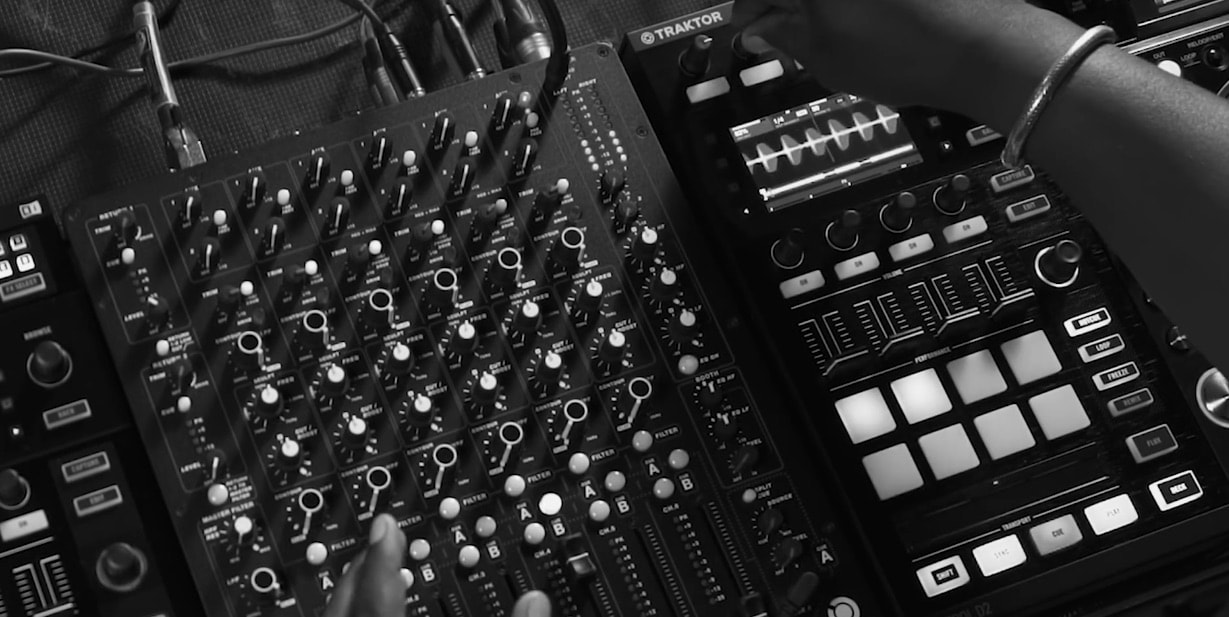
Carl Cox Kontrol D2s, PLAYDifferently MODEL1

The two CDJ-2000NXS2s (what he calls the “outside players” in the video) are not controlling Traktor Pro via HID. Instead, they’re actually external players that he’s syncing up to Traktor. The editing in this video and Carl’s explanation are confusing – but as our commenters have pointed out below, it’s the CDJs are controlling Traktor via HID.

Traktor FX: T3, Beat Masher, and Flux

On his D2s, we don’t see Carl do too many complicated things – but he does use a few effects to layer, loop, and repeat what’s already playing. He shows off T3 Delay, Beat Masher (which he calls “the looper”) and even taps into Flux mode to show how to quickly create ad-hoc loop builds.

Watch more artist interviews:

  • Dubfire
  • Stimming
  • Chris Liebing

Want to reach DJTT's audience here?

Shoot an email to advertising@djtechtools.com

DJTT ads
DJTT newsletter
Midi Fighter
Chat with us
  • ABOUT DJTT
  • CONTACT
  • PRIVACY
  • MIDI FIGHTER HELP
  • ABOUT DJTT
  • JOBS
  • CONTACT US
  • ADVERTISE
  • PRIVACY POLICY
  • ACCESSIBILITY STATEMENT

© 2024 DJ Techtools all rights reserved by DJ TechTools on all content unless otherwise noted.

No Result
View All Result
  • Blog
    • DJ Gear
      • DIY Projects
      • Gear Reviews
      • New Products
      • Controllerism
    • Techniques + Tips
      • Beginner DJ
      • Advanced DJ
      • Producer
      • Finger Drummer
    • News + Culture
      • Editorials + Opinions
      • Artist Interviews
      • Performances + Routines
      • How I Play
    • DJ Software Tutorials
      • Serato Tips
      • CDJ Tips
      • Ableton Live Tips
  • Store
    • Run by real DJs, not a corporation
    • DJ Controllers
      • Midi Fighter Twister
      • Midi Fighter Spectra
      • Midi Fighter 64
      • View All
    • Accessories
      • Chroma USB Drive for DJs
      • Chroma Caps
      • Chroma Cables Audio
      • Chroma Cables USB-A
      • Chroma Cables: USB-C
      • DJTT Gift Card
      • Midi Fighter T-Shirt
      • Keyboard Covers
      • Earplugs by V-Moda
    • Production Gear
    • Soundcards & Mixers
  • Community
    • Popular Forums
      • General Discussion
      • Buy & Sell
      • Reviews
      • Mixes
      • Music Production
      • Show Your Setup
      • Off Topic
    • Handy Links
      • New Posts
      • Private Messages
      • Register
      • Search
    • Midi Maps
      • Traktor
      • Ableton
      • Serato DJ
      • Midi Fighter 3D
      • Midi Fighter Twister
      • Midi Fighter Spectra
  • Midi Fighter
  • Chroma

© 2024 DJ Techtools all rights reserved by DJ TechTools on all content unless otherwise noted.

This website uses cookies. By continuing to use this website you are giving consent to cookies being used. Visit our Privacy and Cookie Policy.
