

DJ TechTools
  • Blog
    • DJ Gear
      • DIY Projects
      • Gear Reviews
      • New Products
      • Controllerism
    • Techniques + Tips
      • Beginner DJ
      • Advanced DJ
      • Producer
      • Finger Drummer
    • News + Culture
      • Editorials + Opinions
      • Artist Interviews
      • Performances + Routines
      • How I Play
    • DJ Software Tutorials
      • Serato Tips
        • Traktor Tips
      • CDJ Tips
      • Ableton Live Tips
  • Store
    • Run by real DJs, not a corporation
    • DJ Controllers
      • Midi Fighter Twister
      • Midi Fighter Spectra
      • Midi Fighter 64
      • View All
    • Accessories
      • Chroma USB Drive for DJs
      • Chroma Caps
      • Chroma Cables Audio
      • Chroma Cables USB-A
      • Chroma Cables: USB-C
      • DJTT Gift Card
      • Midi Fighter T-Shirt
      • Keyboard Covers
      • Earplugs by V-Moda
    • Production Gear
    • Soundcards & Mixers
  • Community
    • Popular Forums
      • General Discussion
      • Buy & Sell
      • Reviews
      • Mixes
      • Music Production
      • Show Your Setup
      • Off Topic
    • Handy Links
      • New Posts
      • Private Messages
      • Register
      • Search
    • Midi Maps
      • Traktor
      • Ableton
      • Serato DJ
      • Midi Fighter 3D
      • Midi Fighter Twister
      • Midi Fighter Spectra
  • Midi Fighter
  • Chroma
No Result
View All Result
DJ TechTools
  • Blog
    • DJ Gear
      • DIY Projects
      • Gear Reviews
      • New Products
      • Controllerism
    • Techniques + Tips
      • Beginner DJ
      • Advanced DJ
      • Producer
      • Finger Drummer
    • News + Culture
      • Editorials + Opinions
      • Artist Interviews
      • Performances + Routines
      • How I Play
    • DJ Software Tutorials
      • Serato Tips
        • Traktor Tips
      • CDJ Tips
      • Ableton Live Tips
  • Store
    • Run by real DJs, not a corporation
    • DJ Controllers
      • Midi Fighter Twister
      • Midi Fighter Spectra
      • Midi Fighter 64
      • View All
    • Accessories
      • Chroma USB Drive for DJs
      • Chroma Caps
      • Chroma Cables Audio
      • Chroma Cables USB-A
      • Chroma Cables: USB-C
      • DJTT Gift Card
      • Midi Fighter T-Shirt
      • Keyboard Covers
      • Earplugs by V-Moda
    • Production Gear
    • Soundcards & Mixers
  • Community
    • Popular Forums
      • General Discussion
      • Buy & Sell
      • Reviews
      • Mixes
      • Music Production
      • Show Your Setup
      • Off Topic
    • Handy Links
      • New Posts
      • Private Messages
      • Register
      • Search
    • Midi Maps
      • Traktor
      • Ableton
      • Serato DJ
      • Midi Fighter 3D
      • Midi Fighter Twister
      • Midi Fighter Spectra
  • Midi Fighter
  • Chroma
No Result
View All Result
DJ TechTools

Soda: Completely Customizable DJ App for iOS; Up to 8 Decks

Post on FacebookTweet thisUpvote on Reddit

What happens when you have complete control over your DJ application’s interface? With many DJ software, you might be able to turn on or off various sections of the UI – but what about changing the layout entirely to your liking?  Soda, a newly launched DJ app for iOS, allows users to adjust almost every element in its design. Keep reading for a quick overview.

  • App: Soda
  • Developer: zerodebug
  • Price: $9.99
  • Availability: Currently in the App Store
  • Requirements:iOS 9.3 or later

Soda Overview

The Interface

Soda’s release notes make clear that it’s an app best used on iPad or iPhones with at least a 4.7″ screen (that’s an iPhone 6 or larger). It makes sense – with the ability to design and customize the interface, more screen space is more fun.
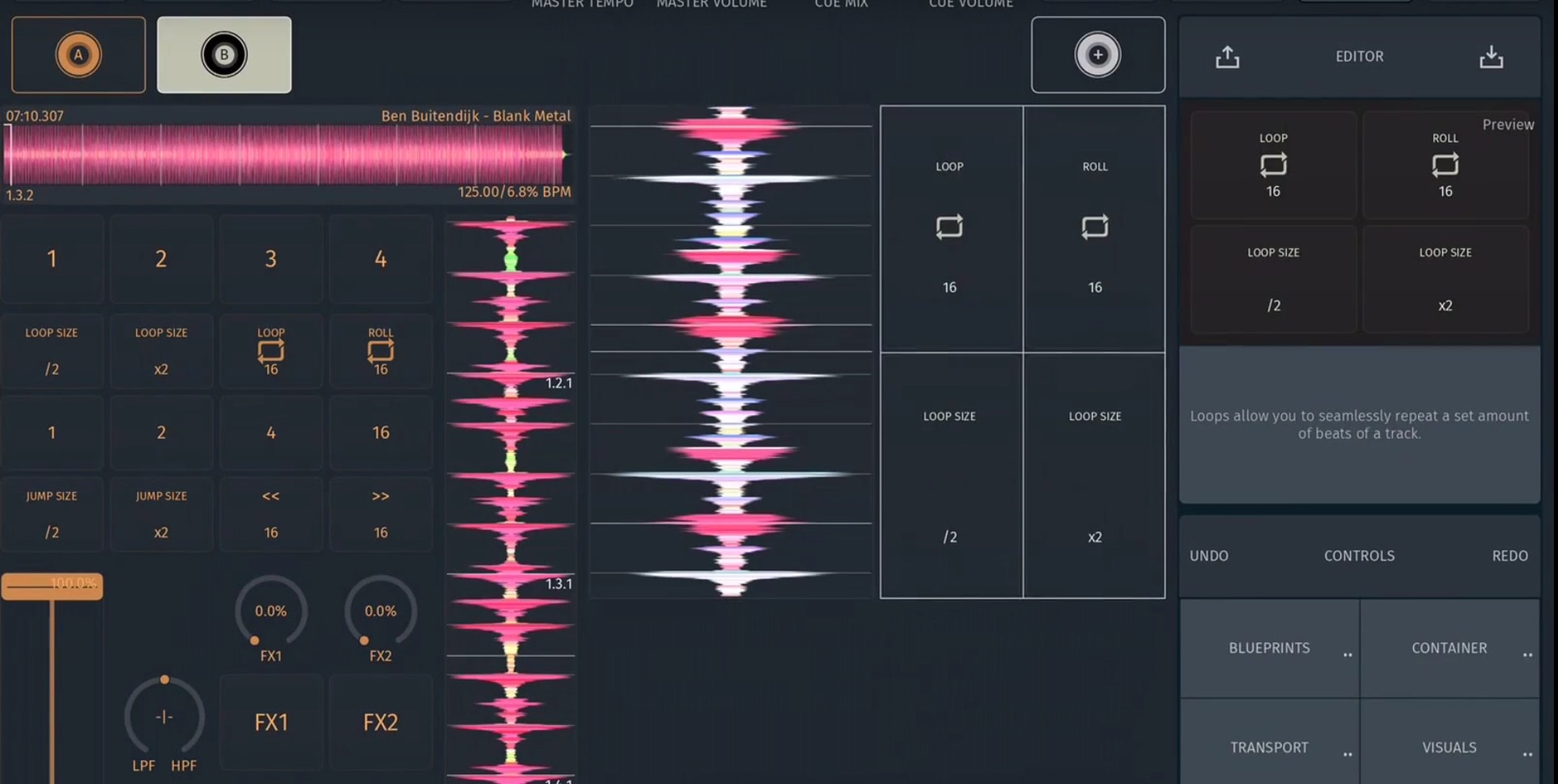
Building out a new deck

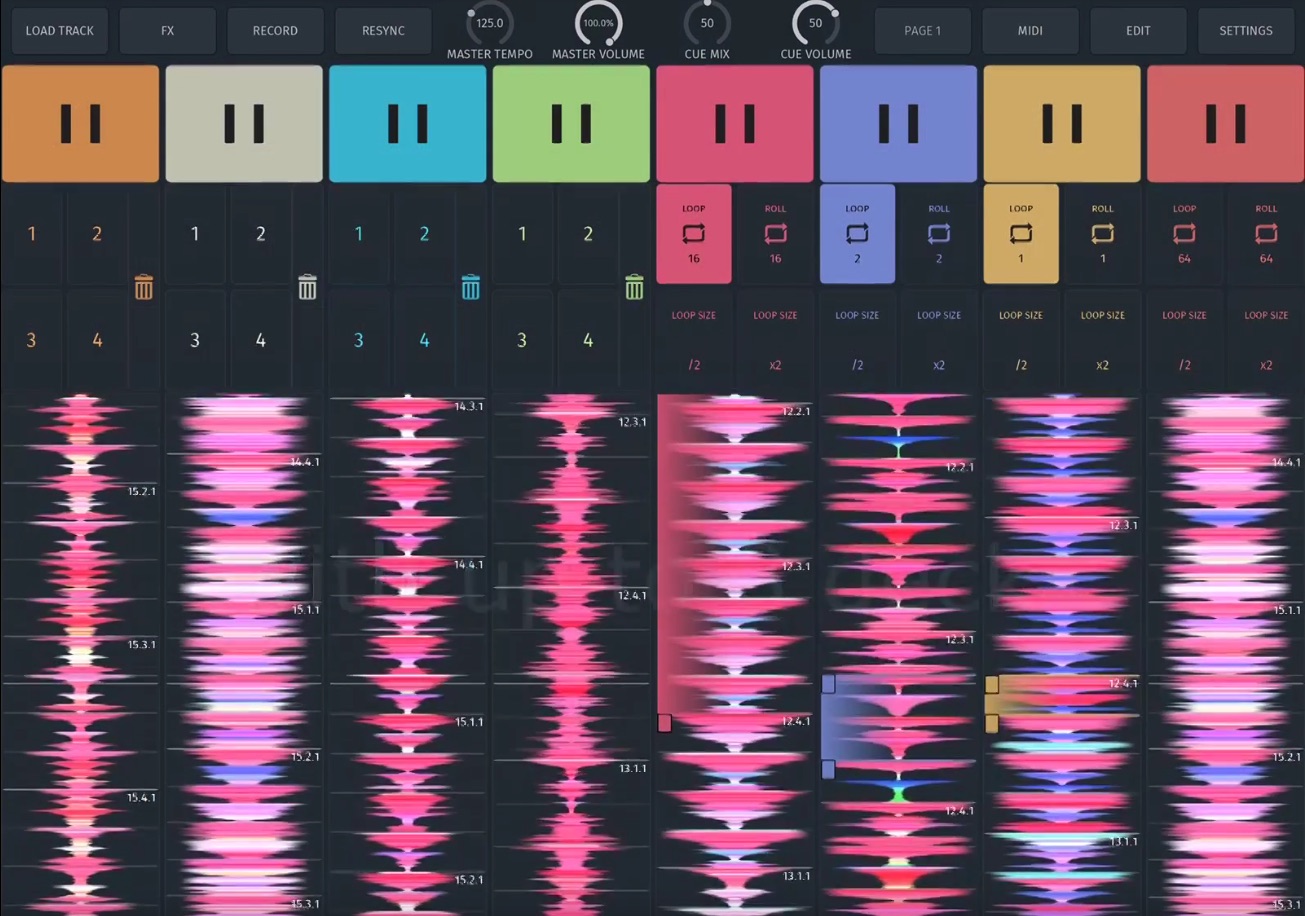
In Soda, the interface is built on a page system, so DJs can build out up to 7 pages of controls (one for transport, one for FX, one for cue point juggles, etc) – or just focus on a single page if you prefer. Editing the interface is intuitive – tap edit, and then tap on any control or element to resize, rearrange, or remove it.

A host of elements exist – including beatjump, loops, loop rolls, cues, transport controls, and FX. The app even supports building out up to eight concurrent decks:
Other Features

Personally, while I love the power-to-the-people approach that Soda takes to DJ interfaces, what really matters to me is the feature set and app capabilities beyond the layout. For the most part, Soda seems to be dynamic and powerful – here’s the abbreviated feature list:

  • Up to 16 nameable Cue-Points per Deck & Track
  • Cue points can either be Hot-Cues or Loop-Cues. The latter can enabled to automatically kick in once the playhead passes the Cue.
  • Zoomable color-coded Waveforms
  • Ableton Link support
  • 2 Send FX Chains
  • AUv3 Effect support – include your favorite AUs into the set.
  • 5 internal Effects (Delay, Reverb, Phaser, Flanger, EQ 3)
  • Sample Import via Apple Document Picker & Files app.
  • Browser access to your iTunes Library.
  • BPM & Key detection, Time-stretch (Key-Lock)
  • Fully MIDI mappable
  • Split Output via compatible split-cable
  • Compatible with any iOS-compatible audio & MIDI interface (no special remapping needed)

Wait, This Concept Feels Familiar….?

If you’re wondering if a modular iOS music application has been built before, it has. As it turns out, the app developer, zerodebug – has been behind a number of other modular iOS apps in our industry before. Included in that lineup is touchAble, an iOS controller for Ableton, and d(–)b, an iPad-only DJ application that was likely much of the foundation for Soda’s development.


Want to reach DJTT's audience here?

Shoot an email to advertising@djtechtools.com

DJTT ads
DJTT newsletter
Midi Fighter
Chat with us
  • ABOUT DJTT
  • CONTACT
  • PRIVACY
  • MIDI FIGHTER HELP
  • ABOUT DJTT
  • JOBS
  • CONTACT US
  • ADVERTISE
  • PRIVACY POLICY
  • ACCESSIBILITY STATEMENT

© 2024 DJ Techtools all rights reserved by DJ TechTools on all content unless otherwise noted.

No Result
View All Result
  • Blog
    • DJ Gear
      • DIY Projects
      • Gear Reviews
      • New Products
      • Controllerism
    • Techniques + Tips
      • Beginner DJ
      • Advanced DJ
      • Producer
      • Finger Drummer
    • News + Culture
      • Editorials + Opinions
      • Artist Interviews
      • Performances + Routines
      • How I Play
    • DJ Software Tutorials
      • Serato Tips
      • CDJ Tips
      • Ableton Live Tips
  • Store
    • Run by real DJs, not a corporation
    • DJ Controllers
      • Midi Fighter Twister
      • Midi Fighter Spectra
      • Midi Fighter 64
      • View All
    • Accessories
      • Chroma USB Drive for DJs
      • Chroma Caps
      • Chroma Cables Audio
      • Chroma Cables USB-A
      • Chroma Cables: USB-C
      • DJTT Gift Card
      • Midi Fighter T-Shirt
      • Keyboard Covers
      • Earplugs by V-Moda
    • Production Gear
    • Soundcards & Mixers
  • Community
    • Popular Forums
      • General Discussion
      • Buy & Sell
      • Reviews
      • Mixes
      • Music Production
      • Show Your Setup
      • Off Topic
    • Handy Links
      • New Posts
      • Private Messages
      • Register
      • Search
    • Midi Maps
      • Traktor
      • Ableton
      • Serato DJ
      • Midi Fighter 3D
      • Midi Fighter Twister
      • Midi Fighter Spectra
  • Midi Fighter
  • Chroma

© 2024 DJ Techtools all rights reserved by DJ TechTools on all content unless otherwise noted.

This website uses cookies. By continuing to use this website you are giving consent to cookies being used. Visit our Privacy and Cookie Policy.