

DJ TechTools
  • Blog
    • DJ Gear
      • DIY Projects
      • Gear Reviews
      • New Products
      • Controllerism
    • Techniques + Tips
      • Beginner DJ
      • Advanced DJ
      • Producer
      • Finger Drummer
    • News + Culture
      • Editorials + Opinions
      • Artist Interviews
      • Performances + Routines
      • How I Play
    • DJ Software Tutorials
      • Serato Tips
        • Traktor Tips
      • CDJ Tips
      • Ableton Live Tips
  • Store
    • Run by real DJs, not a corporation
    • DJ Controllers
      • Midi Fighter Twister
      • Midi Fighter Spectra
      • Midi Fighter 64
      • View All
    • Accessories
      • Chroma USB Drive for DJs
      • Chroma Caps
      • Chroma Cables Audio
      • Chroma Cables USB-A
      • Chroma Cables: USB-C
      • DJTT Gift Card
      • Midi Fighter T-Shirt
      • Keyboard Covers
      • Earplugs by V-Moda
    • Production Gear
    • Soundcards & Mixers
  • Community
    • Popular Forums
      • General Discussion
      • Buy & Sell
      • Reviews
      • Mixes
      • Music Production
      • Show Your Setup
      • Off Topic
    • Handy Links
      • New Posts
      • Private Messages
      • Register
      • Search
    • Midi Maps
      • Traktor
      • Ableton
      • Serato DJ
      • Midi Fighter 3D
      • Midi Fighter Twister
      • Midi Fighter Spectra
  • Midi Fighter
  • Chroma
No Result
View All Result
DJ TechTools
  • Blog
    • DJ Gear
      • DIY Projects
      • Gear Reviews
      • New Products
      • Controllerism
    • Techniques + Tips
      • Beginner DJ
      • Advanced DJ
      • Producer
      • Finger Drummer
    • News + Culture
      • Editorials + Opinions
      • Artist Interviews
      • Performances + Routines
      • How I Play
    • DJ Software Tutorials
      • Serato Tips
        • Traktor Tips
      • CDJ Tips
      • Ableton Live Tips
  • Store
    • Run by real DJs, not a corporation
    • DJ Controllers
      • Midi Fighter Twister
      • Midi Fighter Spectra
      • Midi Fighter 64
      • View All
    • Accessories
      • Chroma USB Drive for DJs
      • Chroma Caps
      • Chroma Cables Audio
      • Chroma Cables USB-A
      • Chroma Cables: USB-C
      • DJTT Gift Card
      • Midi Fighter T-Shirt
      • Keyboard Covers
      • Earplugs by V-Moda
    • Production Gear
    • Soundcards & Mixers
  • Community
    • Popular Forums
      • General Discussion
      • Buy & Sell
      • Reviews
      • Mixes
      • Music Production
      • Show Your Setup
      • Off Topic
    • Handy Links
      • New Posts
      • Private Messages
      • Register
      • Search
    • Midi Maps
      • Traktor
      • Ableton
      • Serato DJ
      • Midi Fighter 3D
      • Midi Fighter Twister
      • Midi Fighter Spectra
  • Midi Fighter
  • Chroma
No Result
View All Result
DJ TechTools

Engine Prime 1.1 Released: Subfolders for iTunes Playlists

Post on FacebookTweet thisUpvote on Reddit

To continue their attempted siege of DJ booths around the world, Denon DJ has had to build Engine Prime, a track preparation/organization/analysis software. Today, they’re launching the first major update, Engine Prime 1.1. Features include iTunes enhancements (subfolder playlists!), custom sort orders for playlists, and a few other tweaks that simplify the organization process for SC5000 owners.

Engine Prime 1.1’s Subfolders

Being able to quickly move an already organized database of music to a new platform for DJing is essential. At launch last spring, Engine Prime was able to do this perfectly – assuming you had a Serato DJ library. It also supported iTunes libraries – but with a flat hierarchy. For DJs with folders and sub-playlists, everything was a massive mess.
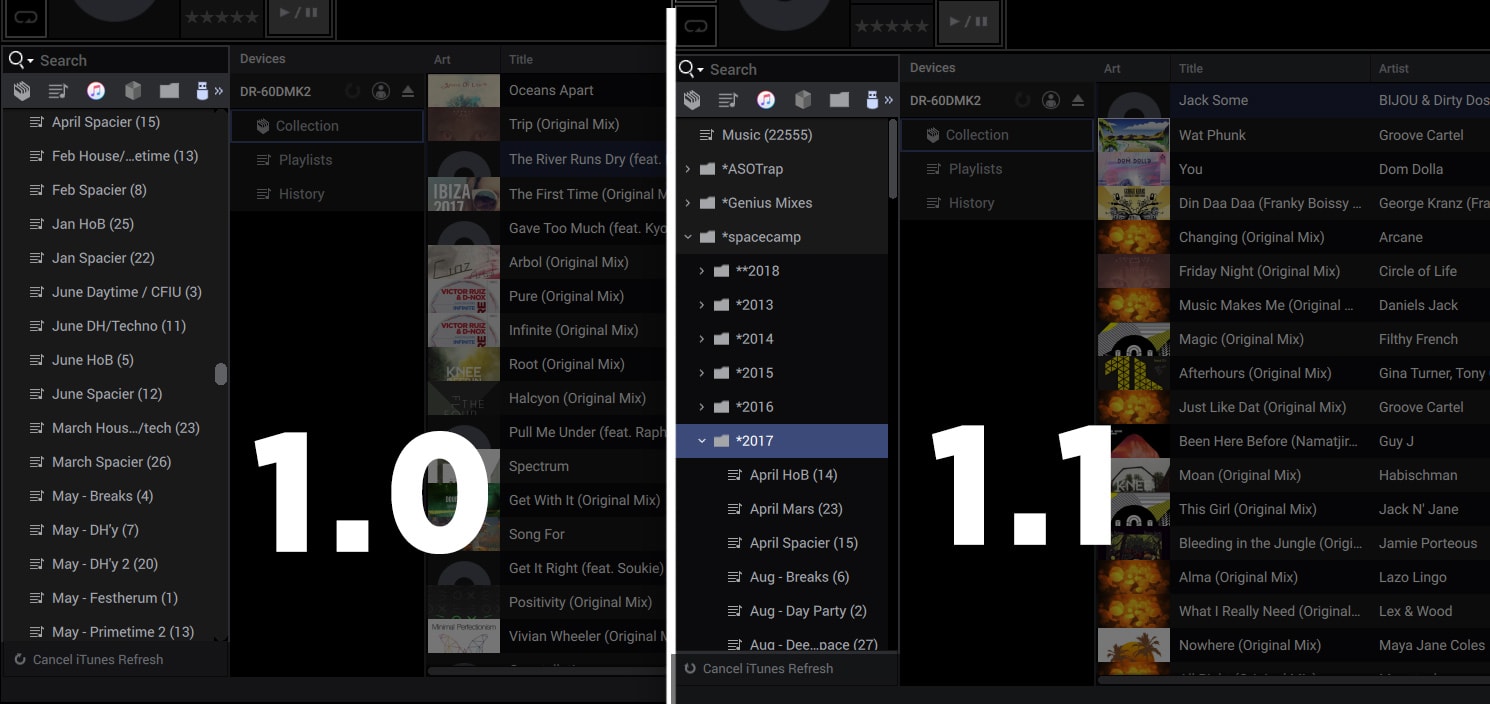
Engine Prime without (1.0, left) and with (1.1, right) subfolders as an option for iTunes organizers.

In Engine Prime 1.1, folders and subfolder are finally here, and importable into Engine Primes playlists fairly easily. You can import any iTunes playlist as a single standalone playlist, or as a crate. Editor’s Update; 12:03pm: It appears you’re not able to import iTunes folders as crates. Come, on, Denon…

In my mind, this is massive. Any DJ who uses iTunes to organize (read, anyone who wants to have playlists that move between different DJ softwares easily) will be saved hours of work re-assembling crates and subcrates.

Other Features In 1.1 Update

Beyond iTunes structure and importing, there are a few other features and changes that Denon DJ made in this new Engine Prime 1.1 update. Here’s what they shared with us:

  • Embedded iTunes structure now supports playlist folders and sub playlists.
  • Embedded iTunes playlists are easily imported to Engine Prime playlist and crate areas via right click menu or dragging.
  • Added support for custom iTunes XML database location.
  • Improved Searching. Users can now use spaces to search text within multiple fields at once.
  • Added ability for Loops and Cues to be placed before analysis is complete.
  • Added ability to right click within a playlist and renumber the playlist based on the current playlist sorting.
  • Filters now highlight all shown related compatible keys and BPMs when selecting items in the lists.
  • Missing songs that could not be packed to a drive are now listed in a missing files crate.
  • New “Job Monitor” feature is accessible on the lower right corner of the application. This feature helps the scheduling of song packing to drives, adding tracks to collections, and other processes.
  • The number of songs selected is now shown at the bottom of the screen.
  • Stability enhancements and various bug fixes.

Engine Prime is a free update, available on the Denon DJ official site here.

Want to see more NAMM 2018 news? Click here to see everything that’s been announced so far!

Want to reach DJTT's audience here?

Shoot an email to advertising@djtechtools.com

DJTT ads
DJTT newsletter
Midi Fighter
Chat with us
  • ABOUT DJTT
  • CONTACT
  • PRIVACY
  • MIDI FIGHTER HELP
  • ABOUT DJTT
  • JOBS
  • CONTACT US
  • ADVERTISE
  • PRIVACY POLICY
  • ACCESSIBILITY STATEMENT

© 2024 DJ Techtools all rights reserved by DJ TechTools on all content unless otherwise noted.

No Result
View All Result
  • Blog
    • DJ Gear
      • DIY Projects
      • Gear Reviews
      • New Products
      • Controllerism
    • Techniques + Tips
      • Beginner DJ
      • Advanced DJ
      • Producer
      • Finger Drummer
    • News + Culture
      • Editorials + Opinions
      • Artist Interviews
      • Performances + Routines
      • How I Play
    • DJ Software Tutorials
      • Serato Tips
      • CDJ Tips
      • Ableton Live Tips
  • Store
    • Run by real DJs, not a corporation
    • DJ Controllers
      • Midi Fighter Twister
      • Midi Fighter Spectra
      • Midi Fighter 64
      • View All
    • Accessories
      • Chroma USB Drive for DJs
      • Chroma Caps
      • Chroma Cables Audio
      • Chroma Cables USB-A
      • Chroma Cables: USB-C
      • DJTT Gift Card
      • Midi Fighter T-Shirt
      • Keyboard Covers
      • Earplugs by V-Moda
    • Production Gear
    • Soundcards & Mixers
  • Community
    • Popular Forums
      • General Discussion
      • Buy & Sell
      • Reviews
      • Mixes
      • Music Production
      • Show Your Setup
      • Off Topic
    • Handy Links
      • New Posts
      • Private Messages
      • Register
      • Search
    • Midi Maps
      • Traktor
      • Ableton
      • Serato DJ
      • Midi Fighter 3D
      • Midi Fighter Twister
      • Midi Fighter Spectra
  • Midi Fighter
  • Chroma

© 2024 DJ Techtools all rights reserved by DJ TechTools on all content unless otherwise noted.

This website uses cookies. By continuing to use this website you are giving consent to cookies being used. Visit our Privacy and Cookie Policy.
