

DJ TechTools
  • Blog
    • DJ Gear
      • DIY Projects
      • Gear Reviews
      • New Products
      • Controllerism
    • Techniques + Tips
      • Beginner DJ
      • Advanced DJ
      • Producer
      • Finger Drummer
    • News + Culture
      • Editorials + Opinions
      • Artist Interviews
      • Performances + Routines
      • How I Play
    • DJ Software Tutorials
      • Serato Tips
        • Traktor Tips
      • CDJ Tips
      • Ableton Live Tips
  • Store
    • Run by real DJs, not a corporation
    • DJ Controllers
      • Midi Fighter Twister
      • Midi Fighter Spectra
      • Midi Fighter 64
      • View All
    • Accessories
      • Chroma USB Drive for DJs
      • Chroma Caps
      • Chroma Cables Audio
      • Chroma Cables USB-A
      • Chroma Cables: USB-C
      • DJTT Gift Card
      • Midi Fighter T-Shirt
      • Keyboard Covers
      • Earplugs by V-Moda
    • Production Gear
    • Soundcards & Mixers
  • Community
    • Popular Forums
      • General Discussion
      • Buy & Sell
      • Reviews
      • Mixes
      • Music Production
      • Show Your Setup
      • Off Topic
    • Handy Links
      • New Posts
      • Private Messages
      • Register
      • Search
    • Midi Maps
      • Traktor
      • Ableton
      • Serato DJ
      • Midi Fighter 3D
      • Midi Fighter Twister
      • Midi Fighter Spectra
  • Midi Fighter
  • Chroma
No Result
View All Result
DJ TechTools
  • Blog
    • DJ Gear
      • DIY Projects
      • Gear Reviews
      • New Products
      • Controllerism
    • Techniques + Tips
      • Beginner DJ
      • Advanced DJ
      • Producer
      • Finger Drummer
    • News + Culture
      • Editorials + Opinions
      • Artist Interviews
      • Performances + Routines
      • How I Play
    • DJ Software Tutorials
      • Serato Tips
        • Traktor Tips
      • CDJ Tips
      • Ableton Live Tips
  • Store
    • Run by real DJs, not a corporation
    • DJ Controllers
      • Midi Fighter Twister
      • Midi Fighter Spectra
      • Midi Fighter 64
      • View All
    • Accessories
      • Chroma USB Drive for DJs
      • Chroma Caps
      • Chroma Cables Audio
      • Chroma Cables USB-A
      • Chroma Cables: USB-C
      • DJTT Gift Card
      • Midi Fighter T-Shirt
      • Keyboard Covers
      • Earplugs by V-Moda
    • Production Gear
    • Soundcards & Mixers
  • Community
    • Popular Forums
      • General Discussion
      • Buy & Sell
      • Reviews
      • Mixes
      • Music Production
      • Show Your Setup
      • Off Topic
    • Handy Links
      • New Posts
      • Private Messages
      • Register
      • Search
    • Midi Maps
      • Traktor
      • Ableton
      • Serato DJ
      • Midi Fighter 3D
      • Midi Fighter Twister
      • Midi Fighter Spectra
  • Midi Fighter
  • Chroma
No Result
View All Result
DJ TechTools

DJM-REC: Pioneer DJ’s New Set Recorder for iOS

Post on FacebookTweet thisUpvote on Reddit

DJs from every genre like to record mixes. Recording mixes give DJs a portfolio of their work and re-listening to old mixes is a great constructive practice. However, recording a mix can be stressful. Everything is dark, the DJ before is still packing up, there is no room to start plugging into the mixer, and the song the other DJ left playing ends in 45 seconds. Pioneer is now coming to DJs’ aid with a new app for iPhones and iPads which enables easy recording and sharing of DJ mixes.

  • App: DJM-REC
  • Developer: Pioneer DJ
  • Price: $9.99
  • Availability: Currently in the App Store
  • Requirements: iOS 8 or later

DJM-REC Overview
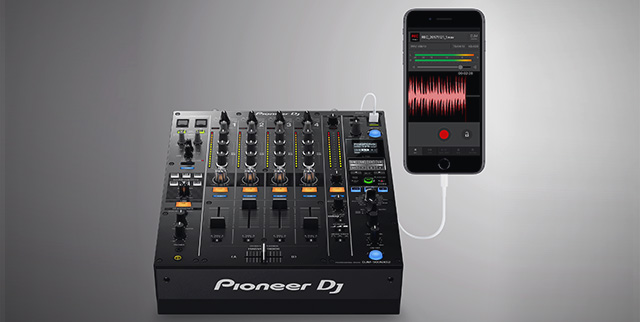
Ease of Use

The DJM-REC uses a lightning cable to connect the DJ’s iOS device to any DJM mixer which has the digital send/return feature using the USB port on the mixer. Right now this includes:

  • DJM-TOUR1
  • DJM-900NXS2
  • DJM-450
  • DJM-750MK2

High Quality Recordings

The DJM-REC app has the ability to control the peak limiter on the DJM mixer. This means that a DJ can worry about mixing at the moment and not about whether the levels are peaking on the recording. Mixes can be recorded in WAV format at a 44.1/48 kHz sample rate or in AAC format from 64kbps to 320kbps.

DJs can also live stream mixes through YouTube, Facebook Live, Periscope, Instagram, and Snapchat through DJM-REC. Recorded mixes can be directly uploaded to sites like Mixcloud and Dropbox.

Time Stamping and Mastering

A unique feature of the DJM-REC app is its ability to time stamp tracks. If a DJ fully uses CDJs with properly labeled tracks, then the DJM-REC will use information from the mixer such as fader positions to accurately timestamp tracks. All timestamps are editable within the app as well, making for easy tracklisting.
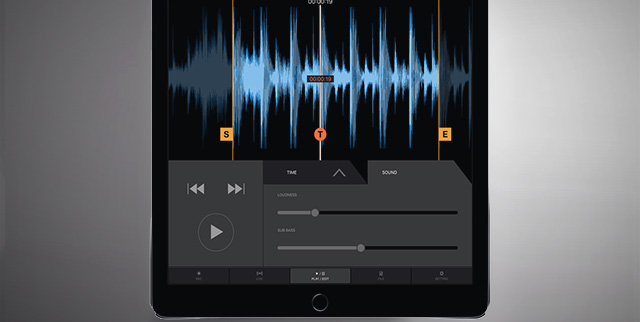
Another notable feature is the Loudness slider which acts as a mastering tool that attempts to make mixes sound punchy, heavier, and vibrant. There is also a Sub Bass slider that refines the low-end sound of the mix in a similar fashion. These sliders can be used on the mixes recorded within the app or old tracks that need a refresher. For a more rugged sound, DJs can get an analog recording using the app’s microphone function when using an external microphone that can plug into a mixer’s traditional outputs.

DJM-REC Worth It or Nah?

DJM-REC is shaping up to be a nifty, useful app for CDJ users. It will be great to hear how DJs respond to this app and if it is heavily adopted. Given the rising popularity of Pioneer DJ’s competitors, this recording app could be a point in their “win” column.

Recording mixes isn’t rocket science. Check out this classic DJTT article!

Want to see more NAMM 2018 news? Click here to see everything that’s been announced so far!

Want to reach DJTT's audience here?

Shoot an email to advertising@djtechtools.com

DJTT ads
DJTT newsletter
Midi Fighter
Chat with us
  • ABOUT DJTT
  • CONTACT
  • PRIVACY
  • MIDI FIGHTER HELP
  • ABOUT DJTT
  • JOBS
  • CONTACT US
  • ADVERTISE
  • PRIVACY POLICY
  • ACCESSIBILITY STATEMENT

© 2024 DJ Techtools all rights reserved by DJ TechTools on all content unless otherwise noted.

No Result
View All Result
  • Blog
    • DJ Gear
      • DIY Projects
      • Gear Reviews
      • New Products
      • Controllerism
    • Techniques + Tips
      • Beginner DJ
      • Advanced DJ
      • Producer
      • Finger Drummer
    • News + Culture
      • Editorials + Opinions
      • Artist Interviews
      • Performances + Routines
      • How I Play
    • DJ Software Tutorials
      • Serato Tips
      • CDJ Tips
      • Ableton Live Tips
  • Store
    • Run by real DJs, not a corporation
    • DJ Controllers
      • Midi Fighter Twister
      • Midi Fighter Spectra
      • Midi Fighter 64
      • View All
    • Accessories
      • Chroma USB Drive for DJs
      • Chroma Caps
      • Chroma Cables Audio
      • Chroma Cables USB-A
      • Chroma Cables: USB-C
      • DJTT Gift Card
      • Midi Fighter T-Shirt
      • Keyboard Covers
      • Earplugs by V-Moda
    • Production Gear
    • Soundcards & Mixers
  • Community
    • Popular Forums
      • General Discussion
      • Buy & Sell
      • Reviews
      • Mixes
      • Music Production
      • Show Your Setup
      • Off Topic
    • Handy Links
      • New Posts
      • Private Messages
      • Register
      • Search
    • Midi Maps
      • Traktor
      • Ableton
      • Serato DJ
      • Midi Fighter 3D
      • Midi Fighter Twister
      • Midi Fighter Spectra
  • Midi Fighter
  • Chroma

© 2024 DJ Techtools all rights reserved by DJ TechTools on all content unless otherwise noted.

This website uses cookies. By continuing to use this website you are giving consent to cookies being used. Visit our Privacy and Cookie Policy.
