

DJ TechTools
  • Blog
    • DJ Gear
      • DIY Projects
      • Gear Reviews
      • New Products
      • Controllerism
    • Techniques + Tips
      • Beginner DJ
      • Advanced DJ
      • Producer
      • Finger Drummer
    • News + Culture
      • Editorials + Opinions
      • Artist Interviews
      • Performances + Routines
      • How I Play
    • DJ Software Tutorials
      • Serato Tips
        • Traktor Tips
      • CDJ Tips
      • Ableton Live Tips
  • Store
    • Run by real DJs, not a corporation
    • DJ Controllers
      • Midi Fighter Twister
      • Midi Fighter Spectra
      • Midi Fighter 64
      • View All
    • Accessories
      • Chroma USB Drive for DJs
      • Chroma Caps
      • Chroma Cables Audio
      • Chroma Cables USB-A
      • Chroma Cables: USB-C
      • DJTT Gift Card
      • Midi Fighter T-Shirt
      • Keyboard Covers
      • Earplugs by V-Moda
    • Production Gear
    • Soundcards & Mixers
  • Community
    • Popular Forums
      • General Discussion
      • Buy & Sell
      • Reviews
      • Mixes
      • Music Production
      • Show Your Setup
      • Off Topic
    • Handy Links
      • New Posts
      • Private Messages
      • Register
      • Search
    • Midi Maps
      • Traktor
      • Ableton
      • Serato DJ
      • Midi Fighter 3D
      • Midi Fighter Twister
      • Midi Fighter Spectra
  • Midi Fighter
  • Chroma
No Result
View All Result
DJ TechTools
  • Blog
    • DJ Gear
      • DIY Projects
      • Gear Reviews
      • New Products
      • Controllerism
    • Techniques + Tips
      • Beginner DJ
      • Advanced DJ
      • Producer
      • Finger Drummer
    • News + Culture
      • Editorials + Opinions
      • Artist Interviews
      • Performances + Routines
      • How I Play
    • DJ Software Tutorials
      • Serato Tips
        • Traktor Tips
      • CDJ Tips
      • Ableton Live Tips
  • Store
    • Run by real DJs, not a corporation
    • DJ Controllers
      • Midi Fighter Twister
      • Midi Fighter Spectra
      • Midi Fighter 64
      • View All
    • Accessories
      • Chroma USB Drive for DJs
      • Chroma Caps
      • Chroma Cables Audio
      • Chroma Cables USB-A
      • Chroma Cables: USB-C
      • DJTT Gift Card
      • Midi Fighter T-Shirt
      • Keyboard Covers
      • Earplugs by V-Moda
    • Production Gear
    • Soundcards & Mixers
  • Community
    • Popular Forums
      • General Discussion
      • Buy & Sell
      • Reviews
      • Mixes
      • Music Production
      • Show Your Setup
      • Off Topic
    • Handy Links
      • New Posts
      • Private Messages
      • Register
      • Search
    • Midi Maps
      • Traktor
      • Ableton
      • Serato DJ
      • Midi Fighter 3D
      • Midi Fighter Twister
      • Midi Fighter Spectra
  • Midi Fighter
  • Chroma
No Result
View All Result
DJ TechTools

Serato Studio Beta: An Incredibly Versatile DJ-Focused Production App Just Launched

Post on FacebookTweet thisUpvote on Reddit

The best parts of Serato Sample and Serato DJ have merged into one formidable production tool.

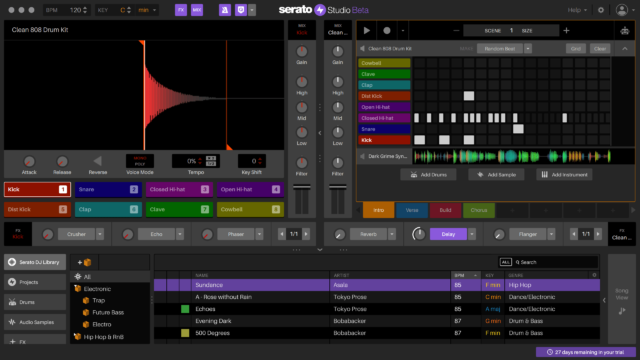
Have you ever felt like your DJ skillset just doesn’t translate over to production? Do you wish that making edits and tracks was a little bit more like mixing music? Serato Studio is Serato’s new production application, and with it, they hope to solve these exact problems. It’s being tauted as a platform that has “powerful production features with a DJ-style workflow.”

Watch the software overview below, and keep reading for a feature overview and our first thoughts on the software.

Features of Serato Studio

  • DJ Style Library: Access your entire Serato DJ library with crates, cue points, BPM and key information.
  • High Quality FX: Tweak your beats using over 30 built-in FX presets that will feel instantly familiar to DJs.
  • Works with DJ hardware: Studio works with a range of DJ controllers and mixers, as well as MIDI controllers, or just your laptop.
  • Make Beats: Get inspired with over 300 pre-made drum patterns across a range of different genres.
  • Master Key and BPM: Let the project key automatically update as you start making your beat. Adjust the BPM to extremes with world-class Pitch ‘n Time stretching
  • Play in Key: Play any instrument or plugin in key, without knowing music theory.
  • Quality Content Built In: Studio comes with a huge amount of built-in drum kits, instruments, audio loops and samples, with frequent content updates for subscribers.
  • Simple Sequencer: Get creative with your drum patterns using the simple and easy-to-use 808-style step sequencer
  • DJ-style mixing? – Mix your sounds using a familiar DJ channel mixing strip, with dedicated gain, EQs, filters and more.
  • Serato Colored Waveforms? – See your audio and MIDI sequences in Serato’s famous colored waveforms.
How Do You Start Using Serato Studio?

Interestingly, and a bit unsurprisingly considering the current environment of software products, Serato is making this software a subscription only service. That means that you’ll pay a small monthly fee to get access to the tool, and then get regular updates and sample content each month. They’re teaming up with a bunch of well-known artists and sound designers to flesh out the content side of things.

Right now, Serato Studio is going into a public beta (accessible here), which will be “open until it reaches member capacity, after which Serato will schedule semi-regular openings to add more members before the official release.”

DJTT’s Hot Take: It’s Brilliant

We’ve had a few chances to start messing around in the Serato Studio software, and honestly, it’s genius. They’ve taken the really comfortable workflow of Serato Sample and expanded it to a full-fledged production software that can quickly and easily get you 90% of the way to a completed track.

It’s very clearly software built with the DJ user in mind first – someone who spends a lot of time in DJ software organizing and performing. If you’re a hardcore Serato DJ user, Studio will be the go-to tool you’ll want to use for quick edits, remixes, and ideas.

Add to that the hardware compatibility, and suddenly everyone who owns a DDJ-SB3 or other Serato DJ device has intuitive control of production software – it’s a really smart move.


Want to reach DJTT's audience here?

Shoot an email to advertising@djtechtools.com

DJTT ads
DJTT newsletter
Midi Fighter
Chat with us
  • ABOUT DJTT
  • CONTACT
  • PRIVACY
  • MIDI FIGHTER HELP
  • ABOUT DJTT
  • JOBS
  • CONTACT US
  • ADVERTISE
  • PRIVACY POLICY
  • ACCESSIBILITY STATEMENT

© 2024 DJ Techtools all rights reserved by DJ TechTools on all content unless otherwise noted.

No Result
View All Result
  • Blog
    • DJ Gear
      • DIY Projects
      • Gear Reviews
      • New Products
      • Controllerism
    • Techniques + Tips
      • Beginner DJ
      • Advanced DJ
      • Producer
      • Finger Drummer
    • News + Culture
      • Editorials + Opinions
      • Artist Interviews
      • Performances + Routines
      • How I Play
    • DJ Software Tutorials
      • Serato Tips
      • CDJ Tips
      • Ableton Live Tips
  • Store
    • Run by real DJs, not a corporation
    • DJ Controllers
      • Midi Fighter Twister
      • Midi Fighter Spectra
      • Midi Fighter 64
      • View All
    • Accessories
      • Chroma USB Drive for DJs
      • Chroma Caps
      • Chroma Cables Audio
      • Chroma Cables USB-A
      • Chroma Cables: USB-C
      • DJTT Gift Card
      • Midi Fighter T-Shirt
      • Keyboard Covers
      • Earplugs by V-Moda
    • Production Gear
    • Soundcards & Mixers
  • Community
    • Popular Forums
      • General Discussion
      • Buy & Sell
      • Reviews
      • Mixes
      • Music Production
      • Show Your Setup
      • Off Topic
    • Handy Links
      • New Posts
      • Private Messages
      • Register
      • Search
    • Midi Maps
      • Traktor
      • Ableton
      • Serato DJ
      • Midi Fighter 3D
      • Midi Fighter Twister
      • Midi Fighter Spectra
  • Midi Fighter
  • Chroma

© 2024 DJ Techtools all rights reserved by DJ TechTools on all content unless otherwise noted.

This website uses cookies. By continuing to use this website you are giving consent to cookies being used. Visit our Privacy and Cookie Policy.