

DJ TechTools
  • Blog
    • DJ Gear
      • DIY Projects
      • Gear Reviews
      • New Products
      • Controllerism
    • Techniques + Tips
      • Beginner DJ
      • Advanced DJ
      • Producer
      • Finger Drummer
    • News + Culture
      • Editorials + Opinions
      • Artist Interviews
      • Performances + Routines
      • How I Play
    • DJ Software Tutorials
      • Serato Tips
        • Traktor Tips
      • CDJ Tips
      • Ableton Live Tips
  • Store
    • Run by real DJs, not a corporation
    • DJ Controllers
      • Midi Fighter Twister
      • Midi Fighter Spectra
      • Midi Fighter 64
      • View All
    • Accessories
      • Chroma USB Drive for DJs
      • Chroma Caps
      • Chroma Cables Audio
      • Chroma Cables USB-A
      • Chroma Cables: USB-C
      • DJTT Gift Card
      • Midi Fighter T-Shirt
      • Keyboard Covers
      • Earplugs by V-Moda
    • Production Gear
    • Soundcards & Mixers
  • Community
    • Popular Forums
      • General Discussion
      • Buy & Sell
      • Reviews
      • Mixes
      • Music Production
      • Show Your Setup
      • Off Topic
    • Handy Links
      • New Posts
      • Private Messages
      • Register
      • Search
    • Midi Maps
      • Traktor
      • Ableton
      • Serato DJ
      • Midi Fighter 3D
      • Midi Fighter Twister
      • Midi Fighter Spectra
  • Midi Fighter
  • Chroma
No Result
View All Result
DJ TechTools
  • Blog
    • DJ Gear
      • DIY Projects
      • Gear Reviews
      • New Products
      • Controllerism
    • Techniques + Tips
      • Beginner DJ
      • Advanced DJ
      • Producer
      • Finger Drummer
    • News + Culture
      • Editorials + Opinions
      • Artist Interviews
      • Performances + Routines
      • How I Play
    • DJ Software Tutorials
      • Serato Tips
        • Traktor Tips
      • CDJ Tips
      • Ableton Live Tips
  • Store
    • Run by real DJs, not a corporation
    • DJ Controllers
      • Midi Fighter Twister
      • Midi Fighter Spectra
      • Midi Fighter 64
      • View All
    • Accessories
      • Chroma USB Drive for DJs
      • Chroma Caps
      • Chroma Cables Audio
      • Chroma Cables USB-A
      • Chroma Cables: USB-C
      • DJTT Gift Card
      • Midi Fighter T-Shirt
      • Keyboard Covers
      • Earplugs by V-Moda
    • Production Gear
    • Soundcards & Mixers
  • Community
    • Popular Forums
      • General Discussion
      • Buy & Sell
      • Reviews
      • Mixes
      • Music Production
      • Show Your Setup
      • Off Topic
    • Handy Links
      • New Posts
      • Private Messages
      • Register
      • Search
    • Midi Maps
      • Traktor
      • Ableton
      • Serato DJ
      • Midi Fighter 3D
      • Midi Fighter Twister
      • Midi Fighter Spectra
  • Midi Fighter
  • Chroma
No Result
View All Result
DJ TechTools

Traktor Pro 3.2 Out Now: Watch Chris Liebing Demo Better Harmonic Mixing In Traktor

Post on FacebookTweet thisUpvote on Reddit

There’s a new version of Traktor Pro 3.2 that’s just been released this morning by Native Instruments. The update is focused primarily on adding features that improve harmonic mixing / key matching functionalities. The new features that help this include a new time-stretching algorithm, a new Key Lock and matching widget, and a new deck header display showing the current “resulting key”.

NI decided to get one of their most prolific users to demonstrate the new features, Chris Liebing. Watch the full demo below, or keep reading for the full feature list.

Traktor Pro 3.2 Overview with Chris Liebing

The Feature List for Traktor Pro 3.2

  • Elastique 3.3.0 Time Stretching: The time-stretching algorithms have been updated to the newest version. Your tracks will sound more present, and transients will maintain their definition when pitching up or down.
  • New Key Widget replacing former Key Lock button: This new widget prominently provides the core features for harmonic mixing all in one place: Key Lock on/off, colored resulting key display, and semitone up/down controls. The new visual appearance can be toggled on/off in the preferences.
  • Semitone up/down key control in Key Widget: When engaging Key Lock the Key Widget displays semitone up/down buttons, enabling you to pitch the track up down the track in musically-relevant steps.
  • Display of resulting key in Key Widget: When engaging Key Lock the button displays the original key of the playing track in the notation of your choice. This enables you to find the next matching track easily be following the rules of harmonic mixing.
  • Display offset between resulting and original in Key Widget: When engaging Key Lock the button below the resulting key displays the offset from the track’s original key in steps of semitones. This enables you to avoid offsets that are too large, which may result in audio degradation.
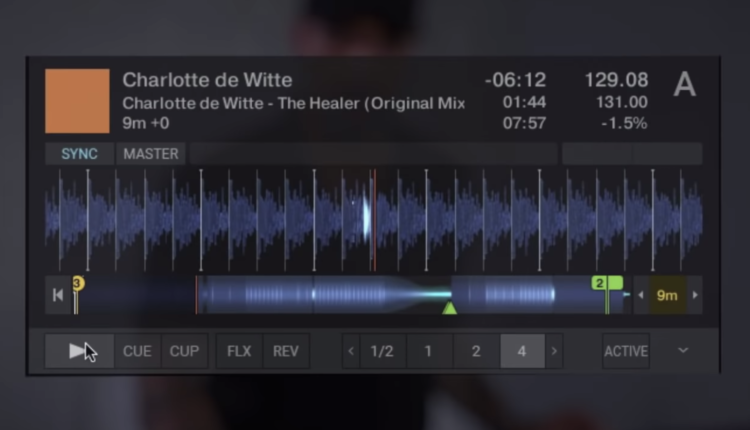
  • Optionally display resulting key in Deck Header: The resulting key can also be displayed in the deck header, by selecting the option “Resulting Key” in the Deck Header section of the “Track Decks” Preferences tab. This value also displays the resulting key without engaging Key Lock, by showing the closest full semitone along with the current offset in cents.
  • Highlight for tracks matching the MASTER deck’s key: When engaging Key Lock on the current Master Deck, all matching keys will be highlighted in the browser, enabling you to select the next matching song in your set. How exactly the keys are highlighted can be personalized in a preference setting.
  • Option to personalize highlighting of key color in browser: A new preference option in the “Browser” tab of the preferences allows you to customize the way, matching keys will be highlighted in the key column of the browser.
  • Quantized semitone up/down controls on S4 MK3: The new quantized semitone control provided by the Key Widget has been applied to the Key Control on the S4MK3. This way shift + right encoder on the S4 now snaps to the closest full semitone.
  • Display quantized resulting key on S4 MK3: The way the resulting key is displayed on the S4 MK3 has also been aligned with the Key Widget on the UI of TRAKTOR PRO.

There are a number of additional bug fixes and small changes (including an S4 MK3 headphone volume boost!) in the official changelog.

The new update is ready for download in Native Access – or you can log in to your NI account on their website.

Overall, this is a pretty powerful free update for Traktor 3.2 – have you had a chance to dive into it yet? Let us know your thoughts in the comments.


Want to reach DJTT's audience here?

Shoot an email to advertising@djtechtools.com

DJTT ads
DJTT newsletter
Midi Fighter
Chat with us
  • ABOUT DJTT
  • CONTACT
  • PRIVACY
  • MIDI FIGHTER HELP
  • ABOUT DJTT
  • JOBS
  • CONTACT US
  • ADVERTISE
  • PRIVACY POLICY
  • ACCESSIBILITY STATEMENT

© 2024 DJ Techtools all rights reserved by DJ TechTools on all content unless otherwise noted.

No Result
View All Result
  • Blog
    • DJ Gear
      • DIY Projects
      • Gear Reviews
      • New Products
      • Controllerism
    • Techniques + Tips
      • Beginner DJ
      • Advanced DJ
      • Producer
      • Finger Drummer
    • News + Culture
      • Editorials + Opinions
      • Artist Interviews
      • Performances + Routines
      • How I Play
    • DJ Software Tutorials
      • Serato Tips
      • CDJ Tips
      • Ableton Live Tips
  • Store
    • Run by real DJs, not a corporation
    • DJ Controllers
      • Midi Fighter Twister
      • Midi Fighter Spectra
      • Midi Fighter 64
      • View All
    • Accessories
      • Chroma USB Drive for DJs
      • Chroma Caps
      • Chroma Cables Audio
      • Chroma Cables USB-A
      • Chroma Cables: USB-C
      • DJTT Gift Card
      • Midi Fighter T-Shirt
      • Keyboard Covers
      • Earplugs by V-Moda
    • Production Gear
    • Soundcards & Mixers
  • Community
    • Popular Forums
      • General Discussion
      • Buy & Sell
      • Reviews
      • Mixes
      • Music Production
      • Show Your Setup
      • Off Topic
    • Handy Links
      • New Posts
      • Private Messages
      • Register
      • Search
    • Midi Maps
      • Traktor
      • Ableton
      • Serato DJ
      • Midi Fighter 3D
      • Midi Fighter Twister
      • Midi Fighter Spectra
  • Midi Fighter
  • Chroma

© 2024 DJ Techtools all rights reserved by DJ TechTools on all content unless otherwise noted.

This website uses cookies. By continuing to use this website you are giving consent to cookies being used. Visit our Privacy and Cookie Policy.