

DJ TechTools
  • Blog
    • DJ Gear
      • DIY Projects
      • Gear Reviews
      • New Products
      • Controllerism
    • Techniques + Tips
      • Beginner DJ
      • Advanced DJ
      • Producer
      • Finger Drummer
    • News + Culture
      • Editorials + Opinions
      • Artist Interviews
      • Performances + Routines
      • How I Play
    • DJ Software Tutorials
      • Serato Tips
        • Traktor Tips
      • CDJ Tips
      • Ableton Live Tips
  • Store
    • Run by real DJs, not a corporation
    • DJ Controllers
      • Midi Fighter Twister
      • Midi Fighter Spectra
      • Midi Fighter 64
      • View All
    • Accessories
      • Chroma USB Drive for DJs
      • Chroma Caps
      • Chroma Cables Audio
      • Chroma Cables USB-A
      • Chroma Cables: USB-C
      • DJTT Gift Card
      • Midi Fighter T-Shirt
      • Keyboard Covers
      • Earplugs by V-Moda
    • Production Gear
    • Soundcards & Mixers
  • Community
    • Popular Forums
      • General Discussion
      • Buy & Sell
      • Reviews
      • Mixes
      • Music Production
      • Show Your Setup
      • Off Topic
    • Handy Links
      • New Posts
      • Private Messages
      • Register
      • Search
    • Midi Maps
      • Traktor
      • Ableton
      • Serato DJ
      • Midi Fighter 3D
      • Midi Fighter Twister
      • Midi Fighter Spectra
  • Midi Fighter
  • Chroma
No Result
View All Result
DJ TechTools
  • Blog
    • DJ Gear
      • DIY Projects
      • Gear Reviews
      • New Products
      • Controllerism
    • Techniques + Tips
      • Beginner DJ
      • Advanced DJ
      • Producer
      • Finger Drummer
    • News + Culture
      • Editorials + Opinions
      • Artist Interviews
      • Performances + Routines
      • How I Play
    • DJ Software Tutorials
      • Serato Tips
        • Traktor Tips
      • CDJ Tips
      • Ableton Live Tips
  • Store
    • Run by real DJs, not a corporation
    • DJ Controllers
      • Midi Fighter Twister
      • Midi Fighter Spectra
      • Midi Fighter 64
      • View All
    • Accessories
      • Chroma USB Drive for DJs
      • Chroma Caps
      • Chroma Cables Audio
      • Chroma Cables USB-A
      • Chroma Cables: USB-C
      • DJTT Gift Card
      • Midi Fighter T-Shirt
      • Keyboard Covers
      • Earplugs by V-Moda
    • Production Gear
    • Soundcards & Mixers
  • Community
    • Popular Forums
      • General Discussion
      • Buy & Sell
      • Reviews
      • Mixes
      • Music Production
      • Show Your Setup
      • Off Topic
    • Handy Links
      • New Posts
      • Private Messages
      • Register
      • Search
    • Midi Maps
      • Traktor
      • Ableton
      • Serato DJ
      • Midi Fighter 3D
      • Midi Fighter Twister
      • Midi Fighter Spectra
  • Midi Fighter
  • Chroma
No Result
View All Result
DJ TechTools

Spleeter: Signal Separation Tool Trained on Deezer’s Library is Pretty Impressive

Post on FacebookTweet thisUpvote on Reddit

We’re written about signal separation before – it’s the process of taking a finished work (a track, for instance) and separating up into its parts (stems). We’ve seen a number of academic and commercial attempts at advancing music signal separation forward, but most of them take a fair amount of tweaking, additional processing, or have mediocre results.

That’s where Deezer comes in. Remember Deezer, the streaming service based in France that started back in 2007? They’ve released a brand new tool called Spleeter that has been trained on their massive library to break apart songs into their respective parts.

As Deezer’s blog post outlines, having a large dataset has historically been one of the biggest challenges for others attempting to make progress on audio signal separation engines:

“One of the hard limitations faced by MIR researchers is the lack of publicly available datasets due to copyright issues. Here at Deezer, we have access to a fairly large catalog that we’ve been leveraging to build Spleeter. Since we can not share this data, turning it into an accessible tool is a way for us to make our research reproducible by everyone. On a more ethical standpoint, we feel there should not be an unfair competition between researchers based on their access to copyrighted material or lack thereof.

[…] training this kind of models requires a lot of time and energy. By doing it once and sharing the result, we hope to save others some trouble and resources.”

How Well Does It Work?

In our testing, Spleeter does some of the best vocal / backing track splitting we’ve ever seen. It has other modes (for dividing up stems into other parts), but those aren’t quite as crisp.

Listen to one of my favorite tests below – conducted on a small loop of Ronnie Spiteri’s “The Empty Eye” featuring vocals from Liz Cass:

Here’s the original loop:

Here’s the vocals separated out:

Here’s the vocals-removed backing track:

How To Try It Yourself
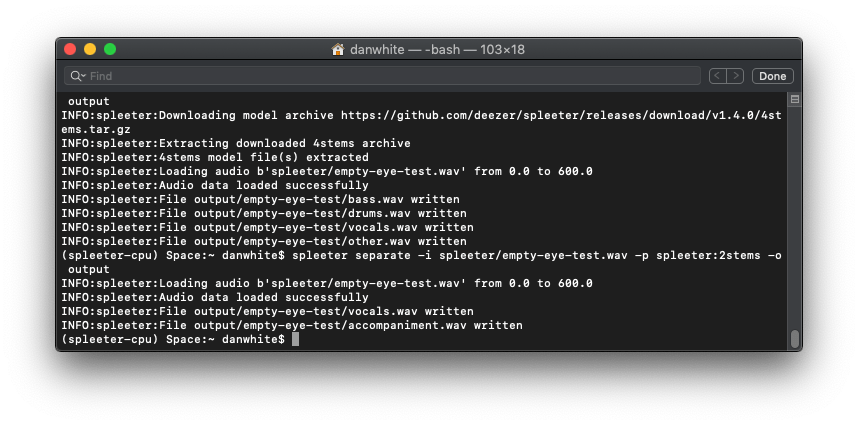
Running Spleeter takes a small dose of command line confidence. It’s not that bad, really.

Installing Spleeter isn’t for the faint of heart – there’s no GUI, so you’re going to have to bust out your terminal/command line and do some copy pasting. Full instructions are available on the official Spleeter GitHub repository here.

Once you’ve installed it, it’s pretty easy to use. Tell it what file you want to use, and what type of split you want to do. The options include:

  • Vocals (singing voice) / accompaniment separation (2 stems)
  • Vocals / drums / bass / other separation (4 stems)
  • Vocals / drums / bass / piano / other separation (5 stems)

The Race Is Still On: Put Signal Separation Into DJ Software

As I first wrote about in January 2018, signal separation could seriously transform the future of DJ software. Imagine instead of adjusting EQ on a track, you’re adjusting each of the parts. Every track that you load into a deck is could be analyzed with a tool like Spleeter, and then you have a knob for each element on your mixer.

There’s no reason this couldn’t be done today, hacked into existing DJ software. The race is on – who will make it happen first? One DJ software in particular – Traktor – already has Stem Decks, which are perfect for playing back split up stems….

Come on, Native Instruments, this could be Traktor’s big play.

Want to reach DJTT's audience here?

Shoot an email to advertising@djtechtools.com

DJTT ads
DJTT newsletter
Midi Fighter
Chat with us
  • ABOUT DJTT
  • CONTACT
  • PRIVACY
  • MIDI FIGHTER HELP
  • ABOUT DJTT
  • JOBS
  • CONTACT US
  • ADVERTISE
  • PRIVACY POLICY
  • ACCESSIBILITY STATEMENT

© 2024 DJ Techtools all rights reserved by DJ TechTools on all content unless otherwise noted.

No Result
View All Result
  • Blog
    • DJ Gear
      • DIY Projects
      • Gear Reviews
      • New Products
      • Controllerism
    • Techniques + Tips
      • Beginner DJ
      • Advanced DJ
      • Producer
      • Finger Drummer
    • News + Culture
      • Editorials + Opinions
      • Artist Interviews
      • Performances + Routines
      • How I Play
    • DJ Software Tutorials
      • Serato Tips
      • CDJ Tips
      • Ableton Live Tips
  • Store
    • Run by real DJs, not a corporation
    • DJ Controllers
      • Midi Fighter Twister
      • Midi Fighter Spectra
      • Midi Fighter 64
      • View All
    • Accessories
      • Chroma USB Drive for DJs
      • Chroma Caps
      • Chroma Cables Audio
      • Chroma Cables USB-A
      • Chroma Cables: USB-C
      • DJTT Gift Card
      • Midi Fighter T-Shirt
      • Keyboard Covers
      • Earplugs by V-Moda
    • Production Gear
    • Soundcards & Mixers
  • Community
    • Popular Forums
      • General Discussion
      • Buy & Sell
      • Reviews
      • Mixes
      • Music Production
      • Show Your Setup
      • Off Topic
    • Handy Links
      • New Posts
      • Private Messages
      • Register
      • Search
    • Midi Maps
      • Traktor
      • Ableton
      • Serato DJ
      • Midi Fighter 3D
      • Midi Fighter Twister
      • Midi Fighter Spectra
  • Midi Fighter
  • Chroma

© 2024 DJ Techtools all rights reserved by DJ TechTools on all content unless otherwise noted.

This website uses cookies. By continuing to use this website you are giving consent to cookies being used. Visit our Privacy and Cookie Policy.
