

DJ TechTools
  • Blog
    • DJ Gear
      • DIY Projects
      • Gear Reviews
      • New Products
      • Controllerism
    • Techniques + Tips
      • Beginner DJ
      • Advanced DJ
      • Producer
      • Finger Drummer
    • News + Culture
      • Editorials + Opinions
      • Artist Interviews
      • Performances + Routines
      • How I Play
    • DJ Software Tutorials
      • Serato Tips
        • Traktor Tips
      • CDJ Tips
      • Ableton Live Tips
  • Store
    • Run by real DJs, not a corporation
    • DJ Controllers
      • Midi Fighter Twister
      • Midi Fighter Spectra
      • Midi Fighter 64
      • View All
    • Accessories
      • Chroma USB Drive for DJs
      • Chroma Caps
      • Chroma Cables Audio
      • Chroma Cables USB-A
      • Chroma Cables: USB-C
      • DJTT Gift Card
      • Midi Fighter T-Shirt
      • Keyboard Covers
      • Earplugs by V-Moda
    • Production Gear
    • Soundcards & Mixers
  • Community
    • Popular Forums
      • General Discussion
      • Buy & Sell
      • Reviews
      • Mixes
      • Music Production
      • Show Your Setup
      • Off Topic
    • Handy Links
      • New Posts
      • Private Messages
      • Register
      • Search
    • Midi Maps
      • Traktor
      • Ableton
      • Serato DJ
      • Midi Fighter 3D
      • Midi Fighter Twister
      • Midi Fighter Spectra
  • Midi Fighter
  • Chroma
No Result
View All Result
DJ TechTools
  • Blog
    • DJ Gear
      • DIY Projects
      • Gear Reviews
      • New Products
      • Controllerism
    • Techniques + Tips
      • Beginner DJ
      • Advanced DJ
      • Producer
      • Finger Drummer
    • News + Culture
      • Editorials + Opinions
      • Artist Interviews
      • Performances + Routines
      • How I Play
    • DJ Software Tutorials
      • Serato Tips
        • Traktor Tips
      • CDJ Tips
      • Ableton Live Tips
  • Store
    • Run by real DJs, not a corporation
    • DJ Controllers
      • Midi Fighter Twister
      • Midi Fighter Spectra
      • Midi Fighter 64
      • View All
    • Accessories
      • Chroma USB Drive for DJs
      • Chroma Caps
      • Chroma Cables Audio
      • Chroma Cables USB-A
      • Chroma Cables: USB-C
      • DJTT Gift Card
      • Midi Fighter T-Shirt
      • Keyboard Covers
      • Earplugs by V-Moda
    • Production Gear
    • Soundcards & Mixers
  • Community
    • Popular Forums
      • General Discussion
      • Buy & Sell
      • Reviews
      • Mixes
      • Music Production
      • Show Your Setup
      • Off Topic
    • Handy Links
      • New Posts
      • Private Messages
      • Register
      • Search
    • Midi Maps
      • Traktor
      • Ableton
      • Serato DJ
      • Midi Fighter 3D
      • Midi Fighter Twister
      • Midi Fighter Spectra
  • Midi Fighter
  • Chroma
No Result
View All Result
DJ TechTools

Apple releases major Logic Pro X update with Live Loops, Step Sequencer

Post on FacebookTweet thisUpvote on Reddit

Apple’s Logic Pro X saw a huge update today – referred to as the “biggest update” to the production software since its launch in 2013, by Apple themselves – with its latest edition, 10.5.

Some of the most notable additions to the software with this update: a new live loops feature, the Step Sequencer editor, and a revision to the sampler tool and its capabilities.

Susan Prescott, the VP of Apps Product Marketing at Apple, shared:

“Logic Pro X 10.5 represents the biggest update to Logic since the launch of Logic Pro X, with powerful new tools that will inspire every artist — from those just getting started with Logic, to those already using it to produce Grammy Award-winning albums. We can’t wait to hear what these artists create next.”

Live Loops
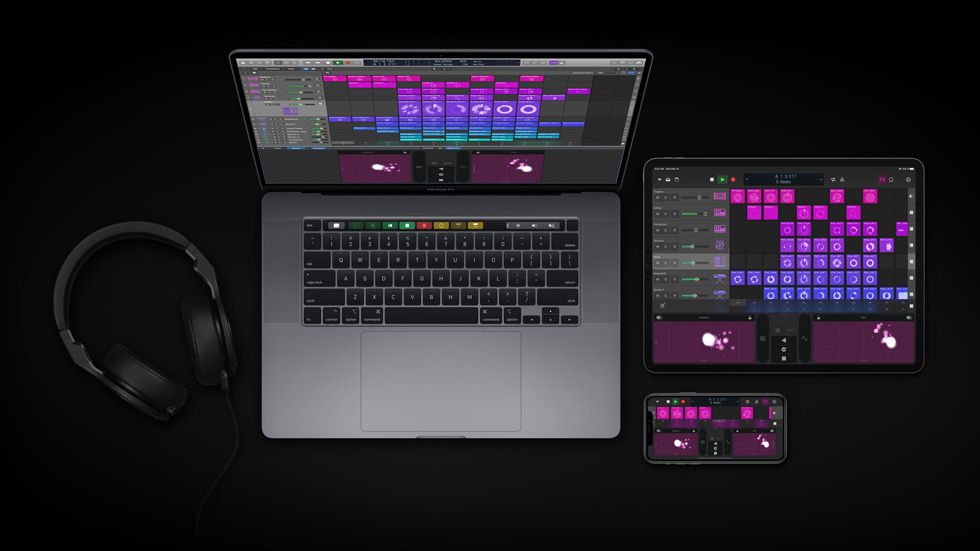
The new Live Loops feature makes it easier to create and add loops, samples, or recorded performances into a grid of cells. You can then move those loops around and play with ideas without needing to deal with a timeline or arrangement – and once you’re comfortable with a musical combination you’ve created, you can push that to the Tracks section of LPX and keep producing.

Logic’s Remix FX feature also adds another layer of opportunity here – you can use it to add effects like filter, gate, and Bitcrusher over your music in real time, whether it’s on an individual track or a song as a whole.

Lastly, if you’re using Live Loops, you can transfer them between Logic X and Garage Band as well.

Step Sequencer
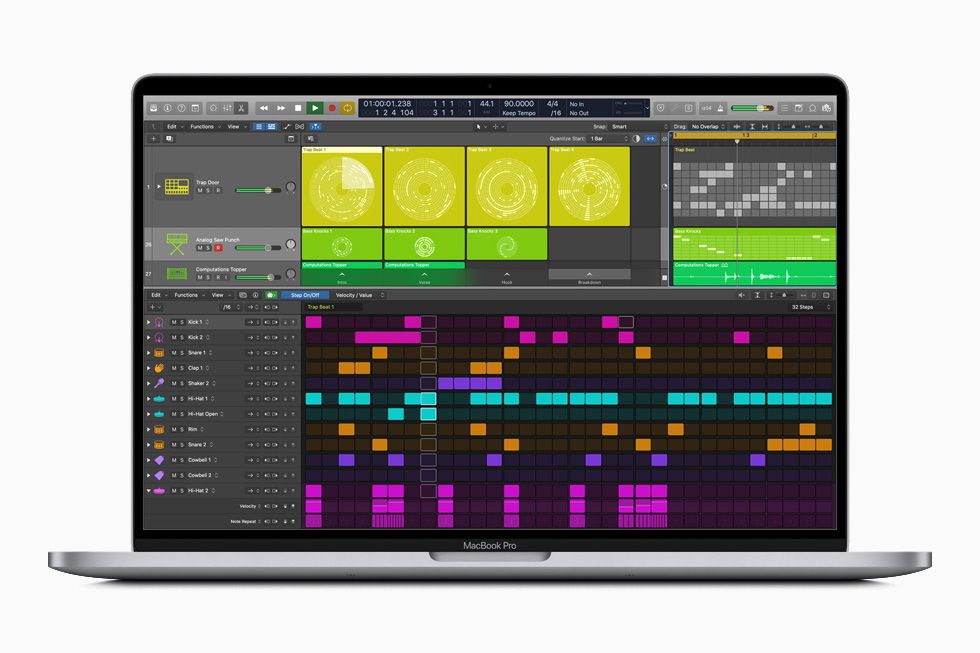
The Step Sequencer is a new editor that lets you program a pattern for your music creation, intended to act as a quick and simple way to program things like drums beats and bass lines. Apple explains that this addition was inspired by classic drum machines and synthesizers, calling it “pure beat poetry.”

Sampler & Quick Sampler

Apple has also remade their EXS24 Sampler with new updates and simplified it to the “Sampler” plug-in within LPX. The simplified version is a one-window tool that lets you create and edit sampler instruments – while still staying compatible with all EXS24 files you’ve used in the past. Plus, it offers a bigger swath of sound-shaping controls to add more emphasis and dynamic sound to your instruments.

In addition to this, the new Quick Sampler adds yet another layer of ease and window to creative opportunity, giving producers a way to turn any sound into an instrument. You can pull a sound in from basically anywhere – within Login, from Finder, your Voice Memos, or even record directly into the plug-in – and trim, loop, and shape those sounds to your heart’s desire.


This new update comes at a great time for producers with more-than-expected time on their hands to work on new tunes. The companion app from Apple for the software, Logic Remote, provides an even easier way to work from multiple devices, too. The app lets you pair with an iPhone or iPad to work on your Logic projects and is getting its own update as well – so you can step away from your laptop, but still have a way to work on your Live Loops.

Apple is currently offering a 90-day free trial on their website, available to Mac users only. The program is also available for purchase at $199.99 USD.


Want to reach DJTT's audience here?

Shoot an email to advertising@djtechtools.com

DJTT ads
DJTT newsletter
Midi Fighter
Chat with us
  • ABOUT DJTT
  • CONTACT
  • PRIVACY
  • MIDI FIGHTER HELP
  • ABOUT DJTT
  • JOBS
  • CONTACT US
  • ADVERTISE
  • PRIVACY POLICY
  • ACCESSIBILITY STATEMENT

© 2024 DJ Techtools all rights reserved by DJ TechTools on all content unless otherwise noted.

No Result
View All Result
  • Blog
    • DJ Gear
      • DIY Projects
      • Gear Reviews
      • New Products
      • Controllerism
    • Techniques + Tips
      • Beginner DJ
      • Advanced DJ
      • Producer
      • Finger Drummer
    • News + Culture
      • Editorials + Opinions
      • Artist Interviews
      • Performances + Routines
      • How I Play
    • DJ Software Tutorials
      • Serato Tips
      • CDJ Tips
      • Ableton Live Tips
  • Store
    • Run by real DJs, not a corporation
    • DJ Controllers
      • Midi Fighter Twister
      • Midi Fighter Spectra
      • Midi Fighter 64
      • View All
    • Accessories
      • Chroma USB Drive for DJs
      • Chroma Caps
      • Chroma Cables Audio
      • Chroma Cables USB-A
      • Chroma Cables: USB-C
      • DJTT Gift Card
      • Midi Fighter T-Shirt
      • Keyboard Covers
      • Earplugs by V-Moda
    • Production Gear
    • Soundcards & Mixers
  • Community
    • Popular Forums
      • General Discussion
      • Buy & Sell
      • Reviews
      • Mixes
      • Music Production
      • Show Your Setup
      • Off Topic
    • Handy Links
      • New Posts
      • Private Messages
      • Register
      • Search
    • Midi Maps
      • Traktor
      • Ableton
      • Serato DJ
      • Midi Fighter 3D
      • Midi Fighter Twister
      • Midi Fighter Spectra
  • Midi Fighter
  • Chroma

© 2024 DJ Techtools all rights reserved by DJ TechTools on all content unless otherwise noted.

This website uses cookies. By continuing to use this website you are giving consent to cookies being used. Visit our Privacy and Cookie Policy.