

DJ TechTools
  • Blog
    • DJ Gear
      • DIY Projects
      • Gear Reviews
      • New Products
      • Controllerism
    • Techniques + Tips
      • Beginner DJ
      • Advanced DJ
      • Producer
      • Finger Drummer
    • News + Culture
      • Editorials + Opinions
      • Artist Interviews
      • Performances + Routines
      • How I Play
    • DJ Software Tutorials
      • Serato Tips
        • Traktor Tips
      • CDJ Tips
      • Ableton Live Tips
  • Store
    • Run by real DJs, not a corporation
    • DJ Controllers
      • Midi Fighter Twister
      • Midi Fighter Spectra
      • Midi Fighter 64
      • View All
    • Accessories
      • Chroma USB Drive for DJs
      • Chroma Caps
      • Chroma Cables Audio
      • Chroma Cables USB-A
      • Chroma Cables: USB-C
      • DJTT Gift Card
      • Midi Fighter T-Shirt
      • Keyboard Covers
      • Earplugs by V-Moda
    • Production Gear
    • Soundcards & Mixers
  • Community
    • Popular Forums
      • General Discussion
      • Buy & Sell
      • Reviews
      • Mixes
      • Music Production
      • Show Your Setup
      • Off Topic
    • Handy Links
      • New Posts
      • Private Messages
      • Register
      • Search
    • Midi Maps
      • Traktor
      • Ableton
      • Serato DJ
      • Midi Fighter 3D
      • Midi Fighter Twister
      • Midi Fighter Spectra
  • Midi Fighter
  • Chroma
No Result
View All Result
DJ TechTools
  • Blog
    • DJ Gear
      • DIY Projects
      • Gear Reviews
      • New Products
      • Controllerism
    • Techniques + Tips
      • Beginner DJ
      • Advanced DJ
      • Producer
      • Finger Drummer
    • News + Culture
      • Editorials + Opinions
      • Artist Interviews
      • Performances + Routines
      • How I Play
    • DJ Software Tutorials
      • Serato Tips
        • Traktor Tips
      • CDJ Tips
      • Ableton Live Tips
  • Store
    • Run by real DJs, not a corporation
    • DJ Controllers
      • Midi Fighter Twister
      • Midi Fighter Spectra
      • Midi Fighter 64
      • View All
    • Accessories
      • Chroma USB Drive for DJs
      • Chroma Caps
      • Chroma Cables Audio
      • Chroma Cables USB-A
      • Chroma Cables: USB-C
      • DJTT Gift Card
      • Midi Fighter T-Shirt
      • Keyboard Covers
      • Earplugs by V-Moda
    • Production Gear
    • Soundcards & Mixers
  • Community
    • Popular Forums
      • General Discussion
      • Buy & Sell
      • Reviews
      • Mixes
      • Music Production
      • Show Your Setup
      • Off Topic
    • Handy Links
      • New Posts
      • Private Messages
      • Register
      • Search
    • Midi Maps
      • Traktor
      • Ableton
      • Serato DJ
      • Midi Fighter 3D
      • Midi Fighter Twister
      • Midi Fighter Spectra
  • Midi Fighter
  • Chroma
No Result
View All Result
DJ TechTools

Prolink Tools pulls CDJ data to enhance DJ sets, share track info into live streams

Post on FacebookTweet thisUpvote on Reddit

Built by a DJ, for DJs, Prolink Tools is a free, open-source software that helps streamers display track info from external Pioneer DJ gear onto their computers. After spending years livestreaming and dealing with messages asking for track IDs from his sets, founder and creator Evan Pukhiser created the software to provide the data for his viewers in real time.

After developing Prolink Tools for approximately six years, Pukhiser has created a program that’s both easy to use and helpful to have.

How it works

The Prolink Tools app participates in Pioneer’s Pro DJ Link network, so any gear that you have with Pro DJ Link is usable here. It uses the protocol to fetch metadata in real time from the hardware to determine when a track is playing, and pulls it into the app running on your computer. The software is available for Mac, Windows, and Linux.

The software has been developed with more updates, according to Pukhiser, to provide proper metadata in regards to timing. He explained to the DJTT team that

“I’ve actually built it to be a little smarter even, so that it will only show new tracks once they have been playing for 64 bars and only if that track is on-air (as indicated by the red CDJ platters). This is one of the key features that ensure’s what track you’re planning to play next doesn’t appear too early on in the transition.”

Take a look at this demo video from Purkhiser:

Using it on your livestream

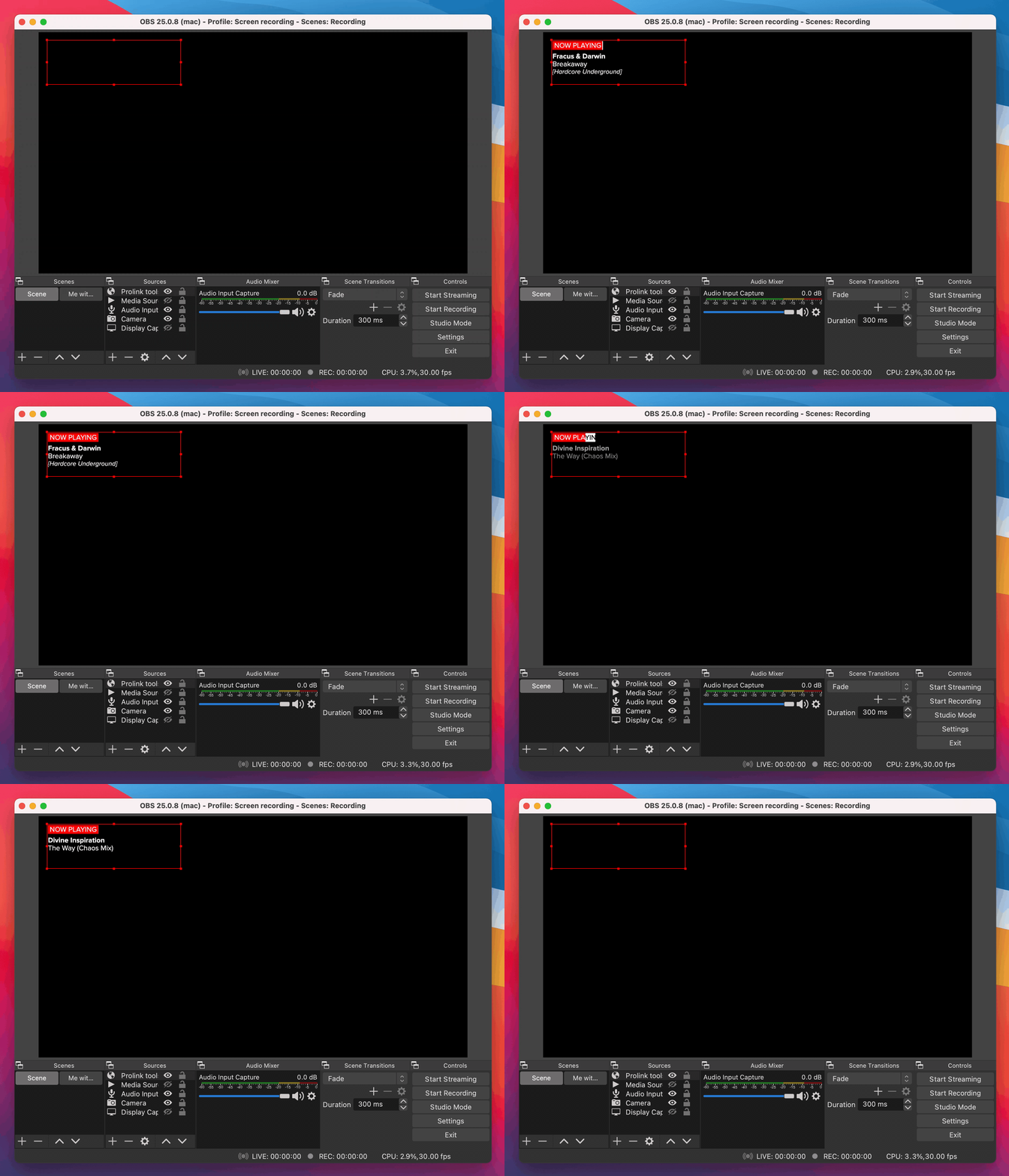
Want to add this into your next livestream event? Once you’ve got the software linked up and the data flowing, you can embed the Prolink Tools overlay in your livestream with software like OBS or StreamLabs. All you’ll need to do is copy the overlay URL exposed in the interface, and use the Browser Source plugin to render it on the stream.
Where it’s going

Eventually, Purkhiser plans to build out Prolink to be more than just a now-playing overlay. A few features he mentioned adding down the road include:

  • Providing an interface for an automated process in which livestream listeners to request tracks from a specific playlist that the DJ specifies
  • Other types of overlays, including a “set stats” overlay that could display how many tracks you’ve played, the genres you’ve played
  • A Discord bot integration
  • A Twitter integration to live post now-playing tracks
  • A documented API to make it easy to integrate other tools

A growing community & a tool that continues to improve

The project is continuing to grow and iterate as Purkhiser chats with users and considers their experiences as he develops the product further. Though he originally had built the software for himself, he finds that “real users will always have interesting ideas or find interesting ways to break things”. What better way to make your product better, than to throw it to the masses of DJs out there for free?

There’s an entire community growing around Prolink Tools, with a discord channel you can join if you’re interested. Check out the User Manual for any questions or details you need, too.

Try it out for yourself and let us know what you think. You can download the software for free here.


Want to reach DJTT's audience here?

Shoot an email to advertising@djtechtools.com

DJTT ads
DJTT newsletter
Midi Fighter
Chat with us
  • ABOUT DJTT
  • CONTACT
  • PRIVACY
  • MIDI FIGHTER HELP
  • ABOUT DJTT
  • JOBS
  • CONTACT US
  • ADVERTISE
  • PRIVACY POLICY
  • ACCESSIBILITY STATEMENT

© 2024 DJ Techtools all rights reserved by DJ TechTools on all content unless otherwise noted.

No Result
View All Result
  • Blog
    • DJ Gear
      • DIY Projects
      • Gear Reviews
      • New Products
      • Controllerism
    • Techniques + Tips
      • Beginner DJ
      • Advanced DJ
      • Producer
      • Finger Drummer
    • News + Culture
      • Editorials + Opinions
      • Artist Interviews
      • Performances + Routines
      • How I Play
    • DJ Software Tutorials
      • Serato Tips
      • CDJ Tips
      • Ableton Live Tips
  • Store
    • Run by real DJs, not a corporation
    • DJ Controllers
      • Midi Fighter Twister
      • Midi Fighter Spectra
      • Midi Fighter 64
      • View All
    • Accessories
      • Chroma USB Drive for DJs
      • Chroma Caps
      • Chroma Cables Audio
      • Chroma Cables USB-A
      • Chroma Cables: USB-C
      • DJTT Gift Card
      • Midi Fighter T-Shirt
      • Keyboard Covers
      • Earplugs by V-Moda
    • Production Gear
    • Soundcards & Mixers
  • Community
    • Popular Forums
      • General Discussion
      • Buy & Sell
      • Reviews
      • Mixes
      • Music Production
      • Show Your Setup
      • Off Topic
    • Handy Links
      • New Posts
      • Private Messages
      • Register
      • Search
    • Midi Maps
      • Traktor
      • Ableton
      • Serato DJ
      • Midi Fighter 3D
      • Midi Fighter Twister
      • Midi Fighter Spectra
  • Midi Fighter
  • Chroma

© 2024 DJ Techtools all rights reserved by DJ TechTools on all content unless otherwise noted.

This website uses cookies. By continuing to use this website you are giving consent to cookies being used. Visit our Privacy and Cookie Policy.