

DJ TechTools
  • Blog
    • DJ Gear
      • DIY Projects
      • Gear Reviews
      • New Products
      • Controllerism
    • Techniques + Tips
      • Beginner DJ
      • Advanced DJ
      • Producer
      • Finger Drummer
    • News + Culture
      • Editorials + Opinions
      • Artist Interviews
      • Performances + Routines
      • How I Play
    • DJ Software Tutorials
      • Serato Tips
        • Traktor Tips
      • CDJ Tips
      • Ableton Live Tips
  • Store
    • Run by real DJs, not a corporation
    • DJ Controllers
      • Midi Fighter Twister
      • Midi Fighter Spectra
      • Midi Fighter 64
      • View All
    • Accessories
      • Chroma USB Drive for DJs
      • Chroma Caps
      • Chroma Cables Audio
      • Chroma Cables USB-A
      • Chroma Cables: USB-C
      • DJTT Gift Card
      • Midi Fighter T-Shirt
      • Keyboard Covers
      • Earplugs by V-Moda
    • Production Gear
    • Soundcards & Mixers
  • Community
    • Popular Forums
      • General Discussion
      • Buy & Sell
      • Reviews
      • Mixes
      • Music Production
      • Show Your Setup
      • Off Topic
    • Handy Links
      • New Posts
      • Private Messages
      • Register
      • Search
    • Midi Maps
      • Traktor
      • Ableton
      • Serato DJ
      • Midi Fighter 3D
      • Midi Fighter Twister
      • Midi Fighter Spectra
  • Midi Fighter
  • Chroma
No Result
View All Result
DJ TechTools
  • Blog
    • DJ Gear
      • DIY Projects
      • Gear Reviews
      • New Products
      • Controllerism
    • Techniques + Tips
      • Beginner DJ
      • Advanced DJ
      • Producer
      • Finger Drummer
    • News + Culture
      • Editorials + Opinions
      • Artist Interviews
      • Performances + Routines
      • How I Play
    • DJ Software Tutorials
      • Serato Tips
        • Traktor Tips
      • CDJ Tips
      • Ableton Live Tips
  • Store
    • Run by real DJs, not a corporation
    • DJ Controllers
      • Midi Fighter Twister
      • Midi Fighter Spectra
      • Midi Fighter 64
      • View All
    • Accessories
      • Chroma USB Drive for DJs
      • Chroma Caps
      • Chroma Cables Audio
      • Chroma Cables USB-A
      • Chroma Cables: USB-C
      • DJTT Gift Card
      • Midi Fighter T-Shirt
      • Keyboard Covers
      • Earplugs by V-Moda
    • Production Gear
    • Soundcards & Mixers
  • Community
    • Popular Forums
      • General Discussion
      • Buy & Sell
      • Reviews
      • Mixes
      • Music Production
      • Show Your Setup
      • Off Topic
    • Handy Links
      • New Posts
      • Private Messages
      • Register
      • Search
    • Midi Maps
      • Traktor
      • Ableton
      • Serato DJ
      • Midi Fighter 3D
      • Midi Fighter Twister
      • Midi Fighter Spectra
  • Midi Fighter
  • Chroma
No Result
View All Result
DJ TechTools

Engine OS’ v1.6 update: streaming from Dropbox + Beatsource LINK, flexible beat grids & more

Post on FacebookTweet thisUpvote on Reddit

Denon DJ‘s flagship software, Engine DJ, is back with a new software upgrade that opens the door to an array of new features. Engine OS v1.6 allows users to access music they’ve stored in their personal cloud directly on Denon DJ hardware with Dropbox and Beatsource LINK integrations, plus flexible beat grids, track previews, and a stacked-waveform view for dual-layer mixing.

As Jason Stout, Product Marketing Manager for Engine DJ, explains:

“The ability to access and play music from your own personal storage cloud has never been possible on a standalone media player, until now. Our Development team anticipated this day through thoughtful product designs, and we’re delighted that we’re able to provide these new capabilities as free updates to our users.”

Let’s dive into the new features.

Cloud music access via Dropbox

Artists can now directly access their music libraries saved to Dropbox on any Denon DJ gear with the v1.6 software. You can either sync your Engine PRIME collection to Dropbox and then access it remotely from any device, or you can use your Engine OS hardware to reach your Dropbox music folders without Engine PRIME. The choice is yours, but it’s free to access either way.

On-hardware streaming with Beatsource LINK

With Engine OS v1.6, DJs can utilize Beatsource LINK‘s music collection through their Denon DJ hardware without needing to use a computer. The integration also brings in metadata such as the BPM, Key, Hot Cues, and Loops and saves said data to your source drive for future usage. You’ll need a subscription to Beatsource LINK, of course — which starts at $9.99/mo for their basic plan. More details on that here.

Flexible beat grids

If you’re a fan of transitioning through multiple genres or tracks with drastic and/or intentional tempo changes, this is a feature you’ll want to pay attention to. You’ll be able to manually create dynamic beat grids for tracks with multiple BPMs by placing tempo anchors in different parts of the track. The OS can automatically detect which tracks have these flexible beat grids and apply the BPM changes you need to keep your tunes in sync.

Track previews & dual-waveform layer view
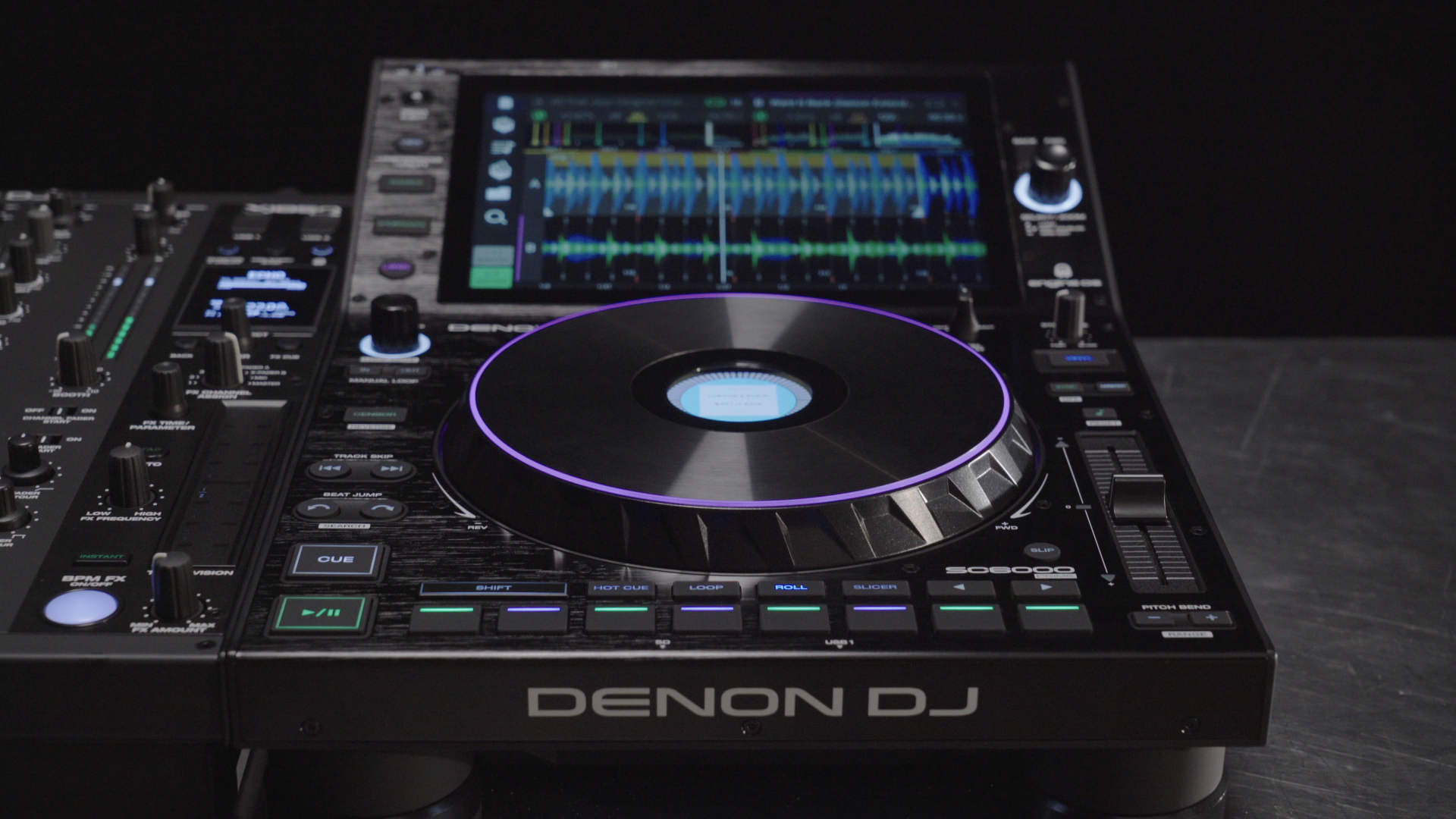
All Engine OS devices with v1.6 now provide users with the ability to preview tracks directly from the library without needing to load the track first – a quick time-saver when you’re moving quickly and on the hunt for your next track.

One other great functionality that comes with update is the ability to play two tracks from one single deck, via a stacked-waveform view. You can see both track info boxes, performance pad feedback, and horizontally-moving waveforms for each layer — all in one view. This feature is available on the SC5000/M and SC6000/M – an amazing sign that Denon DJ continues to keep their “last-generation” players just as up-to-date as the current ones.


Among other notable features in v1.6 are new rekordbox import improvements for Engine PRIME, plus new Retrigger options for saved loops and improved collection navigation behavior on all Engine OS devices.

Engine OS v1.6 is a free download for usage on compatible Denon DJ gear, including the SC6000/M, SC5000/M, PRIME 2, PRIME 4, and PRIME GO.

If you have a Denon DJ SC6000/M, SC5000/M, PRIME 2, PRIME 4, or PRIME GO, you can upgrade to Engine OS v1.6 here.


Want to reach DJTT's audience here?

Shoot an email to advertising@djtechtools.com

DJTT ads
DJTT newsletter
Midi Fighter
Chat with us
  • ABOUT DJTT
  • CONTACT
  • PRIVACY
  • MIDI FIGHTER HELP
  • ABOUT DJTT
  • JOBS
  • CONTACT US
  • ADVERTISE
  • PRIVACY POLICY
  • ACCESSIBILITY STATEMENT

© 2024 DJ Techtools all rights reserved by DJ TechTools on all content unless otherwise noted.

No Result
View All Result
  • Blog
    • DJ Gear
      • DIY Projects
      • Gear Reviews
      • New Products
      • Controllerism
    • Techniques + Tips
      • Beginner DJ
      • Advanced DJ
      • Producer
      • Finger Drummer
    • News + Culture
      • Editorials + Opinions
      • Artist Interviews
      • Performances + Routines
      • How I Play
    • DJ Software Tutorials
      • Serato Tips
      • CDJ Tips
      • Ableton Live Tips
  • Store
    • Run by real DJs, not a corporation
    • DJ Controllers
      • Midi Fighter Twister
      • Midi Fighter Spectra
      • Midi Fighter 64
      • View All
    • Accessories
      • Chroma USB Drive for DJs
      • Chroma Caps
      • Chroma Cables Audio
      • Chroma Cables USB-A
      • Chroma Cables: USB-C
      • DJTT Gift Card
      • Midi Fighter T-Shirt
      • Keyboard Covers
      • Earplugs by V-Moda
    • Production Gear
    • Soundcards & Mixers
  • Community
    • Popular Forums
      • General Discussion
      • Buy & Sell
      • Reviews
      • Mixes
      • Music Production
      • Show Your Setup
      • Off Topic
    • Handy Links
      • New Posts
      • Private Messages
      • Register
      • Search
    • Midi Maps
      • Traktor
      • Ableton
      • Serato DJ
      • Midi Fighter 3D
      • Midi Fighter Twister
      • Midi Fighter Spectra
  • Midi Fighter
  • Chroma

© 2024 DJ Techtools all rights reserved by DJ TechTools on all content unless otherwise noted.

This website uses cookies. By continuing to use this website you are giving consent to cookies being used. Visit our Privacy and Cookie Policy.