DJ TechTools
  • Blog
    • DJ Gear
      • DIY Projects
      • Gear Reviews
      • New Products
      • Controllerism
    • Techniques + Tips
      • Beginner DJ
      • Advanced DJ
      • Producer
      • Finger Drummer
    • News + Culture
      • Editorials + Opinions
      • Artist Interviews
      • Performances + Routines
      • How I Play
    • DJ Software Tutorials
      • Serato Tips
        • Traktor Tips
      • CDJ Tips
      • Ableton Live Tips
  • Store
    • Run by real DJs, not a corporation
    • DJ Controllers
      • Midi Fighter Twister
      • Midi Fighter Spectra
      • Midi Fighter 64
      • View All
    • Accessories
      • Chroma USB Drive for DJs
      • Chroma Caps
      • Chroma Cables Audio
      • Chroma Cables USB-A
      • Chroma Cables: USB-C
      • DJTT Gift Card
      • Midi Fighter T-Shirt
      • Keyboard Covers
      • Earplugs by V-Moda
    • Production Gear
    • Soundcards & Mixers
  • Community
    • Popular Forums
      • General Discussion
      • Buy & Sell
      • Reviews
      • Mixes
      • Music Production
      • Show Your Setup
      • Off Topic
    • Handy Links
      • New Posts
      • Private Messages
      • Register
      • Search
    • Midi Maps
      • Traktor
      • Ableton
      • Serato DJ
      • Midi Fighter 3D
      • Midi Fighter Twister
      • Midi Fighter Spectra
  • Midi Fighter
  • Chroma
No Result
View All Result
DJ TechTools
  • Blog
    • DJ Gear
      • DIY Projects
      • Gear Reviews
      • New Products
      • Controllerism
    • Techniques + Tips
      • Beginner DJ
      • Advanced DJ
      • Producer
      • Finger Drummer
    • News + Culture
      • Editorials + Opinions
      • Artist Interviews
      • Performances + Routines
      • How I Play
    • DJ Software Tutorials
      • Serato Tips
        • Traktor Tips
      • CDJ Tips
      • Ableton Live Tips
  • Store
    • Run by real DJs, not a corporation
    • DJ Controllers
      • Midi Fighter Twister
      • Midi Fighter Spectra
      • Midi Fighter 64
      • View All
    • Accessories
      • Chroma USB Drive for DJs
      • Chroma Caps
      • Chroma Cables Audio
      • Chroma Cables USB-A
      • Chroma Cables: USB-C
      • DJTT Gift Card
      • Midi Fighter T-Shirt
      • Keyboard Covers
      • Earplugs by V-Moda
    • Production Gear
    • Soundcards & Mixers
  • Community
    • Popular Forums
      • General Discussion
      • Buy & Sell
      • Reviews
      • Mixes
      • Music Production
      • Show Your Setup
      • Off Topic
    • Handy Links
      • New Posts
      • Private Messages
      • Register
      • Search
    • Midi Maps
      • Traktor
      • Ableton
      • Serato DJ
      • Midi Fighter 3D
      • Midi Fighter Twister
      • Midi Fighter Spectra
  • Midi Fighter
  • Chroma
No Result
View All Result
DJ TechTools

Traktor Stems vs. Ableton Live: Live Performer Switch?

Ean Golden by Ean Golden
July 29, 2015
in Ableton Live Tips, Editorials and Opinions, Traktor Tips
Reading Time: 4 mins read
0
Traktor Stems vs. Ableton Live: Live Performer Switch?
195
VIEWS
Post on FacebookTweet thisUpvote on Reddit

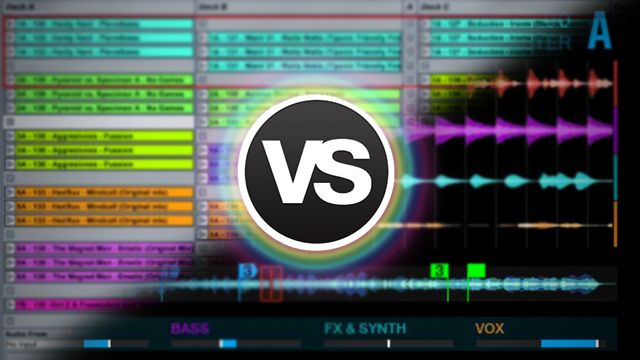
Look out Ableton, Traktor might take your job soon. As teased in yesterday’s video, Native Instruments new stems format is set to drop very soon, and many have asked if DJs will embrace the format. Perhaps, but a different group of people might embrace the technology: live performers. Will Ableton Live see an unexpected competitor to its platform? We think it’s a strong possibility.

Will Traktor Stems Change How Live Producers Perform?

Watch our recent interview with Stimming, a 100% live performer, who plays with Ableton and a few extra hardware pieces. Stimming exclusively plays his own material that has been separated into parts. Many live performers that play shows this way come to the same conclusions and break their live sets into 3-4 parts. Here are the common threads:

  • Usually an original song is isolated, bounced, and played back in groupings (commonly bass, drums, synths, vocals)
  • Groupings are then remixed, solo’d, and effected on the fly.
  • The original composition is respected, but allowing a significant degree of creative freedom.

Sound familiar? The Stems format that Native Instruments has developed completely addresses these needs and others quite well.

All live producers almost always add additional improvised elements on top. Usually these are drum patterns, synths or effects. Although some run software synths as plug-ins, and would require a DAW,  many prefer external hardware. For them, it might not only be feasible – but possibly even preferential to use Traktor over Ableton for live performances. Let’s break it down

Pros: Why Use Traktor Stems For Live Performances

Convenience of File Management
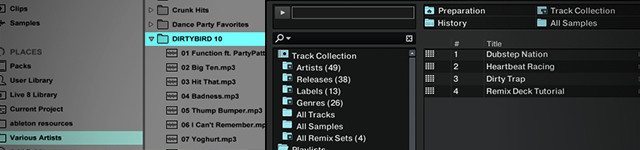
Two very different browsers

File size and browsing capacity are huge issues with preparing sets in Ableton Live, which works best with WAV files and lacks any real music library management aside from your own file structure. In short, Live sets are:

  • tedious to create
  • very large in file size
  • difficult to change out on the fly

This makes Traktor a significantly more useful tool when improvisation is needed. Admittedly, if you only have 15 songs in a Live set, this is really not an issue, but Traktor’s ability to seamlessly and quickly float from original material to DJ sets could be very appealing.

To load a “song” broken into 4 parts into Live is also more problematic, while the Stems format conveniently packages everything into one nice file that is easy to load every time.

Preparation Time
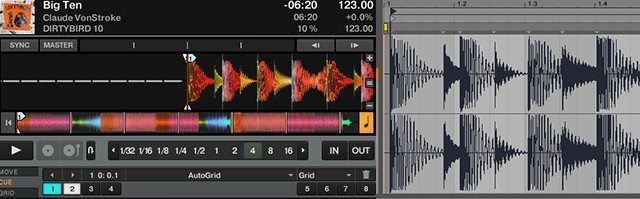
cuepoints-inableton-traktor
Traktor offers way more controls for quickly setting cue points, loops, and this functionality will all be the same for Stems…

Loops and Cue points – essential for live performance – are significantly easier to use and more friendly in Traktor. They also take up a LOT less time to set up. Ableton requires chopping up the song into parts as the core concept of cue points does not exist, and the loop functionality is primitive at best. For producers working with a lot of material (especially >50 songs), they might spend a lot less time managing their music in a more friendly platform like Traktor.

The Mastering Paradigm

In theory, Stems has solved a fundamental live performance challenge. When the original track was created, it was sent out to a high quality mastering engineer, and the process can never be recreated. How then do we manage to have the track hit and punch in the same way when broken up for live use? By blending between the mastered version and individual parts Stems promises to potentially solve this issue.

On the other hand Ableton has the upper hand in this regard supporting native loading of mastering plug-ins that could do the heavy lifting and get the live show nearly there.

Mapping Paradise
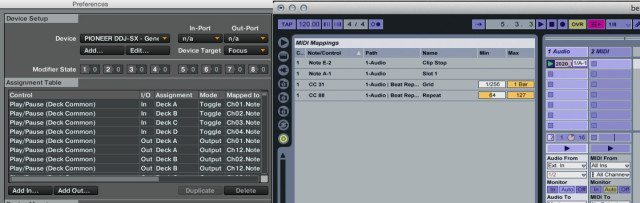
mapping-ableton-traktor
Powerful vs. Simple?

Traktor’s strong suit is most certainly the flexibility in which you can take control over the software. It’s a live performers dream interface, allowing for complex interaction experiences and detailed interfaces. While Max 4 Live users can tap into some pretty crazy potential with MIDI, the core mapping functionality is better in Traktor than Ableton.

Cons: Why Traktor Might Not Beat Ableton

A True DAW = Better For Designing Instruments
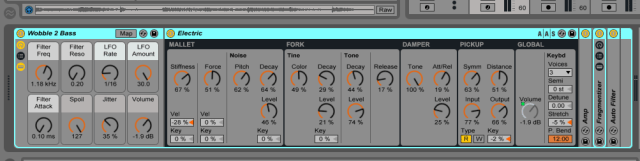
Screen Shot 2015-07-28 at Jul 28.13.00 PM

You can’t beat being able to design instrument racks, drum machines, and complex digital routing when adding live elements to an original performance. Traktor will never become a DAW, and until the dream integration of Machine occurs it will never offer integrated production tools.

Custom FX Racks
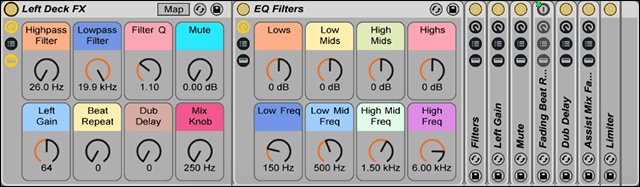
NI could easily make effects  this powerful in Traktor.. but Ableton wins here!
NI could easily make effects this powerful in Traktor.. but Ableton wins here!

For many producers and live performers, their FX racks and routing IS their sound. Utilizing stock Traktor effects is just not going to cut it. It would not be hard to roll out custom effects chains for Native Instruments – it’s obviously deep in their pedigree, but a near-term priority? Probably not.

Traktor vs Ableton For Live Performers: The Bottom Line

I don’t remain convinced that DJs will actually start to play multi-track files any time soon. While the idea sounds intriguing, the format introduces additional mental overhead to an already complex job. However, for live performers, who play the same material every night and need track isolation-  Stems + performance DJ software may just give them a new choice in platforms.

If you are considering putting together a live show that involves blending between original material and some basic isolation of parts then Stems might be a very viable option.  For those that use analogue hardware Traktor syncs up very well with drum  machines like the Roland Tr8.

Read next: more details on Stems-Music.com and Traktor 2.9

Tags: Abletonlive performersstem deckstraktor stemstraktor vs. ableton
Share2Tweet1Share
Previous Post

Mixing Traktor Stem Decks On Kontrol D2: Video Workflow

Next Post

Livid Instruments Minim: A Pocket Sized Wireless Controller

Related Posts

Ableton launches Live 12 Suite rent-to-own plan – and it’s not a subscription
Ableton

Ableton launches Live 12 Suite rent-to-own plan – and it’s not a subscription

October 1, 2025
Control an entire studio with Midi Fighter Spectra (like Mad Zach)
Finger Drumming

Control an entire studio with Midi Fighter Spectra (like Mad Zach)

May 9, 2025
How I Play: Hybrasil’s DAWless live techno setup
How I Play

How I Play: Hybrasil’s DAWless live techno setup

October 3, 2024
Load More
Next Post
Livid Instruments Minim: A Pocket Sized Wireless Controller

Livid Instruments Minim: A Pocket Sized Wireless Controller

Want to reach DJTT's audience here?

Shoot an email to advertising@djtechtools.com

DJTT ads
DJTT newsletter
Midi Fighter
Chat with us
  • ABOUT DJTT
  • CONTACT
  • PRIVACY
  • MIDI FIGHTER HELP
  • ABOUT DJTT
  • JOBS
  • CONTACT US
  • ADVERTISE
  • PRIVACY POLICY
  • ACCESSIBILITY STATEMENT

© 2024 DJ Techtools all rights reserved by DJ TechTools on all content unless otherwise noted.

No Result
View All Result
  • Blog
    • DJ Gear
      • DIY Projects
      • Gear Reviews
      • New Products
      • Controllerism
    • Techniques + Tips
      • Beginner DJ
      • Advanced DJ
      • Producer
      • Finger Drummer
    • News + Culture
      • Editorials + Opinions
      • Artist Interviews
      • Performances + Routines
      • How I Play
    • DJ Software Tutorials
      • Serato Tips
      • CDJ Tips
      • Ableton Live Tips
  • Store
    • Run by real DJs, not a corporation
    • DJ Controllers
      • Midi Fighter Twister
      • Midi Fighter Spectra
      • Midi Fighter 64
      • View All
    • Accessories
      • Chroma USB Drive for DJs
      • Chroma Caps
      • Chroma Cables Audio
      • Chroma Cables USB-A
      • Chroma Cables: USB-C
      • DJTT Gift Card
      • Midi Fighter T-Shirt
      • Keyboard Covers
      • Earplugs by V-Moda
    • Production Gear
    • Soundcards & Mixers
  • Community
    • Popular Forums
      • General Discussion
      • Buy & Sell
      • Reviews
      • Mixes
      • Music Production
      • Show Your Setup
      • Off Topic
    • Handy Links
      • New Posts
      • Private Messages
      • Register
      • Search
    • Midi Maps
      • Traktor
      • Ableton
      • Serato DJ
      • Midi Fighter 3D
      • Midi Fighter Twister
      • Midi Fighter Spectra
  • Midi Fighter
  • Chroma

© 2024 DJ Techtools all rights reserved by DJ TechTools on all content unless otherwise noted.

This website uses cookies. By continuing to use this website you are giving consent to cookies being used. Visit our Privacy and Cookie Policy.