

DJ TechTools
  • Blog
    • DJ Gear
      • DIY Projects
      • Gear Reviews
      • New Products
      • Controllerism
    • Techniques + Tips
      • Beginner DJ
      • Advanced DJ
      • Producer
      • Finger Drummer
    • News + Culture
      • Editorials + Opinions
      • Artist Interviews
      • Performances + Routines
      • How I Play
    • DJ Software Tutorials
      • Serato Tips
        • Traktor Tips
      • CDJ Tips
      • Ableton Live Tips
  • Store
    • Run by real DJs, not a corporation
    • DJ Controllers
      • Midi Fighter Twister
      • Midi Fighter Spectra
      • Midi Fighter 64
      • View All
    • Accessories
      • Chroma USB Drive for DJs
      • Chroma Caps
      • Chroma Cables Audio
      • Chroma Cables USB-A
      • Chroma Cables: USB-C
      • DJTT Gift Card
      • Midi Fighter T-Shirt
      • Keyboard Covers
      • Earplugs by V-Moda
    • Production Gear
    • Soundcards & Mixers
  • Community
    • Popular Forums
      • General Discussion
      • Buy & Sell
      • Reviews
      • Mixes
      • Music Production
      • Show Your Setup
      • Off Topic
    • Handy Links
      • New Posts
      • Private Messages
      • Register
      • Search
    • Midi Maps
      • Traktor
      • Ableton
      • Serato DJ
      • Midi Fighter 3D
      • Midi Fighter Twister
      • Midi Fighter Spectra
  • Midi Fighter
  • Chroma
No Result
View All Result
DJ TechTools
  • Blog
    • DJ Gear
      • DIY Projects
      • Gear Reviews
      • New Products
      • Controllerism
    • Techniques + Tips
      • Beginner DJ
      • Advanced DJ
      • Producer
      • Finger Drummer
    • News + Culture
      • Editorials + Opinions
      • Artist Interviews
      • Performances + Routines
      • How I Play
    • DJ Software Tutorials
      • Serato Tips
        • Traktor Tips
      • CDJ Tips
      • Ableton Live Tips
  • Store
    • Run by real DJs, not a corporation
    • DJ Controllers
      • Midi Fighter Twister
      • Midi Fighter Spectra
      • Midi Fighter 64
      • View All
    • Accessories
      • Chroma USB Drive for DJs
      • Chroma Caps
      • Chroma Cables Audio
      • Chroma Cables USB-A
      • Chroma Cables: USB-C
      • DJTT Gift Card
      • Midi Fighter T-Shirt
      • Keyboard Covers
      • Earplugs by V-Moda
    • Production Gear
    • Soundcards & Mixers
  • Community
    • Popular Forums
      • General Discussion
      • Buy & Sell
      • Reviews
      • Mixes
      • Music Production
      • Show Your Setup
      • Off Topic
    • Handy Links
      • New Posts
      • Private Messages
      • Register
      • Search
    • Midi Maps
      • Traktor
      • Ableton
      • Serato DJ
      • Midi Fighter 3D
      • Midi Fighter Twister
      • Midi Fighter Spectra
  • Midi Fighter
  • Chroma
No Result
View All Result
DJ TechTools

Out Now: Serato DJ Pro 2.0 + Serato DJ Lite 1.0

Post on FacebookTweet thisUpvote on Reddit

Finally out of the private closed beta, two brand new versions of Serato’s DJing software are launching today: Serato DJ Pro 2.0 and Serato DJ Lite 1.0. The new releases include an updated refresh of the user interface, an offline practice mode, and 64-bit support. Keep reading for the full details.

Serato DJ Pro 2.0

So Serato DJ is now called Serato DJ Pro – renamed to keep it the clear premium option against Serato DJ Lite (formerly Serato DJ Intro). In the new version of Pro, there are a number of major changes that catapult the software forward. Watch Serato’s official announcement video below, then keep reading:

In text summary, the new features in Serato DJ Pro 2.0 include:

  • An offline Practice Mode: meaning you can mix tracks together with no hardware connected, making it easy to try out mixes, set loops and hotcues against another song, etc. There’s no EQ or fader support in practice mode – just a crossfader.
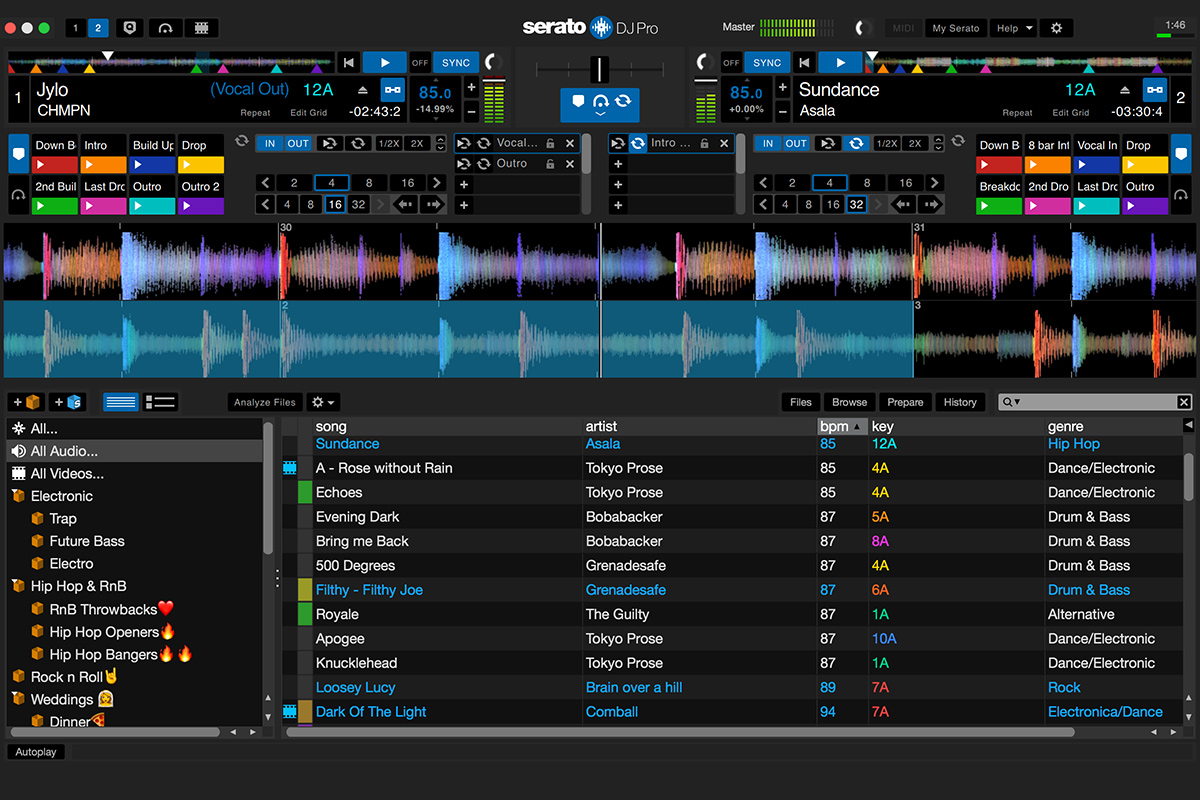
Practice Mode
  • 64 bit support: Serato notes that bringing their software into the 64-bit world makes the entire program more reliable. The specific use case that they’ve chosen to highlight is the increase in library size. Now there’s “virtually no limit on DJ library sizes”
  • Performance Pad View: effectively, cue point are now laid out in two rows of four. This mirrors what you would experience on most Serato DJ hardware with performance pads.
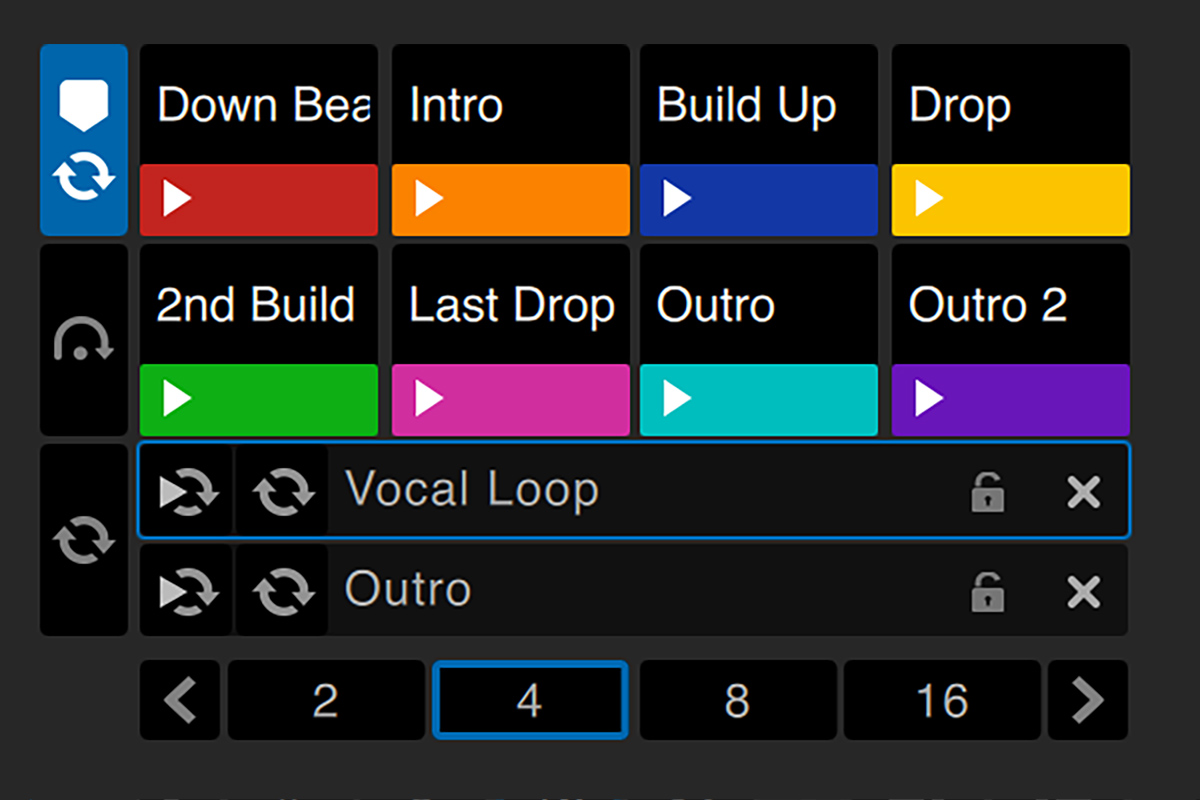
Performance Pad view
  • High Res UI: We’ve been asking for Retina support for years – and Serato has brought it in this new version, adding support for Retina, 4K, and UHD displays. Check out this before/after image that Serato has on their site:
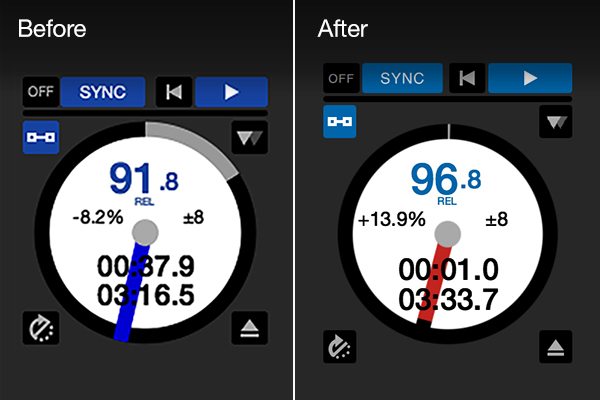
The software is a free update for all existing Serato DJ users, and everything should still work the same with your library and existing hardware. You can download the new version right here.

Worth noting, when you install the new version of Serato DJ Pro, it will automatically overwrite old versions of the software. Serato has shared a support article on keeping your old version if you want to compare the two.

Serato DJ Lite 1.0

Goodbye, Serato DJ Intro – hello, Serato DJ Lite. It’s nice to rebrand entry-level products to make them more approachable, and Serato has done a good job of not limiting their improvements to the software to just the Pro version.

It’s still free, and includes Practice Mode as shown on Serato DJ Pro. This makes it a decent way to start DJing for free without spending any money. Cleverly, this brings Serato DJ into direct competition with Virtual DJ, who also offer a commonly downloaded basic version that allows anyone to start DJing for free without gear.

What About That New Rane Gear?

Here’s the real question: Rane has said (based on what we’ve heard from official company representatives at NAMM) that their Seventy Two mixer and Twelve vinyl deck controller will be available once Serato DJ Pro 2.0 launches. We’ve reached out to representatives from Rane/InMusic to learn more about the current status of these products – but so far, no official response.

Serato notes that there is no official support for these new units in the new version – and that there’s no official date announced for support yet.


Want to reach DJTT's audience here?

Shoot an email to advertising@djtechtools.com

DJTT ads
DJTT newsletter
Midi Fighter
Chat with us
  • ABOUT DJTT
  • CONTACT
  • PRIVACY
  • MIDI FIGHTER HELP
  • ABOUT DJTT
  • JOBS
  • CONTACT US
  • ADVERTISE
  • PRIVACY POLICY
  • ACCESSIBILITY STATEMENT

© 2024 DJ Techtools all rights reserved by DJ TechTools on all content unless otherwise noted.

No Result
View All Result
  • Blog
    • DJ Gear
      • DIY Projects
      • Gear Reviews
      • New Products
      • Controllerism
    • Techniques + Tips
      • Beginner DJ
      • Advanced DJ
      • Producer
      • Finger Drummer
    • News + Culture
      • Editorials + Opinions
      • Artist Interviews
      • Performances + Routines
      • How I Play
    • DJ Software Tutorials
      • Serato Tips
      • CDJ Tips
      • Ableton Live Tips
  • Store
    • Run by real DJs, not a corporation
    • DJ Controllers
      • Midi Fighter Twister
      • Midi Fighter Spectra
      • Midi Fighter 64
      • View All
    • Accessories
      • Chroma USB Drive for DJs
      • Chroma Caps
      • Chroma Cables Audio
      • Chroma Cables USB-A
      • Chroma Cables: USB-C
      • DJTT Gift Card
      • Midi Fighter T-Shirt
      • Keyboard Covers
      • Earplugs by V-Moda
    • Production Gear
    • Soundcards & Mixers
  • Community
    • Popular Forums
      • General Discussion
      • Buy & Sell
      • Reviews
      • Mixes
      • Music Production
      • Show Your Setup
      • Off Topic
    • Handy Links
      • New Posts
      • Private Messages
      • Register
      • Search
    • Midi Maps
      • Traktor
      • Ableton
      • Serato DJ
      • Midi Fighter 3D
      • Midi Fighter Twister
      • Midi Fighter Spectra
  • Midi Fighter
  • Chroma

© 2024 DJ Techtools all rights reserved by DJ TechTools on all content unless otherwise noted.

This website uses cookies. By continuing to use this website you are giving consent to cookies being used. Visit our Privacy and Cookie Policy.