DJ TechTools
  • Blog
    • DJ Gear
      • DIY Projects
      • Gear Reviews
      • New Products
      • Controllerism
    • Techniques + Tips
      • Beginner DJ
      • Advanced DJ
      • Producer
      • Finger Drummer
    • News + Culture
      • Editorials + Opinions
      • Artist Interviews
      • Performances + Routines
      • How I Play
    • DJ Software Tutorials
      • Serato Tips
        • Traktor Tips
      • CDJ Tips
      • Ableton Live Tips
  • Store
    • Run by real DJs, not a corporation
    • DJ Controllers
      • Midi Fighter Twister
      • Midi Fighter Spectra
      • Midi Fighter 64
      • View All
    • Accessories
      • Chroma USB Drive for DJs
      • Chroma Caps
      • Chroma Cables Audio
      • Chroma Cables USB-A
      • Chroma Cables: USB-C
      • DJTT Gift Card
      • Midi Fighter T-Shirt
      • Keyboard Covers
      • Earplugs by V-Moda
    • Production Gear
    • Soundcards & Mixers
  • Community
    • Popular Forums
      • General Discussion
      • Buy & Sell
      • Reviews
      • Mixes
      • Music Production
      • Show Your Setup
      • Off Topic
    • Handy Links
      • New Posts
      • Private Messages
      • Register
      • Search
    • Midi Maps
      • Traktor
      • Ableton
      • Serato DJ
      • Midi Fighter 3D
      • Midi Fighter Twister
      • Midi Fighter Spectra
  • Midi Fighter
  • Chroma
No Result
View All Result
DJ TechTools
  • Blog
    • DJ Gear
      • DIY Projects
      • Gear Reviews
      • New Products
      • Controllerism
    • Techniques + Tips
      • Beginner DJ
      • Advanced DJ
      • Producer
      • Finger Drummer
    • News + Culture
      • Editorials + Opinions
      • Artist Interviews
      • Performances + Routines
      • How I Play
    • DJ Software Tutorials
      • Serato Tips
        • Traktor Tips
      • CDJ Tips
      • Ableton Live Tips
  • Store
    • Run by real DJs, not a corporation
    • DJ Controllers
      • Midi Fighter Twister
      • Midi Fighter Spectra
      • Midi Fighter 64
      • View All
    • Accessories
      • Chroma USB Drive for DJs
      • Chroma Caps
      • Chroma Cables Audio
      • Chroma Cables USB-A
      • Chroma Cables: USB-C
      • DJTT Gift Card
      • Midi Fighter T-Shirt
      • Keyboard Covers
      • Earplugs by V-Moda
    • Production Gear
    • Soundcards & Mixers
  • Community
    • Popular Forums
      • General Discussion
      • Buy & Sell
      • Reviews
      • Mixes
      • Music Production
      • Show Your Setup
      • Off Topic
    • Handy Links
      • New Posts
      • Private Messages
      • Register
      • Search
    • Midi Maps
      • Traktor
      • Ableton
      • Serato DJ
      • Midi Fighter 3D
      • Midi Fighter Twister
      • Midi Fighter Spectra
  • Midi Fighter
  • Chroma
No Result
View All Result
DJ TechTools

iTunes Power Tips, Part 4: New Smart Playlists

mikecharles by mikecharles
September 27, 2009
in Advanced DJ Tips
Reading Time: 3 mins read
0
iTunes Power Tips, Part 4: New Smart Playlists
88
VIEWS
Post on FacebookTweet thisUpvote on Reddit

By Mike Charles

Apple recently rolled out iTunes 9, which included a slew of new features–none of which seemed to be of particular interest to DJ Tech Tools. However, Apple quietly updated my all-time favorite feature, the Smart Playlist, to include a powerful new option: nested conditions. This really excited the nerd in me, and I’d like to show you how this new option will help Smart Playlist-using DJs.

NOW WITH EVEN MORE SMARTS

Smart Playlists in iTunes 9 now include, the ability to create nested conditions in your Smart Playlist. In the past, every statement in your Smart Playlist’s conditions was either an “and” statement or an “or” statement. The only possible way to create an “and + or” condition was to build a playlist, and then build a second Smart Playlist off the first playlist. Clear as mud, right? Let’s walk through an example that will show you why you should care about this new feature.

Let’s say we want a playlist that includes all of our best-rated breakbeat tracks. The criteria are:

  • All tracks with a Rating of 4 or 5 stars

and:

  • All tracks where the Genre contains “breaks”

or:

  • All tracks where the Grouping contains “breaks”

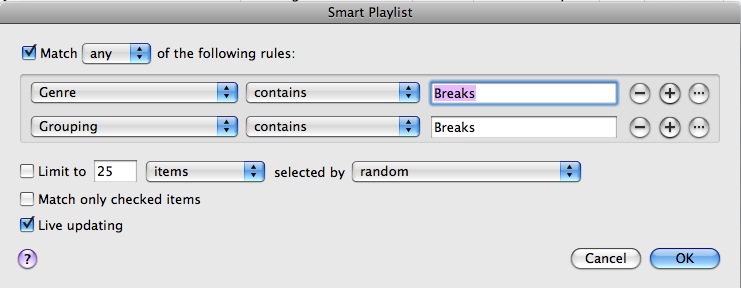
What we need to do here is locate any track where the Rating is in the 4 to 5 range and either the Genre or Grouping fields contain the word “breaks.” In old-school iTunes, we would have needed two separate Smart Playlists: one playlist to find any track that had a genre or grouping of “breaks,” and a second playlist that found all tracks rated 4 or 5 in the first playlist. That would have looked something like this:

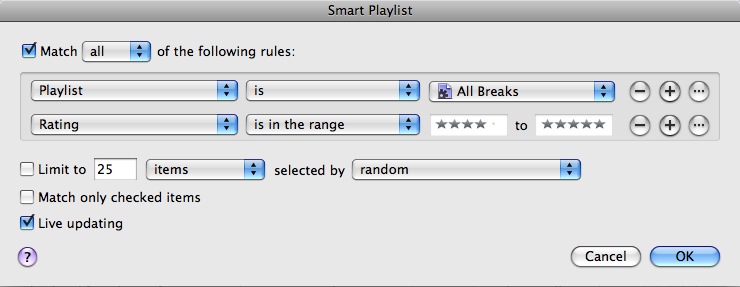
Playlist 1, named All Breaks
Mike Charles 2

Playlist 2, referencing Playlist 1

Mike Charles 3

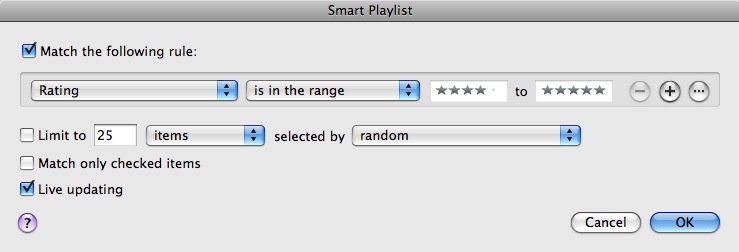
Now with iTunes 9 we can accomplish the same task with a single playlist. Create a Smart Playlist and tell it to look for all tracks with a rating of 4 to 5.
Mike Charles 4

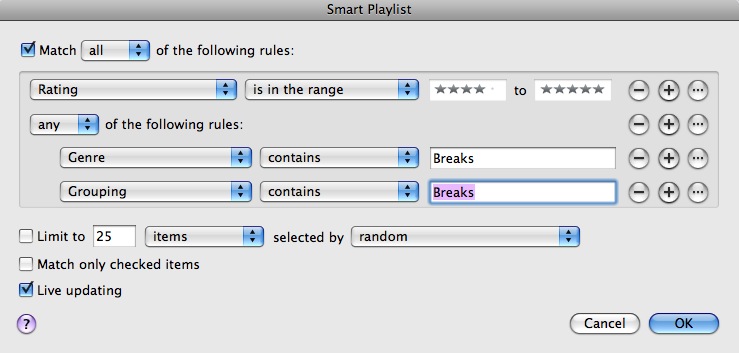
Next click the new Ellipsis […] button. This creates a second level of conditions under the first level, effectively eliminating the need for multiple playlists to accomplish a single task. At this second level we have two criteria:

Genre – contains – Breaks

or

Grouping – contains – Breaks

Use the Plus Sign button to add more than one condition, and be sure to change the matching criteria at this second level to “any” instead of “all.” It should now look like this:
Mike Charles 5

Now we have a playlist that finds all tracks with a range of 4 to 5 and either the Genre or Grouping fields contain the word “Breaks,” and we did it in one step instead of two. At first glance it seems like a minor update, but I’m positive that fans of my iTunes Power Tips series are happy to welcome this new tool to the arsenal.

ANOTHER MIKE CHARLES PSA

This PSA goes back to how it all began, with tagging. Tag early and tag often, because without good tags none of this will work. If by chance you missed any of the previous portions of this series, check ’em out now.

iTunes Power Tips Part 1 | iTunes Power Tips Part 2 |iTunes Power Tips Part 3 | iTunes Power Tips Part 4

Tags: Tips
Share1Tweet1Share
Previous Post

Top American DJs on our Controllers

Next Post

New Traktor Controller from NI

Related Posts

Meet the Koala sampler app: a mobile production powerhouse, now with stems
DJ Gear

Meet the Koala sampler app: a mobile production powerhouse, now with stems

February 7, 2023
Tips for DJing in Extreme Cold: DJTT readers share their advice
DJ Techniques / Tips

Tips for DJing in Extreme Cold: DJTT readers share their advice

January 30, 2023
One Thing Ableton Production Tips
Production Tips

One Thing: Super Quick Ableton Tips From Professional Producers

March 10, 2017
Load More
Next Post
New Traktor Controller from NI

New Traktor Controller from NI

Want to reach DJTT's audience here?

Shoot an email to advertising@djtechtools.com

DJTT ads
DJTT newsletter
Midi Fighter
Chat with us
  • ABOUT DJTT
  • CONTACT
  • PRIVACY
  • MIDI FIGHTER HELP
  • ABOUT DJTT
  • JOBS
  • CONTACT US
  • ADVERTISE
  • PRIVACY POLICY
  • ACCESSIBILITY STATEMENT

© 2024 DJ Techtools all rights reserved by DJ TechTools on all content unless otherwise noted.

No Result
View All Result
  • Blog
    • DJ Gear
      • DIY Projects
      • Gear Reviews
      • New Products
      • Controllerism
    • Techniques + Tips
      • Beginner DJ
      • Advanced DJ
      • Producer
      • Finger Drummer
    • News + Culture
      • Editorials + Opinions
      • Artist Interviews
      • Performances + Routines
      • How I Play
    • DJ Software Tutorials
      • Serato Tips
      • CDJ Tips
      • Ableton Live Tips
  • Store
    • Run by real DJs, not a corporation
    • DJ Controllers
      • Midi Fighter Twister
      • Midi Fighter Spectra
      • Midi Fighter 64
      • View All
    • Accessories
      • Chroma USB Drive for DJs
      • Chroma Caps
      • Chroma Cables Audio
      • Chroma Cables USB-A
      • Chroma Cables: USB-C
      • DJTT Gift Card
      • Midi Fighter T-Shirt
      • Keyboard Covers
      • Earplugs by V-Moda
    • Production Gear
    • Soundcards & Mixers
  • Community
    • Popular Forums
      • General Discussion
      • Buy & Sell
      • Reviews
      • Mixes
      • Music Production
      • Show Your Setup
      • Off Topic
    • Handy Links
      • New Posts
      • Private Messages
      • Register
      • Search
    • Midi Maps
      • Traktor
      • Ableton
      • Serato DJ
      • Midi Fighter 3D
      • Midi Fighter Twister
      • Midi Fighter Spectra
  • Midi Fighter
  • Chroma

© 2024 DJ Techtools all rights reserved by DJ TechTools on all content unless otherwise noted.

This website uses cookies. By continuing to use this website you are giving consent to cookies being used. Visit our Privacy and Cookie Policy.