First came the insane press attention for the iPad DJ and now we have two more touch-screen DJ concepts making serious waves in the blog-sphere. It’s safe to say that the DJ world is fired up about DJing with touch interfaces and chomping at the bit for something mind-blowing. Even though Gizmodo seems to think so, are these latest videos really that amazing? After the jump, we will share the videos in question, talk to some creators and evaluate what the latest buzz in DJing really has to offer.
THE EMULATOR
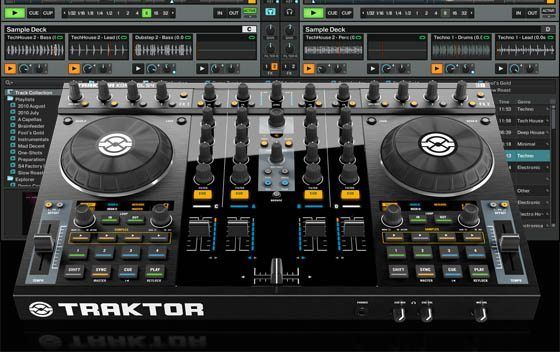
Re-engineering Traktor into a touch-screen interface is an exciting concept that was created by Pablo Martin, creator of MonoTouchLive. I like that the browser disappears and becomes a controller interface during playback, making a tiny 15″ screen much more workable. In this case the touch aspect does not add much functionality to the Traktor UI but it does turn a low-cost touch-screen laptop into an all-in-one DJ solution that could offer a glimpse into the future.
Assuming you don’t have a touch-screen computer, an Emulator system will cost around $500-800:
- $49 – Emulator Software
- $299 – HP L2105tm
- $199 – Traktor Pro
You could, alternatively, purchase a mid-range Traktor LE controller like the Typhoon and a Traktor Pro upgrade for under $400. That’s not to say that this concept does not have potential – it does. Once touch surfaces become more prevalent then the entire idea will become very cost-effective.
Where touch-screens fail
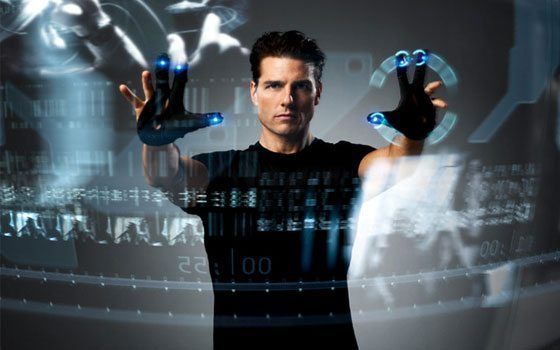
In the first video, everything seems incredibly usable on a 60″ transparent touch surface. Unfortunately, a touch-screen laptop is the only way to use this concept today if you want a portable solution. When evaluated under those conditions (see the video above), the user interface starts to have some difficulties.
- Loop Buttons – Multiple loop buttons for each value take up more space than a more effective encoder and they are easy to accidentally trigger.
- Low Res Faders – Divide the length of the virtual fader by the width of your finger tip and calculate the effective resolution of a touch fader. Not only are they awkward to use and very low resolution but trying to do fast DJ throws is very difficult.
- Waveform Interface – Unless it takes advantage of gestures a mouse may be more precise than the finger tip when skipping through a visual waveform.
- Rotary Knobs – Unfortunately, touch surfaces are just not very good at knob emulation and certainly don’t improve on the physical alternative.
 Where It Works
- Browsing – Searching and loading tracks is very natural via a touch interface. It works better than a mouse and we are very used to the work flow. The drag-and-drop loading action presented in the video looks very natural.
- Dynamic Interface – While this could be done with a non-touch interface, a dynamic touch surface that changes depending on environmental conditions is a big improvement over static control surfaces.
- Transparent Screens – When the audience is able to see what your doing and the entire interface is eye level, everyone wins.
GERG’S LIGHT TABLE
First, to clarify some confusion, we spoke to the creator of this project about how it was made. Contrary to some reports, this video does not feature a real touch-screen interface. Instead, it is a very convincing non-functional mock-up that the creator, Gerg, used to demonstrate his video and graphics skills for a final thesis project.
Q. How did you create this prototype?
Gerg: To visualize my idea, I mocked up this prototype with Adobe After Effects, camera work and editing. The first thing I did was record a mini-set. Then, I animated my design to the music and played the results back through a flat-screen monitor. While the animation was playing, I ‘performed’ the hand gestures as if I were really using the touch-screen.
Q. Where did you pull inspiration from for the FX, scratch and cue interfaces?
Gerg: My college professor sent me a quote from an article in DJ Mag interviewing Carl Cox. While talking about his setup, he stated,
“What I am worried about and don’t want to fall into, is dependence on too many screens to play a set. It’s bad enough having one computer screen. After all, it’s all about the performance and the people. I want to be looking at the crowd and them looking at me, interacting with one another. If we start getting dependent on screens it is going to ruin the art of performance.”
This really got me thinking about utilizing the capabilities of a multi-touch surface. If you could apply a gesture to large areas on the screen without having to look down to be precise, then you can interact with the crowd more.
Q. How has the response been so far to the installation?
Gerg: So far, the response has been very inspiring. There are lots of people very excited about my idea. I’ve gotten both a lot of positive and negative comments. I’m glad its gotten people participating in a dialogue, good or bad. I have to take negative comments with a grain of salt because this way of doing things is not for everyone. This is by no means the only solution, but the beginning of something new.
We Like
- Blob-Like Circles – Rotate to give you a real sense of distance travelled and a unique look!
- 4-Finger Volume Swipe – Yes! One question: does Apple own the 4-finger swipe?
- Cue Points Tied To The Waveform Position – Way cool.
- 2-Finger Pinch For Loop Setting – Great concept, but problematic for longer loops.
- One-Touch Effects – The intuitive touch-and-pull action replicates the Fader FX concept found on our VCI-100SE, so of course I love it! 🙂
Could Be Better
- As the video points out, a touch-screen interface is problematic because you have to keep a careful eye on finger position to avoid accidents. He reduces the issue by using large spaces and big gestures but does not solve the core issue: many DJs want to close their eyes, listen to the music and gently ride the faders.
- The intro to the movie is fairly misguided, but I like the totally outside perspective on a DJ interface. The results speak for themselves; they are original and well thought out, without sticking to the obnoxious status quo of DJ gear today.
- Three essential DJ functions are poorly recreated and won’t work as presented: start, stop, tempo adjustment and phase adjustment.
WRAP UP
The big-picture concept here is really compelling. Sound card, computer and controller all wrapped up in one portable object that replaces an expensive and complex DJ rig. Unfortunately, realizing that dream is still several years off. While these videos may be a great glimpse at what the future of DJing could look like, they fail to deliver a vehicle or the road-map on how to get there.
Of course, knobs, faders and touchscreens are only the beginning… how about some 3D motion control?