DJ TechTools
  • Blog
    • DJ Gear
      • DIY Projects
      • Gear Reviews
      • New Products
      • Controllerism
    • Techniques + Tips
      • Beginner DJ
      • Advanced DJ
      • Producer
      • Finger Drummer
    • News + Culture
      • Editorials + Opinions
      • Artist Interviews
      • Performances + Routines
      • How I Play
    • DJ Software Tutorials
      • Serato Tips
        • Traktor Tips
      • CDJ Tips
      • Ableton Live Tips
  • Store
    • Run by real DJs, not a corporation
    • DJ Controllers
      • Midi Fighter Twister
      • Midi Fighter Spectra
      • Midi Fighter 64
      • View All
    • Accessories
      • Chroma USB Drive for DJs
      • Chroma Caps
      • Chroma Cables Audio
      • Chroma Cables USB-A
      • Chroma Cables: USB-C
      • DJTT Gift Card
      • Midi Fighter T-Shirt
      • Keyboard Covers
      • Earplugs by V-Moda
    • Production Gear
    • Soundcards & Mixers
  • Community
    • Popular Forums
      • General Discussion
      • Buy & Sell
      • Reviews
      • Mixes
      • Music Production
      • Show Your Setup
      • Off Topic
    • Handy Links
      • New Posts
      • Private Messages
      • Register
      • Search
    • Midi Maps
      • Traktor
      • Ableton
      • Serato DJ
      • Midi Fighter 3D
      • Midi Fighter Twister
      • Midi Fighter Spectra
  • Midi Fighter
  • Chroma
No Result
View All Result
DJ TechTools
  • Blog
    • DJ Gear
      • DIY Projects
      • Gear Reviews
      • New Products
      • Controllerism
    • Techniques + Tips
      • Beginner DJ
      • Advanced DJ
      • Producer
      • Finger Drummer
    • News + Culture
      • Editorials + Opinions
      • Artist Interviews
      • Performances + Routines
      • How I Play
    • DJ Software Tutorials
      • Serato Tips
        • Traktor Tips
      • CDJ Tips
      • Ableton Live Tips
  • Store
    • Run by real DJs, not a corporation
    • DJ Controllers
      • Midi Fighter Twister
      • Midi Fighter Spectra
      • Midi Fighter 64
      • View All
    • Accessories
      • Chroma USB Drive for DJs
      • Chroma Caps
      • Chroma Cables Audio
      • Chroma Cables USB-A
      • Chroma Cables: USB-C
      • DJTT Gift Card
      • Midi Fighter T-Shirt
      • Keyboard Covers
      • Earplugs by V-Moda
    • Production Gear
    • Soundcards & Mixers
  • Community
    • Popular Forums
      • General Discussion
      • Buy & Sell
      • Reviews
      • Mixes
      • Music Production
      • Show Your Setup
      • Off Topic
    • Handy Links
      • New Posts
      • Private Messages
      • Register
      • Search
    • Midi Maps
      • Traktor
      • Ableton
      • Serato DJ
      • Midi Fighter 3D
      • Midi Fighter Twister
      • Midi Fighter Spectra
  • Midi Fighter
  • Chroma
No Result
View All Result
DJ TechTools

Mad Zach: Sample Slicing With The Ableton 9.7 Simpler

Mad Zach by Mad Zach
August 30, 2016
in Ableton Live Tips, How-To Video Tutorials, Production Tips
Reading Time: 3 mins read
0
Mad Zach: Sample Slicing With The Ableton 9.7 Simpler
225
VIEWS
Post on FacebookTweet thisUpvote on Reddit

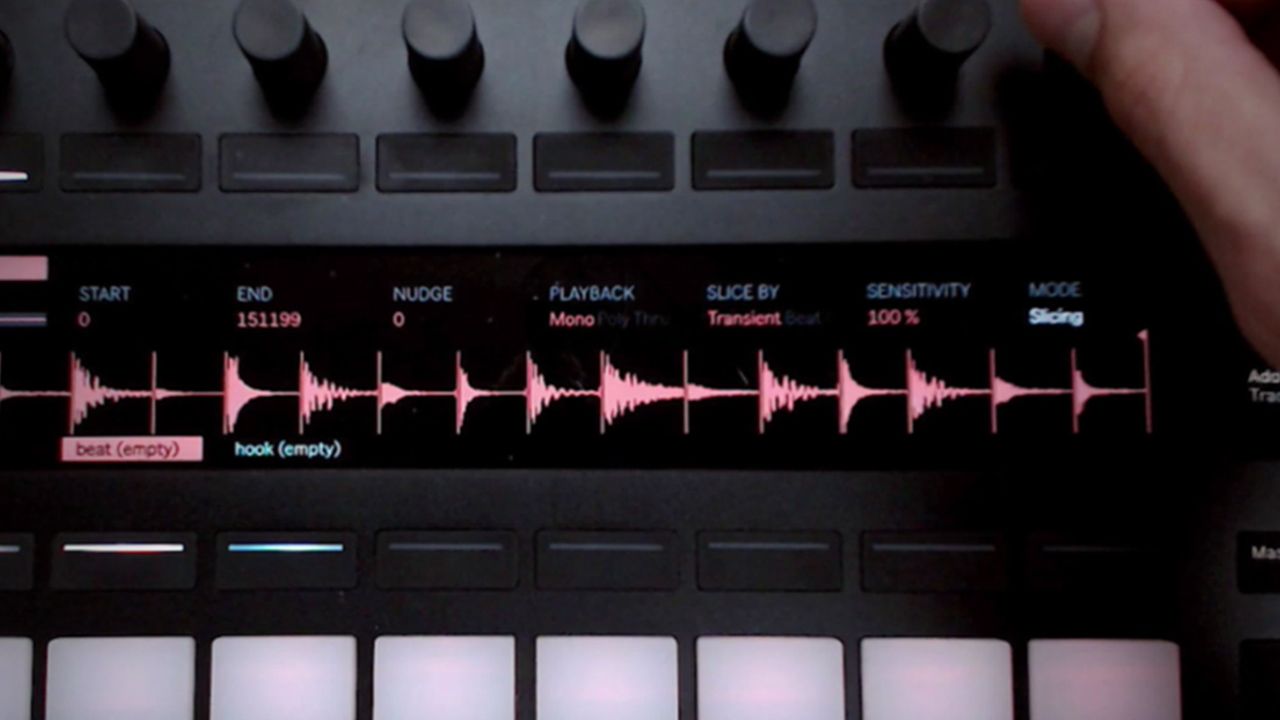
Mad Zach is back with another new video from his studio. This one takes a closer look at the brand new slicing features in the upcoming Ableton Live 9.7. Being able to quickly chop up a sample based on transients unlocks some powerful new creative possibilities! Get inspired by today’s video.

Slicing With The Ableton Live 9.7 Simpler

What Is Slicing Anyway?

Slicing is when you chop a sample up into sections so that you can play each little part of the sample on its own pad or trigger. Slicing has its origins in the classic sampler – the MPC, and has been around for a long time. In fact, most of your favorite classic hip hop tracks were probably made using some kind of slicing technique.

The most quintessential hip hop beat-making technique is to slice up a part of a song (i.e. an old vinyl), slice up a break, and fuse the two elements together, reconfiguring the rhythm and re-contextualizing elements from the original track.

Mad Zach’s Take On The New Ableton Slicer

Coming from an MPC background, I was curious to see how Ableton would implement the concept of “slicing.”

I found the new slicing features in the software to be effective, quick to work with, and capable of yielding great results. Slicing lends a pretty specific workflow, but I would definitely imagine integrating the new features into my daily practice.

The main ways in which I see this being useful is for chopping up breaks, or looking quickly for interesting one-shots within a longer sample. Since I’m recording studio sessions with synths and drum machines a lot – and then manually chopping up bits, I think this could save me a lot of time turning long sessions into neat collections of useful one-shots. It also worked really well when chopping up an acapella or “drumless” sample because each slice can be used musically, and isn’t cluttered by percussion.

The home run here for me is that once you’ve got your slice points worked out and envelopes set, you can easily port the slices to a drumrack and use the individual slices each in their own simpler.

About The Different Slicing Modes

  • For breaks or any kind of rhythmic focused material, you’ll probably want to choose transient mode” This will create a new slice at each transient (or drum hit), so you can make sure to capture each beat. Of course, you can always edit the slices after Ableton auto-detects – the markers Ableton places are great starting places, but sometimes need a bit of tweaking. If you have Push, the process becomes more tactile and intuitive.
  • Beat mode allows you to alternate between quantized divisions, allowing you to move freely between 1/16, ?, ¼, etc.
  • Regions will create a fixed and evenly distributed division based on whatever number you implement. For example if you select “8” – Ableton will create 8 even divisions.
  • Manual mode is perfect for getting creative with your slices. My favorite part about manual mode is that you can create new slices on the fly while the sample is playing.

Get more details about the upcoming version of Ableton Live 9.7 in this announcement article. 

Ableton Push 2 + Suite Bundle is $400 off in the DJTT store. Only $999 here for a limited time 

Have your own techniques for slicing up samples? Let us know your secrets in the comments. 

Tags: ableton livemad zachSamplersimplerslicingtransientsTutorial
Share2Tweet1Share
Previous Post

Kreasound: A Hub for Project Files and Remix Contests

Next Post

AGNT: The AirBnB for DJ Gigs?

Related Posts

Ableton launches Live 12 Suite rent-to-own plan – and it’s not a subscription
Ableton

Ableton launches Live 12 Suite rent-to-own plan – and it’s not a subscription

October 1, 2025
Use your Midi Fighter Twister as an Audio-Reactive Visualizer
Ableton Live Tips

Use your Midi Fighter Twister as an Audio-Reactive Visualizer

June 23, 2025
Control an entire studio with Midi Fighter Spectra (like Mad Zach)
Finger Drumming

Control an entire studio with Midi Fighter Spectra (like Mad Zach)

May 9, 2025
Load More
Next Post
AGNT: The AirBnB for DJ Gigs?

AGNT: The AirBnB for DJ Gigs?

Want to reach DJTT's audience here?

Shoot an email to advertising@djtechtools.com

DJTT ads
DJTT newsletter
Midi Fighter
Chat with us
  • ABOUT DJTT
  • CONTACT
  • PRIVACY
  • MIDI FIGHTER HELP
  • ABOUT DJTT
  • JOBS
  • CONTACT US
  • ADVERTISE
  • PRIVACY POLICY
  • ACCESSIBILITY STATEMENT

© 2024 DJ Techtools all rights reserved by DJ TechTools on all content unless otherwise noted.

No Result
View All Result
  • Blog
    • DJ Gear
      • DIY Projects
      • Gear Reviews
      • New Products
      • Controllerism
    • Techniques + Tips
      • Beginner DJ
      • Advanced DJ
      • Producer
      • Finger Drummer
    • News + Culture
      • Editorials + Opinions
      • Artist Interviews
      • Performances + Routines
      • How I Play
    • DJ Software Tutorials
      • Serato Tips
      • CDJ Tips
      • Ableton Live Tips
  • Store
    • Run by real DJs, not a corporation
    • DJ Controllers
      • Midi Fighter Twister
      • Midi Fighter Spectra
      • Midi Fighter 64
      • View All
    • Accessories
      • Chroma USB Drive for DJs
      • Chroma Caps
      • Chroma Cables Audio
      • Chroma Cables USB-A
      • Chroma Cables: USB-C
      • DJTT Gift Card
      • Midi Fighter T-Shirt
      • Keyboard Covers
      • Earplugs by V-Moda
    • Production Gear
    • Soundcards & Mixers
  • Community
    • Popular Forums
      • General Discussion
      • Buy & Sell
      • Reviews
      • Mixes
      • Music Production
      • Show Your Setup
      • Off Topic
    • Handy Links
      • New Posts
      • Private Messages
      • Register
      • Search
    • Midi Maps
      • Traktor
      • Ableton
      • Serato DJ
      • Midi Fighter 3D
      • Midi Fighter Twister
      • Midi Fighter Spectra
  • Midi Fighter
  • Chroma

© 2024 DJ Techtools all rights reserved by DJ TechTools on all content unless otherwise noted.

This website uses cookies. By continuing to use this website you are giving consent to cookies being used. Visit our Privacy and Cookie Policy.