DJ TechTools
  • Blog
    • DJ Gear
      • DIY Projects
      • Gear Reviews
      • New Products
      • Controllerism
    • Techniques + Tips
      • Beginner DJ
      • Advanced DJ
      • Producer
      • Finger Drummer
    • News + Culture
      • Editorials + Opinions
      • Artist Interviews
      • Performances + Routines
      • How I Play
    • DJ Software Tutorials
      • Serato Tips
        • Traktor Tips
      • CDJ Tips
      • Ableton Live Tips
  • Store
    • Run by real DJs, not a corporation
    • DJ Controllers
      • Midi Fighter Twister
      • Midi Fighter Spectra
      • Midi Fighter 64
      • View All
    • Accessories
      • Chroma USB Drive for DJs
      • Chroma Caps
      • Chroma Cables Audio
      • Chroma Cables USB-A
      • Chroma Cables: USB-C
      • DJTT Gift Card
      • Midi Fighter T-Shirt
      • Keyboard Covers
      • Earplugs by V-Moda
    • Production Gear
    • Soundcards & Mixers
  • Community
    • Popular Forums
      • General Discussion
      • Buy & Sell
      • Reviews
      • Mixes
      • Music Production
      • Show Your Setup
      • Off Topic
    • Handy Links
      • New Posts
      • Private Messages
      • Register
      • Search
    • Midi Maps
      • Traktor
      • Ableton
      • Serato DJ
      • Midi Fighter 3D
      • Midi Fighter Twister
      • Midi Fighter Spectra
  • Midi Fighter
  • Chroma
No Result
View All Result
DJ TechTools
  • Blog
    • DJ Gear
      • DIY Projects
      • Gear Reviews
      • New Products
      • Controllerism
    • Techniques + Tips
      • Beginner DJ
      • Advanced DJ
      • Producer
      • Finger Drummer
    • News + Culture
      • Editorials + Opinions
      • Artist Interviews
      • Performances + Routines
      • How I Play
    • DJ Software Tutorials
      • Serato Tips
        • Traktor Tips
      • CDJ Tips
      • Ableton Live Tips
  • Store
    • Run by real DJs, not a corporation
    • DJ Controllers
      • Midi Fighter Twister
      • Midi Fighter Spectra
      • Midi Fighter 64
      • View All
    • Accessories
      • Chroma USB Drive for DJs
      • Chroma Caps
      • Chroma Cables Audio
      • Chroma Cables USB-A
      • Chroma Cables: USB-C
      • DJTT Gift Card
      • Midi Fighter T-Shirt
      • Keyboard Covers
      • Earplugs by V-Moda
    • Production Gear
    • Soundcards & Mixers
  • Community
    • Popular Forums
      • General Discussion
      • Buy & Sell
      • Reviews
      • Mixes
      • Music Production
      • Show Your Setup
      • Off Topic
    • Handy Links
      • New Posts
      • Private Messages
      • Register
      • Search
    • Midi Maps
      • Traktor
      • Ableton
      • Serato DJ
      • Midi Fighter 3D
      • Midi Fighter Twister
      • Midi Fighter Spectra
  • Midi Fighter
  • Chroma
No Result
View All Result
DJ TechTools

Ammobox- Load up your Scratch Samples

BentoSan by BentoSan
May 7, 2008
in Ableton Live Tips, Advanced DJ Tips, Controllerism, DJ Software
Reading Time: 4 mins read
0
Ammobox- Load up your Scratch Samples
97
VIEWS
Post on FacebookTweet thisUpvote on Reddit

Nathan Ramella, who is known for his work on the unofficial Ableton live Python API, has come up with something that is sure to shake the very fabric scratching as we know it today. Ammobox promises to finish the transformation of the turntable from a utility device to musical instrument by converting control vinyl signal into midi like values. Using his software in conjunction with Reaktor 5 allows you to take those values and scratch multiple samples at once or scratch a stream of pre-sequenced samples layered on each top of each other. You can even quantize and record the results to quickly “scratch” in notes of a song on the fly. Imagine a scenario where you have pre sequenced a set of well known drum samples and you build a beat from scratch by layering in each sound at a time.

Ammobox requires no special hardware, it is free as long as you own a copy of Reaktor5 and is available for download on the Ammobox wiki. Or you can try this direct download.

Reaktor is capable of storing 128 samples which you can then control in Ableton though midi to create your own battle record as shown in this first public demonstration of Ammobox posted on youtube:

[youtube]http://www.youtube.com/watch?v=yZ2jTG7OLss[/youtube]

This second video gives you a better look at whats going on in the ammo box ensemble. The midi controls playing in the background is triggering samples in Ammobox that makes up the song:

[youtube]http://www.youtube.com/watch?v=5ZI-0zagrvU[/youtube]

What you see is only possible with several scratch artists each using their own precut vinyl just for the one performance. Ammobox also also offers quantization making scratching easier than ever before.

This not only works using vinyl time code, it will also work with a CD deck playing a time code CD. You can load any of the supported timecodes into Traktor, route the timecode audio stream into Ableton and then from there into Reaktor ensemble. Doing this makes it possible to scratch in Reaktor with the various midi jogs on the market.

One of Ammobox’s very handy functions is that when rewired, it can send out its own unique timecode that you can then record and save as an mp3 or burn it onto a CD to use with a CD Deck. That means you do not need to go out and buy timecode to use with Ammobox unless you intend to a use a vinyl deck.

To make things easier i have recorded the timecode for you – Ammobox Timecode Mp3, right click and save target as on link if your having difficulties downloading the file.

If you find the time code too short you can simply use the looping function in your dj software to give you a non-stop timecode stream going into Ammobox without any adverse effects on your scratching.

Check out these two articles on routing audio dj software into Ableton if you have not already done so, they will help you to route you audio from any DJ software into Ableton –

  • Smart Mixing Traktor with Ableton – PC Users
  • Route any dj software into Ableton – Mac Users

This last video demonstration of Ammobox shows what can be done if effects are added into the ensemble, in this case the Chris List Beat lookup effect is being used – which you can download here.

[youtube]http://www.youtube.com/watch?v=J11GXHHY0aY[/youtube]

It is also possible to use an XY pad to control the deck in Ammobox by loading the Ammobox timecode into MadHeads XY turntable ensmble. This will replicate scratching the Timecode in Vinyl, which you can then use to control Ammobox by routing the timecode audio into Ammobox.

[youtube]http://www.youtube.com/watch?v=SUvBYYspHpc[/youtube]

MadHead left us a very nice present in his comments, his Reaktor scratch ensemble ! Grab it here – Madhead’s XY pad ensemble. Hopefully over time we will see users build in direct midi support as opposed to having to route timecode.

You need to bind the X and Y parameters of your XY controller to the X and Y parameters as shown in green in this picture. If you have problems finding these parameters click the small button as shown in blue, then drag the viewing window as(shown in red over) over to the right until you see the X and Y parameter controls.
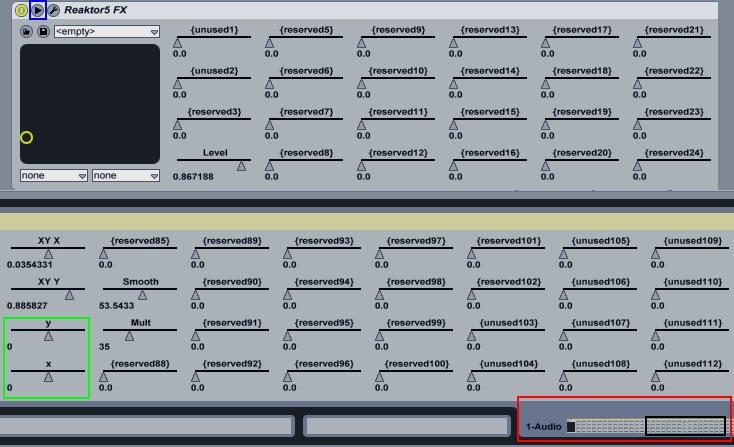
Ammobox XY Ableton Midi parameters.

I tested Ammobox with my VCI-100, routing the audio from Traktor into Ableton and the only bug I have experienced with this setup is when doing fast spinbacks, the ammobox play position will wobble back and forward. I have not tested ammobox with a Vinyl or a CD deck so its not clear if this bug also exists using these interfaces. Please leave a comment if you do/do not experience this problem with Vinyl or CD.

Tags: Dj EquipmentTips
Share1Tweet1Share
Previous Post

Black VCI-100SE Update

Next Post

How to Dj with Guitar Hero

Related Posts

Traktor MX2: Native Instruments’ New 2-Channel Controller
DJ Gear Announcements

Traktor MX2: Native Instruments’ New 2-Channel Controller

October 8, 2025
CDJ-3000x player by AlphaTheta
Breaking News

The CDJ-3000X is here: an iterative upgrade of the media player for $3,000 / £2,399

September 9, 2025
Meet the Koala sampler app: a mobile production powerhouse, now with stems
DJ Gear

Meet the Koala sampler app: a mobile production powerhouse, now with stems

February 7, 2023
Load More
Next Post
How to Dj with Guitar Hero

How to Dj with Guitar Hero

Want to reach DJTT's audience here?

Shoot an email to advertising@djtechtools.com

DJTT ads
DJTT newsletter
Midi Fighter
Chat with us
  • ABOUT DJTT
  • CONTACT
  • PRIVACY
  • MIDI FIGHTER HELP
  • ABOUT DJTT
  • JOBS
  • CONTACT US
  • ADVERTISE
  • PRIVACY POLICY
  • ACCESSIBILITY STATEMENT

© 2024 DJ Techtools all rights reserved by DJ TechTools on all content unless otherwise noted.

No Result
View All Result
  • Blog
    • DJ Gear
      • DIY Projects
      • Gear Reviews
      • New Products
      • Controllerism
    • Techniques + Tips
      • Beginner DJ
      • Advanced DJ
      • Producer
      • Finger Drummer
    • News + Culture
      • Editorials + Opinions
      • Artist Interviews
      • Performances + Routines
      • How I Play
    • DJ Software Tutorials
      • Serato Tips
      • CDJ Tips
      • Ableton Live Tips
  • Store
    • Run by real DJs, not a corporation
    • DJ Controllers
      • Midi Fighter Twister
      • Midi Fighter Spectra
      • Midi Fighter 64
      • View All
    • Accessories
      • Chroma USB Drive for DJs
      • Chroma Caps
      • Chroma Cables Audio
      • Chroma Cables USB-A
      • Chroma Cables: USB-C
      • DJTT Gift Card
      • Midi Fighter T-Shirt
      • Keyboard Covers
      • Earplugs by V-Moda
    • Production Gear
    • Soundcards & Mixers
  • Community
    • Popular Forums
      • General Discussion
      • Buy & Sell
      • Reviews
      • Mixes
      • Music Production
      • Show Your Setup
      • Off Topic
    • Handy Links
      • New Posts
      • Private Messages
      • Register
      • Search
    • Midi Maps
      • Traktor
      • Ableton
      • Serato DJ
      • Midi Fighter 3D
      • Midi Fighter Twister
      • Midi Fighter Spectra
  • Midi Fighter
  • Chroma

© 2024 DJ Techtools all rights reserved by DJ TechTools on all content unless otherwise noted.

This website uses cookies. By continuing to use this website you are giving consent to cookies being used. Visit our Privacy and Cookie Policy.