DJ TechTools
  • Blog
    • DJ Gear
      • DIY Projects
      • Gear Reviews
      • New Products
      • Controllerism
    • Techniques + Tips
      • Beginner DJ
      • Advanced DJ
      • Producer
      • Finger Drummer
    • News + Culture
      • Editorials + Opinions
      • Artist Interviews
      • Performances + Routines
      • How I Play
    • DJ Software Tutorials
      • Serato Tips
        • Traktor Tips
      • CDJ Tips
      • Ableton Live Tips
  • Store
    • Run by real DJs, not a corporation
    • DJ Controllers
      • Midi Fighter Twister
      • Midi Fighter Spectra
      • Midi Fighter 64
      • View All
    • Accessories
      • Chroma USB Drive for DJs
      • Chroma Caps
      • Chroma Cables Audio
      • Chroma Cables USB-A
      • Chroma Cables: USB-C
      • DJTT Gift Card
      • Midi Fighter T-Shirt
      • Keyboard Covers
      • Earplugs by V-Moda
    • Production Gear
    • Soundcards & Mixers
  • Community
    • Popular Forums
      • General Discussion
      • Buy & Sell
      • Reviews
      • Mixes
      • Music Production
      • Show Your Setup
      • Off Topic
    • Handy Links
      • New Posts
      • Private Messages
      • Register
      • Search
    • Midi Maps
      • Traktor
      • Ableton
      • Serato DJ
      • Midi Fighter 3D
      • Midi Fighter Twister
      • Midi Fighter Spectra
  • Midi Fighter
  • Chroma
No Result
View All Result
DJ TechTools
  • Blog
    • DJ Gear
      • DIY Projects
      • Gear Reviews
      • New Products
      • Controllerism
    • Techniques + Tips
      • Beginner DJ
      • Advanced DJ
      • Producer
      • Finger Drummer
    • News + Culture
      • Editorials + Opinions
      • Artist Interviews
      • Performances + Routines
      • How I Play
    • DJ Software Tutorials
      • Serato Tips
        • Traktor Tips
      • CDJ Tips
      • Ableton Live Tips
  • Store
    • Run by real DJs, not a corporation
    • DJ Controllers
      • Midi Fighter Twister
      • Midi Fighter Spectra
      • Midi Fighter 64
      • View All
    • Accessories
      • Chroma USB Drive for DJs
      • Chroma Caps
      • Chroma Cables Audio
      • Chroma Cables USB-A
      • Chroma Cables: USB-C
      • DJTT Gift Card
      • Midi Fighter T-Shirt
      • Keyboard Covers
      • Earplugs by V-Moda
    • Production Gear
    • Soundcards & Mixers
  • Community
    • Popular Forums
      • General Discussion
      • Buy & Sell
      • Reviews
      • Mixes
      • Music Production
      • Show Your Setup
      • Off Topic
    • Handy Links
      • New Posts
      • Private Messages
      • Register
      • Search
    • Midi Maps
      • Traktor
      • Ableton
      • Serato DJ
      • Midi Fighter 3D
      • Midi Fighter Twister
      • Midi Fighter Spectra
  • Midi Fighter
  • Chroma
No Result
View All Result
DJ TechTools

Rockin Digital Doubles: Deck Duplication in Traktor

Ean Golden by Ean Golden
September 11, 2008
in Advanced DJ Tips, Traktor Tips
Reading Time: 2 mins read
0
Rockin Digital Doubles: Deck Duplication in Traktor
36
VIEWS
Post on FacebookTweet thisUpvote on Reddit

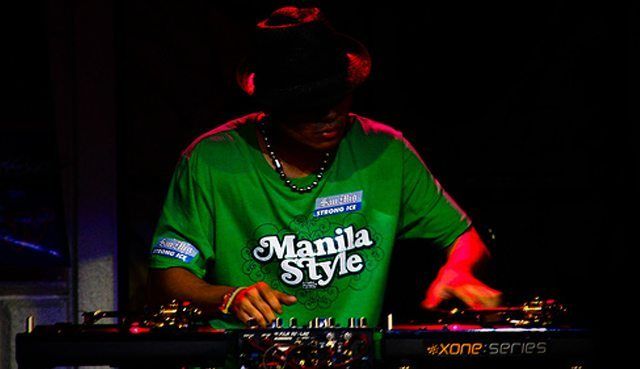
About a year ago, I suggested a feature to the Traktor team which they quickly implemented, much to my excitement. My suggestion was instant deck duplication, to and from any deck. Even though this is great for the obvious application of freeing up a deck, it has also turned out to be good for many other creative uses. Lately I have been getting into juggling opposing copies of the same track with different treatments and cue points tricks. Let’s walk through 5 fundamental techniques and then roll them into one routine:
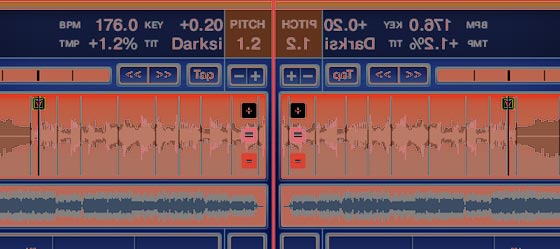
Watch this video and follow along below:

Technique 1:  Phasing Doubles

This one was demonstrated in detail on the video below a few weeks back. It’s simple:

  1. Start any track
  2. Set a cue point on the down beat
  3. Then use deck duplicate to copy the other track over in time (click and drag the track or use your MIDI controller) This duplicates the track and the last cue point.
  4. Now use the play button to restart both songs at the same point – since you will be slightly off every time, they will always phase in interesting ways.

2) Beat Repeat

This is an old turntablist trick which builds on Technique #1. Once you have both songs in time, you off set the second deck behind the first by a half a beat. Then use the crossfader to switch back and forth, creating a fill effect. This can be accomplished two ways:

  • Old School: Restart the song a half a beat after the first
  • Digital Ease: Use “beat jump” – back 1/2 beat (or whatever you like) to offset the 2nd track

3) Snare Fill

You can drop and set a temporary cue point anywhere in a song. In Technique #1 we set a cue on the downbeat and then duplicated it to both tracks. Do then same thing here, except drop a cue point in the 2nd deck on a snare or fill. Now this is your fill track and you can rhythmically cut it in over the first deck without ever losing the master rhythm.

4) Drum Solo

Now that you have access to a kick on the left and a snare on the right, you can use the pause buttons of each deck to sample those sounds and drum away to your heart’s content. The pause lets your use space and timing to create more musical voicing than just re-triggering the start point.

5) Half Time Fill

Instead of using the right deck to create fills using a cue point dropped on a snare. We are going to rhythmically drop cue points and re-sample them in time to essentially cut the entire rhythm in half. Then after 2 counts drop it back into the left deck and never miss a beat.

I spent all of 10 minutes working out that routine in the video, so take these techniques, make them your own and upload a better video that blows my stuff away!
Tags: ControllerismDj BasicsDj TutorialsNative InstrumentsTipsTIPS FROM THE PROSTraktor Tips
ShareTweetShare
Previous Post

VCI-300 Reviewed

Next Post

Essential Dj Tools

Related Posts

A Prime 4+ and a Kontrol S3 intercut against eachother over a black background
Breaking News

InMusic just bought Native Instruments. So what now for Traktor?

May 8, 2026
Traktor MX2: Native Instruments’ New 2-Channel Controller
DJ Gear Announcements

Traktor MX2: Native Instruments’ New 2-Channel Controller

October 8, 2025
Use your Midi Fighter Twister as an Audio-Reactive Visualizer
Ableton Live Tips

Use your Midi Fighter Twister as an Audio-Reactive Visualizer

June 23, 2025
Load More
Next Post
Essential Dj Tools

Essential Dj Tools

Want to reach DJTT's audience here?

Shoot an email to advertising@djtechtools.com

DJTT ads
DJTT newsletter
Midi Fighter
Chat with us
  • ABOUT DJTT
  • CONTACT
  • PRIVACY
  • MIDI FIGHTER HELP
  • ABOUT DJTT
  • JOBS
  • CONTACT US
  • ADVERTISE
  • PRIVACY POLICY
  • ACCESSIBILITY STATEMENT

© 2024 DJ Techtools all rights reserved by DJ TechTools on all content unless otherwise noted.

No Result
View All Result
  • Blog
    • DJ Gear
      • DIY Projects
      • Gear Reviews
      • New Products
      • Controllerism
    • Techniques + Tips
      • Beginner DJ
      • Advanced DJ
      • Producer
      • Finger Drummer
    • News + Culture
      • Editorials + Opinions
      • Artist Interviews
      • Performances + Routines
      • How I Play
    • DJ Software Tutorials
      • Serato Tips
      • CDJ Tips
      • Ableton Live Tips
  • Store
    • Run by real DJs, not a corporation
    • DJ Controllers
      • Midi Fighter Twister
      • Midi Fighter Spectra
      • Midi Fighter 64
      • View All
    • Accessories
      • Chroma USB Drive for DJs
      • Chroma Caps
      • Chroma Cables Audio
      • Chroma Cables USB-A
      • Chroma Cables: USB-C
      • DJTT Gift Card
      • Midi Fighter T-Shirt
      • Keyboard Covers
      • Earplugs by V-Moda
    • Production Gear
    • Soundcards & Mixers
  • Community
    • Popular Forums
      • General Discussion
      • Buy & Sell
      • Reviews
      • Mixes
      • Music Production
      • Show Your Setup
      • Off Topic
    • Handy Links
      • New Posts
      • Private Messages
      • Register
      • Search
    • Midi Maps
      • Traktor
      • Ableton
      • Serato DJ
      • Midi Fighter 3D
      • Midi Fighter Twister
      • Midi Fighter Spectra
  • Midi Fighter
  • Chroma

© 2024 DJ Techtools all rights reserved by DJ TechTools on all content unless otherwise noted.

This website uses cookies. By continuing to use this website you are giving consent to cookies being used. Visit our Privacy and Cookie Policy.