DJ TechTools
  • Blog
    • DJ Gear
      • DIY Projects
      • Gear Reviews
      • New Products
      • Controllerism
    • Techniques + Tips
      • Beginner DJ
      • Advanced DJ
      • Producer
      • Finger Drummer
    • News + Culture
      • Editorials + Opinions
      • Artist Interviews
      • Performances + Routines
      • How I Play
    • DJ Software Tutorials
      • Serato Tips
        • Traktor Tips
      • CDJ Tips
      • Ableton Live Tips
  • Store
    • Run by real DJs, not a corporation
    • DJ Controllers
      • Midi Fighter Twister
      • Midi Fighter Spectra
      • Midi Fighter 64
      • View All
    • Accessories
      • Chroma USB Drive for DJs
      • Chroma Caps
      • Chroma Cables Audio
      • Chroma Cables USB-A
      • Chroma Cables: USB-C
      • DJTT Gift Card
      • Midi Fighter T-Shirt
      • Keyboard Covers
      • Earplugs by V-Moda
    • Production Gear
    • Soundcards & Mixers
  • Community
    • Popular Forums
      • General Discussion
      • Buy & Sell
      • Reviews
      • Mixes
      • Music Production
      • Show Your Setup
      • Off Topic
    • Handy Links
      • New Posts
      • Private Messages
      • Register
      • Search
    • Midi Maps
      • Traktor
      • Ableton
      • Serato DJ
      • Midi Fighter 3D
      • Midi Fighter Twister
      • Midi Fighter Spectra
  • Midi Fighter
  • Chroma
No Result
View All Result
DJ TechTools
  • Blog
    • DJ Gear
      • DIY Projects
      • Gear Reviews
      • New Products
      • Controllerism
    • Techniques + Tips
      • Beginner DJ
      • Advanced DJ
      • Producer
      • Finger Drummer
    • News + Culture
      • Editorials + Opinions
      • Artist Interviews
      • Performances + Routines
      • How I Play
    • DJ Software Tutorials
      • Serato Tips
        • Traktor Tips
      • CDJ Tips
      • Ableton Live Tips
  • Store
    • Run by real DJs, not a corporation
    • DJ Controllers
      • Midi Fighter Twister
      • Midi Fighter Spectra
      • Midi Fighter 64
      • View All
    • Accessories
      • Chroma USB Drive for DJs
      • Chroma Caps
      • Chroma Cables Audio
      • Chroma Cables USB-A
      • Chroma Cables: USB-C
      • DJTT Gift Card
      • Midi Fighter T-Shirt
      • Keyboard Covers
      • Earplugs by V-Moda
    • Production Gear
    • Soundcards & Mixers
  • Community
    • Popular Forums
      • General Discussion
      • Buy & Sell
      • Reviews
      • Mixes
      • Music Production
      • Show Your Setup
      • Off Topic
    • Handy Links
      • New Posts
      • Private Messages
      • Register
      • Search
    • Midi Maps
      • Traktor
      • Ableton
      • Serato DJ
      • Midi Fighter 3D
      • Midi Fighter Twister
      • Midi Fighter Spectra
  • Midi Fighter
  • Chroma
No Result
View All Result
DJ TechTools

A New Arcade Button Controlller Is Born

BentoSan by BentoSan
March 17, 2009
in Controllerism, DIY Project Tutorials, How-To Video Tutorials
Reading Time: 5 mins read
0
A New Arcade Button Controlller Is Born
142
VIEWS
Post on FacebookTweet thisUpvote on Reddit

One of the users in our rapidly expanding forum has made this wonderfully fun arcade controller and shared some info on how you can do it yourself.  Inspired by the Monome and Ean’s original arcade button mod, King Vitamin set upon a journey to create a unique controller for his live ableton sets.  The result is a great example in DIY controllerism that you could easily adopt into your own concepts. Lets dive in and take a closer look at his controller, the mappings and how you might also do the same thing.


The BackStory
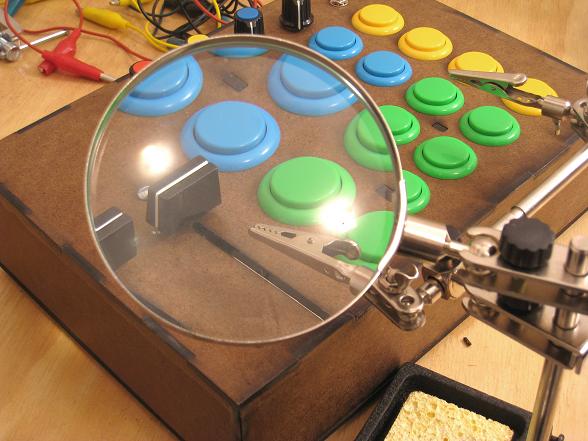
King Vitamin started working in his spare time last December, he first started by collecting the parts and pieces and then created the case design inside of a Adobe Illustrator. Once that was finished he sent the AI file off to his brother who just happens to  work for a company that has a laser cutting machine. Some friendly advise would be to triple check your measurements before sending something off to the laser machine, once the case had been cut he had to do some fix ups with the duct tape of DIY projects- a dremel. If you plan on doing any kind of DIY modifications, a $45 dremmel is a must have.


Originally the case was supposed to be made out of colored acrylic sheets,  However his brother convinced him that using wood should provide a sturdier case that wouldn’t flex under the weight of a heavy button mashing session. Arched supports were used under the top panel to provide extra support for the face plate. The wood was a great move, it gives the controller a street fighter meets boy scout camp look that you cant help but love.
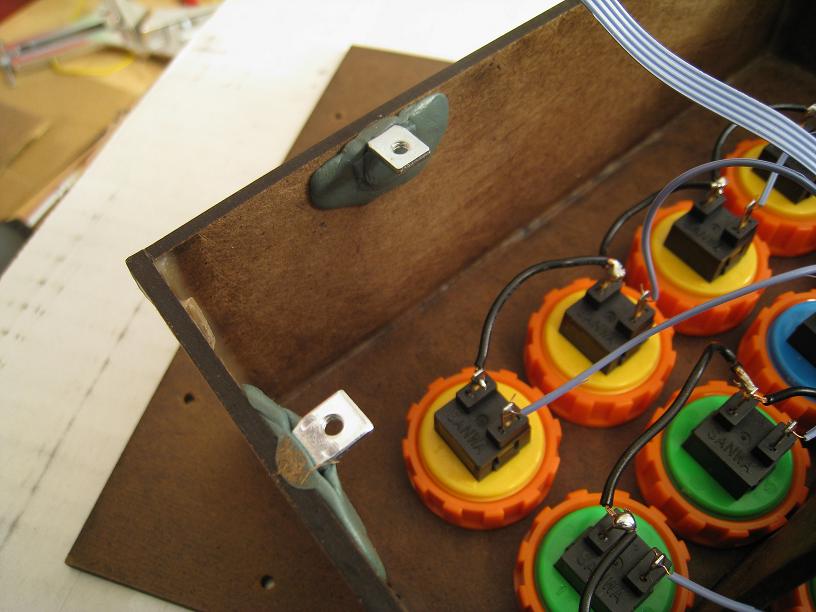
The wood panels are made out of Masonite and glued together using PVA wood glue. King Vitamin doesn’t recommend using masonite if it can be avoided though, as over time the corners might chip away easily. For soldering, connection checking and general maintenance, the bottom plate needs to be easily removable, so miniature brackets were secured to the bottom lip using Sculpting Epoxy.

Whats in the box:
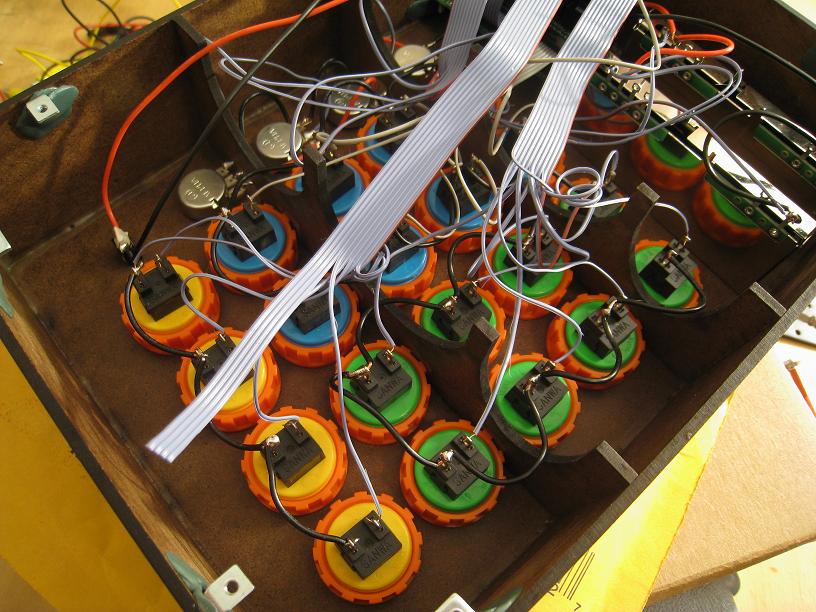

– UMC32 circuit board $75
– Arcade buttons $2.05 each x20
– Faders $13.60 each x2
– 10k Linear taper potentiometers $.55 each x4
– Pot knobs $.35 each x4

– Fader knobs (vestax crossfader caps) $5 each x2
– Switch, wire, solder

<<

Mounting Solution:

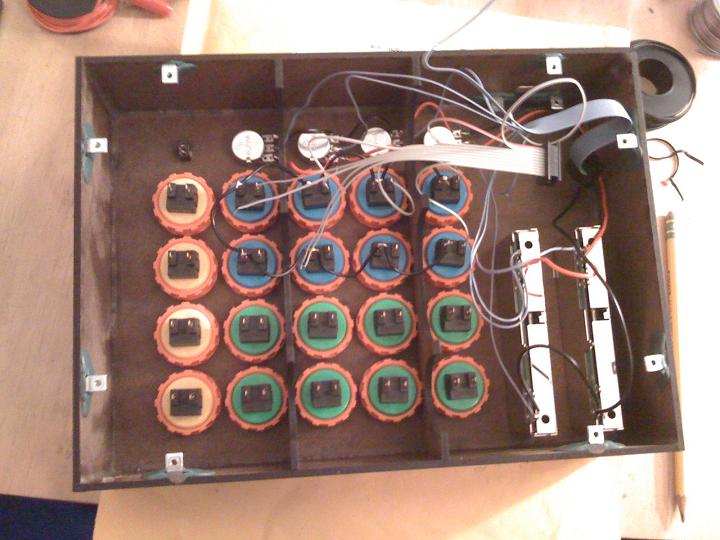
Mounting the arcade buttons, faders and knobs is easy work. The arcade buttons slip into holes drilled into the faceplate and the included orange nut holds it in place. The knobs are also attached in a similar fashion. The faders are mounted using a screws that go into pre-drilled holes on the ends of the faders. The UMC32 (the brains of the operation) is mounted on the same brackets that are used to fix the bottom plate of the unit to the rest of the case. You get a good idea of how everything is mounted by looking inside the box:
Ableton Controllerism

In ableton I set it up really simply. It is just triggering clips in the session view. Usually all the clips are quantized to 1 bar so everything comes in at the beginning of the next bar, but for this I set it to 1/16 so you can still trigger them pretty fast, but you timing doesn’t have to be perfect. I liked the way some of the applications for the Monome worked where a one or two bar loop is mapped across the buttons, so that’s the idea i was going for, except parred down a bit.

So I just take whatever loop i want and put that in the top clip slot and set the play marker at the beginning as usual. Then i duplicate it to the slot below and move the play marker to the next snare hit, or a quarter note later in the song, keeping the beginning and end of the loops the same. I do this for the rest of the clips in that column, moving the play marker along the loop. So, when play around and start pushing buttons, the loop keeps playing no matter what the last button you press is. If anybody knows a better way to do this let me know cause this is kind of a pain in the ass. I tried doing this same thing with drum racks, but that didn’t work because it wasn’t quantized and just didn’t work with the tempo.

With Bome’s Midi Translator I have figured out a way to make it so when you press the yellow buttons, it will cycle through different columns, activating only one at a time. So if you wanted 5 different loops to switch through on the blue buttons, you setup five columns that are all being triggered simultaneously, but only one is active and not muted.

So the big idea is to take an original, break it into different parts, say bass and drums on the blue buttons, then samples and a lead synth on the green, then play the parts together, remixing them live and progressing through different parts by switching loops with the yellow buttons.” – King Vitamin

We will write a more in depth tutorial on how this can be accomplished inside abelton later this month. In the mean time check out the video bellow which has more detail on the abelton session. If you found this article interesting you might want to check out some of the many oher DIY articles we have written on the blog here.

Tags: arcade buttonControllerismDIY ProjectsModTips
Share1Tweet1Share
Previous Post

Bars and Clubs To Pay More Taxes on Music?

Next Post

Press Play

Related Posts

Use your Midi Fighter Twister as an Audio-Reactive Visualizer
Ableton Live Tips

Use your Midi Fighter Twister as an Audio-Reactive Visualizer

June 23, 2025
Meet the Koala sampler app: a mobile production powerhouse, now with stems
DJ Gear

Meet the Koala sampler app: a mobile production powerhouse, now with stems

February 7, 2023
Tips for DJing in Extreme Cold: DJTT readers share their advice
DJ Techniques / Tips

Tips for DJing in Extreme Cold: DJTT readers share their advice

January 30, 2023
Load More
Next Post
Press Play

Press Play

Want to reach DJTT's audience here?

Shoot an email to advertising@djtechtools.com

DJTT ads
DJTT newsletter
Midi Fighter
Chat with us
  • ABOUT DJTT
  • CONTACT
  • PRIVACY
  • MIDI FIGHTER HELP
  • ABOUT DJTT
  • JOBS
  • CONTACT US
  • ADVERTISE
  • PRIVACY POLICY
  • ACCESSIBILITY STATEMENT

© 2024 DJ Techtools all rights reserved by DJ TechTools on all content unless otherwise noted.

No Result
View All Result
  • Blog
    • DJ Gear
      • DIY Projects
      • Gear Reviews
      • New Products
      • Controllerism
    • Techniques + Tips
      • Beginner DJ
      • Advanced DJ
      • Producer
      • Finger Drummer
    • News + Culture
      • Editorials + Opinions
      • Artist Interviews
      • Performances + Routines
      • How I Play
    • DJ Software Tutorials
      • Serato Tips
      • CDJ Tips
      • Ableton Live Tips
  • Store
    • Run by real DJs, not a corporation
    • DJ Controllers
      • Midi Fighter Twister
      • Midi Fighter Spectra
      • Midi Fighter 64
      • View All
    • Accessories
      • Chroma USB Drive for DJs
      • Chroma Caps
      • Chroma Cables Audio
      • Chroma Cables USB-A
      • Chroma Cables: USB-C
      • DJTT Gift Card
      • Midi Fighter T-Shirt
      • Keyboard Covers
      • Earplugs by V-Moda
    • Production Gear
    • Soundcards & Mixers
  • Community
    • Popular Forums
      • General Discussion
      • Buy & Sell
      • Reviews
      • Mixes
      • Music Production
      • Show Your Setup
      • Off Topic
    • Handy Links
      • New Posts
      • Private Messages
      • Register
      • Search
    • Midi Maps
      • Traktor
      • Ableton
      • Serato DJ
      • Midi Fighter 3D
      • Midi Fighter Twister
      • Midi Fighter Spectra
  • Midi Fighter
  • Chroma

© 2024 DJ Techtools all rights reserved by DJ TechTools on all content unless otherwise noted.

This website uses cookies. By continuing to use this website you are giving consent to cookies being used. Visit our Privacy and Cookie Policy.