
DJ TechTools
  • Blog
    • DJ Gear
      • DIY Projects
      • Gear Reviews
      • New Products
      • Controllerism
    • Techniques + Tips
      • Beginner DJ
      • Advanced DJ
      • Producer
      • Finger Drummer
    • News + Culture
      • Editorials + Opinions
      • Artist Interviews
      • Performances + Routines
      • How I Play
    • DJ Software Tutorials
      • Serato Tips
        • Traktor Tips
      • CDJ Tips
      • Ableton Live Tips
  • Store
    • Run by real DJs, not a corporation
    • DJ Controllers
      • Midi Fighter Twister
      • Midi Fighter Spectra
      • Midi Fighter 64
      • View All
    • Accessories
      • Chroma USB Drive for DJs
      • Chroma Caps
      • Chroma Cables Audio
      • Chroma Cables USB-A
      • Chroma Cables: USB-C
      • DJTT Gift Card
      • Midi Fighter T-Shirt
      • Keyboard Covers
      • Earplugs by V-Moda
    • Production Gear
    • Soundcards & Mixers
  • Community
    • Popular Forums
      • General Discussion
      • Buy & Sell
      • Reviews
      • Mixes
      • Music Production
      • Show Your Setup
      • Off Topic
    • Handy Links
      • New Posts
      • Private Messages
      • Register
      • Search
    • Midi Maps
      • Traktor
      • Ableton
      • Serato DJ
      • Midi Fighter 3D
      • Midi Fighter Twister
      • Midi Fighter Spectra
  • Midi Fighter
  • Chroma
No Result
View All Result
DJ TechTools
  • Blog
    • DJ Gear
      • DIY Projects
      • Gear Reviews
      • New Products
      • Controllerism
    • Techniques + Tips
      • Beginner DJ
      • Advanced DJ
      • Producer
      • Finger Drummer
    • News + Culture
      • Editorials + Opinions
      • Artist Interviews
      • Performances + Routines
      • How I Play
    • DJ Software Tutorials
      • Serato Tips
        • Traktor Tips
      • CDJ Tips
      • Ableton Live Tips
  • Store
    • Run by real DJs, not a corporation
    • DJ Controllers
      • Midi Fighter Twister
      • Midi Fighter Spectra
      • Midi Fighter 64
      • View All
    • Accessories
      • Chroma USB Drive for DJs
      • Chroma Caps
      • Chroma Cables Audio
      • Chroma Cables USB-A
      • Chroma Cables: USB-C
      • DJTT Gift Card
      • Midi Fighter T-Shirt
      • Keyboard Covers
      • Earplugs by V-Moda
    • Production Gear
    • Soundcards & Mixers
  • Community
    • Popular Forums
      • General Discussion
      • Buy & Sell
      • Reviews
      • Mixes
      • Music Production
      • Show Your Setup
      • Off Topic
    • Handy Links
      • New Posts
      • Private Messages
      • Register
      • Search
    • Midi Maps
      • Traktor
      • Ableton
      • Serato DJ
      • Midi Fighter 3D
      • Midi Fighter Twister
      • Midi Fighter Spectra
  • Midi Fighter
  • Chroma
No Result
View All Result
DJ TechTools

Inside Timecode- Understanding the Basics pt 2

Rainer G. Haselier by Rainer G. Haselier
August 3, 2009
in Basic DJ Tips, Traktor Tips
Reading Time: 3 mins read
0
Inside Timecode- Understanding the Basics pt 2
285
VIEWS
Post on FacebookTweet thisUpvote on Reddit

The better you understand the technology we dj with, the more empowered you are to fix problems and improve performance. Last week we published an article on fixing common timecode problems. This week we will take you deeper inside timecode technology and show how a computer can accurately track a record’s position.

Traktor Scratch’s timecode vinyl and timecode CDs contain an audio signal constructed from two sinus waves with a frequency of 2 KHz. Serato Scratch and many other competitors have frequencies of 1khz. This signal is analogue and can be brought into to the computer through any audio interface.  Once in the computer, the timecode decoder extracts three different types of information from the incoming signal:

  • Playback speed of the timecode vinyl or timecode CD, respectively,
  • Playback direction (forward, backwards) and
  • Current playback position on the timecode vinyl or on the timecode CD.

Playback Speed

The detection of the current playback speed isn’t too complicated because the decoder knows the original frequency of the timecode signal. If playback is slowe, then the frequency of the incoming timecode signal will be lower than the original frequency. If the rotation speed of the turntables or CD player is higher than 100%, then the frequency increases. The timecode decoder analyzes the frequency of the incoming signal and uses the difference between the original and the incoming frequency to calculate the current speed. Traktor can then match the playback speed of the deck to the playback speed of the timecode medium.
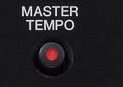
mastertempo*Good To Know* Because Traktor uses the frequency to calculate the speed you must never activate the Master Tempo feature available on many CDJ players, because the Master Tempo function corrects the tone pitch. This is not wanted when using timecode.

If you are using turntables, which always flutter, the BPM display on a timecode controlled deck is never stable; dont worry- the program is not broken, this simply reflects the flutter of the turntables.

Playback Direction

For forward playback the frequency information is already sufficient but it is not enough to determine whether the timecode medium is moving forward or backwards. This information is absolutely necessary when scratching or manual beat matching. To detect the playback direction the timecode signal is constructed from two sinus waves, one for the left and another one for the right channel. The phases of both waves are slightly shifted. This can be seen in the following figure which simulates this (let’s assume the upper wave is for the left and the lower one for the right channel).
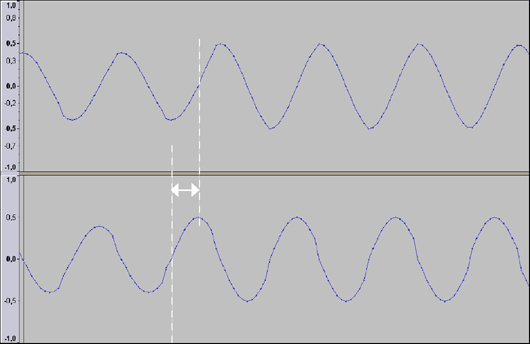
Phase Shift between Left and Right Channel

Because of the phase shifting the right channel is a bit ahead of the left channel. When the right channel meets the zero line, then the values of the amplitude of the left channel are negative. When the playback direction is reversed and the right channel reaches the zero line, then the values of the amplitude of the left channel are positive.

*Good To Know* This is also the reason why Traktor always needs the timecode signal of the left and the right channel to function properly. If one channel is missing (maybe because one cable is not connected or because the contacts of the cartridge are black or dirty) only forward playback will be possible. This mode is called emergency mode. More practical information about the left/right channel topic can be found in this tutorial where timecode configuration is covered.

Current Playback Position

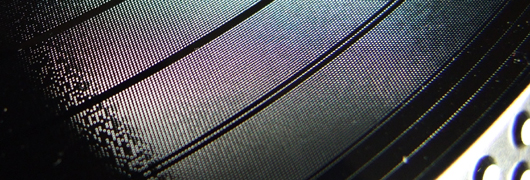
This brings us to the third and last question, how does Traktor recognize the current playback position. Unfortunately we will never know the answer because it is one Native Instruments best kept secrets. If you have a very close look at a piece of timecode vinyl you will see little data packages as small boxes, where the position information is hidden.Timecode Vinyl
Rainer G. Haselier is the author of the “Traktor Pro Bible“.  Dj TechTools readers may use the following discount code to get 15% off the book in the CreateSpace e-store:  SWBLQERF

Tags: CalibrationScratchTimecode ControlTimecode DecoderTipsTraktor Tips
Share2Tweet2Share
Previous Post

And we’re back!

Next Post

Streamline Your Mac

Related Posts

traktor-pro plus 3.8 pattern player controls
Dj and Production Tutorials

Review: Traktor Pro Plus 3.8 – After 8 months, is the subscription worth it?

April 20, 2023
Meet the Koala sampler app: a mobile production powerhouse, now with stems
DJ Gear

Meet the Koala sampler app: a mobile production powerhouse, now with stems

February 7, 2023
Tips for DJing in Extreme Cold: DJTT readers share their advice
DJ Techniques / Tips

Tips for DJing in Extreme Cold: DJTT readers share their advice

January 30, 2023
Load More
Next Post
Streamline Your Mac

Streamline Your Mac

Want to reach DJTT's audience here?

Shoot an email to advertising@djtechtools.com

DJTT ads
DJTT newsletter
Midi Fighter
Chat with us
  • ABOUT DJTT
  • CONTACT
  • PRIVACY
  • MIDI FIGHTER HELP
  • ABOUT DJTT
  • JOBS
  • CONTACT US
  • ADVERTISE
  • PRIVACY POLICY
  • ACCESSIBILITY STATEMENT

© 2024 DJ Techtools all rights reserved by DJ TechTools on all content unless otherwise noted.

No Result
View All Result
  • Blog
    • DJ Gear
      • DIY Projects
      • Gear Reviews
      • New Products
      • Controllerism
    • Techniques + Tips
      • Beginner DJ
      • Advanced DJ
      • Producer
      • Finger Drummer
    • News + Culture
      • Editorials + Opinions
      • Artist Interviews
      • Performances + Routines
      • How I Play
    • DJ Software Tutorials
      • Serato Tips
      • CDJ Tips
      • Ableton Live Tips
  • Store
    • Run by real DJs, not a corporation
    • DJ Controllers
      • Midi Fighter Twister
      • Midi Fighter Spectra
      • Midi Fighter 64
      • View All
    • Accessories
      • Chroma USB Drive for DJs
      • Chroma Caps
      • Chroma Cables Audio
      • Chroma Cables USB-A
      • Chroma Cables: USB-C
      • DJTT Gift Card
      • Midi Fighter T-Shirt
      • Keyboard Covers
      • Earplugs by V-Moda
    • Production Gear
    • Soundcards & Mixers
  • Community
    • Popular Forums
      • General Discussion
      • Buy & Sell
      • Reviews
      • Mixes
      • Music Production
      • Show Your Setup
      • Off Topic
    • Handy Links
      • New Posts
      • Private Messages
      • Register
      • Search
    • Midi Maps
      • Traktor
      • Ableton
      • Serato DJ
      • Midi Fighter 3D
      • Midi Fighter Twister
      • Midi Fighter Spectra
  • Midi Fighter
  • Chroma

© 2024 DJ Techtools all rights reserved by DJ TechTools on all content unless otherwise noted.

This website uses cookies. By continuing to use this website you are giving consent to cookies being used. Visit our Privacy and Cookie Policy.