DJ TechTools
  • Blog
    • DJ Gear
      • DIY Projects
      • Gear Reviews
      • New Products
      • Controllerism
    • Techniques + Tips
      • Beginner DJ
      • Advanced DJ
      • Producer
      • Finger Drummer
    • News + Culture
      • Editorials + Opinions
      • Artist Interviews
      • Performances + Routines
      • How I Play
    • DJ Software Tutorials
      • Serato Tips
        • Traktor Tips
      • CDJ Tips
      • Ableton Live Tips
  • Store
    • Run by real DJs, not a corporation
    • DJ Controllers
      • Midi Fighter Twister
      • Midi Fighter Spectra
      • Midi Fighter 64
      • View All
    • Accessories
      • Chroma USB Drive for DJs
      • Chroma Caps
      • Chroma Cables Audio
      • Chroma Cables USB-A
      • Chroma Cables: USB-C
      • DJTT Gift Card
      • Midi Fighter T-Shirt
      • Keyboard Covers
      • Earplugs by V-Moda
    • Production Gear
    • Soundcards & Mixers
  • Community
    • Popular Forums
      • General Discussion
      • Buy & Sell
      • Reviews
      • Mixes
      • Music Production
      • Show Your Setup
      • Off Topic
    • Handy Links
      • New Posts
      • Private Messages
      • Register
      • Search
    • Midi Maps
      • Traktor
      • Ableton
      • Serato DJ
      • Midi Fighter 3D
      • Midi Fighter Twister
      • Midi Fighter Spectra
  • Midi Fighter
  • Chroma
No Result
View All Result
DJ TechTools
  • Blog
    • DJ Gear
      • DIY Projects
      • Gear Reviews
      • New Products
      • Controllerism
    • Techniques + Tips
      • Beginner DJ
      • Advanced DJ
      • Producer
      • Finger Drummer
    • News + Culture
      • Editorials + Opinions
      • Artist Interviews
      • Performances + Routines
      • How I Play
    • DJ Software Tutorials
      • Serato Tips
        • Traktor Tips
      • CDJ Tips
      • Ableton Live Tips
  • Store
    • Run by real DJs, not a corporation
    • DJ Controllers
      • Midi Fighter Twister
      • Midi Fighter Spectra
      • Midi Fighter 64
      • View All
    • Accessories
      • Chroma USB Drive for DJs
      • Chroma Caps
      • Chroma Cables Audio
      • Chroma Cables USB-A
      • Chroma Cables: USB-C
      • DJTT Gift Card
      • Midi Fighter T-Shirt
      • Keyboard Covers
      • Earplugs by V-Moda
    • Production Gear
    • Soundcards & Mixers
  • Community
    • Popular Forums
      • General Discussion
      • Buy & Sell
      • Reviews
      • Mixes
      • Music Production
      • Show Your Setup
      • Off Topic
    • Handy Links
      • New Posts
      • Private Messages
      • Register
      • Search
    • Midi Maps
      • Traktor
      • Ableton
      • Serato DJ
      • Midi Fighter 3D
      • Midi Fighter Twister
      • Midi Fighter Spectra
  • Midi Fighter
  • Chroma
No Result
View All Result
DJ TechTools

USB Hubs De-Mystified

Ean Golden by Ean Golden
January 25, 2010
in Basic DJ Tips, DJ Equipment / Accessories
Reading Time: 4 mins read
0
USB Hubs De-Mystified
227
VIEWS
Post on FacebookTweet thisUpvote on Reddit

Chances are you have more digital dj gear than you have available USB ports. Between controllers, sound cards, USB lights and ipods- every controllerist needs a lot more usb power than the typical laptop can offer. The logical solution to this common problem is to add a USB hub to your setup but this seemingly straightforward device can introduce a lot of variables and problems.  Should the port be powered? Will it cause latency? Which hubs are good for djing? Will it cause audio drop outs? In this article we will attempt to clear up some of these questions and help you pick the right USB hub for djing.

POWER OR NO POWER?

powerlines
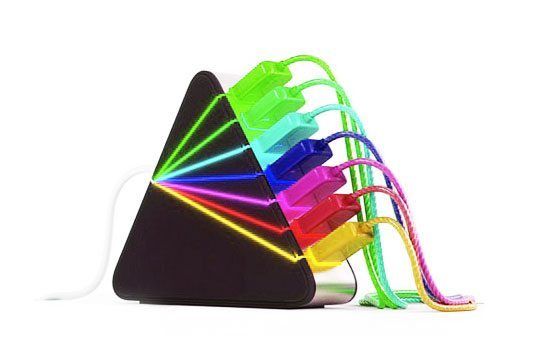
The first thing you will notice about USB hubs is that they come in 2 main types: Powered or non-powered. Powered hubs require an external power supply so they can send a full amount of USB power evenly to all ports. Non-powered hubs simply split the power available on one laptop port between all the devices which means much less juice for everyone on the train.

If you are using basic input devices like mice, keyboards or basic controllers (without any LEDS) then its safe to split a USB port between several items without a power supply. The trouble starts when you introduce large midi controllers like the VCI-100 or sound cards, which demand nearly all of the power available on single port. In these cases, you absolutely need to use a powered USB hub to guarantee that each device has all the juice it needs.

SHARING RECOURCES
USBLego

In addition to making sure each device has enough power, you should also consider the balance of data so 2 devices are not overwhelming a single usb port with too much information.
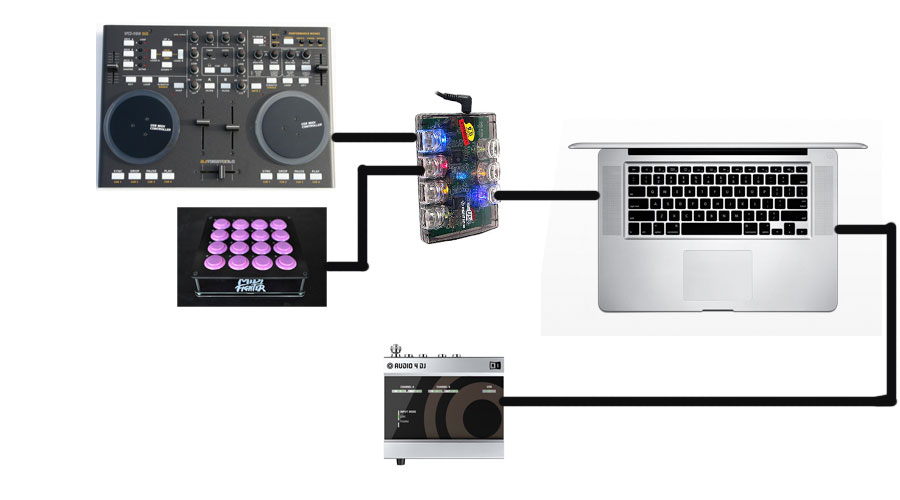
The typical digital dj set up is probably going to look like this:

  • 1 main controller (hi power draw- medium data transfer)
  • 1 secondary controller (hi power draw- low data transfer)
  • 1 sound card (medium power draw- hi data transfer)

Lets assume you only have 2 USB ports available. The following configuration would be a good place to start. If you experience drop outs, try changing things around. In this case the sound card gets it own USB port to maximize data transfer. The controllers are sharing a powered USB hub because power, not data, is the main concern there. You could possibly make this configuration work with a non-powered hub but it really depends on how much power each device requires. The average laptop USB port supplies about 500 milliamps of power so find out the specs on your devices and do the math.
controller-setup

Keep it 2.0

There are 2 USB speeds, USB 1.0 and 2.0. To keep things simple, you just need to keep in mind that USB 2.0 is much faster. Its usually a bad idea to combine USB 1.0 devices (most controllers) and USb 2.0 devices (hard-drives and some sound cards) on the same USB hub because then all the devices transfer at 1.0 speeds.

A FEW RECOMMENDATIONS

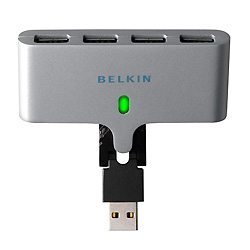
For a simple, non-powered space saving hub we like the Belkin swivel hub which has a built in cable.
STD1_F5U415

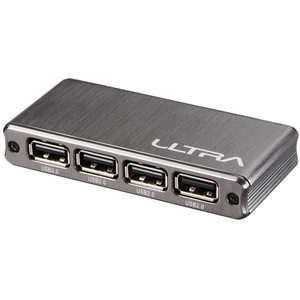
Ultra makes a sleek hi-speed powered hub that looks good and takes up minimal space
ULT40476-main-sp

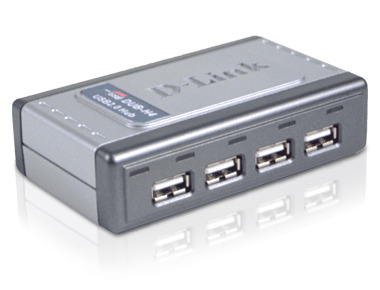
If your looking for a big brand option- the D-link dub h4 appears to be a good option
DUB-H4_right

Want to combine 2.0 and 1.0 devices on one hub? There are a few rare hubs that can do this called “multi TT” hubs. The Belkin Tetra hub is one of them.


DONT DROP OUT

glitch-image

Occasionally USB has its problems. When a device gets confused and sends an audio glitch or disconnects on its own its called a “drop out”. This can happen for any number of reasons. Common causes of drop outs are interference, power issues, lack of bandwidth or CPU capacity.

To Avoid Drop Outs

  • Keep your USB cables away from cell phones, power cables, florescent lighting, cordless mics and speaker wires
  • Make sure you are using a high quality cable that’s as short as possible with proper shielding and ferrite cores (the little cylinders on the ends of some cables). Dj TechTools actually manufactured a USB cable specifically for DJs that meets all of these criteria.
  • raise your audio card buffer sizes. If your experiencing audio dropouts, pops and crackles chances are the audio buffer is too low.
  • Turn off the airport (it can cause problems)
  • try a different USB port- apparently not all of them are equal.
  • try a powered USB hub. The actual power supplied by a USB port can vary wildy from laptop to laptop, meaning that you may be under-powering your audio device. Try a powered hub and see if the problem is eliminated.

Looking Forward

The future of USB is looking even better with the introduction of USB 3.0. The speed has been increased to a ballistic 4 Gbit/s and the power rating has been stepped up to 80 percent more than 2.0. Translation- it’s capable of running up to six devices and lighting up even more LEDS on a controller without requiring power supplies.

additional research provided by: Dj Nisus

Tags: High speedHubMidi ControllersTipsUSB
Share2Tweet1Share
Previous Post

Stuff we like: Controllerism and Guitars

Next Post

Digital Record Pool Round-up

Related Posts

Meet the Koala sampler app: a mobile production powerhouse, now with stems
DJ Gear

Meet the Koala sampler app: a mobile production powerhouse, now with stems

February 7, 2023
Tips for DJing in Extreme Cold: DJTT readers share their advice
DJ Techniques / Tips

Tips for DJing in Extreme Cold: DJTT readers share their advice

January 30, 2023
Move Your iTunes Playlists To Any USB Drive
DJ Music Library Tips

Move Your iTunes Playlists To Any USB Drive

July 26, 2018
Load More
Next Post
Digital Record Pool Round-up

Digital Record Pool Round-up

Want to reach DJTT's audience here?

Shoot an email to advertising@djtechtools.com

DJTT ads
DJTT newsletter
Midi Fighter
Chat with us
  • ABOUT DJTT
  • CONTACT
  • PRIVACY
  • MIDI FIGHTER HELP
  • ABOUT DJTT
  • JOBS
  • CONTACT US
  • ADVERTISE
  • PRIVACY POLICY
  • ACCESSIBILITY STATEMENT

© 2024 DJ Techtools all rights reserved by DJ TechTools on all content unless otherwise noted.

No Result
View All Result
  • Blog
    • DJ Gear
      • DIY Projects
      • Gear Reviews
      • New Products
      • Controllerism
    • Techniques + Tips
      • Beginner DJ
      • Advanced DJ
      • Producer
      • Finger Drummer
    • News + Culture
      • Editorials + Opinions
      • Artist Interviews
      • Performances + Routines
      • How I Play
    • DJ Software Tutorials
      • Serato Tips
      • CDJ Tips
      • Ableton Live Tips
  • Store
    • Run by real DJs, not a corporation
    • DJ Controllers
      • Midi Fighter Twister
      • Midi Fighter Spectra
      • Midi Fighter 64
      • View All
    • Accessories
      • Chroma USB Drive for DJs
      • Chroma Caps
      • Chroma Cables Audio
      • Chroma Cables USB-A
      • Chroma Cables: USB-C
      • DJTT Gift Card
      • Midi Fighter T-Shirt
      • Keyboard Covers
      • Earplugs by V-Moda
    • Production Gear
    • Soundcards & Mixers
  • Community
    • Popular Forums
      • General Discussion
      • Buy & Sell
      • Reviews
      • Mixes
      • Music Production
      • Show Your Setup
      • Off Topic
    • Handy Links
      • New Posts
      • Private Messages
      • Register
      • Search
    • Midi Maps
      • Traktor
      • Ableton
      • Serato DJ
      • Midi Fighter 3D
      • Midi Fighter Twister
      • Midi Fighter Spectra
  • Midi Fighter
  • Chroma

© 2024 DJ Techtools all rights reserved by DJ TechTools on all content unless otherwise noted.

This website uses cookies. By continuing to use this website you are giving consent to cookies being used. Visit our Privacy and Cookie Policy.