Connecting dj gear, setting up speakers and re-wireing a booth under pressure can be a harrowing experience. When people are paying you good money to play great music, they also expect the sound to be up to snuff- so understanding connections really well is just as important to DJs as pulling off the latest mixing tricks. In this article we will cover a few connection essentials and expand deeper into the balanced and un-balanced concept.
DISSECTING THE MAZE
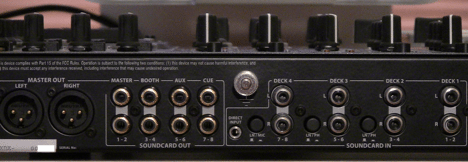
Most people understand what to do with hardware that has only one out, the confusion usually starts when there are multiple ins and outs or many choices of ins. Lets look at a mixer. I’ll use the Xone DX as I am a learning this one at the moment and it has almost all of the typical connections.
Ins
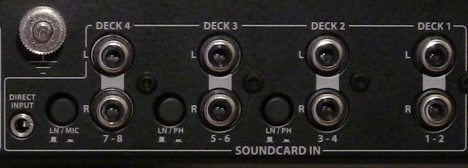
These are all unbalanced connections, except the mic (which has an XLR input on the front of the unit). Each deck is RCA with Deck 1 being line only, Decks 2 and 3 are line or phono selectable by the switch and Deck 4 is line or mic, with only the line connection on the back.
The direct input is a 1/8” (3.5mm) stereo TRS connection that is routed straight to the master channel. As it is stereo, it is unbalanced, and suitable for an MP3 player to be connected should you need to reboot software or hardware. Notice there is no switch on it, so anything connected to it and playing is going right into your master. Nice feature, but be careful with it.
Outs
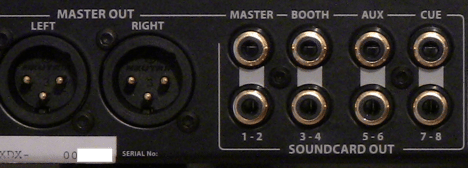
The Cue, Aux, Booth and Master (the one on the right) are all unbalanced RCA connections. The Master Out is our only balanced out.
COMMON QUESTIONS
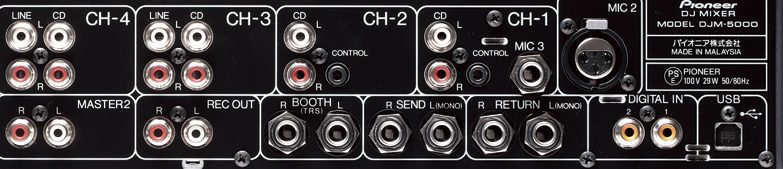
Last month we had an article on cables and their uses (see Chales Goodarcre’s “Cable Pizza”). Despite this invaluable information, several DJTT members have been asking questions about hooking up their equipment and the various connection options that the article mentioned. Lets look at a few of the most common questions people have:
Can I plug a CD player or computer into a phono input?
Well you can, but it will sound distorted and far too loud. If everything sounds like a guitar distortion pedal, then chances are you made this mistake – Check the back of the mixer.
Can I plug turntables into any input or does it need to be designated phono?
You can only plug turntables into a phono input, which boosts the levels and makes critical EQ adjustments. If the turntable signal is strangely low (very low) then chances are you have it connected to a line input. Check the back of the mixer as the inputs are usually switchable to work with either.
Can I plug a Mic into any old input?
No- A mic has very low levels and requires a pre-amp which can boost the levels up to an audible range. Some mics won’t work at all without something called Phantom Power. Few Dj mixers supply this and even fewer mics used in clubs require it so you wont need to worry about this too much. If the mic is plugged in and turned on but there is no signal then chances are it might need phantom power.
Can I plug other Gear into a mic input?
The only thing you can plug into a mic input other than a microphone is a pair of headphones (which can be used as a microphone in times of absolute desperation). Dont attempt to plug a guitar, or any other input into a mic input it will sound like ass.
Can I go from un-balanced to balanced? (Ex. Master RCA to Powered Speakers)
You can run a un-balanced output into a balanced input (RCA to XLR cable) but you lose all the benefits of a balanced connection and the signal will not be as strong.
Can I go from Balanced outs to Un-Balanced inputs? (Ex. Professional Sound Card to Mixer line inputs)
This method may work without effecting the audio quality but the levels will be strangely high and possibly distorted. Its not advisable and has un-predictable results.
BALANCING ACT
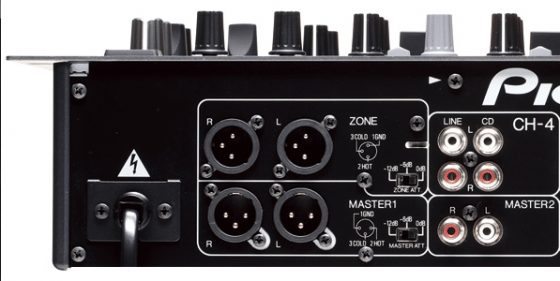
After the input variations we come to the output section. This is where you connect your dj mixer to various critical components like amps, speakers or recording devices. The outputs on a mixer come in 2 types:
- RCA & TS = Unbalanced -10DB
- XLR & TRS = Balanced +4DB
- Headphones = Amplified Unbalanced
What’s the difference?
Balanced is meant for long connections or critical audio paths where the line might pick up noise and interference. Un-balanced cables are meant to cover short distances between audio components like CD players, sound cards and dj mixers.
HOW BALANCED WORKS
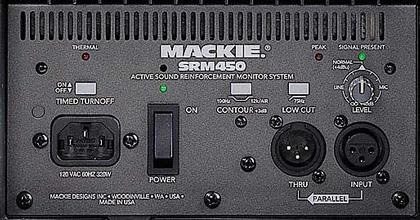
Unbalanced is two wire (hot and ground) and balanced is three wire (hot, cold and ground). The hot signal is our mono audio signal, which is the same in both types. The cold signal in balanced is actually the hot signal inverted. This requires special hardware at both ends to process the extra signal.
How balanced works in by measuring the difference in the hot and cold at the receiving end. Noise tends to add itself to both lines due to both the cable construction (twisted pair) and loading. Any noise that might be added to the signal in transit is then ignored, and the audio signal integrity remains. (For more detailed info).
The name balanced comes from a feature in its implementation, where both the hot and cold signal have identical impedances (resistances for AC signals) applied. Therefore, both the hot and cold signal each have an equal (balanced) load on them. Unbalanced is the name given to any audio signal that does not have this equal impedance on the hot and cold signal (how could it? it only has a hot signal!).
As far as how that affects our connection, lets just say that balanced signals require more complicated hardware, but have an advantage in that they resist disturbances (noise) from outside contributors. That makes them good for long cables that can be subject to all kinds of interference (i.e. power amps, light installations, fog machines, etc.). They are also good for signals post master EQ, since the signal is going straight to the power amp and/or powered speakers with no possibility for adjustment (they have to be close to perfect here). Hence mixer inputs tend to be unbalanced (we can correct them through the EQ) while the master is often available as a balanced output.
Unbalanced connections are the most common and least complicated. They are every bit as “good” as balanced signals, provided they are treated properly. As they are relatively easy to add noise to, we have to pay a little more attention with their routing. Just keep them short and clear of potential sources of high energy (see kinds of interference above) and they’ll be fine.
Easy? Balanced = 3 wire (XLR or mono TRS) and Unbalanced = 2 wire (RCA or TS or stereo TRS)
Know Your Equipment
As a DJ, your equipment is your toolbox. It is critical to your survival to know what each tool you have can and cannot do. Knowing what each of your connection is and what it isn’t means that you will be better equipped for when “what just happened?” happens to you.