DJ TechTools
  • Blog
    • DJ Gear
      • DIY Projects
      • Gear Reviews
      • New Products
      • Controllerism
    • Techniques + Tips
      • Beginner DJ
      • Advanced DJ
      • Producer
      • Finger Drummer
    • News + Culture
      • Editorials + Opinions
      • Artist Interviews
      • Performances + Routines
      • How I Play
    • DJ Software Tutorials
      • Serato Tips
        • Traktor Tips
      • CDJ Tips
      • Ableton Live Tips
  • Store
    • Run by real DJs, not a corporation
    • DJ Controllers
      • Midi Fighter Twister
      • Midi Fighter Spectra
      • Midi Fighter 64
      • View All
    • Accessories
      • Chroma USB Drive for DJs
      • Chroma Caps
      • Chroma Cables Audio
      • Chroma Cables USB-A
      • Chroma Cables: USB-C
      • DJTT Gift Card
      • Midi Fighter T-Shirt
      • Keyboard Covers
      • Earplugs by V-Moda
    • Production Gear
    • Soundcards & Mixers
  • Community
    • Popular Forums
      • General Discussion
      • Buy & Sell
      • Reviews
      • Mixes
      • Music Production
      • Show Your Setup
      • Off Topic
    • Handy Links
      • New Posts
      • Private Messages
      • Register
      • Search
    • Midi Maps
      • Traktor
      • Ableton
      • Serato DJ
      • Midi Fighter 3D
      • Midi Fighter Twister
      • Midi Fighter Spectra
  • Midi Fighter
  • Chroma
No Result
View All Result
DJ TechTools
  • Blog
    • DJ Gear
      • DIY Projects
      • Gear Reviews
      • New Products
      • Controllerism
    • Techniques + Tips
      • Beginner DJ
      • Advanced DJ
      • Producer
      • Finger Drummer
    • News + Culture
      • Editorials + Opinions
      • Artist Interviews
      • Performances + Routines
      • How I Play
    • DJ Software Tutorials
      • Serato Tips
        • Traktor Tips
      • CDJ Tips
      • Ableton Live Tips
  • Store
    • Run by real DJs, not a corporation
    • DJ Controllers
      • Midi Fighter Twister
      • Midi Fighter Spectra
      • Midi Fighter 64
      • View All
    • Accessories
      • Chroma USB Drive for DJs
      • Chroma Caps
      • Chroma Cables Audio
      • Chroma Cables USB-A
      • Chroma Cables: USB-C
      • DJTT Gift Card
      • Midi Fighter T-Shirt
      • Keyboard Covers
      • Earplugs by V-Moda
    • Production Gear
    • Soundcards & Mixers
  • Community
    • Popular Forums
      • General Discussion
      • Buy & Sell
      • Reviews
      • Mixes
      • Music Production
      • Show Your Setup
      • Off Topic
    • Handy Links
      • New Posts
      • Private Messages
      • Register
      • Search
    • Midi Maps
      • Traktor
      • Ableton
      • Serato DJ
      • Midi Fighter 3D
      • Midi Fighter Twister
      • Midi Fighter Spectra
  • Midi Fighter
  • Chroma
No Result
View All Result
DJ TechTools

Glitch Mob- Live Footage and Interview

Ean Golden by Ean Golden
July 16, 2010
in Artist Features, Controllerism, Music, Video Posts
Reading Time: 4 mins read
0
Glitch Mob- Live Footage and Interview
295
VIEWS
Post on FacebookTweet thisUpvote on Reddit

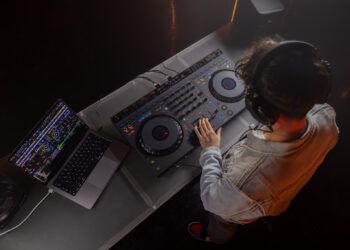
Dj TechTools spent some time with Glitch Mob, the Ableton dj crew turned live band, and dug into the details on how they make their new bombastic show work technically. Read on after the break for the full interview on what they like and don’t like about Lemurs and more!

What kind of a concert is the new Glitch Mob Set?

To some people going to the Glitch Mob is a full on rave party and to some it’s an experimental electronic rock concert. We take you on a ride.. we are not afraid to have tender moments and also crush them over the head.

What kind of technology do you use live?

Basically we have a bunch of midi controllers and perform our music through Ableton Live using a series of samplers. We use a combination of traditional instruments like guitar and bass, which run through Ableton, and we also use touch screen controllers called Lemurs made by Jazz Mutant.  We also use Roland V Drum midi controllers.

Before this bigger live show, you did a mash-up remix set. How has the transition gone?

The transition has gone well. The biggest difference now is that we stop between songs where before it was a continuous dj set. It feels good to be up there playing the songs, which is what this show was all about- playing the songs from our new record. Its a heavily percussive album so we wanted to get up there and actually play the percussion.

Are you getting the band effect (stop and watch) or are people still dancing?

I think its a fair bit of both. I noticed last night, playing in LA that there was a whole chunk of people dancing the whole time but then there is a whole different group that is just fascinated by what is going on. I actually think that’s amazing because if people are dancing the whole time it would not matter if we were up there with instruments or a turntable. I have noticed that this is a really cool mix of the dance party and a show you can watch.

How do you make computer technology playable and not stiff?

The way we have the live set set up is that we use a series of samplers instead of launching clips. We previously used clip launching, but for this particular set we have essentially sampled (note for note) every melody and chord progression from the record so we can re-play that exact melody live. Obviously,  due to the fact that it is live there will be that humanistic feel and error involved.

How much does each song then evolve as you play it live?

We have the opportunity to riff.. but we try to keep it as close to the way the record was written because this is the first time most people have heard the record but there are moments where we can throw in a little. There are improvised moments- like we always do a drum solo every single night and every single night it comes out a little bit different.
<

Are the controllers you are using expressive enough?

We are always looking for stuff that we can bash harder and tweak more. I imagine a keyboard with big giant keys. We were just over at the Moog factory and checking out the midi-theremin which could get worked in some-how.

The Jazz-Mutant Lemur literally takes center stage, how well do they work for you?

They are not perfect. For example, you can hit them, but you can’t really whack it. Its also not the most accurate or responsive of interfaces. Like, if you have an air bubble in your screen you will get weird anomalies sometimes.  The visual feedback is awesome but its not precise. Its cool because we can actually show people what we are doing because they can see the correlation between visual and audible.

How do you manage to play so many different parts with one controller?

The way we have designed our set, we could not really perform without it (the Lemur). We have written some scripts where Ableton will basically fire off some midi to the Lemur and the Lemur will change pages and then you are ready to play your next part.

Lets say we play 8-10 parts in a song and some of the parts are back to back with only a 16th note between the 2 parts. So with this set-up, you don’t have to press the next page button- Ableton does it for you. Basically, by the time your done playing the end of a phrase, the Lemur page will change and your playing a completely new instrument with a completely different layout with pads and stuff all custom designed for that part. That’s one thing about the Lemur thats important for us.  We could not just have 16 buttons, some of our melodies have anywhere from 4 notes to 12 notes so it has to flexible and open.

So your willing to trade the loss of tactility and errors in exchange for flexibility?

Yeah – not that this is a good thing but when there are those minor errors then its obvious that we are playing up there. When you hear a dropped note, then its like- ok this is live.

We are often talking about one of the drawbacks of Ableton is its rigidity and the fact that it is so hard to screw up.

It actually took us a lot of engineering hours to make Ableton be able to fuck up. It was 2 months solid of trial and error programming to really get things tight but now everything is running pretty smooth.

Get more info on Glitch Mob including tour dates at their website.
Tags: Ableton Live TipscontrollerdrumEquipmentgearglitch mobinterviewlemur
Share2Tweet2Share
Previous Post

MacBook USB Port Inequality

Next Post

Wanted: DJ – Mixing Optional

Related Posts

This is the DDJ-GRV6 by AlphaTheta: a 4-channel controller with the ability to live remix drum loops
Breaking News

This is the DDJ-GRV6 by AlphaTheta: a 4-channel controller with the ability to live remix drum loops

October 8, 2024
This is the DDJ-FLX10, with new Track Separation and Mix Point Link features for mashups and more
DJ Gear

This is the DDJ-FLX10, with new Track Separation and Mix Point Link features for mashups and more

March 23, 2023
The DDJ-FLX6-GT from Pioneer DJ: 4 channels, Merge FX + Virtual DJ compatibility
DJ Gear

The DDJ-FLX6-GT from Pioneer DJ: 4 channels, Merge FX + Virtual DJ compatibility

November 15, 2022
Load More
Next Post
Wanted: DJ – Mixing Optional

Wanted: DJ - Mixing Optional

Want to reach DJTT's audience here?

Shoot an email to advertising@djtechtools.com

DJTT ads
DJTT newsletter
Midi Fighter
Chat with us
  • ABOUT DJTT
  • CONTACT
  • PRIVACY
  • MIDI FIGHTER HELP
  • ABOUT DJTT
  • JOBS
  • CONTACT US
  • ADVERTISE
  • PRIVACY POLICY
  • ACCESSIBILITY STATEMENT

© 2024 DJ Techtools all rights reserved by DJ TechTools on all content unless otherwise noted.

No Result
View All Result
  • Blog
    • DJ Gear
      • DIY Projects
      • Gear Reviews
      • New Products
      • Controllerism
    • Techniques + Tips
      • Beginner DJ
      • Advanced DJ
      • Producer
      • Finger Drummer
    • News + Culture
      • Editorials + Opinions
      • Artist Interviews
      • Performances + Routines
      • How I Play
    • DJ Software Tutorials
      • Serato Tips
      • CDJ Tips
      • Ableton Live Tips
  • Store
    • Run by real DJs, not a corporation
    • DJ Controllers
      • Midi Fighter Twister
      • Midi Fighter Spectra
      • Midi Fighter 64
      • View All
    • Accessories
      • Chroma USB Drive for DJs
      • Chroma Caps
      • Chroma Cables Audio
      • Chroma Cables USB-A
      • Chroma Cables: USB-C
      • DJTT Gift Card
      • Midi Fighter T-Shirt
      • Keyboard Covers
      • Earplugs by V-Moda
    • Production Gear
    • Soundcards & Mixers
  • Community
    • Popular Forums
      • General Discussion
      • Buy & Sell
      • Reviews
      • Mixes
      • Music Production
      • Show Your Setup
      • Off Topic
    • Handy Links
      • New Posts
      • Private Messages
      • Register
      • Search
    • Midi Maps
      • Traktor
      • Ableton
      • Serato DJ
      • Midi Fighter 3D
      • Midi Fighter Twister
      • Midi Fighter Spectra
  • Midi Fighter
  • Chroma

© 2024 DJ Techtools all rights reserved by DJ TechTools on all content unless otherwise noted.

This website uses cookies. By continuing to use this website you are giving consent to cookies being used. Visit our Privacy and Cookie Policy.