Konkreet Labs Performer is an iPad app that allows you to control your DAW/DJ software thru MIDI signals which are sent via the app’s unique multi-touch interface. Nodes replace traditional controls like faders and knobs, allowing you to manipulate DAW/DJ functions in an entirely different manner.
Review by Joey Santos
Product Reviewed: Konkreet Labs Performer
Price: $24.99
Communication: Ad-Hoc/WiFi
Available: Now!
Minimum System Requirements: An iPad.
THE GOOD
- A new way to augment your DAW/DJing experience.
- Responsive, intuitive control for just about any performance application.
- Unique layout allows for assigning “super knob-like” parameters on a touch surface.
- Gorgeous, customizable interface makes it look like it came straight from the future.
- Quite fun!
THE BAD
- Not exactly a replacement for your standard DJ controller (unless you prefer DJing with circles and X-Y axes).
- Not as revolutionary as it claims to be (at least when it comes to DJing).
- Requires a bit of MIDI mapping to get started.
THE BOTTOM LINE
Great for effect tweaking, EQ’s and musical improvisation. Not so great as a sole DJ controller.
OVERVIEW
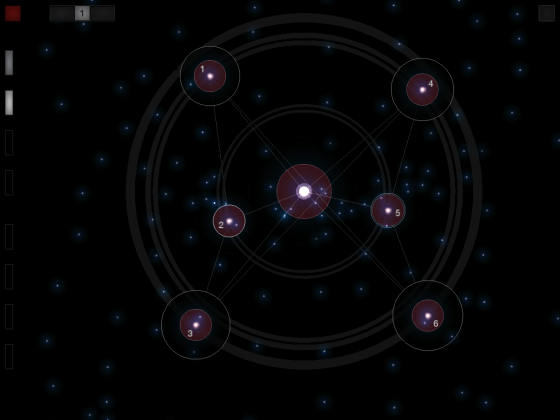
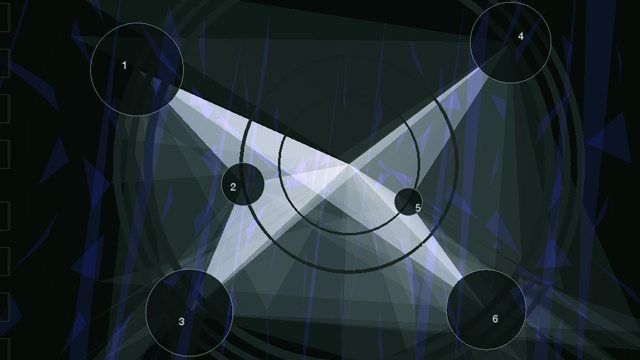
Instead of faders, buttons and knobs, Performer gives you the option of controlling your software via touch points on its interface called Nodes. Touching these nodes and combining them with gestures moving around the screen are what create the MIDI messages that Performer sends to your software. Up to 10 Nodes are available to you at any one point, with eight assignable banks that you can save screenshots to. A ribbon control is also provided.
There are a variety of ways in which Performer presents itself on your iPad. You can choose from three different kinds of backgrounds and Node representations, allowing you to mix and match up to three different options for some cool visuals, which you can send to a video projector via Konkreet Labs’ upcoming Visualizer partner app for your laptop. It gets a bit cluttered when you’re using a lot of Nodes though, so I found myself keeping the background to a bare minimum (my favorite “Stars” configuration).
Performer is great at what it does: Giving you a new way to interact with your DAW/DJ parameters through a responsive multi-touch interface. It’s not as much a DJ controller as the ones featured in this site as it’s an app meant for expressive tweaking of FX or EQ’s, as well as some fun musical improvisation when paired with your soft-synth of choice. Of course, its near-limitless design and assignability allow you to map all those nodes to perform like a grid controller, like the Midi Fighter, but then you might actually miss pushing buttons and twisting knobs.
HOOKING IT ALL UP
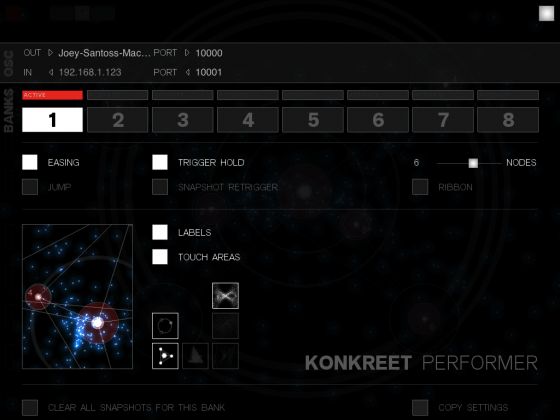
Getting Performer to work with your system isn’t a one step process, but it’s not that difficult! After firing up the app, head over to the preferences page and enter your Mac/PC’s local hostname in the “Out” field and, provided you’re on the same network (Konkreet Labs suggests using an Ad-Hoc connection), Performer automatically communicates with your computer via OSC messages. These messages can run NI Reaktor natively, but should be converted to MIDI if you’re going to be using your DAW/DJ software with it.
Mac users should grab a copy of OSCulator (http://www.osculator.net/), which acts as the bridge that translates OSC messages to MIDI. It’s a free download, but you really should pay for the software (minimum 19USD) if you plan on using it for extended periods of time since a pop-up that reminds you to pay for it effectively stops the program dead in its tracks. If you’re on a PC, download Pure Data Extended as well as Midi Yoke, which are both free to use applications.
PERFORMER WITH TRAKTOR
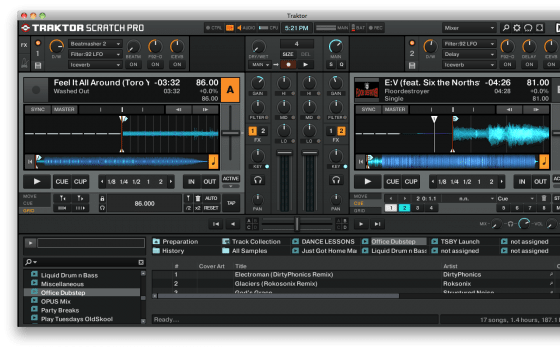
Performer doesn’t come with any mappings at the time of this writing, so I went ahead and downloaded the Wobbulator.TSI file from DigitalDJTools to get me started. After opening the template for T2 and OSCulator, I was good to go! It’s easy to see why the Performer works great as a multi-touch controller: Just moving one node around the X-Y axis allowed me to work through a handful of different parameters at once. As mentioned previously, the closest thing I can relate it to is Ean’s Super Knob idea for the VCI-100 wherein a group of parameters (in this case, my FX knobs and buttons) are mapped to just one control.
Nodes also transmit MIDI signals when you touch, hold and release them, allowing you to launch multiple cue points (among other things, if you mapped them differently) during a single press-release movement.
Of course, what makes Performer a powerful piece of gear is the fact that you can map it to Traktor any way you want to. If you’re new to mapping for Traktor, I suggest heading over to http://traktorbible.com to check out the basics because you’ll definitely want to know your way around Traktor’s controller messages.
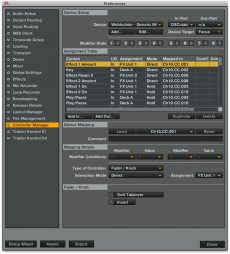
After playing around with the Wobbulator.TSI, I set out to make my own basic Effect mapping. I intend to use the app to control my two FX groups that I’ve been tweaking using my MC6000’s knobs, so I set up six Nodes in Performer to control one effect each, starting out by limiting the OSC messages to send out values of Distance of each Node from the Object Center (which is Performer’s reference point in-app), and from this one aspect alone the advantage of using Performer becomes evident: With this fundamental mapping I was able to control the Effect Amount of six different effects independently of each other all at the same time. Try doing that with 6 knobs! Indeed, you’re only limited by your mapping creativity and number of fingers (if you have an extra set of working opposable thumbs, those would come in handy right now).
If you want to use Performer as a more traditional DJ controller, you can also map out all the basic DJ functions like Cue/Play, Cue Points and even the crossfader, although it’d probably be quite confusing since the only labels assigned to the Nodes are numbers. The software doesn’t allow customization of Node names at the time of this writing, which is something that would help out modders and Traktor mappers immensely.
SUMMARY
We’ve only given you an overview of what Performer is and what it does: A smart, elegant way to take a different approach when it comes to playing live. I’m personally not convinced that it’s an essential DJ controller, but it does make tweaking FX/EQ/Synths more fun. Its structure allows you to discover new combinations for FX and creates some interesting new sounds, so if you’re into that sort of thing you’re probably going to head on over to the App Store to get it.
As with any piece of gear or software that gives you powerful control over your DAW/DJ program, it’s the way that you customize it to make it your own that really matters anyway, and thankfully Konkreet Labs’ Performer shines in this aspect.