DJ TechTools
  • Blog
    • DJ Gear
      • DIY Projects
      • Gear Reviews
      • New Products
      • Controllerism
    • Techniques + Tips
      • Beginner DJ
      • Advanced DJ
      • Producer
      • Finger Drummer
    • News + Culture
      • Editorials + Opinions
      • Artist Interviews
      • Performances + Routines
      • How I Play
    • DJ Software Tutorials
      • Serato Tips
        • Traktor Tips
      • CDJ Tips
      • Ableton Live Tips
  • Store
    • Run by real DJs, not a corporation
    • DJ Controllers
      • Midi Fighter Twister
      • Midi Fighter Spectra
      • Midi Fighter 64
      • View All
    • Accessories
      • Chroma USB Drive for DJs
      • Chroma Caps
      • Chroma Cables Audio
      • Chroma Cables USB-A
      • Chroma Cables: USB-C
      • DJTT Gift Card
      • Midi Fighter T-Shirt
      • Keyboard Covers
      • Earplugs by V-Moda
    • Production Gear
    • Soundcards & Mixers
  • Community
    • Popular Forums
      • General Discussion
      • Buy & Sell
      • Reviews
      • Mixes
      • Music Production
      • Show Your Setup
      • Off Topic
    • Handy Links
      • New Posts
      • Private Messages
      • Register
      • Search
    • Midi Maps
      • Traktor
      • Ableton
      • Serato DJ
      • Midi Fighter 3D
      • Midi Fighter Twister
      • Midi Fighter Spectra
  • Midi Fighter
  • Chroma
No Result
View All Result
DJ TechTools
  • Blog
    • DJ Gear
      • DIY Projects
      • Gear Reviews
      • New Products
      • Controllerism
    • Techniques + Tips
      • Beginner DJ
      • Advanced DJ
      • Producer
      • Finger Drummer
    • News + Culture
      • Editorials + Opinions
      • Artist Interviews
      • Performances + Routines
      • How I Play
    • DJ Software Tutorials
      • Serato Tips
        • Traktor Tips
      • CDJ Tips
      • Ableton Live Tips
  • Store
    • Run by real DJs, not a corporation
    • DJ Controllers
      • Midi Fighter Twister
      • Midi Fighter Spectra
      • Midi Fighter 64
      • View All
    • Accessories
      • Chroma USB Drive for DJs
      • Chroma Caps
      • Chroma Cables Audio
      • Chroma Cables USB-A
      • Chroma Cables: USB-C
      • DJTT Gift Card
      • Midi Fighter T-Shirt
      • Keyboard Covers
      • Earplugs by V-Moda
    • Production Gear
    • Soundcards & Mixers
  • Community
    • Popular Forums
      • General Discussion
      • Buy & Sell
      • Reviews
      • Mixes
      • Music Production
      • Show Your Setup
      • Off Topic
    • Handy Links
      • New Posts
      • Private Messages
      • Register
      • Search
    • Midi Maps
      • Traktor
      • Ableton
      • Serato DJ
      • Midi Fighter 3D
      • Midi Fighter Twister
      • Midi Fighter Spectra
  • Midi Fighter
  • Chroma
No Result
View All Result
DJ TechTools

Optimizing Windows for DJing – Part I (Power Script)

SmiTTTen by SmiTTTen
August 14, 2011
in Advanced DJ Tips, Basic DJ Tips, DJ Music Library Tips, DJ Techniques / Tips, How-To Video Tutorials, Video Posts
Reading Time: 3 mins read
0
Optimizing Windows for DJing – Part I (Power Script)
760
VIEWS
Post on FacebookTweet thisUpvote on Reddit
[youtube width=”640″ height=”360″]http://www.youtube.com/watch?v=Ey-YiiXpwoM[/youtube]

What’s it going to be? Mac or PC? One is the toast of the creative industry with each unit being delicately hand crafted on a silk pillow by a choir of angels. The other is a clunking black hole sucking the cool out of the universe and replacing it with narcoleptic accountants and device driver errors. At least that is what we are led to believe.  If you happen to fall into the latter camp you might grudgingly admit to having a PC stashed under the desk for mundane office work but you certainly wouldn’t consider taking it to a club? Would you?

REALITY CHECK

The reality is that, despite the bad press, PCs can be configured to work just as effectively as Macs, you just need to know your way around them. In this article we show you how to take the first step in understanding PC optimization for Traktor (amongst other things). You will learn how to use and customize a basic script that kills off dozens of CPU and RAM hungry Windows Services.  This script is not a panacea but it is one piece of the puzzle you can play with before making more permanent changes to your setup.

Watch the video at the top of the article for a full walkthrough on using our handy optimizer script. Here is a basic glossary of terms to get you started:

WINDOWS SERVICES

Windows Services are programs that are loaded up during boot time. Each service is tasked supporting a specific feature or component. They require no user interaction, are transparent to the user and their numbers quietly grow as new applications are installed on your machine.  Some Windows Services are vital, many are not and, all of them consume your system resources.

SCRIPTS

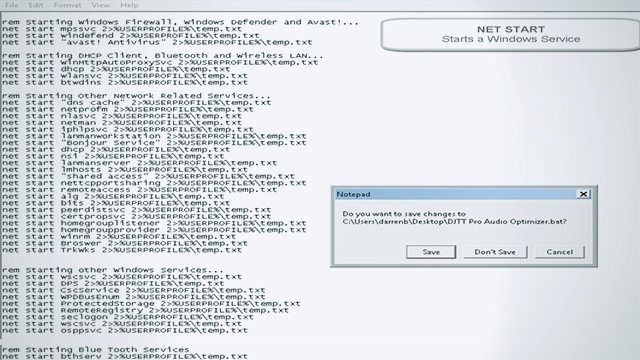
A script or “batch file” is simply a text file that contains sets of commands.  Scripts are incredibly useful because they can contain multiple sets of commands that can be executed in no more than two clicks. The script that we have created enables you to stop and subsequently restart a number of common services that are not needed by Traktor and most DJ services.

GET THE SCRIPT
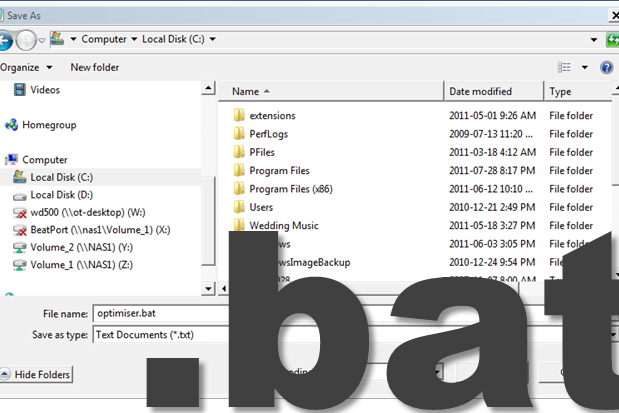
  • Go to: http://themixtrain.wordpress.com/resources/djtt-pro-audio-optimizer/
  • Copy and paste the script text into a Notepad file. Save the file as whateveryoulike.bat (Note: there is no .BAT option in the the ‘Save as Type’ in the Notepad ‘Save As ‘ dialog.  By adding .bat to the end of the file name you will ensure the file is correctly saved as a batch file and not a text file.
  • Watch the video in the header for full installation instructions.

SUMMARY

This script enables you to take the first step in optimizing a PC but it certainly isn’t designed to be a complete solution for applications like Traktor or Serato.   Stripping you system down takes some time and know-how.  In future posts we’ll cover topics like creating a dual-boot environment so you can create a stripped down system for Traktor alongside another instance of Windows that will happily support your day-to-day activities.  If however, this level of OS tweaking is not for you and you are currently in the market for a machine that will run DJ software effortlessly, heading to the Apple store is still a good bet.

Special Thanks to Trancicted and Stashe for their work on the script

Tags: microsoft windowsoptimizeoptimize abletonoptimize seratosmitttenTraktor Tips
Share6Tweet4Share
Previous Post

Itch 2.0 Reviewed – Onwards and Upwards

Next Post

The Laptop: Evolution or Revolution?

Related Posts

traktor-pro plus 3.8 pattern player controls
Dj and Production Tutorials

Review: Traktor Pro Plus 3.8 – After 8 months, is the subscription worth it?

April 20, 2023
Traktor Pro 3.6 releases, as well as a feature roadmap…
Breaking News

Traktor Pro 3.6 releases, as well as a feature roadmap…

August 19, 2022
Traktor Pro 3.6 beta and iZotope's Ozone Maximizer side by side
NAMM 2022

Traktor’s new beta cycle has begun: 3.6 to include iZotope products, maybe NKS support?

May 30, 2022
Load More
Next Post
The Laptop: Evolution or Revolution?

The Laptop: Evolution or Revolution?

Want to reach DJTT's audience here?

Shoot an email to advertising@djtechtools.com

DJTT ads
DJTT newsletter
Midi Fighter
Chat with us
  • ABOUT DJTT
  • CONTACT
  • PRIVACY
  • MIDI FIGHTER HELP
  • ABOUT DJTT
  • JOBS
  • CONTACT US
  • ADVERTISE
  • PRIVACY POLICY
  • ACCESSIBILITY STATEMENT

© 2024 DJ Techtools all rights reserved by DJ TechTools on all content unless otherwise noted.

No Result
View All Result
  • Blog
    • DJ Gear
      • DIY Projects
      • Gear Reviews
      • New Products
      • Controllerism
    • Techniques + Tips
      • Beginner DJ
      • Advanced DJ
      • Producer
      • Finger Drummer
    • News + Culture
      • Editorials + Opinions
      • Artist Interviews
      • Performances + Routines
      • How I Play
    • DJ Software Tutorials
      • Serato Tips
      • CDJ Tips
      • Ableton Live Tips
  • Store
    • Run by real DJs, not a corporation
    • DJ Controllers
      • Midi Fighter Twister
      • Midi Fighter Spectra
      • Midi Fighter 64
      • View All
    • Accessories
      • Chroma USB Drive for DJs
      • Chroma Caps
      • Chroma Cables Audio
      • Chroma Cables USB-A
      • Chroma Cables: USB-C
      • DJTT Gift Card
      • Midi Fighter T-Shirt
      • Keyboard Covers
      • Earplugs by V-Moda
    • Production Gear
    • Soundcards & Mixers
  • Community
    • Popular Forums
      • General Discussion
      • Buy & Sell
      • Reviews
      • Mixes
      • Music Production
      • Show Your Setup
      • Off Topic
    • Handy Links
      • New Posts
      • Private Messages
      • Register
      • Search
    • Midi Maps
      • Traktor
      • Ableton
      • Serato DJ
      • Midi Fighter 3D
      • Midi Fighter Twister
      • Midi Fighter Spectra
  • Midi Fighter
  • Chroma

© 2024 DJ Techtools all rights reserved by DJ TechTools on all content unless otherwise noted.

This website uses cookies. By continuing to use this website you are giving consent to cookies being used. Visit our Privacy and Cookie Policy.