DJ TechTools
  • Blog
    • DJ Gear
      • DIY Projects
      • Gear Reviews
      • New Products
      • Controllerism
    • Techniques + Tips
      • Beginner DJ
      • Advanced DJ
      • Producer
      • Finger Drummer
    • News + Culture
      • Editorials + Opinions
      • Artist Interviews
      • Performances + Routines
      • How I Play
    • DJ Software Tutorials
      • Serato Tips
        • Traktor Tips
      • CDJ Tips
      • Ableton Live Tips
  • Store
    • Run by real DJs, not a corporation
    • DJ Controllers
      • Midi Fighter Twister
      • Midi Fighter Spectra
      • Midi Fighter 64
      • View All
    • Accessories
      • Chroma USB Drive for DJs
      • Chroma Caps
      • Chroma Cables Audio
      • Chroma Cables USB-A
      • Chroma Cables: USB-C
      • DJTT Gift Card
      • Midi Fighter T-Shirt
      • Keyboard Covers
      • Earplugs by V-Moda
    • Production Gear
    • Soundcards & Mixers
  • Community
    • Popular Forums
      • General Discussion
      • Buy & Sell
      • Reviews
      • Mixes
      • Music Production
      • Show Your Setup
      • Off Topic
    • Handy Links
      • New Posts
      • Private Messages
      • Register
      • Search
    • Midi Maps
      • Traktor
      • Ableton
      • Serato DJ
      • Midi Fighter 3D
      • Midi Fighter Twister
      • Midi Fighter Spectra
  • Midi Fighter
  • Chroma
No Result
View All Result
DJ TechTools
  • Blog
    • DJ Gear
      • DIY Projects
      • Gear Reviews
      • New Products
      • Controllerism
    • Techniques + Tips
      • Beginner DJ
      • Advanced DJ
      • Producer
      • Finger Drummer
    • News + Culture
      • Editorials + Opinions
      • Artist Interviews
      • Performances + Routines
      • How I Play
    • DJ Software Tutorials
      • Serato Tips
        • Traktor Tips
      • CDJ Tips
      • Ableton Live Tips
  • Store
    • Run by real DJs, not a corporation
    • DJ Controllers
      • Midi Fighter Twister
      • Midi Fighter Spectra
      • Midi Fighter 64
      • View All
    • Accessories
      • Chroma USB Drive for DJs
      • Chroma Caps
      • Chroma Cables Audio
      • Chroma Cables USB-A
      • Chroma Cables: USB-C
      • DJTT Gift Card
      • Midi Fighter T-Shirt
      • Keyboard Covers
      • Earplugs by V-Moda
    • Production Gear
    • Soundcards & Mixers
  • Community
    • Popular Forums
      • General Discussion
      • Buy & Sell
      • Reviews
      • Mixes
      • Music Production
      • Show Your Setup
      • Off Topic
    • Handy Links
      • New Posts
      • Private Messages
      • Register
      • Search
    • Midi Maps
      • Traktor
      • Ableton
      • Serato DJ
      • Midi Fighter 3D
      • Midi Fighter Twister
      • Midi Fighter Spectra
  • Midi Fighter
  • Chroma
No Result
View All Result
DJ TechTools

Featured User Mapping: Kontrol X1 Preparation

Dan White by Dan White
February 29, 2012
in Advanced DJ Tips, Basic DJ Tips, Featured User Mapping, Traktor Tips
Reading Time: 2 mins read
0
Featured User Mapping: Kontrol X1 Preparation
220
VIEWS
Post on FacebookTweet thisUpvote on Reddit

Mappings are one of the greatest things about the community that surrounds DJ TechTools, so we’ve decided to start featuring one of our favorite user-created mappings on a regular basis. This month’s is a mapping by a moderator who really does a bang-up job on the forums, Photojojo. The mapping is made for the X1, and focuses around prepping tracks with super-efficiency. Read on for details and a download!
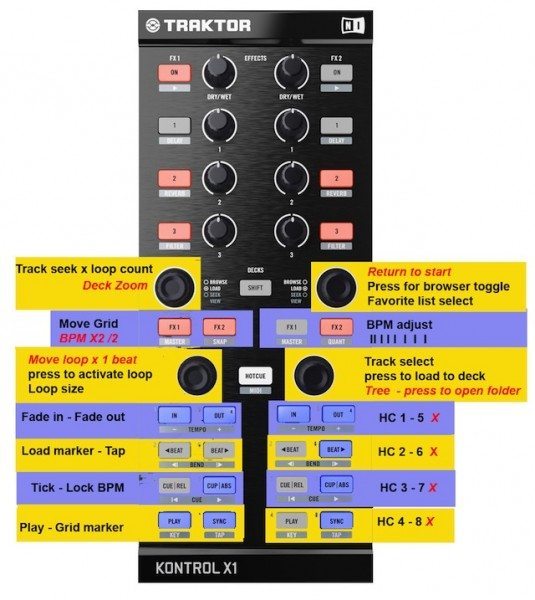
What we like most about this mapping is that it creates a really smart workflow for processing new tracks and getting them DJ-ready in a hurry – something that most DJs spend (or should spend) quite a bit of time doing. This mapping allows the user to select tracks, set and adjust beat grids, loops, hotcues, and fade in/out points with speed.

You’ll need:

  • Traktor Pro 2
  • An Kontrol X1 in MIDI mode (simply press Shift + Hotcue to set it to this mode)
  • Photojojo’s preparation mapping (download here!)

Simply load the mapping into the Traktor Controller Manager and and start setting the essentials. With a little bit of practice, I felt like I was already really getting a benefit out of the workflow that Photojojo has set here.
We recommend keeping the above photo up next to Traktor while you get used to the mapping, it’ll make your first few tracks go a lot smoother.

Feeling left out because you don’t own an XI (yet)? Amazon is here for you.

Want to thank Photojojo for this mapping and give him some feedback? Check out this thread on the forums!

Think you know of a DJTT user mapping that deserves highlighting in the next Featured User Mapping article? Let us know in the comments below, and vote for the ones that you think deserve it! Be sure to look in the comments first to avoid double posting.
Tags: photojojoprep tracks in traktorpreparation mappingtraktor mappingx1 mapping
Share2Tweet1Share
Previous Post

Legal Concerns for DJs: Negotiating a DJ Contract

Next Post

DJ TechTools on G4’s Attack of the Show

Related Posts

10 Powerful MIDI Mappings Designed By DJTT’s Maps Community
Controllerism

10 Powerful MIDI Mappings Designed By DJTT’s Maps Community

March 19, 2014
Looping Techniques For DJs: Loop Move Macros
Advanced DJ Tips

Looping Techniques For DJs: Loop Move Macros

January 5, 2014
Load More
Next Post
DJ TechTools on G4’s Attack of the Show

DJ TechTools on G4's Attack of the Show

Want to reach DJTT's audience here?

Shoot an email to advertising@djtechtools.com

DJTT ads
DJTT newsletter
Midi Fighter
Chat with us
  • ABOUT DJTT
  • CONTACT
  • PRIVACY
  • MIDI FIGHTER HELP
  • ABOUT DJTT
  • JOBS
  • CONTACT US
  • ADVERTISE
  • PRIVACY POLICY
  • ACCESSIBILITY STATEMENT

© 2024 DJ Techtools all rights reserved by DJ TechTools on all content unless otherwise noted.

No Result
View All Result
  • Blog
    • DJ Gear
      • DIY Projects
      • Gear Reviews
      • New Products
      • Controllerism
    • Techniques + Tips
      • Beginner DJ
      • Advanced DJ
      • Producer
      • Finger Drummer
    • News + Culture
      • Editorials + Opinions
      • Artist Interviews
      • Performances + Routines
      • How I Play
    • DJ Software Tutorials
      • Serato Tips
      • CDJ Tips
      • Ableton Live Tips
  • Store
    • Run by real DJs, not a corporation
    • DJ Controllers
      • Midi Fighter Twister
      • Midi Fighter Spectra
      • Midi Fighter 64
      • View All
    • Accessories
      • Chroma USB Drive for DJs
      • Chroma Caps
      • Chroma Cables Audio
      • Chroma Cables USB-A
      • Chroma Cables: USB-C
      • DJTT Gift Card
      • Midi Fighter T-Shirt
      • Keyboard Covers
      • Earplugs by V-Moda
    • Production Gear
    • Soundcards & Mixers
  • Community
    • Popular Forums
      • General Discussion
      • Buy & Sell
      • Reviews
      • Mixes
      • Music Production
      • Show Your Setup
      • Off Topic
    • Handy Links
      • New Posts
      • Private Messages
      • Register
      • Search
    • Midi Maps
      • Traktor
      • Ableton
      • Serato DJ
      • Midi Fighter 3D
      • Midi Fighter Twister
      • Midi Fighter Spectra
  • Midi Fighter
  • Chroma

© 2024 DJ Techtools all rights reserved by DJ TechTools on all content unless otherwise noted.

This website uses cookies. By continuing to use this website you are giving consent to cookies being used. Visit our Privacy and Cookie Policy.