DJ TechTools
  • Blog
    • DJ Gear
      • DIY Projects
      • Gear Reviews
      • New Products
      • Controllerism
    • Techniques + Tips
      • Beginner DJ
      • Advanced DJ
      • Producer
      • Finger Drummer
    • News + Culture
      • Editorials + Opinions
      • Artist Interviews
      • Performances + Routines
      • How I Play
    • DJ Software Tutorials
      • Serato Tips
        • Traktor Tips
      • CDJ Tips
      • Ableton Live Tips
  • Store
    • Run by real DJs, not a corporation
    • DJ Controllers
      • Midi Fighter Twister
      • Midi Fighter Spectra
      • Midi Fighter 64
      • View All
    • Accessories
      • Chroma USB Drive for DJs
      • Chroma Caps
      • Chroma Cables Audio
      • Chroma Cables USB-A
      • Chroma Cables: USB-C
      • DJTT Gift Card
      • Midi Fighter T-Shirt
      • Keyboard Covers
      • Earplugs by V-Moda
    • Production Gear
    • Soundcards & Mixers
  • Community
    • Popular Forums
      • General Discussion
      • Buy & Sell
      • Reviews
      • Mixes
      • Music Production
      • Show Your Setup
      • Off Topic
    • Handy Links
      • New Posts
      • Private Messages
      • Register
      • Search
    • Midi Maps
      • Traktor
      • Ableton
      • Serato DJ
      • Midi Fighter 3D
      • Midi Fighter Twister
      • Midi Fighter Spectra
  • Midi Fighter
  • Chroma
No Result
View All Result
DJ TechTools
  • Blog
    • DJ Gear
      • DIY Projects
      • Gear Reviews
      • New Products
      • Controllerism
    • Techniques + Tips
      • Beginner DJ
      • Advanced DJ
      • Producer
      • Finger Drummer
    • News + Culture
      • Editorials + Opinions
      • Artist Interviews
      • Performances + Routines
      • How I Play
    • DJ Software Tutorials
      • Serato Tips
        • Traktor Tips
      • CDJ Tips
      • Ableton Live Tips
  • Store
    • Run by real DJs, not a corporation
    • DJ Controllers
      • Midi Fighter Twister
      • Midi Fighter Spectra
      • Midi Fighter 64
      • View All
    • Accessories
      • Chroma USB Drive for DJs
      • Chroma Caps
      • Chroma Cables Audio
      • Chroma Cables USB-A
      • Chroma Cables: USB-C
      • DJTT Gift Card
      • Midi Fighter T-Shirt
      • Keyboard Covers
      • Earplugs by V-Moda
    • Production Gear
    • Soundcards & Mixers
  • Community
    • Popular Forums
      • General Discussion
      • Buy & Sell
      • Reviews
      • Mixes
      • Music Production
      • Show Your Setup
      • Off Topic
    • Handy Links
      • New Posts
      • Private Messages
      • Register
      • Search
    • Midi Maps
      • Traktor
      • Ableton
      • Serato DJ
      • Midi Fighter 3D
      • Midi Fighter Twister
      • Midi Fighter Spectra
  • Midi Fighter
  • Chroma
No Result
View All Result
DJ TechTools

Advanced Key Mixing Techniques for DJs

Ean Golden by Ean Golden
December 20, 2013
in Advanced DJ Tips, DJ Techniques / Tips
Reading Time: 3 mins read
0
Advanced Key Mixing Techniques for DJs
95
SHARES
4.8k
VIEWS
Post on FacebookTweet thisUpvote on Reddit

OK, you’ve figured out basic two track mixing, started blending four decks, and even thrown in a little beat juggling for good measure. What’s next in the pantheon of creative DJ mixing? How about advanced harmonic transitions? DJs talk all the time about taking people on a “journey”, but to really create a musical story it’s critical to master the language of music. Today I have one simple tip for you: how to transition smoothly between major and minor keys – along with one other bonus technique for good measure.

First things first, if you’re not up to speed on mixing “in key” then check out this article for a primer – then pop back while we delve into more advanced territory.

MAJOR TO MINOR – THE ENERGY SWAP

If you are playing any form of electronic music then chances are very high that most of your library is in a minor key. There are however a few gems in major keys, which provide excellent dance floor lift but present a musical mixing challenge. Imagine the current playing song is in 7B, and the desire is to mix out perfectly in key but there are no suitable 7B tracks in the library.

There is one simple way to mix from major to minor harmonically:  match the number, and change the letter from A to B or visa versa.

Check out the camelot system created by Mixed in Key below which makes it easy to visualize. In this case D minor (7A) contains the same notes as F major (7B) so the two can be mixed together.
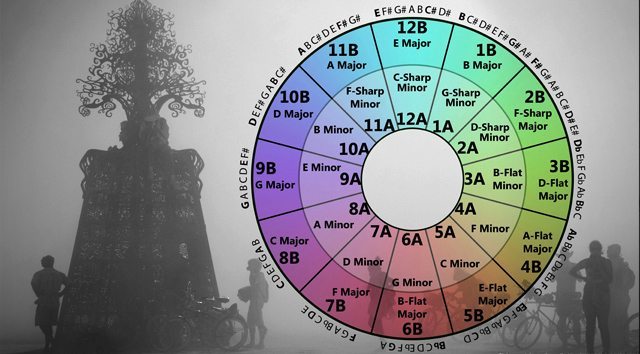
An enhanced Camelot Wheel

If you are feeling adventurous, and want to mix out of the box, try an “Absolute Major/Minor” switch by staying in the same key and transitioning from F Major to F minor. Here is a simple formula to follow:

  • If In Major: Subtract 3 from the number EX: 7B to 4A
  • If In Minor: Add 3 to the number: EX: 10A to 1B

Many DJs play it safe and mix during the drum breaks so there are no harmonic clashes. While this is a clean, fail-proof method, it leaves a lot of magic moments on the table. Key matched mixing, including major/minor or minor/major flips, present an exciting way to truly “mix” music.

“ENERGY BOOST” KEY MIXING
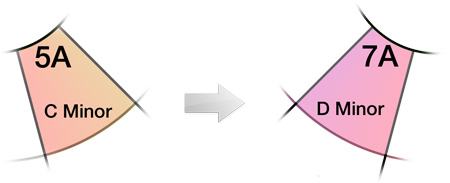
Going Up Whole Step – Energy Boost Mix

You have probably heard this trick used by pop musicians for decades – it’s the final verse that rises in key, usually one or two semitones for a big energy lift. To find a Camelot or Open Key notated song that’s in this range:

  • One semitone: Add 7 to the key notation of your current track
  • Two semitones: Add 2 to the key notation of your current track

From experience, usually a two semitone jump will work more consistently than a one semitone mix. Be aware, this type of “energy boost”  is more likely to conflict in a longer mix and should be used in short transitions.

THE SHORT LOOP

In each of these instances, matching key codes do not guarantee a perfect mix since both songs might share similar notes but the chords are in an incompatible order. To create a bridge between the songs allowing for longer (compatible) mixes simply drop a short (one count) loop on a single chord or note that is in harmony. This is particularly nice for melodic transitions up or down the minor/major scales.

In the Major to Minor flip example above – the songs may contain one note that does not match. Make sure to drop a loop at the beginning, or end of a musical phrase to avoid any conflict should it arise.

As always, trust your ears before anything else. Read more in our introduction to Key Lock and how different softwares treat key mixing.

Tags: camelot wheelHarmonic MixingKey Mixingmajor to minormixed in keymixing in keysemitones
Share38Tweet24Share
Previous Post

History of the Rave Scene: How DJs Built Modern Dance Music

Next Post

Routine: Mad Zach Two-Handed Logiheck On Midi Fighter Spectras

Related Posts

Mixed In Key Live can analyze tracks from streaming platforms, DAWs, and any audio on your Mac
DJ Software

Mixed In Key Live can analyze tracks from streaming platforms, DAWs, and any audio on your Mac

November 5, 2021
Mixed In Key 10: improved key detection, cue point exporting, & a UI update
DJ Gear

Mixed In Key 10: improved key detection, cue point exporting, & a UI update

May 6, 2021
Rekordbox’s New Beta Brings Stoplight Key Match Display
News

Rekordbox’s New Beta Brings Stoplight Key Match Display

August 1, 2018
Load More
Next Post
Routine: Mad Zach Two-Handed Logiheck On Midi Fighter Spectras

Routine: Mad Zach Two-Handed Logiheck On Midi Fighter Spectras

Want to reach DJTT's audience here?

Shoot an email to advertising@djtechtools.com

DJTT ads
DJTT newsletter
Midi Fighter
Chat with us
  • ABOUT DJTT
  • CONTACT
  • PRIVACY
  • MIDI FIGHTER HELP
  • ABOUT DJTT
  • JOBS
  • CONTACT US
  • ADVERTISE
  • PRIVACY POLICY
  • ACCESSIBILITY STATEMENT

© 2024 DJ Techtools all rights reserved by DJ TechTools on all content unless otherwise noted.

No Result
View All Result
  • Blog
    • DJ Gear
      • DIY Projects
      • Gear Reviews
      • New Products
      • Controllerism
    • Techniques + Tips
      • Beginner DJ
      • Advanced DJ
      • Producer
      • Finger Drummer
    • News + Culture
      • Editorials + Opinions
      • Artist Interviews
      • Performances + Routines
      • How I Play
    • DJ Software Tutorials
      • Serato Tips
      • CDJ Tips
      • Ableton Live Tips
  • Store
    • Run by real DJs, not a corporation
    • DJ Controllers
      • Midi Fighter Twister
      • Midi Fighter Spectra
      • Midi Fighter 64
      • View All
    • Accessories
      • Chroma USB Drive for DJs
      • Chroma Caps
      • Chroma Cables Audio
      • Chroma Cables USB-A
      • Chroma Cables: USB-C
      • DJTT Gift Card
      • Midi Fighter T-Shirt
      • Keyboard Covers
      • Earplugs by V-Moda
    • Production Gear
    • Soundcards & Mixers
  • Community
    • Popular Forums
      • General Discussion
      • Buy & Sell
      • Reviews
      • Mixes
      • Music Production
      • Show Your Setup
      • Off Topic
    • Handy Links
      • New Posts
      • Private Messages
      • Register
      • Search
    • Midi Maps
      • Traktor
      • Ableton
      • Serato DJ
      • Midi Fighter 3D
      • Midi Fighter Twister
      • Midi Fighter Spectra
  • Midi Fighter
  • Chroma

© 2024 DJ Techtools all rights reserved by DJ TechTools on all content unless otherwise noted.

This website uses cookies. By continuing to use this website you are giving consent to cookies being used. Visit our Privacy and Cookie Policy.