DJ TechTools
  • Blog
    • DJ Gear
      • DIY Projects
      • Gear Reviews
      • New Products
      • Controllerism
    • Techniques + Tips
      • Beginner DJ
      • Advanced DJ
      • Producer
      • Finger Drummer
    • News + Culture
      • Editorials + Opinions
      • Artist Interviews
      • Performances + Routines
      • How I Play
    • DJ Software Tutorials
      • Serato Tips
        • Traktor Tips
      • CDJ Tips
      • Ableton Live Tips
  • Store
    • Run by real DJs, not a corporation
    • DJ Controllers
      • Midi Fighter Twister
      • Midi Fighter Spectra
      • Midi Fighter 64
      • View All
    • Accessories
      • Chroma USB Drive for DJs
      • Chroma Caps
      • Chroma Cables Audio
      • Chroma Cables USB-A
      • Chroma Cables: USB-C
      • DJTT Gift Card
      • Midi Fighter T-Shirt
      • Keyboard Covers
      • Earplugs by V-Moda
    • Production Gear
    • Soundcards & Mixers
  • Community
    • Popular Forums
      • General Discussion
      • Buy & Sell
      • Reviews
      • Mixes
      • Music Production
      • Show Your Setup
      • Off Topic
    • Handy Links
      • New Posts
      • Private Messages
      • Register
      • Search
    • Midi Maps
      • Traktor
      • Ableton
      • Serato DJ
      • Midi Fighter 3D
      • Midi Fighter Twister
      • Midi Fighter Spectra
  • Midi Fighter
  • Chroma
No Result
View All Result
DJ TechTools
  • Blog
    • DJ Gear
      • DIY Projects
      • Gear Reviews
      • New Products
      • Controllerism
    • Techniques + Tips
      • Beginner DJ
      • Advanced DJ
      • Producer
      • Finger Drummer
    • News + Culture
      • Editorials + Opinions
      • Artist Interviews
      • Performances + Routines
      • How I Play
    • DJ Software Tutorials
      • Serato Tips
        • Traktor Tips
      • CDJ Tips
      • Ableton Live Tips
  • Store
    • Run by real DJs, not a corporation
    • DJ Controllers
      • Midi Fighter Twister
      • Midi Fighter Spectra
      • Midi Fighter 64
      • View All
    • Accessories
      • Chroma USB Drive for DJs
      • Chroma Caps
      • Chroma Cables Audio
      • Chroma Cables USB-A
      • Chroma Cables: USB-C
      • DJTT Gift Card
      • Midi Fighter T-Shirt
      • Keyboard Covers
      • Earplugs by V-Moda
    • Production Gear
    • Soundcards & Mixers
  • Community
    • Popular Forums
      • General Discussion
      • Buy & Sell
      • Reviews
      • Mixes
      • Music Production
      • Show Your Setup
      • Off Topic
    • Handy Links
      • New Posts
      • Private Messages
      • Register
      • Search
    • Midi Maps
      • Traktor
      • Ableton
      • Serato DJ
      • Midi Fighter 3D
      • Midi Fighter Twister
      • Midi Fighter Spectra
  • Midi Fighter
  • Chroma
No Result
View All Result
DJ TechTools

Richie Hawtin Talks Creative Process, Shows Studio and Live Setups at EM15/MUTEK

Ken Taylor by Ken Taylor
June 2, 2014
in Ableton, Ableton Live Push, Ableton Videos, Artist Features, Breaking News, Controllerism, Live 9, News, News + Culture, Video Posts, Videos
Reading Time: 3 mins read
0
Richie Hawtin Talks Creative Process, Shows Studio and Live Setups at EM15/MUTEK
175
VIEWS
Post on FacebookTweet thisUpvote on Reddit

This past weekend, the DJ TechTools crew headed to Montreal for the 15th edition of the city’s MUTEK Festival, which this year paired up with the digital-arts festival Elektra for a joint presentation called EM15. Over the course of six days, EM15 featured all manner of boundary-pushing artists from both the experimental-electronic and beat-oriented worlds of music, including Ricardo Villalobos, Audion, Robert Henke, Marc Houle, Max Cooper, Fluxion, Tim Hecker, and tons more.

Of course, one of the festival’s biggest draws was Richie Hawtin, who not only performed twice (at an official ENTER.-branded performance at Metropolis and a surprise outdoor RBMA-sponsored gig) but also sat down with us for an interview in the Ableton Lounge to go deep into his process of making and performing music over the course of his 25-year career—which you can watch in full below.

Not only were we treated to an hour of discussion on everything from how he made his early DE9 mixes, and how his albums and live performances influence one another, but he also shared with us a handful of exclusive behind-the-scenes technical photos—from his live setup for his Richie Hawtin/Plastikman gig at the Guggenheim Museum last year, to his DJ setup, to his home studio in Windsor, Ontario.
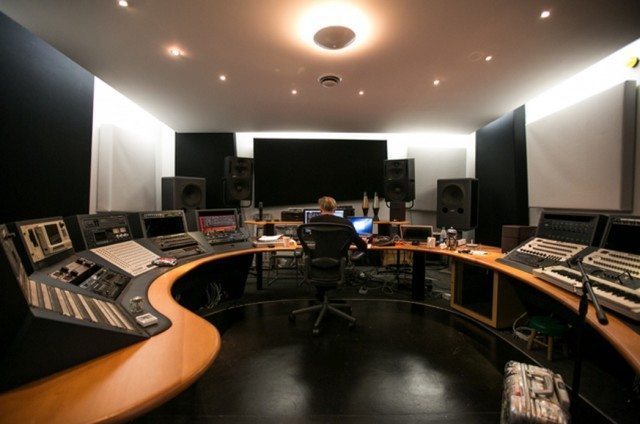
windsor-studio
A wide angle of Hawtin’s studio in Windsor, which he fully built out shortly before moving to Berlin. He told us that because of his move, he rarely gets to use this studio.


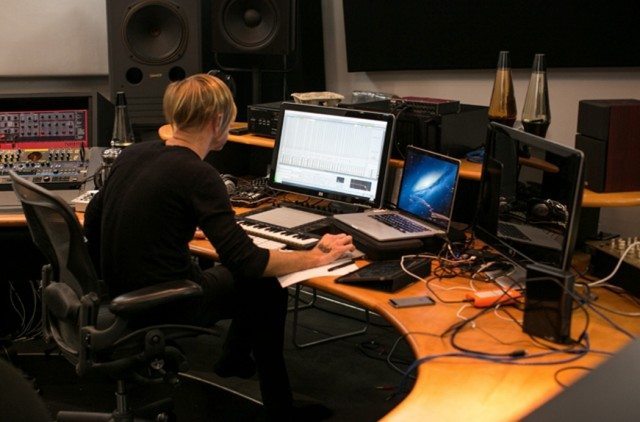
windsor-close
A closer detail of the workspace, where he made most of the music that went into his Plastikman performance at New York’s Guggenheim Museum last November.


Because Hawtin does much of his producing and editing on the go these days, he told us that the above detail is a more realistic reflection of his mobile setup, which consists primarily of his laptop, Ableton Push, and a pair of speakers. “When you’re going around, you don’t want to take speakers, so I have speakers dotted around the world right now,” he said with a chuckle. “So if anyone wants to record in the Philippines, I have a pair of speakers there,” he joked.
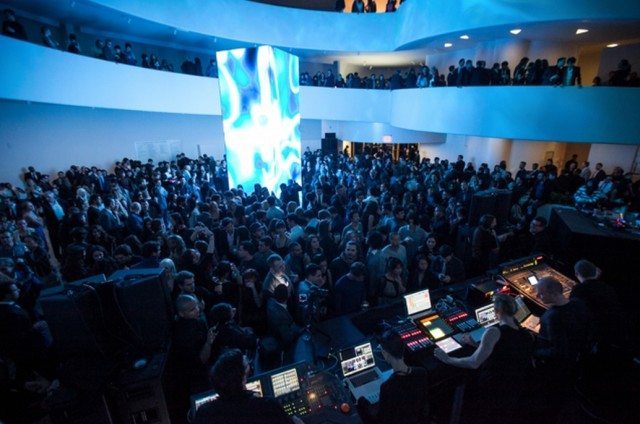
guggenheim-plastikman-crowd-view
Hawtin’s Plastikman performance at the Guggenheim Museum.


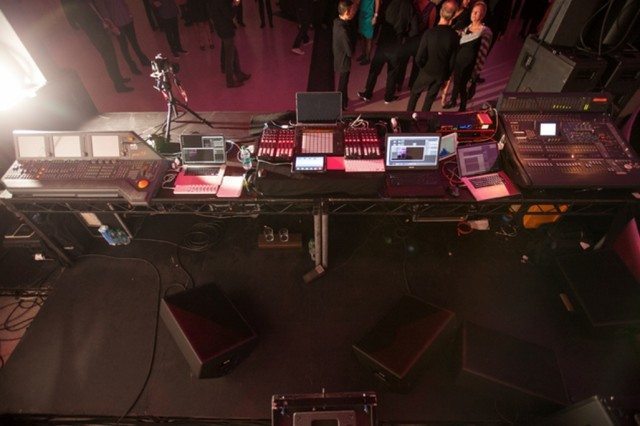
guggenheim-plastikman-crowd
The same performance, from Hawtin’s point of view.

“The reason I do these shows is to try and play with how audio and visuals and lighting all react together when one person is controlling them,” he said. “So that’s why I can’t just use audio stems—I need to have as much information running as possible from my computer systems that we can turn into information that can drive other systems. You see a lighting console on the left. You see a visual computer running LED displays next to it, then my computer, then audio. All of those are tied together in a higher way than normal, of course. My audio is always connected to the audio mixer… There’s a really interesting system called Dante, which is actually audio over Ethernet. So once you’re using that, any computers on the network up there can tap into any audio that’s on my computer. You don’t have to route wires or anything like that.”


“Sure it would be great to do a live show with all analog gear,” he continued, “but the complexities of using analog gear and taking audio from my 303 to the speakers and also to the computer and lighting systems is not gonna work. So going completely digital for this setup enabled us to route MIDI information, DMX lighting information, and audio signals seamlessly between any of those systems. And once you have this network of information, it’s very easy—well, relatively easy—to say, ‘Okay, I want this musical information to go to the lighting system, and that musical information, instead of playing notes, to turn notes into colors.’ And that’s really the system we’ve been developing for the Plastikman shows for the last couple of years.”
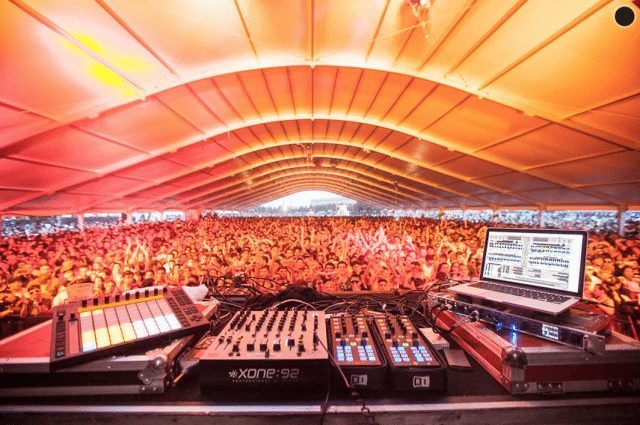
richie-hawtin-dj-booth
Hawtin’s current DJ setup.

“What was really good for me was when I went into the studio to do the Guggenheim show last October, I’d already spent six months on tour with the Push in my DJ shows, doing all those drum fills,” he said. “Every time I’d play and I was doing those, and something was working well, I’m like, ‘Okay, that could be good in the studio,’ or kind of multitasking, thinking, ‘Okay, well, if I’m doing this live, can those movements be sent to the LED wall? Can we visualize my movements?’ So it’s that idea of studio-reduction, performance, being on the plane, being in the Philippines, being in Berlin—it really is one big loop now.”

Check out more of our MUTEK coverage to come here on DJ TechTools.
 

Tags: em15live setupmontrealmutekplastikmanplastikman live setupRichie Hawtinrichie hawtin's DJ setuprichie hawtin's studio
Share2Tweet1Share
Previous Post

Making Your First DJ Intro Edit in Ableton Live

Next Post

DJTT Summer Sale: All Midi Fighters $199! + A Midi Fighter Giveaway

Related Posts

How I Play: Stavroz
How I Play

How I Play: Stavroz

December 14, 2023
A beginner’s guide to adding DJ tracks to your synthesizer set
Dj and Production Tutorials

A beginner’s guide to adding DJ tracks to your synthesizer set

August 15, 2021
PLAYdifferently releases MODEL 1.4 – a compact, 4-channel analogue mixer
DJ Gear

PLAYdifferently releases MODEL 1.4 – a compact, 4-channel analogue mixer

January 20, 2021
Load More
Next Post
DJTT Summer Sale: All Midi Fighters $199! + A Midi Fighter Giveaway

DJTT Summer Sale: All Midi Fighters $199! + A Midi Fighter Giveaway

Want to reach DJTT's audience here?

Shoot an email to advertising@djtechtools.com

DJTT ads
DJTT newsletter
Midi Fighter
Chat with us
  • ABOUT DJTT
  • CONTACT
  • PRIVACY
  • MIDI FIGHTER HELP
  • ABOUT DJTT
  • JOBS
  • CONTACT US
  • ADVERTISE
  • PRIVACY POLICY
  • ACCESSIBILITY STATEMENT

© 2024 DJ Techtools all rights reserved by DJ TechTools on all content unless otherwise noted.

No Result
View All Result
  • Blog
    • DJ Gear
      • DIY Projects
      • Gear Reviews
      • New Products
      • Controllerism
    • Techniques + Tips
      • Beginner DJ
      • Advanced DJ
      • Producer
      • Finger Drummer
    • News + Culture
      • Editorials + Opinions
      • Artist Interviews
      • Performances + Routines
      • How I Play
    • DJ Software Tutorials
      • Serato Tips
      • CDJ Tips
      • Ableton Live Tips
  • Store
    • Run by real DJs, not a corporation
    • DJ Controllers
      • Midi Fighter Twister
      • Midi Fighter Spectra
      • Midi Fighter 64
      • View All
    • Accessories
      • Chroma USB Drive for DJs
      • Chroma Caps
      • Chroma Cables Audio
      • Chroma Cables USB-A
      • Chroma Cables: USB-C
      • DJTT Gift Card
      • Midi Fighter T-Shirt
      • Keyboard Covers
      • Earplugs by V-Moda
    • Production Gear
    • Soundcards & Mixers
  • Community
    • Popular Forums
      • General Discussion
      • Buy & Sell
      • Reviews
      • Mixes
      • Music Production
      • Show Your Setup
      • Off Topic
    • Handy Links
      • New Posts
      • Private Messages
      • Register
      • Search
    • Midi Maps
      • Traktor
      • Ableton
      • Serato DJ
      • Midi Fighter 3D
      • Midi Fighter Twister
      • Midi Fighter Spectra
  • Midi Fighter
  • Chroma

© 2024 DJ Techtools all rights reserved by DJ TechTools on all content unless otherwise noted.

This website uses cookies. By continuing to use this website you are giving consent to cookies being used. Visit our Privacy and Cookie Policy.