DJ TechTools
  • Blog
    • DJ Gear
      • DIY Projects
      • Gear Reviews
      • New Products
      • Controllerism
    • Techniques + Tips
      • Beginner DJ
      • Advanced DJ
      • Producer
      • Finger Drummer
    • News + Culture
      • Editorials + Opinions
      • Artist Interviews
      • Performances + Routines
      • How I Play
    • DJ Software Tutorials
      • Serato Tips
        • Traktor Tips
      • CDJ Tips
      • Ableton Live Tips
  • Store
    • Run by real DJs, not a corporation
    • DJ Controllers
      • Midi Fighter Twister
      • Midi Fighter Spectra
      • Midi Fighter 64
      • View All
    • Accessories
      • Chroma USB Drive for DJs
      • Chroma Caps
      • Chroma Cables Audio
      • Chroma Cables USB-A
      • Chroma Cables: USB-C
      • DJTT Gift Card
      • Midi Fighter T-Shirt
      • Keyboard Covers
      • Earplugs by V-Moda
    • Production Gear
    • Soundcards & Mixers
  • Community
    • Popular Forums
      • General Discussion
      • Buy & Sell
      • Reviews
      • Mixes
      • Music Production
      • Show Your Setup
      • Off Topic
    • Handy Links
      • New Posts
      • Private Messages
      • Register
      • Search
    • Midi Maps
      • Traktor
      • Ableton
      • Serato DJ
      • Midi Fighter 3D
      • Midi Fighter Twister
      • Midi Fighter Spectra
  • Midi Fighter
  • Chroma
No Result
View All Result
DJ TechTools
  • Blog
    • DJ Gear
      • DIY Projects
      • Gear Reviews
      • New Products
      • Controllerism
    • Techniques + Tips
      • Beginner DJ
      • Advanced DJ
      • Producer
      • Finger Drummer
    • News + Culture
      • Editorials + Opinions
      • Artist Interviews
      • Performances + Routines
      • How I Play
    • DJ Software Tutorials
      • Serato Tips
        • Traktor Tips
      • CDJ Tips
      • Ableton Live Tips
  • Store
    • Run by real DJs, not a corporation
    • DJ Controllers
      • Midi Fighter Twister
      • Midi Fighter Spectra
      • Midi Fighter 64
      • View All
    • Accessories
      • Chroma USB Drive for DJs
      • Chroma Caps
      • Chroma Cables Audio
      • Chroma Cables USB-A
      • Chroma Cables: USB-C
      • DJTT Gift Card
      • Midi Fighter T-Shirt
      • Keyboard Covers
      • Earplugs by V-Moda
    • Production Gear
    • Soundcards & Mixers
  • Community
    • Popular Forums
      • General Discussion
      • Buy & Sell
      • Reviews
      • Mixes
      • Music Production
      • Show Your Setup
      • Off Topic
    • Handy Links
      • New Posts
      • Private Messages
      • Register
      • Search
    • Midi Maps
      • Traktor
      • Ableton
      • Serato DJ
      • Midi Fighter 3D
      • Midi Fighter Twister
      • Midi Fighter Spectra
  • Midi Fighter
  • Chroma
No Result
View All Result
DJ TechTools

Routine Breakdown: DJ Rasp + One DJ + VCI-400

Dan White by Dan White
June 23, 2014
in News, Routines
Reading Time: 2 mins read
0
Routine Breakdown: DJ Rasp + One DJ + VCI-400
242
VIEWS
Post on FacebookTweet thisUpvote on Reddit

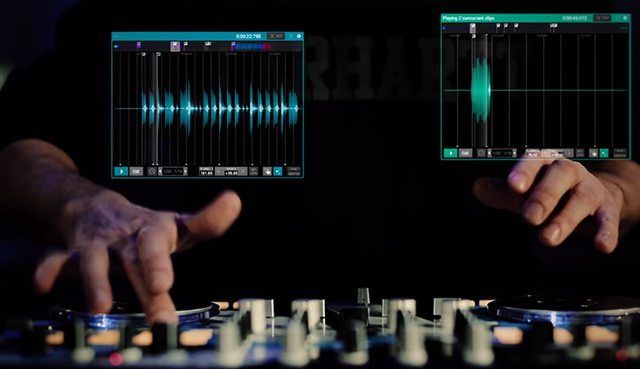
Launched last year, One DJ has been a slow builder in the DJ software world that attempts to combine live decks and timeline editing into one (read our full review here). They’ve recently put out a brand new routine video of the software in use in a live performance setting, with DMC/IDA champion DJ Rasp behind the controls on a VCI-400:

The routine itself is cool – but we found ourselves asking through out it “What is actually happening here?” – so we reached out to Audio Artery and Rasp to get a better idea of what’s being controlled live, and how it all works. First, here’s the deck-by-deck breakdown of what’s being controlled:

dekkiselitys

Rasp sent us this play-by-play of what happens in the video itself – with timestamps for each major action:
0.10 The routine starts with a layered backing track on deck C (this plays up till 1.28, I use the other 3 decks to trigger, effect, loop & scratch over the top of the routine)  *There are 7 layers of drums, percussion, melody, cinematic sounds & bass all arranged, edited & prepared within the DAW feature then saved to play as a track (note that the backing track has space for beatjuggling/finger drumming & various other parts)
0.22 Triggering bass on deck A
0.27 Trigger bass on deck A whilst finger drumming & using loop roll on deck B (deck C is playing in the background)
0.28 Loop roll on drum on deck B
0.44 Cue point beatjuggling using deck A & B with loop rolls
0.54 Scratching on deck A
1.07 Cue point trick using melody on deck B  & bass hit on deck A & occasionally using a filter
1.26 Trigger ‘Cut Like A Guillotine’ vocal sample, backing track continues on deck B & stops on deck C (switch from using deck A & B to C & D with deck B continuing to play the backing track created & prepared in the DAW feature)
 1.28 Juggling & crabbing the cue points of melody on deck C whilst effecting a loop of a tone on deck D with flanger (note that I push the tone to create a varied pitch)
1.51 Adding delay then bashing buttons (on deck C) hardcore til the end 🙂

For more inspiration to get working on your next routine video, click here to check out our DJ routine archives.
Tags: audio arterybreakdowndj raspDj softwareOne DJperformance routineroutines
Share2Tweet1Share
Previous Post

What’s the Best Way to Make Beats? A Look at Digital Drum Sequencers

Next Post

Budget DJ Mixer Reviewed: Pioneer, Allen & Heath, DJ-Tech, Behringer

Related Posts

A Prime 4+ and a Kontrol S3 intercut against eachother over a black background
Breaking News

InMusic just bought Native Instruments. So what now for Traktor?

May 8, 2026
Ableton launches Live 12 Suite rent-to-own plan – and it’s not a subscription
Ableton

Ableton launches Live 12 Suite rent-to-own plan – and it’s not a subscription

October 1, 2025
Rekordox Spotify
Breaking News

Spotify (finally) slides into Rekordbox, Serato, and Algoriddim djay (again) – for better or worse?

September 24, 2025
Load More
Next Post
Budget DJ Mixer Reviewed: Pioneer, Allen & Heath, DJ-Tech, Behringer

Budget DJ Mixer Reviewed: Pioneer, Allen & Heath, DJ-Tech, Behringer

Want to reach DJTT's audience here?

Shoot an email to advertising@djtechtools.com

DJTT ads
DJTT newsletter
Midi Fighter
Chat with us
  • ABOUT DJTT
  • CONTACT
  • PRIVACY
  • MIDI FIGHTER HELP
  • ABOUT DJTT
  • JOBS
  • CONTACT US
  • ADVERTISE
  • PRIVACY POLICY
  • ACCESSIBILITY STATEMENT

© 2024 DJ Techtools all rights reserved by DJ TechTools on all content unless otherwise noted.

No Result
View All Result
  • Blog
    • DJ Gear
      • DIY Projects
      • Gear Reviews
      • New Products
      • Controllerism
    • Techniques + Tips
      • Beginner DJ
      • Advanced DJ
      • Producer
      • Finger Drummer
    • News + Culture
      • Editorials + Opinions
      • Artist Interviews
      • Performances + Routines
      • How I Play
    • DJ Software Tutorials
      • Serato Tips
      • CDJ Tips
      • Ableton Live Tips
  • Store
    • Run by real DJs, not a corporation
    • DJ Controllers
      • Midi Fighter Twister
      • Midi Fighter Spectra
      • Midi Fighter 64
      • View All
    • Accessories
      • Chroma USB Drive for DJs
      • Chroma Caps
      • Chroma Cables Audio
      • Chroma Cables USB-A
      • Chroma Cables: USB-C
      • DJTT Gift Card
      • Midi Fighter T-Shirt
      • Keyboard Covers
      • Earplugs by V-Moda
    • Production Gear
    • Soundcards & Mixers
  • Community
    • Popular Forums
      • General Discussion
      • Buy & Sell
      • Reviews
      • Mixes
      • Music Production
      • Show Your Setup
      • Off Topic
    • Handy Links
      • New Posts
      • Private Messages
      • Register
      • Search
    • Midi Maps
      • Traktor
      • Ableton
      • Serato DJ
      • Midi Fighter 3D
      • Midi Fighter Twister
      • Midi Fighter Spectra
  • Midi Fighter
  • Chroma

© 2024 DJ Techtools all rights reserved by DJ TechTools on all content unless otherwise noted.

This website uses cookies. By continuing to use this website you are giving consent to cookies being used. Visit our Privacy and Cookie Policy.