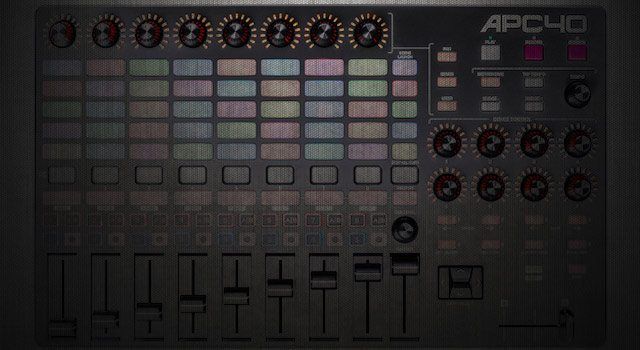
The original Akai APC40 is one of the rare breed of products in the computer music age to achieve iconic status. Launched in 2009, the APC40 (followed by its more compact sibling, the APC20) was, along with the Novation Launchpad, the first dedicated, plug-and-play Ableton Live controller to hit the mainstream market. Five years later, Akai are releasing a re-imagining of the original APC40, the Mk2. Will it be as widely adopted as its forebear? We spent some time with it to try to find out.
Reviewed: Akai APC40 MK2
Expected Street Price: $399
Released: Available now in the DJTT webstore
The Good:
- Cheaper and more portable than the original model
- New RGB pads are very cool
- Bus powered
The Bad:
- Doesn’t feel as solid as the mk1
- No new ‘creative’ features
EVERYTHING OLD IS NEW AGAIN
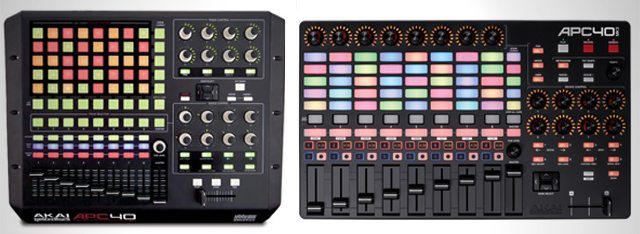
Anyone who has spent time with an original APC40 (and liked it) will certainly be comforted by just how similar the new version is. Yes, the layout is a little different, and there are a couple of new features, but overall in functionality terms, the Mk2 is just that; a revision of the mk1.
The APC40 Mk2 remains very much a ‘live’ controller, designed purely for playback of clips in Live’s session view. There are very few concessions to studio use here; no way to input notes, no step sequencer. This model is very clear in it’s purpose, and that’s rather refreshing in a market so often crowded with ’Swiss Army Knife’ products.
The 8×5 matrix of buttons for launching clips is the most noticeable difference. Now fully RGB capable, they allow proper colour feedback of all the myriad assignable colours within Live itself. On the one hand, that is a wonderful development, allowing users to colour-code different clips to their own taste, reducing the need to look at the screen.
On the other hand, though, the way to tell if a pad is active, and playing, now, is that the illumination gently pulses. That’s ok in a very dark club space, but if you’re using the Mk2 in a lighter environment (daylight, for example) it can be quite hard to see at a glance exactly which clip is playing in any particular column.
On balance, the benefits offered by the RGB pads do outweigh the issue of clarity; it’s a massive leap forward from the old 3 colour system, but you should keep it in mind if you perform at a lot of daytime events.
OTHER NEW APC 40 MK2 FEATURES
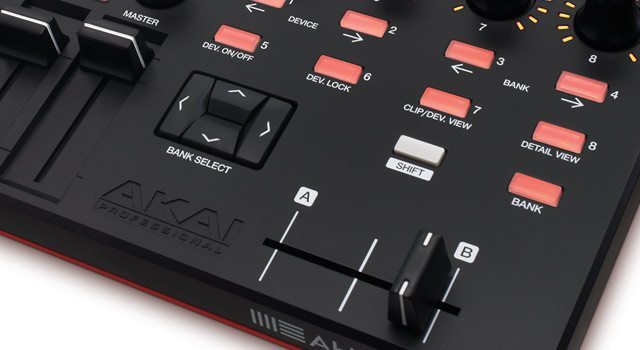
There are a few other new features that have made their way to the Mk2:
- A dedicated tempo control knob joins the Tap Tempo and Nudge buttons, which should make mixing your Live set into a DJ set a little easier.
- Channels can be assigned to the crossfader, either side, on the fly, and there’s a button for Session Record, a new feature which appeared in Live 9.
- The Clip Stop buttons are now recessed, making them less prone to accidental activation.
- The 8 endless rotary knobs, (previously sat on the top right of the controller) to control pans and sends (and have a user assignable mode too), have been relocated to directly above the channel strips. This is a much more logical setup, and as they are endless rotaries with LED ring lighting, will immediately adjust to match their mode, or channel as you navigate around your Live set.
That ease of use is similarly reflected in the Device Control section, again with 8 rotaries, along with buttons to navigate through different devices, lock control to a single device, and switch them on and off. All good stuff, and using it reminds you why the original APC40 did prove to be so popular; there’s smart design going on here.
One big benefit over the original APC40 is that the Mk2 is powered solely over USB. There’s not even an optional power supply. That’s quite a step up from the original, which required a fairly hefty wall-wart at all times, and makes the Mk2 a much more portable solution.
APC 40 MK2 BUILD & SIZE

Speaking of portability, the Mk2 is actually quite a bit smaller than the original, whilst, as it loses the rather superfluous ‘wings’ of the earlier model, there is generally more space for the controls.
It’s a touch narrower, around 3 inches shorter front to back, and, as it has a completely flat profile, not as tall overall, by around an inch. It’s also not far off half the weight of the old one, perhaps due to the completely plastic nature of the the casing now. It still feels well built, and sturdy, but doesn’t quite exude the ‘tank-like’ feeling of the mk1. In general though, the increased portability feels like a reasonable payoff for that.
WHAT’S STILL MISSING?
The main things one might look for in a controller dedicated to Ableton Live, which aren’t found in the APC40 Mk2, are all related to MIDI creation, really. The pads aren’t velocity sensitive, so even if Akai did offer a Note Mode, as found on the APC20, you wouldn’t be able to be very expressive with them. There’s no step sequencer, either, as found on the competing Ableton Push (also made by Akai). The APC really is designed just for playing back existing clips, and mixing them. Anything much beyond that, you’ll need a secondary controller.
One feature which has always seemed to be a missing link in the APC range is a lack of motorised faders. Yes, they would add to the cost, and weight of the device, but they do make a massive difference to some people. Ableton’s takeover modes go some way to negating the need for them, but it’s worth being clear – if you need motorised faders, the Mk2 isn’t for you.
WRAP UP
The APC40 Mk2 feels like a natural evolution of the original model, bringing it up to date smoothly. Users of the old APC40 will feel right at home here, whilst enjoying the nice new design touches. Anyone who was put off by the lack of ‘creation’ options before won’t find anything new here to get them excited, but considering what this controller is designed to do – control Ableton Live in a live environment, it achieves that superbly. It’s really fun and intuitive to work with, and feels like it will last. A worthy successor, especially considering it is launching at $399, a full $200 less than the original price of the mk1.
The Push is $599, so you’ll really need to consider how much you need the clip creation features of the Push before choosing between the two for live use. For playback of clips, and control of devices in Ableton Live, the APC40 Mk2 serves its purpose superbly.
BONUS REVIEWS: APC MINI & APC KEY 25
Along with the APC40 Mk2, Akai have added a couple of super-portable extra units to the APC range.
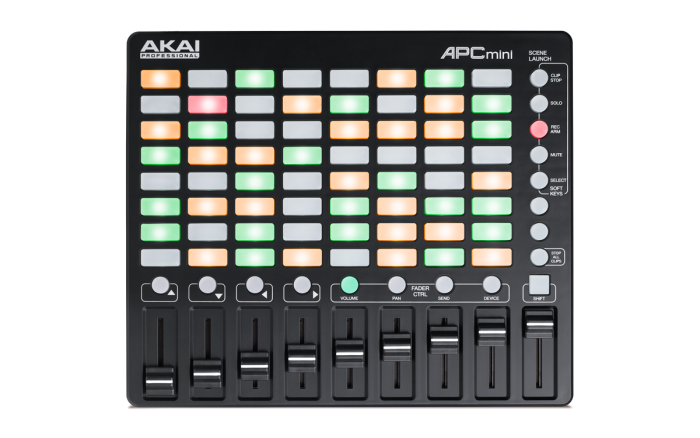
The APC Mini ($99 in the DJTT webstore) looks like a shrunken version of the Mk2, with the now familiar 8×5 grid of pads (just very small), with equally diminutive recessed, low profile faders below. The faders can be quickly assigned to different functions with dedicated buttons, and clever use of a shift key allows the Mini to pull off a lot more than you might imagine for such a tiny device.
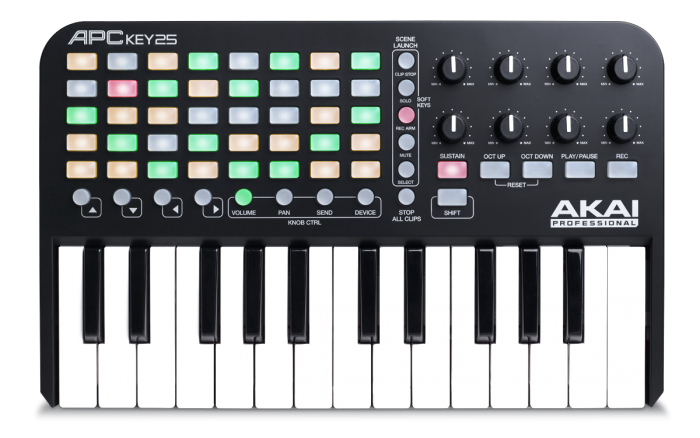
The APC Key 25 ($129 in the DJTT webstore) has an even smaller 8×5 grid, and all the same controls, but instead of faders, you get a set of 8 knobs (not endless), and a compact 25-key keyboard.
Ultimately, these mini devices didn’t get our blood pumping like the APC40 Mk2, but we didn’t expect them to; they are designed to be used on the move, or as part of a bigger setup, and they do that job very well. Both feature 3 colour LED clip launch pads, rather than RGB, but those pads are just big enough to be usable. Perfect for practicing, or recording mixes whilst on a train or sat in an airport, really. Add in the fact that you can use any combination of the APC range together in one Ableton Live rig, and at $129 for the Key 25, and $99 for the Mini, they both seem like a good deal.