DJ TechTools
  • Blog
    • DJ Gear
      • DIY Projects
      • Gear Reviews
      • New Products
      • Controllerism
    • Techniques + Tips
      • Beginner DJ
      • Advanced DJ
      • Producer
      • Finger Drummer
    • News + Culture
      • Editorials + Opinions
      • Artist Interviews
      • Performances + Routines
      • How I Play
    • DJ Software Tutorials
      • Serato Tips
        • Traktor Tips
      • CDJ Tips
      • Ableton Live Tips
  • Store
    • Run by real DJs, not a corporation
    • DJ Controllers
      • Midi Fighter Twister
      • Midi Fighter Spectra
      • Midi Fighter 64
      • View All
    • Accessories
      • Chroma USB Drive for DJs
      • Chroma Caps
      • Chroma Cables Audio
      • Chroma Cables USB-A
      • Chroma Cables: USB-C
      • DJTT Gift Card
      • Midi Fighter T-Shirt
      • Keyboard Covers
      • Earplugs by V-Moda
    • Production Gear
    • Soundcards & Mixers
  • Community
    • Popular Forums
      • General Discussion
      • Buy & Sell
      • Reviews
      • Mixes
      • Music Production
      • Show Your Setup
      • Off Topic
    • Handy Links
      • New Posts
      • Private Messages
      • Register
      • Search
    • Midi Maps
      • Traktor
      • Ableton
      • Serato DJ
      • Midi Fighter 3D
      • Midi Fighter Twister
      • Midi Fighter Spectra
  • Midi Fighter
  • Chroma
No Result
View All Result
DJ TechTools
  • Blog
    • DJ Gear
      • DIY Projects
      • Gear Reviews
      • New Products
      • Controllerism
    • Techniques + Tips
      • Beginner DJ
      • Advanced DJ
      • Producer
      • Finger Drummer
    • News + Culture
      • Editorials + Opinions
      • Artist Interviews
      • Performances + Routines
      • How I Play
    • DJ Software Tutorials
      • Serato Tips
        • Traktor Tips
      • CDJ Tips
      • Ableton Live Tips
  • Store
    • Run by real DJs, not a corporation
    • DJ Controllers
      • Midi Fighter Twister
      • Midi Fighter Spectra
      • Midi Fighter 64
      • View All
    • Accessories
      • Chroma USB Drive for DJs
      • Chroma Caps
      • Chroma Cables Audio
      • Chroma Cables USB-A
      • Chroma Cables: USB-C
      • DJTT Gift Card
      • Midi Fighter T-Shirt
      • Keyboard Covers
      • Earplugs by V-Moda
    • Production Gear
    • Soundcards & Mixers
  • Community
    • Popular Forums
      • General Discussion
      • Buy & Sell
      • Reviews
      • Mixes
      • Music Production
      • Show Your Setup
      • Off Topic
    • Handy Links
      • New Posts
      • Private Messages
      • Register
      • Search
    • Midi Maps
      • Traktor
      • Ableton
      • Serato DJ
      • Midi Fighter 3D
      • Midi Fighter Twister
      • Midi Fighter Spectra
  • Midi Fighter
  • Chroma
No Result
View All Result
DJ TechTools

Traktor DJ 1.5 Update: 3 Mode Superslicer Effect

Dan White by Dan White
August 19, 2014
in Breaking News, News, Traktor DJ
Reading Time: 2 mins read
0
Traktor DJ 1.5 Update: 3 Mode Superslicer Effect
58
VIEWS
Post on FacebookTweet thisUpvote on Reddit

Native Instruments has released a new update to the iOS-only Traktor DJ app, version 1.5, with the most prominent new feature being a brand new performance mode, SuperSlicer, that combines a number of different effects into one. Watch it in action in the below video, and then read more below the embed:

HOW THE SUPERSLICER WORKS
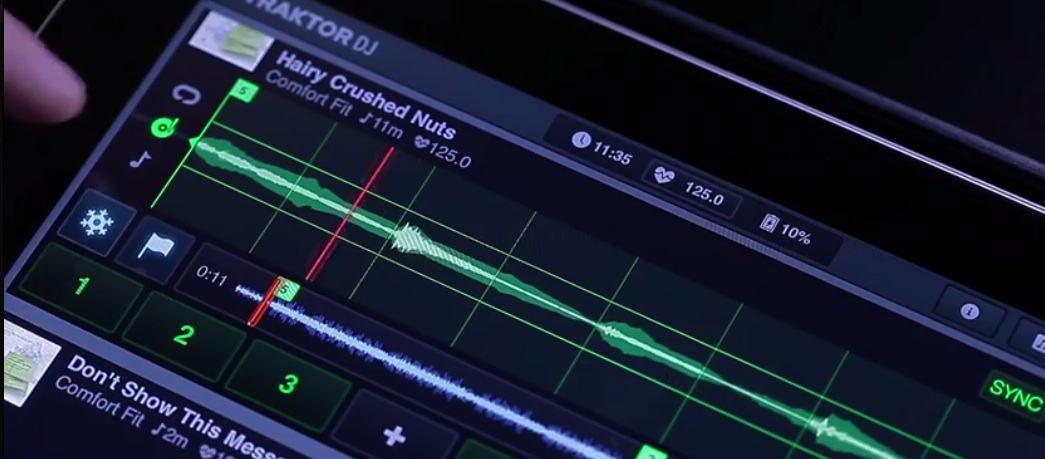
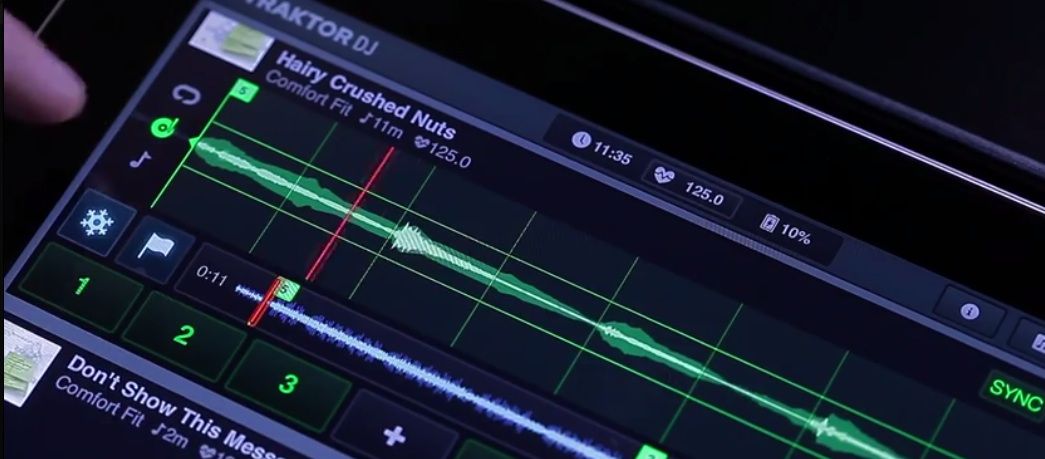
SuperSlicer's Three Mode Buttons
SuperSlicer’s Three Mode Buttons

If you watch carefully, you can see that turning on the SuperSlicer pops out three new icons to the immediate left of the waveform (pictured above), each of which correlate to a different set of on-waveform touch effects. Touch one of them, and a second vertical axis grid is added to the track, splitting it into three parts, each of which are a different level of the selected effect.

  • Loop Stutter FX: loops the beat being touched, similar to a loop roll. Shorter loop rolls are the highest part of the waveform (top grid), longer are at the bottom.
  • Turntablism FX: three different effects – brake (top grid), “scratch” (middle grid), and reverse (bottom grid)
  • Pitch FX: A bit more basic, but this mode lets you temporarily pitch each slice up or down (top and bottom grid)

Adding to these three modes is the fact that you can use two fingers to pinch across the waveform and apply the effect to a whole section of the current loop – demonstrated in the video at 0:28 with the Reverse effect.

Traktor DJ’s new powerful SuperSlicer doesn’t come free with the app – you’ll have to purchase it as an in-app purchase for $1.99 on the iPad version or $0.99 on the iPhone.

OTHER NEW TRAKTOR DJ 1.5 UPDATES?

While the SuperSlicer takes the main spotlight on this update, there were a few other small changes made to the app for the 1.5 version:

  • History Playlists (a much-requested feature by users) keeps track of every track played in a session
  • BeatGrid Enhancements hopefully will have fewer users reaching for the “Grid” button every time they load a new track. The enhancements also include “Pinch To Zoom” and “magnetic snapping” while in the Grid mode
  • a number of bugfixes for the track browser
  • enhanced performance on the latest iOS devices

We’re really hoping that Traktor Pro will soon finally get some of these features that Traktor DJ has been championing strongly, including this new SuperSlicer but also the older track recommendation and Freeze Modes.

Traktor DJ is available on the iTunes App Store. 
Tags: IOSperformance modessuperslicertraktor dj
ShareTweetShare
Previous Post

The Dreaded DJ Bio: Six Tips to Make A Good One

Next Post

First Look At The Numark NV Controller With Onboard Serato DJ Displays

Related Posts

A beginner’s guide to adding DJ tracks to your synthesizer set
Dj and Production Tutorials

A beginner’s guide to adding DJ tracks to your synthesizer set

August 15, 2021
What does the future of traktor hold with NI's ownership changing?
Native Instruments

Most of Native Instruments’ shares have sold. What could it mean for Traktor?

January 26, 2021
Traktor DJ 2.4 app update
Traktor Tips

Traktor DJ 2.4: Transport Control UI Improvements, Genre Sorting

May 7, 2020
Load More
Next Post
First Look At The Numark NV Controller With Onboard Serato DJ Displays

First Look At The Numark NV Controller With Onboard Serato DJ Displays

Want to reach DJTT's audience here?

Shoot an email to advertising@djtechtools.com

DJTT ads
DJTT newsletter
Midi Fighter
Chat with us
  • ABOUT DJTT
  • CONTACT
  • PRIVACY
  • MIDI FIGHTER HELP
  • ABOUT DJTT
  • JOBS
  • CONTACT US
  • ADVERTISE
  • PRIVACY POLICY
  • ACCESSIBILITY STATEMENT

© 2024 DJ Techtools all rights reserved by DJ TechTools on all content unless otherwise noted.

No Result
View All Result
  • Blog
    • DJ Gear
      • DIY Projects
      • Gear Reviews
      • New Products
      • Controllerism
    • Techniques + Tips
      • Beginner DJ
      • Advanced DJ
      • Producer
      • Finger Drummer
    • News + Culture
      • Editorials + Opinions
      • Artist Interviews
      • Performances + Routines
      • How I Play
    • DJ Software Tutorials
      • Serato Tips
      • CDJ Tips
      • Ableton Live Tips
  • Store
    • Run by real DJs, not a corporation
    • DJ Controllers
      • Midi Fighter Twister
      • Midi Fighter Spectra
      • Midi Fighter 64
      • View All
    • Accessories
      • Chroma USB Drive for DJs
      • Chroma Caps
      • Chroma Cables Audio
      • Chroma Cables USB-A
      • Chroma Cables: USB-C
      • DJTT Gift Card
      • Midi Fighter T-Shirt
      • Keyboard Covers
      • Earplugs by V-Moda
    • Production Gear
    • Soundcards & Mixers
  • Community
    • Popular Forums
      • General Discussion
      • Buy & Sell
      • Reviews
      • Mixes
      • Music Production
      • Show Your Setup
      • Off Topic
    • Handy Links
      • New Posts
      • Private Messages
      • Register
      • Search
    • Midi Maps
      • Traktor
      • Ableton
      • Serato DJ
      • Midi Fighter 3D
      • Midi Fighter Twister
      • Midi Fighter Spectra
  • Midi Fighter
  • Chroma

© 2024 DJ Techtools all rights reserved by DJ TechTools on all content unless otherwise noted.

This website uses cookies. By continuing to use this website you are giving consent to cookies being used. Visit our Privacy and Cookie Policy.