DJ TechTools
  • Blog
    • DJ Gear
      • DIY Projects
      • Gear Reviews
      • New Products
      • Controllerism
    • Techniques + Tips
      • Beginner DJ
      • Advanced DJ
      • Producer
      • Finger Drummer
    • News + Culture
      • Editorials + Opinions
      • Artist Interviews
      • Performances + Routines
      • How I Play
    • DJ Software Tutorials
      • Serato Tips
        • Traktor Tips
      • CDJ Tips
      • Ableton Live Tips
  • Store
    • Run by real DJs, not a corporation
    • DJ Controllers
      • Midi Fighter Twister
      • Midi Fighter Spectra
      • Midi Fighter 64
      • View All
    • Accessories
      • Chroma USB Drive for DJs
      • Chroma Caps
      • Chroma Cables Audio
      • Chroma Cables USB-A
      • Chroma Cables: USB-C
      • DJTT Gift Card
      • Midi Fighter T-Shirt
      • Keyboard Covers
      • Earplugs by V-Moda
    • Production Gear
    • Soundcards & Mixers
  • Community
    • Popular Forums
      • General Discussion
      • Buy & Sell
      • Reviews
      • Mixes
      • Music Production
      • Show Your Setup
      • Off Topic
    • Handy Links
      • New Posts
      • Private Messages
      • Register
      • Search
    • Midi Maps
      • Traktor
      • Ableton
      • Serato DJ
      • Midi Fighter 3D
      • Midi Fighter Twister
      • Midi Fighter Spectra
  • Midi Fighter
  • Chroma
No Result
View All Result
DJ TechTools
  • Blog
    • DJ Gear
      • DIY Projects
      • Gear Reviews
      • New Products
      • Controllerism
    • Techniques + Tips
      • Beginner DJ
      • Advanced DJ
      • Producer
      • Finger Drummer
    • News + Culture
      • Editorials + Opinions
      • Artist Interviews
      • Performances + Routines
      • How I Play
    • DJ Software Tutorials
      • Serato Tips
        • Traktor Tips
      • CDJ Tips
      • Ableton Live Tips
  • Store
    • Run by real DJs, not a corporation
    • DJ Controllers
      • Midi Fighter Twister
      • Midi Fighter Spectra
      • Midi Fighter 64
      • View All
    • Accessories
      • Chroma USB Drive for DJs
      • Chroma Caps
      • Chroma Cables Audio
      • Chroma Cables USB-A
      • Chroma Cables: USB-C
      • DJTT Gift Card
      • Midi Fighter T-Shirt
      • Keyboard Covers
      • Earplugs by V-Moda
    • Production Gear
    • Soundcards & Mixers
  • Community
    • Popular Forums
      • General Discussion
      • Buy & Sell
      • Reviews
      • Mixes
      • Music Production
      • Show Your Setup
      • Off Topic
    • Handy Links
      • New Posts
      • Private Messages
      • Register
      • Search
    • Midi Maps
      • Traktor
      • Ableton
      • Serato DJ
      • Midi Fighter 3D
      • Midi Fighter Twister
      • Midi Fighter Spectra
  • Midi Fighter
  • Chroma
No Result
View All Result
DJ TechTools

DJ Equipment: 5 Creative Tools To Mix Up Your DJ Set

Aden Russell by Aden Russell
November 27, 2014
in Basic DJ Tips, Controllerism, DJ Techniques / Tips
Reading Time: 5 mins read
0
Maschine
402
VIEWS
Post on FacebookTweet thisUpvote on Reddit

“Anyone can DJ.” Ever heard the saying before? Today’s DJ equipment makes it easier then ever to get started. While technology and media may be making DJ’ing more accessible to the wider community, DJ’s who play unique sets and have different playing styles are progressively becoming the minority. They’re drowned out by the noise of Top 40 DJ’s who simply just fade one track into the next. You can show up to the club with a USB in hand and rock it, but then again, there are thousands of people who could do the exact same thing. But DJ equipment and technology has so much to offer, that in actual fact, it can help us put a unique edge on our sets. Here are 5 tools that , when combined with talent, could help you achieve that.

We have looked at 5 tools that can help mix up your set:

  • Apple iPad – (9.7″ multi touch tablet, tons of apps)  – $499
  • Native Instruments Maschine – (Groove production system, MIDI mappable)  – $599 in the DJTT Store
  • Pioneer RMX-1000 – (Remix Station/Effects unit) – $799 in the DJTT Store
  • DJTT Midi Fighter 3D – (Responsive arcade buttons, motion sensor built in) – $219 in the DJTT Store
  • Live Instruments – Guitar, brass, live drums, or a cowbell. Experiment!

1. Apple iPad
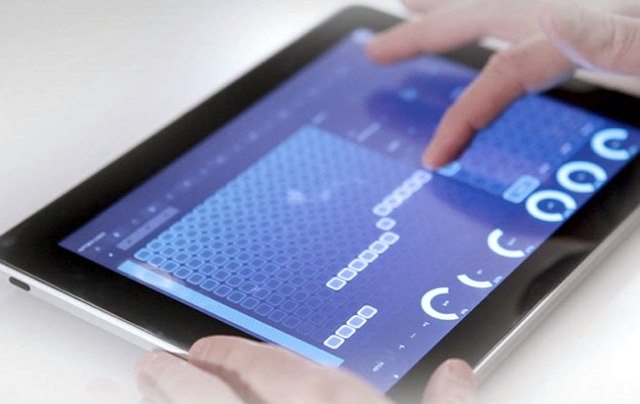
iPad Lemur

The iPad is a tablet, with a large range of applications catering for many different needs, including DJ’ing. Many DJ’s, like James Zabiela, have picked up on this device’s capabilities and have begun to use it in their own sets, whether as a sampler, a controller or an FX processor.

Some notable apps are: Lemur, Traktor DJ, iMaschine, WOW2, iKaossilator (anything by Korg), and touchable 2 (check out our review). To use it for music, you may have to purchase some external equipment such as the iPad Camera Connection Kit or an iRig. However, it can be used wirelessly as a controller, using Bluetooth or Wi-Fi.

The new iPad Air 2 (from $499 USD)  and iPad Mini 3 (from $399 USD) are reasonably priced, but some applications will cost money on top of that, usually up to $30.

2. Native Instruments Maschine
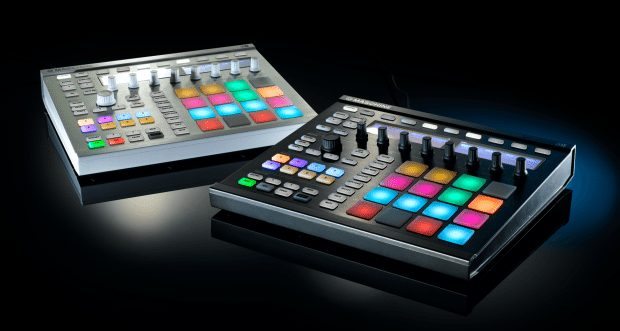
Native Instruments Maschine MK2

Native Instruments Maschine has become a standard for performance of electronic and hip-hop music, allowing the user to trigger samples on a 4×4 grid of pads. Coming bundled with it’s own software, its feature packed and has heaps of content and capabilities to get you started. It’s also compatible with Native Instruments own plugins like Massive, meaning you can even play synths live.

Bass Kleph is an example of someone who is using this device in his DJ sets to play parts of songs live, by chopping up songs into different samples and jamming out. If you need inspiration, see how he slices his samples. It can seem daunting at first, but as they say, practice makes perfect. Maschine does have quite a price point, the MK2 costing usually around $600-$700, but on eBay you can find it for as low $300-$400. The Maschine MK2 ($599) is also available in the DJTT store.

3. Pioneer RMX-1000
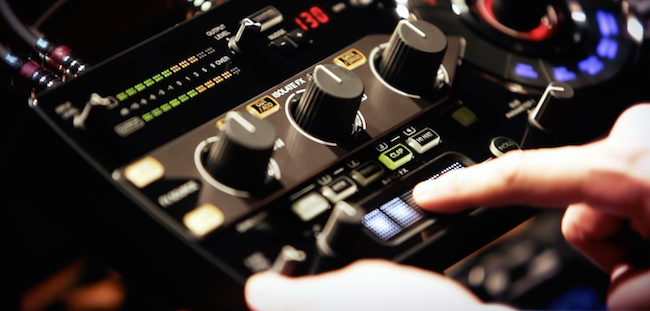
Pioneer RMX-1000

Released back into 2012, this incredible piece of gear gave DJ’s whole new possibilities for FX and live remixing tracks. Its main features are: isolator effects on three different bands, low, mid and high, as well as beat rolls, sample triggering and a vinyl braking/back spining switch. Simply by plugging your mixer’s output into this piece of gear, you can get some crazy sounds and effects out of it.

Many artists are now curating it, such as James Zabiela, Laidback Luke & Chuckie. More clubs are also starting to introduce this piece of gear, but it’s still not permanent at some venues. For an in depth look at the RMX-1000, check out Ean’s review. The Pioneer RMX 1000 is available in the DJTT store for $799.

4. Midi Fighter 3D
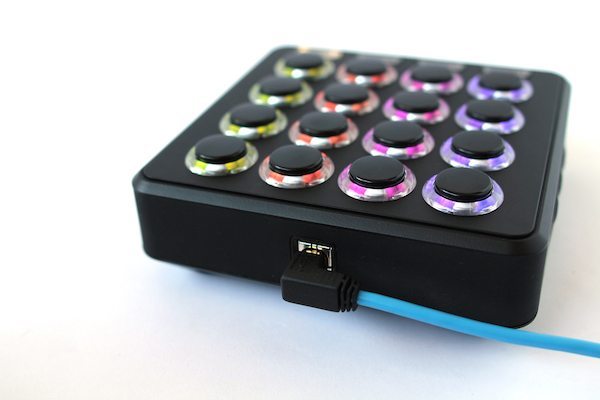
DJ TechTools Midi Fighter 3D

This little controller was born here at DJ Techtools, with the aim of making DJ’ing more expressive, enjoyable and interesting. It is now well-respected and used around the world by artists like Shawn Wasabi, even Linkin Park’s Mr. Hahn. It features a 4×4 grid of Sanwa arcade buttons, which are tactile and super responsive. One of the least ubiquitous features, is the use of motion-tracking to add motion-controlled MIDI commands, which can be used for FX Sweeps, filters or anything!

The buttons can be customised with an on and off color setting and it can be used with Traktor, Ableton, Serato or any software. You can also quickly change how the Midi Fighter works by downloading a new MIDI mapping from DJTT Maps.

It is very affordable, compact and durable, making this controller very ideal, and it is available on the DJTT Store ($219) to purchase.

5. Live Instruments
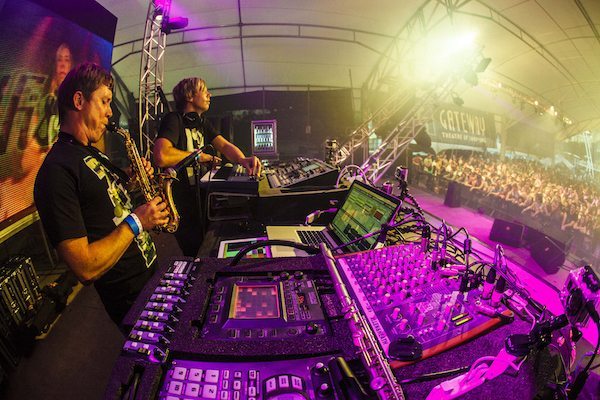
Live Instruments

This last ‘tool’ strays from technology and goes back to the roots: live instrumentation. Some of the most standout DJ acts like Goldfish, GRiZ and Gramatik all incorporate live instruments into their sets, and this gets people excited. Whether it be electric guitar, saxaphone, piano, anything, adding an instrument to a DJ set gives it a fresh edge, makes it a memorable set and creates a name for yourself as a performer. If you ever played one or still do, why not whip it back out and jam with it over some beats? If you have never played an instrument, it can be quite a valuable skill to pick up.

Hopefully these tools give you some ideas as to how you can put a creative and fresh edge on your set.

Next Steps

  • What creative DJ equipment are you using?  Feel free to post them in the comments below!
  • Looking for some creative DJ equipment? Check out our selection of fun and creative DJ gear in the store

Tags: Ableton Live Tipscreativedjdjttipadlemurmaschinemidi fighter 3dNative Instrumentsperformancepioneerrmx-1000
Share3Tweet2Share
Previous Post

Routine: Mojaxx’s 35 Minute Mix On Kontrol S8

Next Post

DJ TechTools 2014 Black Friday/Cyber Monday Sale

Related Posts

A screenshot of the 2.91 version of the Midi Fighter Utility software in Dark Mode
Midi Fighter

Midi Fighter Utility 2.91 Is Out; Our Biggest Update in Years

June 1, 2026
A Prime 4+ and a Kontrol S3 intercut against eachother over a black background
Breaking News

InMusic just bought Native Instruments. So what now for Traktor?

May 8, 2026
The DJM-V5 from AlphaTheta: 3 channels, 4-band EQ, V10 sound – no Beat FX or crossfader.
Breaking News

The DJM-V5 from AlphaTheta: 3 channels, 4-band EQ, V10 sound – no Beat FX or crossfader.

January 20, 2026
Load More
Next Post
DJ TechTools 2014 Black Friday/Cyber Monday Sale

DJ TechTools 2014 Black Friday/Cyber Monday Sale

Want to reach DJTT's audience here?

Shoot an email to advertising@djtechtools.com

DJTT ads
DJTT newsletter
Midi Fighter
Chat with us
  • ABOUT DJTT
  • CONTACT
  • PRIVACY
  • MIDI FIGHTER HELP
  • ABOUT DJTT
  • JOBS
  • CONTACT US
  • ADVERTISE
  • PRIVACY POLICY
  • ACCESSIBILITY STATEMENT

© 2024 DJ Techtools all rights reserved by DJ TechTools on all content unless otherwise noted.

No Result
View All Result
  • Blog
    • DJ Gear
      • DIY Projects
      • Gear Reviews
      • New Products
      • Controllerism
    • Techniques + Tips
      • Beginner DJ
      • Advanced DJ
      • Producer
      • Finger Drummer
    • News + Culture
      • Editorials + Opinions
      • Artist Interviews
      • Performances + Routines
      • How I Play
    • DJ Software Tutorials
      • Serato Tips
      • CDJ Tips
      • Ableton Live Tips
  • Store
    • Run by real DJs, not a corporation
    • DJ Controllers
      • Midi Fighter Twister
      • Midi Fighter Spectra
      • Midi Fighter 64
      • View All
    • Accessories
      • Chroma USB Drive for DJs
      • Chroma Caps
      • Chroma Cables Audio
      • Chroma Cables USB-A
      • Chroma Cables: USB-C
      • DJTT Gift Card
      • Midi Fighter T-Shirt
      • Keyboard Covers
      • Earplugs by V-Moda
    • Production Gear
    • Soundcards & Mixers
  • Community
    • Popular Forums
      • General Discussion
      • Buy & Sell
      • Reviews
      • Mixes
      • Music Production
      • Show Your Setup
      • Off Topic
    • Handy Links
      • New Posts
      • Private Messages
      • Register
      • Search
    • Midi Maps
      • Traktor
      • Ableton
      • Serato DJ
      • Midi Fighter 3D
      • Midi Fighter Twister
      • Midi Fighter Spectra
  • Midi Fighter
  • Chroma

© 2024 DJ Techtools all rights reserved by DJ TechTools on all content unless otherwise noted.

This website uses cookies. By continuing to use this website you are giving consent to cookies being used. Visit our Privacy and Cookie Policy.