DJ TechTools
  • Blog
    • DJ Gear
      • DIY Projects
      • Gear Reviews
      • New Products
      • Controllerism
    • Techniques + Tips
      • Beginner DJ
      • Advanced DJ
      • Producer
      • Finger Drummer
    • News + Culture
      • Editorials + Opinions
      • Artist Interviews
      • Performances + Routines
      • How I Play
    • DJ Software Tutorials
      • Serato Tips
        • Traktor Tips
      • CDJ Tips
      • Ableton Live Tips
  • Store
    • Run by real DJs, not a corporation
    • DJ Controllers
      • Midi Fighter Twister
      • Midi Fighter Spectra
      • Midi Fighter 64
      • View All
    • Accessories
      • Chroma USB Drive for DJs
      • Chroma Caps
      • Chroma Cables Audio
      • Chroma Cables USB-A
      • Chroma Cables: USB-C
      • DJTT Gift Card
      • Midi Fighter T-Shirt
      • Keyboard Covers
      • Earplugs by V-Moda
    • Production Gear
    • Soundcards & Mixers
  • Community
    • Popular Forums
      • General Discussion
      • Buy & Sell
      • Reviews
      • Mixes
      • Music Production
      • Show Your Setup
      • Off Topic
    • Handy Links
      • New Posts
      • Private Messages
      • Register
      • Search
    • Midi Maps
      • Traktor
      • Ableton
      • Serato DJ
      • Midi Fighter 3D
      • Midi Fighter Twister
      • Midi Fighter Spectra
  • Midi Fighter
  • Chroma
No Result
View All Result
DJ TechTools
  • Blog
    • DJ Gear
      • DIY Projects
      • Gear Reviews
      • New Products
      • Controllerism
    • Techniques + Tips
      • Beginner DJ
      • Advanced DJ
      • Producer
      • Finger Drummer
    • News + Culture
      • Editorials + Opinions
      • Artist Interviews
      • Performances + Routines
      • How I Play
    • DJ Software Tutorials
      • Serato Tips
        • Traktor Tips
      • CDJ Tips
      • Ableton Live Tips
  • Store
    • Run by real DJs, not a corporation
    • DJ Controllers
      • Midi Fighter Twister
      • Midi Fighter Spectra
      • Midi Fighter 64
      • View All
    • Accessories
      • Chroma USB Drive for DJs
      • Chroma Caps
      • Chroma Cables Audio
      • Chroma Cables USB-A
      • Chroma Cables: USB-C
      • DJTT Gift Card
      • Midi Fighter T-Shirt
      • Keyboard Covers
      • Earplugs by V-Moda
    • Production Gear
    • Soundcards & Mixers
  • Community
    • Popular Forums
      • General Discussion
      • Buy & Sell
      • Reviews
      • Mixes
      • Music Production
      • Show Your Setup
      • Off Topic
    • Handy Links
      • New Posts
      • Private Messages
      • Register
      • Search
    • Midi Maps
      • Traktor
      • Ableton
      • Serato DJ
      • Midi Fighter 3D
      • Midi Fighter Twister
      • Midi Fighter Spectra
  • Midi Fighter
  • Chroma
No Result
View All Result
DJ TechTools

Tonetable + Scratch Track: The Turntablist VST

Dean Zulueta by Dean Zulueta
March 16, 2015
in Breaking News
Reading Time: 3 mins read
0
Tonetable is a DVS solution for iOS devices and DAWs such as Ableton and Logic
222
VIEWS
Post on FacebookTweet thisUpvote on Reddit

It seems these days that more and more apps are coming out on the market for the iPad and iOS. While there is a lot of copy cats and poorly programmed apps, there are some that offer viable solutions for the DJ looking to get more out of there iOS device.

Inklen introduced the Tonetable app in 2011 which is a DVS control device for your iPhone, iPad, or iPod Touch. DVS control for iOS is really cool but the folks at Stagecraft took the app to the next level by creating a DVS compatible VST. Read more below about how Tonetable now can be used to create scratch effects in any VST compatible DAW and what Scratch Track brings for producers.

Turntablism Brought to Producers

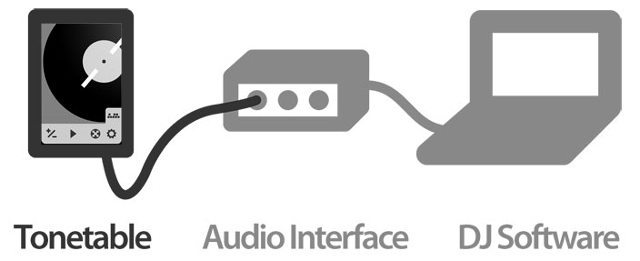
The Tonetable app is a very simple design that recreates the function of a turntable and timecode vinyl. When the user hits play the platter starts to spin and a constant tone (learn more about how timecode works) is produced. This tone can be set to 1 kHz (Scratch Live), 1.2 kHz (Torq), and 1.3 kHz (MixVibes). Then the user can control the software of their choice by plugging the output of the iPad into the input of their software. Since the birth of hip-hop, scratch sounds have been added as flavor to many productions. Not only is Tonetable the solution for a DJ wanting to use their iPad but it also is a solution for a producer wanting to add some interesting sounds into a production.
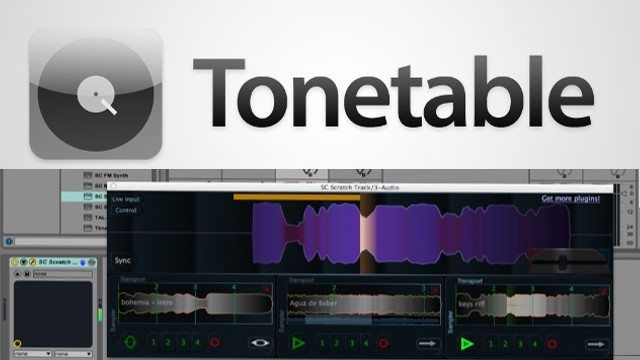
Tonetable is a DVS solution for iOS devices and DAWs such as Ableton and Logic

With the Tonetable app and the Scratch Track plugin, a user can recreate the turntable effects with any audio file inside any DAW that is VST compatible. DJTT wrote an article last year about the VST and it is awesome to see it being used again today with the capabilities of Tonetable. Watch a video below of Aaron with Scratch Track as he walks us through the Tonetable app and his VST.

The Scratch Track VST is a very inexpensive way to add scratch effects to productions. Before, a producer would have to time the perfect scratch while dealing with latency of the recording. Now, there is less latency and the producer isn’t limited to their physical record collection. When DVS came to the market, DJs realized their whole vinyl collection expanded exponentially. Now with Scratch Track, producers will come to realize that they have a new instrument to utilize in their productions.

What would be cool to see from this VST and the many more to come after it is turntabilism making a comeback in productions. Scratching doesn’t have to be confined to just hip-hop tracks and it can be argued that there is a lot of room for turntablism in other genres. Stagecraft has also reported that they are working on a plugin with two turntables and some effects so that means the Scratch Track is only the beginning of turntablist VSTs.


Tonetable is available for $7.99 in the app store.

Scratch Track is available for $35 on Stagecrafts’ site.

What are your thoughts on iOS devices being used for production and DJing?
Tags: Abletondawdjdj gearDVSdvs controlinklenIOSipadipad djingipad productionIphoneipod touchpluginProductionscratch trackstage crafttimecodetonetableturntablismvinylvst
Share2Tweet1Share
Previous Post

Why You Should be Playing with Soundpacks

Next Post

The Mixfader: A Bluetooth-Enabled Crossfader

Related Posts

Devious Pocket: a €249 open-source DVS that ditches the laptop
Breaking News

Devious Pocket: a €249 open-source DVS that ditches the laptop

May 10, 2026
Traktor MX2: Native Instruments’ New 2-Channel Controller
DJ Gear Announcements

Traktor MX2: Native Instruments’ New 2-Channel Controller

October 8, 2025
Akai Launches MPC Live III Standalone With 8-Core Processor, Clip Matrix, Stems, and 3D Pads
Breaking News

Akai Launches MPC Live III Standalone With 8-Core Processor, Clip Matrix, Stems, and 3D Pads

October 2, 2025
Load More
Next Post
The Mixfader: A Bluetooth-Enabled Crossfader

The Mixfader: A Bluetooth-Enabled Crossfader

Want to reach DJTT's audience here?

Shoot an email to advertising@djtechtools.com

DJTT ads
DJTT newsletter
Midi Fighter
Chat with us
  • ABOUT DJTT
  • CONTACT
  • PRIVACY
  • MIDI FIGHTER HELP
  • ABOUT DJTT
  • JOBS
  • CONTACT US
  • ADVERTISE
  • PRIVACY POLICY
  • ACCESSIBILITY STATEMENT

© 2024 DJ Techtools all rights reserved by DJ TechTools on all content unless otherwise noted.

No Result
View All Result
  • Blog
    • DJ Gear
      • DIY Projects
      • Gear Reviews
      • New Products
      • Controllerism
    • Techniques + Tips
      • Beginner DJ
      • Advanced DJ
      • Producer
      • Finger Drummer
    • News + Culture
      • Editorials + Opinions
      • Artist Interviews
      • Performances + Routines
      • How I Play
    • DJ Software Tutorials
      • Serato Tips
      • CDJ Tips
      • Ableton Live Tips
  • Store
    • Run by real DJs, not a corporation
    • DJ Controllers
      • Midi Fighter Twister
      • Midi Fighter Spectra
      • Midi Fighter 64
      • View All
    • Accessories
      • Chroma USB Drive for DJs
      • Chroma Caps
      • Chroma Cables Audio
      • Chroma Cables USB-A
      • Chroma Cables: USB-C
      • DJTT Gift Card
      • Midi Fighter T-Shirt
      • Keyboard Covers
      • Earplugs by V-Moda
    • Production Gear
    • Soundcards & Mixers
  • Community
    • Popular Forums
      • General Discussion
      • Buy & Sell
      • Reviews
      • Mixes
      • Music Production
      • Show Your Setup
      • Off Topic
    • Handy Links
      • New Posts
      • Private Messages
      • Register
      • Search
    • Midi Maps
      • Traktor
      • Ableton
      • Serato DJ
      • Midi Fighter 3D
      • Midi Fighter Twister
      • Midi Fighter Spectra
  • Midi Fighter
  • Chroma

© 2024 DJ Techtools all rights reserved by DJ TechTools on all content unless otherwise noted.

This website uses cookies. By continuing to use this website you are giving consent to cookies being used. Visit our Privacy and Cookie Policy.