DJ TechTools
  • Blog
    • DJ Gear
      • DIY Projects
      • Gear Reviews
      • New Products
      • Controllerism
    • Techniques + Tips
      • Beginner DJ
      • Advanced DJ
      • Producer
      • Finger Drummer
    • News + Culture
      • Editorials + Opinions
      • Artist Interviews
      • Performances + Routines
      • How I Play
    • DJ Software Tutorials
      • Serato Tips
        • Traktor Tips
      • CDJ Tips
      • Ableton Live Tips
  • Store
    • Run by real DJs, not a corporation
    • DJ Controllers
      • Midi Fighter Twister
      • Midi Fighter Spectra
      • Midi Fighter 64
      • View All
    • Accessories
      • Chroma USB Drive for DJs
      • Chroma Caps
      • Chroma Cables Audio
      • Chroma Cables USB-A
      • Chroma Cables: USB-C
      • DJTT Gift Card
      • Midi Fighter T-Shirt
      • Keyboard Covers
      • Earplugs by V-Moda
    • Production Gear
    • Soundcards & Mixers
  • Community
    • Popular Forums
      • General Discussion
      • Buy & Sell
      • Reviews
      • Mixes
      • Music Production
      • Show Your Setup
      • Off Topic
    • Handy Links
      • New Posts
      • Private Messages
      • Register
      • Search
    • Midi Maps
      • Traktor
      • Ableton
      • Serato DJ
      • Midi Fighter 3D
      • Midi Fighter Twister
      • Midi Fighter Spectra
  • Midi Fighter
  • Chroma
No Result
View All Result
DJ TechTools
  • Blog
    • DJ Gear
      • DIY Projects
      • Gear Reviews
      • New Products
      • Controllerism
    • Techniques + Tips
      • Beginner DJ
      • Advanced DJ
      • Producer
      • Finger Drummer
    • News + Culture
      • Editorials + Opinions
      • Artist Interviews
      • Performances + Routines
      • How I Play
    • DJ Software Tutorials
      • Serato Tips
        • Traktor Tips
      • CDJ Tips
      • Ableton Live Tips
  • Store
    • Run by real DJs, not a corporation
    • DJ Controllers
      • Midi Fighter Twister
      • Midi Fighter Spectra
      • Midi Fighter 64
      • View All
    • Accessories
      • Chroma USB Drive for DJs
      • Chroma Caps
      • Chroma Cables Audio
      • Chroma Cables USB-A
      • Chroma Cables: USB-C
      • DJTT Gift Card
      • Midi Fighter T-Shirt
      • Keyboard Covers
      • Earplugs by V-Moda
    • Production Gear
    • Soundcards & Mixers
  • Community
    • Popular Forums
      • General Discussion
      • Buy & Sell
      • Reviews
      • Mixes
      • Music Production
      • Show Your Setup
      • Off Topic
    • Handy Links
      • New Posts
      • Private Messages
      • Register
      • Search
    • Midi Maps
      • Traktor
      • Ableton
      • Serato DJ
      • Midi Fighter 3D
      • Midi Fighter Twister
      • Midi Fighter Spectra
  • Midi Fighter
  • Chroma
No Result
View All Result
DJ TechTools

BeatSeeker: A Simple Way To Revive Serato Bridge?

Dean Zulueta by Dean Zulueta
September 16, 2015
in Ableton Live Tips, DJ Gear Announcements, News, News + Culture
Reading Time: 2 mins read
0
BeatSeeker: A Simple Way To Revive Serato Bridge?
129
VIEWS
Post on FacebookTweet thisUpvote on Reddit

Many moons ago there was The Bridge – a joint effort by Serato and Ableton to link the two pieces of software. When The Bridge came out five years ago there wasn’t a lot of reaction from the DJ world. The software wasn’t revolutionary, but it was a useful tool that has since been forgotten (or put on the back burner) by both companies. However, Andrew Robertson has developed an Ableton Live device (based on research at the Centre for Digital Music, Queen Mary University of London) called the BeatSeeker to serve as a simpler bridge between Ableton and other music-making software.

Counting Every Beat

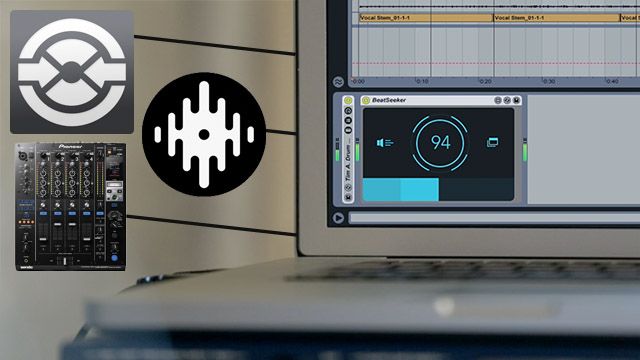
As its name suggests, the BeatSeeker is an Max 4 Live device that detects the tempo from an external source (i.e. a mixer’s output) and then tells Ableton to follow that tempo. This means that any audio source can control the tempo of clips being launched in Ableton which makes the DJ less restricted by Ableton’s set tempo. Whether the DJ is riding the fader or dropping from 140 BPM to 70 BPM, Ableton will be able to keep up. The beauty of it is that this device isn’t limited to just Serato – give BeatSeeker any audio source and Ableton will follow it.


BeatSeeker wasn’t developed for the DJ in mind, but we think DJs who want to mix Ableton clip launching and deck mixing can definitely use this device to do so. Since BeatSeeker was aimed more towards bands, there are two options for the way BeatSeeker follows the tempo of a track:

  • Fixed Tempo Mode increases the accuracy of the tempo that is being followed and follows a pattern rigidly
  • Tempo Following Mode tells Ableton to respond to fluctuations in tempo which gives the set a more human feel which can be useful when playing tracks with tempo shifts.

This isn’t exactly Serato Bridge’s level of functionality, but it’s a simple device that DJs and producers can use to blend clip launching performances with live deck mixing.

BeatSeeker is available for Ableton Live 9 Standard & Max for Live for $29.

Tags: Abletonableton liveAbleton Serato BridgeAbleton ToolsAndrew RobertsonBeat SeekerBeatSeekerbpmCentre for Digital MusicdevicesDJ productionDJing ToolsdjsLive Deviceslive performancelondonmax for liveproducersseratoserato bridgeSoftwareSyncsyncingtempoTraktor Tips
Share1Tweet1Share
Previous Post

Hacking Stems: How To Extract Parts From Stem Files

Next Post

Input Transform: Throwback Thursday DJ Technique

Related Posts

The DJM-V5 from AlphaTheta: 3 channels, 4-band EQ, V10 sound – no Beat FX or crossfader.
Breaking News

The DJM-V5 from AlphaTheta: 3 channels, 4-band EQ, V10 sound – no Beat FX or crossfader.

January 20, 2026
Ableton launches Live 12 Suite rent-to-own plan – and it’s not a subscription
Ableton

Ableton launches Live 12 Suite rent-to-own plan – and it’s not a subscription

October 1, 2025
Use your Midi Fighter Twister as an Audio-Reactive Visualizer
Ableton Live Tips

Use your Midi Fighter Twister as an Audio-Reactive Visualizer

June 23, 2025
Load More
Next Post
Input Transform: Throwback Thursday DJ Technique

Input Transform: Throwback Thursday DJ Technique

Want to reach DJTT's audience here?

Shoot an email to advertising@djtechtools.com

DJTT ads
DJTT newsletter
Midi Fighter
Chat with us
  • ABOUT DJTT
  • CONTACT
  • PRIVACY
  • MIDI FIGHTER HELP
  • ABOUT DJTT
  • JOBS
  • CONTACT US
  • ADVERTISE
  • PRIVACY POLICY
  • ACCESSIBILITY STATEMENT

© 2024 DJ Techtools all rights reserved by DJ TechTools on all content unless otherwise noted.

No Result
View All Result
  • Blog
    • DJ Gear
      • DIY Projects
      • Gear Reviews
      • New Products
      • Controllerism
    • Techniques + Tips
      • Beginner DJ
      • Advanced DJ
      • Producer
      • Finger Drummer
    • News + Culture
      • Editorials + Opinions
      • Artist Interviews
      • Performances + Routines
      • How I Play
    • DJ Software Tutorials
      • Serato Tips
      • CDJ Tips
      • Ableton Live Tips
  • Store
    • Run by real DJs, not a corporation
    • DJ Controllers
      • Midi Fighter Twister
      • Midi Fighter Spectra
      • Midi Fighter 64
      • View All
    • Accessories
      • Chroma USB Drive for DJs
      • Chroma Caps
      • Chroma Cables Audio
      • Chroma Cables USB-A
      • Chroma Cables: USB-C
      • DJTT Gift Card
      • Midi Fighter T-Shirt
      • Keyboard Covers
      • Earplugs by V-Moda
    • Production Gear
    • Soundcards & Mixers
  • Community
    • Popular Forums
      • General Discussion
      • Buy & Sell
      • Reviews
      • Mixes
      • Music Production
      • Show Your Setup
      • Off Topic
    • Handy Links
      • New Posts
      • Private Messages
      • Register
      • Search
    • Midi Maps
      • Traktor
      • Ableton
      • Serato DJ
      • Midi Fighter 3D
      • Midi Fighter Twister
      • Midi Fighter Spectra
  • Midi Fighter
  • Chroma

© 2024 DJ Techtools all rights reserved by DJ TechTools on all content unless otherwise noted.

This website uses cookies. By continuing to use this website you are giving consent to cookies being used. Visit our Privacy and Cookie Policy.