DJ TechTools
  • Blog
    • DJ Gear
      • DIY Projects
      • Gear Reviews
      • New Products
      • Controllerism
    • Techniques + Tips
      • Beginner DJ
      • Advanced DJ
      • Producer
      • Finger Drummer
    • News + Culture
      • Editorials + Opinions
      • Artist Interviews
      • Performances + Routines
      • How I Play
    • DJ Software Tutorials
      • Serato Tips
        • Traktor Tips
      • CDJ Tips
      • Ableton Live Tips
  • Store
    • Run by real DJs, not a corporation
    • DJ Controllers
      • Midi Fighter Twister
      • Midi Fighter Spectra
      • Midi Fighter 64
      • View All
    • Accessories
      • Chroma USB Drive for DJs
      • Chroma Caps
      • Chroma Cables Audio
      • Chroma Cables USB-A
      • Chroma Cables: USB-C
      • DJTT Gift Card
      • Midi Fighter T-Shirt
      • Keyboard Covers
      • Earplugs by V-Moda
    • Production Gear
    • Soundcards & Mixers
  • Community
    • Popular Forums
      • General Discussion
      • Buy & Sell
      • Reviews
      • Mixes
      • Music Production
      • Show Your Setup
      • Off Topic
    • Handy Links
      • New Posts
      • Private Messages
      • Register
      • Search
    • Midi Maps
      • Traktor
      • Ableton
      • Serato DJ
      • Midi Fighter 3D
      • Midi Fighter Twister
      • Midi Fighter Spectra
  • Midi Fighter
  • Chroma
No Result
View All Result
DJ TechTools
  • Blog
    • DJ Gear
      • DIY Projects
      • Gear Reviews
      • New Products
      • Controllerism
    • Techniques + Tips
      • Beginner DJ
      • Advanced DJ
      • Producer
      • Finger Drummer
    • News + Culture
      • Editorials + Opinions
      • Artist Interviews
      • Performances + Routines
      • How I Play
    • DJ Software Tutorials
      • Serato Tips
        • Traktor Tips
      • CDJ Tips
      • Ableton Live Tips
  • Store
    • Run by real DJs, not a corporation
    • DJ Controllers
      • Midi Fighter Twister
      • Midi Fighter Spectra
      • Midi Fighter 64
      • View All
    • Accessories
      • Chroma USB Drive for DJs
      • Chroma Caps
      • Chroma Cables Audio
      • Chroma Cables USB-A
      • Chroma Cables: USB-C
      • DJTT Gift Card
      • Midi Fighter T-Shirt
      • Keyboard Covers
      • Earplugs by V-Moda
    • Production Gear
    • Soundcards & Mixers
  • Community
    • Popular Forums
      • General Discussion
      • Buy & Sell
      • Reviews
      • Mixes
      • Music Production
      • Show Your Setup
      • Off Topic
    • Handy Links
      • New Posts
      • Private Messages
      • Register
      • Search
    • Midi Maps
      • Traktor
      • Ableton
      • Serato DJ
      • Midi Fighter 3D
      • Midi Fighter Twister
      • Midi Fighter Spectra
  • Midi Fighter
  • Chroma
No Result
View All Result
DJ TechTools

Akai MPC Touch: A Touchscreen Groovebox

Dan White by Dan White
October 7, 2015
in DJ Gear Announcements, News
Reading Time: 2 mins read
0
Akai MPC Touch: A Touchscreen Groovebox
125
VIEWS
Post on FacebookTweet thisUpvote on Reddit

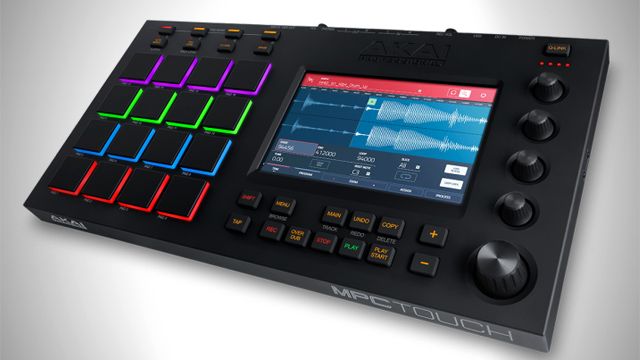
Native Instruments and Numark have led the pack on building out great-looking color displays on DJ controllers, but now Akai has introduced a touchscreen production MPC that allows manipulation of the on-screen sample chopping with just your fingertips. Read on for all the details:

The Akai MPC Touch takes the classic Akai velocity-sensitive pad grid controllers and puts a huge 7″ full-color, multi-touch display next to it. The workflow on the unit allows producers to “Literally grab and pinch waveforms, draw midi events, adjust envelopes, chop samples, add effects and precisely set your controls using your fingertips.”
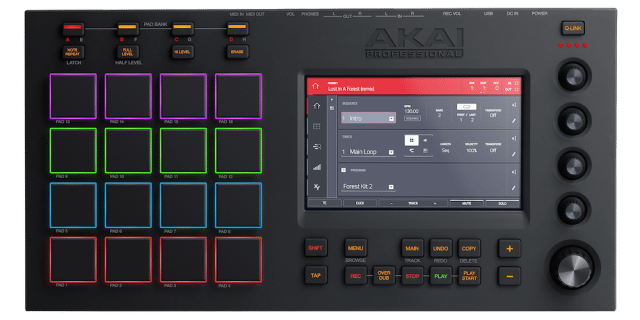
mainmenu

There’s one big catch – this isn’t one of Akai’s standalone units, and requires a computer to use the unit. The computer runs Akai’s MPC software, and ostensibly you’ll be able to put the computer to the side as the demos we’ve seen have kept the focus entirely on the unit’s interface:

It’s clear that Akai is taking aim at Ableton and Maschine’s workflows with their own dedicated software/hardware pairings, but beyond a touchscreen, there’s a second feature that puts the MPC Touch with a bit of a lead over the other two: an audio interface. The dual 1/4 inputs and outputs mean sampling and output are easily covered, and there’s headphone out, and MIDI/IO on the rear of the unit as well.
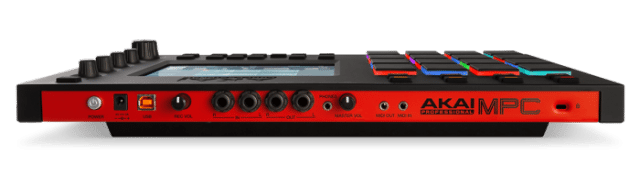
MPCTouch_rear_web_700x438

MPC Touch Feature List

  • 7″ color multi-touch Display
  • 16 velocity-sensitive thick, fat MPC pads with RGB backlighting
  • 2-in/2-out audio interface
  • Step Sequencer with touch interface
  • XYFX control adds effects, adjusts sound dynamics in real time
  • Phrase Looper, enables connection of any instrument to create loops
  • Pad Mixer for setting levels, stereo panning and adding VST effects
  • Sample Edit control, for trimming, chopping and processing your samples
  • 4 new, performance-ready touch-sensitive controls
  • Data Encoder knob, for push-and-twist control of display parameters
  • Includes MPC software and over 20,000 sounds

The MPC Touch is due out November 2015 for £499 – about $770. Get more details on this setup here on Akai’s site.
 

Tags: akaimpcmpc touchproduction controllertouchscreen
Share1Tweet1Share
Previous Post

Drum Compression Basics: Creating Punchy Drums

Next Post

Using Headphones As A Microphone: Throwback Thursday DJ Technique

Related Posts

Akai Launches MPC Live III Standalone With 8-Core Processor, Clip Matrix, Stems, and 3D Pads
Breaking News

Akai Launches MPC Live III Standalone With 8-Core Processor, Clip Matrix, Stems, and 3D Pads

October 2, 2025
How I Play: Hybrasil’s DAWless live techno setup
How I Play

How I Play: Hybrasil’s DAWless live techno setup

October 3, 2024
Akai’s new MPC Live II: a standalone tool with built-in monitors
News

Akai’s new MPC Live II: a standalone tool with built-in monitors

May 14, 2020
Load More
Next Post
Using Headphones As A Microphone: Throwback Thursday DJ Technique

Using Headphones As A Microphone: Throwback Thursday DJ Technique

Want to reach DJTT's audience here?

Shoot an email to advertising@djtechtools.com

DJTT ads
DJTT newsletter
Midi Fighter
Chat with us
  • ABOUT DJTT
  • CONTACT
  • PRIVACY
  • MIDI FIGHTER HELP
  • ABOUT DJTT
  • JOBS
  • CONTACT US
  • ADVERTISE
  • PRIVACY POLICY
  • ACCESSIBILITY STATEMENT

© 2024 DJ Techtools all rights reserved by DJ TechTools on all content unless otherwise noted.

No Result
View All Result
  • Blog
    • DJ Gear
      • DIY Projects
      • Gear Reviews
      • New Products
      • Controllerism
    • Techniques + Tips
      • Beginner DJ
      • Advanced DJ
      • Producer
      • Finger Drummer
    • News + Culture
      • Editorials + Opinions
      • Artist Interviews
      • Performances + Routines
      • How I Play
    • DJ Software Tutorials
      • Serato Tips
      • CDJ Tips
      • Ableton Live Tips
  • Store
    • Run by real DJs, not a corporation
    • DJ Controllers
      • Midi Fighter Twister
      • Midi Fighter Spectra
      • Midi Fighter 64
      • View All
    • Accessories
      • Chroma USB Drive for DJs
      • Chroma Caps
      • Chroma Cables Audio
      • Chroma Cables USB-A
      • Chroma Cables: USB-C
      • DJTT Gift Card
      • Midi Fighter T-Shirt
      • Keyboard Covers
      • Earplugs by V-Moda
    • Production Gear
    • Soundcards & Mixers
  • Community
    • Popular Forums
      • General Discussion
      • Buy & Sell
      • Reviews
      • Mixes
      • Music Production
      • Show Your Setup
      • Off Topic
    • Handy Links
      • New Posts
      • Private Messages
      • Register
      • Search
    • Midi Maps
      • Traktor
      • Ableton
      • Serato DJ
      • Midi Fighter 3D
      • Midi Fighter Twister
      • Midi Fighter Spectra
  • Midi Fighter
  • Chroma

© 2024 DJ Techtools all rights reserved by DJ TechTools on all content unless otherwise noted.

This website uses cookies. By continuing to use this website you are giving consent to cookies being used. Visit our Privacy and Cookie Policy.