DJ TechTools
  • Blog
    • DJ Gear
      • DIY Projects
      • Gear Reviews
      • New Products
      • Controllerism
    • Techniques + Tips
      • Beginner DJ
      • Advanced DJ
      • Producer
      • Finger Drummer
    • News + Culture
      • Editorials + Opinions
      • Artist Interviews
      • Performances + Routines
      • How I Play
    • DJ Software Tutorials
      • Serato Tips
        • Traktor Tips
      • CDJ Tips
      • Ableton Live Tips
  • Store
    • Run by real DJs, not a corporation
    • DJ Controllers
      • Midi Fighter Twister
      • Midi Fighter Spectra
      • Midi Fighter 64
      • View All
    • Accessories
      • Chroma USB Drive for DJs
      • Chroma Caps
      • Chroma Cables Audio
      • Chroma Cables USB-A
      • Chroma Cables: USB-C
      • DJTT Gift Card
      • Midi Fighter T-Shirt
      • Keyboard Covers
      • Earplugs by V-Moda
    • Production Gear
    • Soundcards & Mixers
  • Community
    • Popular Forums
      • General Discussion
      • Buy & Sell
      • Reviews
      • Mixes
      • Music Production
      • Show Your Setup
      • Off Topic
    • Handy Links
      • New Posts
      • Private Messages
      • Register
      • Search
    • Midi Maps
      • Traktor
      • Ableton
      • Serato DJ
      • Midi Fighter 3D
      • Midi Fighter Twister
      • Midi Fighter Spectra
  • Midi Fighter
  • Chroma
No Result
View All Result
DJ TechTools
  • Blog
    • DJ Gear
      • DIY Projects
      • Gear Reviews
      • New Products
      • Controllerism
    • Techniques + Tips
      • Beginner DJ
      • Advanced DJ
      • Producer
      • Finger Drummer
    • News + Culture
      • Editorials + Opinions
      • Artist Interviews
      • Performances + Routines
      • How I Play
    • DJ Software Tutorials
      • Serato Tips
        • Traktor Tips
      • CDJ Tips
      • Ableton Live Tips
  • Store
    • Run by real DJs, not a corporation
    • DJ Controllers
      • Midi Fighter Twister
      • Midi Fighter Spectra
      • Midi Fighter 64
      • View All
    • Accessories
      • Chroma USB Drive for DJs
      • Chroma Caps
      • Chroma Cables Audio
      • Chroma Cables USB-A
      • Chroma Cables: USB-C
      • DJTT Gift Card
      • Midi Fighter T-Shirt
      • Keyboard Covers
      • Earplugs by V-Moda
    • Production Gear
    • Soundcards & Mixers
  • Community
    • Popular Forums
      • General Discussion
      • Buy & Sell
      • Reviews
      • Mixes
      • Music Production
      • Show Your Setup
      • Off Topic
    • Handy Links
      • New Posts
      • Private Messages
      • Register
      • Search
    • Midi Maps
      • Traktor
      • Ableton
      • Serato DJ
      • Midi Fighter 3D
      • Midi Fighter Twister
      • Midi Fighter Spectra
  • Midi Fighter
  • Chroma
No Result
View All Result
DJ TechTools

Using A Roland TR-8 To Play Expressive Synths In Ableton

Ean Golden by Ean Golden
February 1, 2016
in Ableton Live Tips, Ableton Videos, Production Tips
Reading Time: 2 mins read
0
Using A Roland TR-8 To Play Expressive Synths In Ableton
420
VIEWS
Post on FacebookTweet thisUpvote on Reddit

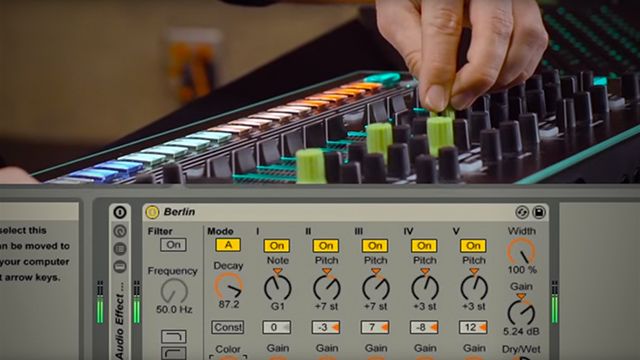
The Roland AIRA TR-8 is an incredibly powerful standalone performance and production tool – but what would happen if you super-charged it with a bit of creative MIDI mapping and sound manipulation in Ableton Live? In part one of a new series, Ean shares his technique for taking the tom-tom channel on the TR-8, adding resonance to create a synthesizer-like sound, and then adding more effects on top. It makes for an expressive and fun performance tool – watch the full video inside.

MIDI Mapping Roland TR-8 In Ableton

Basic Setup Instructions

As a reminder for if you’re setting this up for yourself, here’s what Ean did in this video:

  • Connect the Roland TR-8 to Ableton Live via USB
  • Send the TR-8’s audio output into Ableton Live – set up a new audio channel for each instrument on the TR-8
  • Make sure the TR-8 is also set up as a MIDI input device in Ableton’s preferences – this allows you to MIDI map the controls on the device
  • Add an Ableton Resonator device to the Tom channel – in the video, Ean applies the Berlin preset.
  • Hunt for expressive controls inside of the Resonator (Color, Decay, etc), find a solid range, and MIDI map the TR-8’s knobs to them. Use Ableton’s mapping interface to set the start and end points for the knobs’ controls!
  • Note that the original control of the knob will still exist – for example, in the video Ean maps the resonator’s decay to the decay knob for the tom channel. Try to find controls that work well together!
  • Add a Grain Delay audio effect, apply the Kick Toner preset to detune and repitch the synth – and map the

Gear Used In This Video

  • Razer Blade Pro laptop
  • Ableton Live 9
  • Roland AIRA TR-8 drum machine
  • Chroma Caps (to remind you which knobs are particularly important!)

Want to see this technique in action in a performance? There’s a full performance video in this series coming out soon, but int the mean time, see a similar setup in a performance that posted to Ean’s Facebook page back in October:

Back in action with a fresh One Take Track #LiveMusic

Posted by Ean Golden on Sunday, October 4, 2015

Stay tuned to DJTT in the coming weeks for more tutorials from Ean on making music production more interesting and playable. 

Tags: ableton livechroma capsean goldenGrain Delaymidi mappingRazerresonatorroland airaRoland AIRA TR-8
Share3Tweet2Share
Previous Post

How I Play: Rodriguez Jr. Interview + Live Rig Walkthrough

Next Post

SFX Entertainment Files For Chapter 11 Bankruptcy, Beatport To Carry On

Related Posts

Ableton launches Live 12 Suite rent-to-own plan – and it’s not a subscription
Ableton

Ableton launches Live 12 Suite rent-to-own plan – and it’s not a subscription

October 1, 2025
Use your Midi Fighter Twister as an Audio-Reactive Visualizer
Ableton Live Tips

Use your Midi Fighter Twister as an Audio-Reactive Visualizer

June 23, 2025
Control an entire studio with Midi Fighter Spectra (like Mad Zach)
Finger Drumming

Control an entire studio with Midi Fighter Spectra (like Mad Zach)

May 9, 2025
Load More
Next Post
SFX Entertainment Bankruptcy

SFX Entertainment Files For Chapter 11 Bankruptcy, Beatport To Carry On

Want to reach DJTT's audience here?

Shoot an email to advertising@djtechtools.com

DJTT ads
DJTT newsletter
Midi Fighter
Chat with us
  • ABOUT DJTT
  • CONTACT
  • PRIVACY
  • MIDI FIGHTER HELP
  • ABOUT DJTT
  • JOBS
  • CONTACT US
  • ADVERTISE
  • PRIVACY POLICY
  • ACCESSIBILITY STATEMENT

© 2024 DJ Techtools all rights reserved by DJ TechTools on all content unless otherwise noted.

No Result
View All Result
  • Blog
    • DJ Gear
      • DIY Projects
      • Gear Reviews
      • New Products
      • Controllerism
    • Techniques + Tips
      • Beginner DJ
      • Advanced DJ
      • Producer
      • Finger Drummer
    • News + Culture
      • Editorials + Opinions
      • Artist Interviews
      • Performances + Routines
      • How I Play
    • DJ Software Tutorials
      • Serato Tips
      • CDJ Tips
      • Ableton Live Tips
  • Store
    • Run by real DJs, not a corporation
    • DJ Controllers
      • Midi Fighter Twister
      • Midi Fighter Spectra
      • Midi Fighter 64
      • View All
    • Accessories
      • Chroma USB Drive for DJs
      • Chroma Caps
      • Chroma Cables Audio
      • Chroma Cables USB-A
      • Chroma Cables: USB-C
      • DJTT Gift Card
      • Midi Fighter T-Shirt
      • Keyboard Covers
      • Earplugs by V-Moda
    • Production Gear
    • Soundcards & Mixers
  • Community
    • Popular Forums
      • General Discussion
      • Buy & Sell
      • Reviews
      • Mixes
      • Music Production
      • Show Your Setup
      • Off Topic
    • Handy Links
      • New Posts
      • Private Messages
      • Register
      • Search
    • Midi Maps
      • Traktor
      • Ableton
      • Serato DJ
      • Midi Fighter 3D
      • Midi Fighter Twister
      • Midi Fighter Spectra
  • Midi Fighter
  • Chroma

© 2024 DJ Techtools all rights reserved by DJ TechTools on all content unless otherwise noted.

This website uses cookies. By continuing to use this website you are giving consent to cookies being used. Visit our Privacy and Cookie Policy.