DJ TechTools
  • Blog
    • DJ Gear
      • DIY Projects
      • Gear Reviews
      • New Products
      • Controllerism
    • Techniques + Tips
      • Beginner DJ
      • Advanced DJ
      • Producer
      • Finger Drummer
    • News + Culture
      • Editorials + Opinions
      • Artist Interviews
      • Performances + Routines
      • How I Play
    • DJ Software Tutorials
      • Serato Tips
        • Traktor Tips
      • CDJ Tips
      • Ableton Live Tips
  • Store
    • Run by real DJs, not a corporation
    • DJ Controllers
      • Midi Fighter Twister
      • Midi Fighter Spectra
      • Midi Fighter 64
      • View All
    • Accessories
      • Chroma USB Drive for DJs
      • Chroma Caps
      • Chroma Cables Audio
      • Chroma Cables USB-A
      • Chroma Cables: USB-C
      • DJTT Gift Card
      • Midi Fighter T-Shirt
      • Keyboard Covers
      • Earplugs by V-Moda
    • Production Gear
    • Soundcards & Mixers
  • Community
    • Popular Forums
      • General Discussion
      • Buy & Sell
      • Reviews
      • Mixes
      • Music Production
      • Show Your Setup
      • Off Topic
    • Handy Links
      • New Posts
      • Private Messages
      • Register
      • Search
    • Midi Maps
      • Traktor
      • Ableton
      • Serato DJ
      • Midi Fighter 3D
      • Midi Fighter Twister
      • Midi Fighter Spectra
  • Midi Fighter
  • Chroma
No Result
View All Result
DJ TechTools
  • Blog
    • DJ Gear
      • DIY Projects
      • Gear Reviews
      • New Products
      • Controllerism
    • Techniques + Tips
      • Beginner DJ
      • Advanced DJ
      • Producer
      • Finger Drummer
    • News + Culture
      • Editorials + Opinions
      • Artist Interviews
      • Performances + Routines
      • How I Play
    • DJ Software Tutorials
      • Serato Tips
        • Traktor Tips
      • CDJ Tips
      • Ableton Live Tips
  • Store
    • Run by real DJs, not a corporation
    • DJ Controllers
      • Midi Fighter Twister
      • Midi Fighter Spectra
      • Midi Fighter 64
      • View All
    • Accessories
      • Chroma USB Drive for DJs
      • Chroma Caps
      • Chroma Cables Audio
      • Chroma Cables USB-A
      • Chroma Cables: USB-C
      • DJTT Gift Card
      • Midi Fighter T-Shirt
      • Keyboard Covers
      • Earplugs by V-Moda
    • Production Gear
    • Soundcards & Mixers
  • Community
    • Popular Forums
      • General Discussion
      • Buy & Sell
      • Reviews
      • Mixes
      • Music Production
      • Show Your Setup
      • Off Topic
    • Handy Links
      • New Posts
      • Private Messages
      • Register
      • Search
    • Midi Maps
      • Traktor
      • Ableton
      • Serato DJ
      • Midi Fighter 3D
      • Midi Fighter Twister
      • Midi Fighter Spectra
  • Midi Fighter
  • Chroma
No Result
View All Result
DJ TechTools

Serato DJ Pro Tips: Using The New Serato Sampler

Marc Santaromana by Marc Santaromana
February 20, 2017
in DJ Software Tips, Serato Tips
Reading Time: 2 mins read
0
Serato DJ Pro Tips: Using The New Serato Sampler
359
VIEWS
Post on FacebookTweet thisUpvote on Reddit

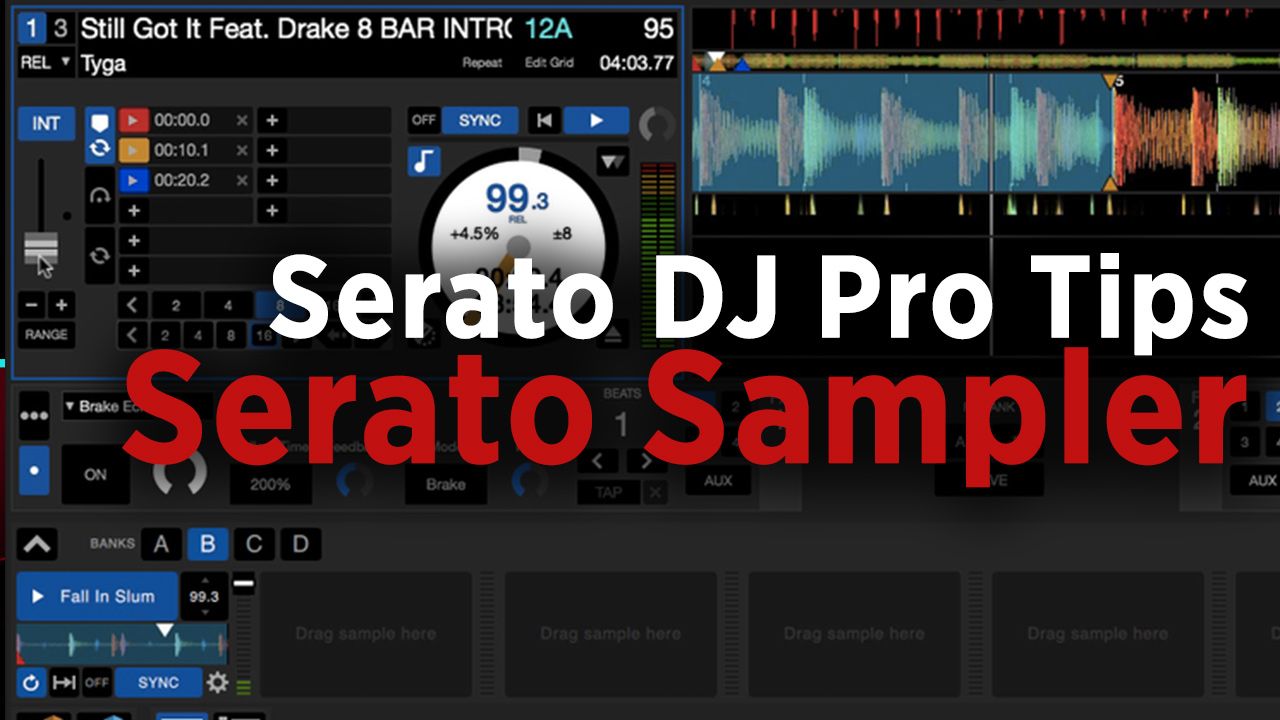
The SP-6 was instantly a favorite feature to DJs around the world when it was added to Scratch Live over half a decade ago. In first few years after Serato DJ became Serato’s only supported DJ software, the SP-6 went largely unchanged. Learn about the many features of the Serato Sampler, which many DJs aren’t even aware of, in this article.

What’s The Serato Sampler Capable Of?

The Serato sampler has some really cool functionality that many DJs don’t even know exist, let alone use. Let’s take a look at some of the Serato Sampler’s features:

  • Slots/Banks: With the ability to have 32 different samples over 4 banks, the Serato Sampler has plenty of room for creativity.
  • Play Modes: The Serato Sampler has 3 possible play modes, and these are selectable for each sample slot.
  • Keylock: Each of the sample slots can be locked to a key using the same technology used in the full track decks.

What Does The Serato Sampler Do That SP-6 Didn’t?

With the latest phase out of the SP-6 to the Serato Sampler, a new features were added as well:

  • Added slots: Each bank now has 2 extra slots, adding an additional 8 slots total.
  • New view modes: Serato added a couple condensed Sampler view modes that allow you to see anything from the full feature set all the way down to just play buttons for each slot.
  • Smart Sync follow in DVS: Now with the ability to enable smart sync, the Serato Sampler can act like a very basic remix deck. With slots that follow whatever track deck is enabled as the master.

The new Serato Sampler add a lot of performance opportunities that many DJs have yet put to use. It’s extremely flexible – great for simple uses like playing DJ drops, or as complex as a keylocked, BPM-synced, multilayered 3rd deck.

If you are already a Serato DJ user play around with the Sampler and it’s possibilities. We’ve already seen it used as a key part in the world finals sets for the last two Red Bull Thre3style champions (see the 2016 winning set below):
Tags: serato DJserato dj pro tipsserato samplerSp6
Share3Tweet2Share
Previous Post

Routine: Shawn Wasabi + A New Midi Fighter 64 in “Spicy Boyfriend”

Next Post

Ableton Launches Beat Tools Pack

Related Posts

“No Deal”: New Zealand’s ComCom denies clearance for AlphaTheta’s Serato acquisition
Breaking News

“No Deal”: New Zealand’s ComCom denies clearance for AlphaTheta’s Serato acquisition

July 17, 2024
TIDAL blocked DJs from using Stems – but the next generation of DJ gear will likely make that irrelevant
DJ Gear

TIDAL blocked DJs from using Stems – but the next generation of DJ gear will likely make that irrelevant

January 18, 2024
Serato DJ 3.1 adds integrated accessory control of Serato Stems
Serato

Serato DJ 3.1 adds integrated accessory control of Serato Stems

December 5, 2023
Load More
Next Post
Ableton Launches Beat Tools Pack

Ableton Launches Beat Tools Pack

Want to reach DJTT's audience here?

Shoot an email to advertising@djtechtools.com

DJTT ads
DJTT newsletter
Midi Fighter
Chat with us
  • ABOUT DJTT
  • CONTACT
  • PRIVACY
  • MIDI FIGHTER HELP
  • ABOUT DJTT
  • JOBS
  • CONTACT US
  • ADVERTISE
  • PRIVACY POLICY
  • ACCESSIBILITY STATEMENT

© 2024 DJ Techtools all rights reserved by DJ TechTools on all content unless otherwise noted.

No Result
View All Result
  • Blog
    • DJ Gear
      • DIY Projects
      • Gear Reviews
      • New Products
      • Controllerism
    • Techniques + Tips
      • Beginner DJ
      • Advanced DJ
      • Producer
      • Finger Drummer
    • News + Culture
      • Editorials + Opinions
      • Artist Interviews
      • Performances + Routines
      • How I Play
    • DJ Software Tutorials
      • Serato Tips
      • CDJ Tips
      • Ableton Live Tips
  • Store
    • Run by real DJs, not a corporation
    • DJ Controllers
      • Midi Fighter Twister
      • Midi Fighter Spectra
      • Midi Fighter 64
      • View All
    • Accessories
      • Chroma USB Drive for DJs
      • Chroma Caps
      • Chroma Cables Audio
      • Chroma Cables USB-A
      • Chroma Cables: USB-C
      • DJTT Gift Card
      • Midi Fighter T-Shirt
      • Keyboard Covers
      • Earplugs by V-Moda
    • Production Gear
    • Soundcards & Mixers
  • Community
    • Popular Forums
      • General Discussion
      • Buy & Sell
      • Reviews
      • Mixes
      • Music Production
      • Show Your Setup
      • Off Topic
    • Handy Links
      • New Posts
      • Private Messages
      • Register
      • Search
    • Midi Maps
      • Traktor
      • Ableton
      • Serato DJ
      • Midi Fighter 3D
      • Midi Fighter Twister
      • Midi Fighter Spectra
  • Midi Fighter
  • Chroma

© 2024 DJ Techtools all rights reserved by DJ TechTools on all content unless otherwise noted.

This website uses cookies. By continuing to use this website you are giving consent to cookies being used. Visit our Privacy and Cookie Policy.