DJ TechTools
  • Blog
    • DJ Gear
      • DIY Projects
      • Gear Reviews
      • New Products
      • Controllerism
    • Techniques + Tips
      • Beginner DJ
      • Advanced DJ
      • Producer
      • Finger Drummer
    • News + Culture
      • Editorials + Opinions
      • Artist Interviews
      • Performances + Routines
      • How I Play
    • DJ Software Tutorials
      • Serato Tips
        • Traktor Tips
      • CDJ Tips
      • Ableton Live Tips
  • Store
    • Run by real DJs, not a corporation
    • DJ Controllers
      • Midi Fighter Twister
      • Midi Fighter Spectra
      • Midi Fighter 64
      • View All
    • Accessories
      • Chroma USB Drive for DJs
      • Chroma Caps
      • Chroma Cables Audio
      • Chroma Cables USB-A
      • Chroma Cables: USB-C
      • DJTT Gift Card
      • Midi Fighter T-Shirt
      • Keyboard Covers
      • Earplugs by V-Moda
    • Production Gear
    • Soundcards & Mixers
  • Community
    • Popular Forums
      • General Discussion
      • Buy & Sell
      • Reviews
      • Mixes
      • Music Production
      • Show Your Setup
      • Off Topic
    • Handy Links
      • New Posts
      • Private Messages
      • Register
      • Search
    • Midi Maps
      • Traktor
      • Ableton
      • Serato DJ
      • Midi Fighter 3D
      • Midi Fighter Twister
      • Midi Fighter Spectra
  • Midi Fighter
  • Chroma
No Result
View All Result
DJ TechTools
  • Blog
    • DJ Gear
      • DIY Projects
      • Gear Reviews
      • New Products
      • Controllerism
    • Techniques + Tips
      • Beginner DJ
      • Advanced DJ
      • Producer
      • Finger Drummer
    • News + Culture
      • Editorials + Opinions
      • Artist Interviews
      • Performances + Routines
      • How I Play
    • DJ Software Tutorials
      • Serato Tips
        • Traktor Tips
      • CDJ Tips
      • Ableton Live Tips
  • Store
    • Run by real DJs, not a corporation
    • DJ Controllers
      • Midi Fighter Twister
      • Midi Fighter Spectra
      • Midi Fighter 64
      • View All
    • Accessories
      • Chroma USB Drive for DJs
      • Chroma Caps
      • Chroma Cables Audio
      • Chroma Cables USB-A
      • Chroma Cables: USB-C
      • DJTT Gift Card
      • Midi Fighter T-Shirt
      • Keyboard Covers
      • Earplugs by V-Moda
    • Production Gear
    • Soundcards & Mixers
  • Community
    • Popular Forums
      • General Discussion
      • Buy & Sell
      • Reviews
      • Mixes
      • Music Production
      • Show Your Setup
      • Off Topic
    • Handy Links
      • New Posts
      • Private Messages
      • Register
      • Search
    • Midi Maps
      • Traktor
      • Ableton
      • Serato DJ
      • Midi Fighter 3D
      • Midi Fighter Twister
      • Midi Fighter Spectra
  • Midi Fighter
  • Chroma
No Result
View All Result
DJ TechTools

Traktor DJ 2: NI Has Rewritten Their App For iOS, PC, and Mac

Post on FacebookTweet thisUpvote on Reddit

It’s not even dawn here in Anaheim, but Native Instruments wants to be sure that their news dominates on the first day of NAMM. The news is that Traktor DJ 2 is here – the follow-up to the powerful iOS app that was first announced at NAMM 2013. Details are a bit sparse in the official press release, but we’ll share everything we know in the article below, and we’ll be doing live coverage of new app later today on our Facebook page. 

Traktor DJ 2: A Whole New Codebase
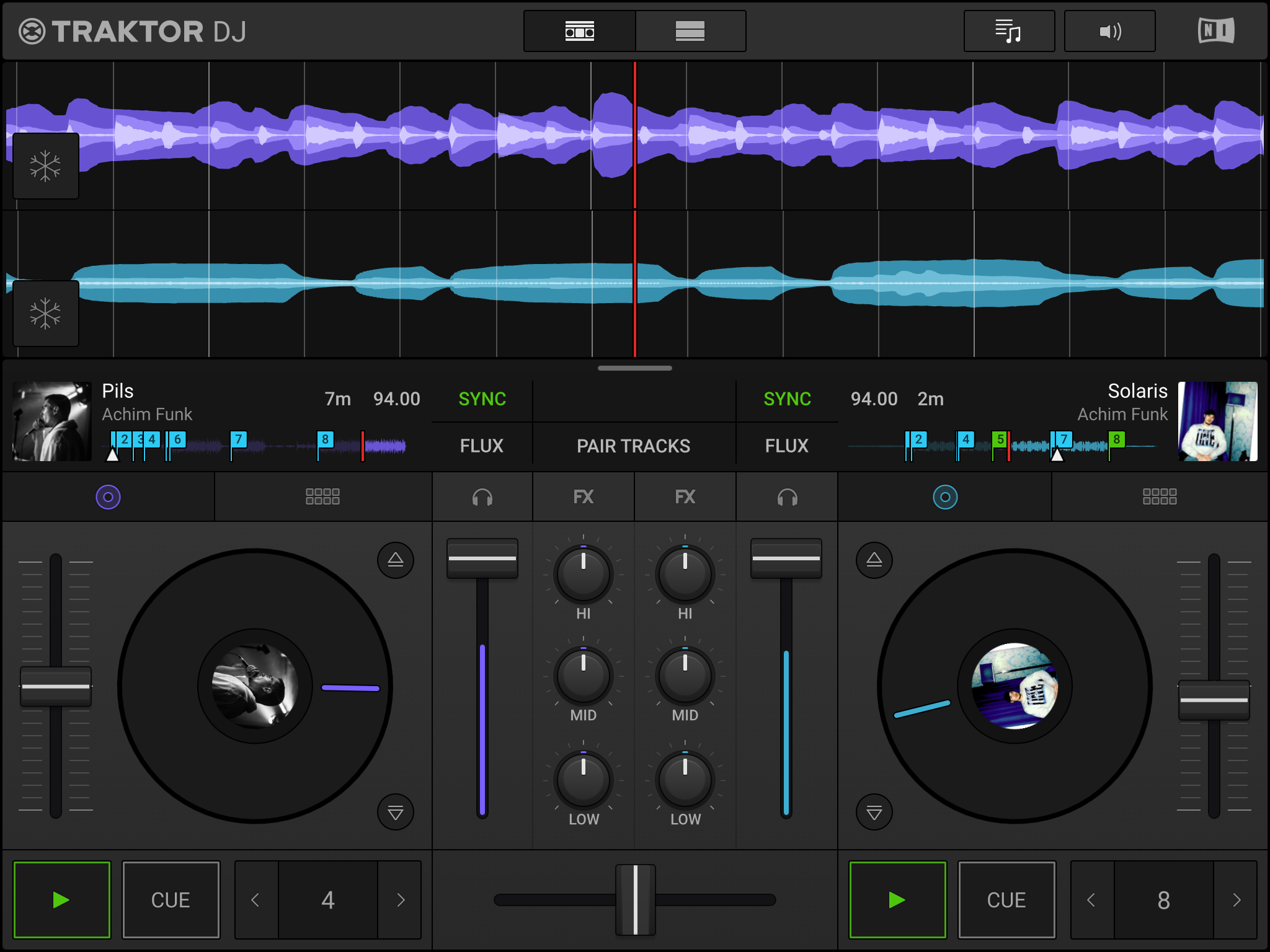
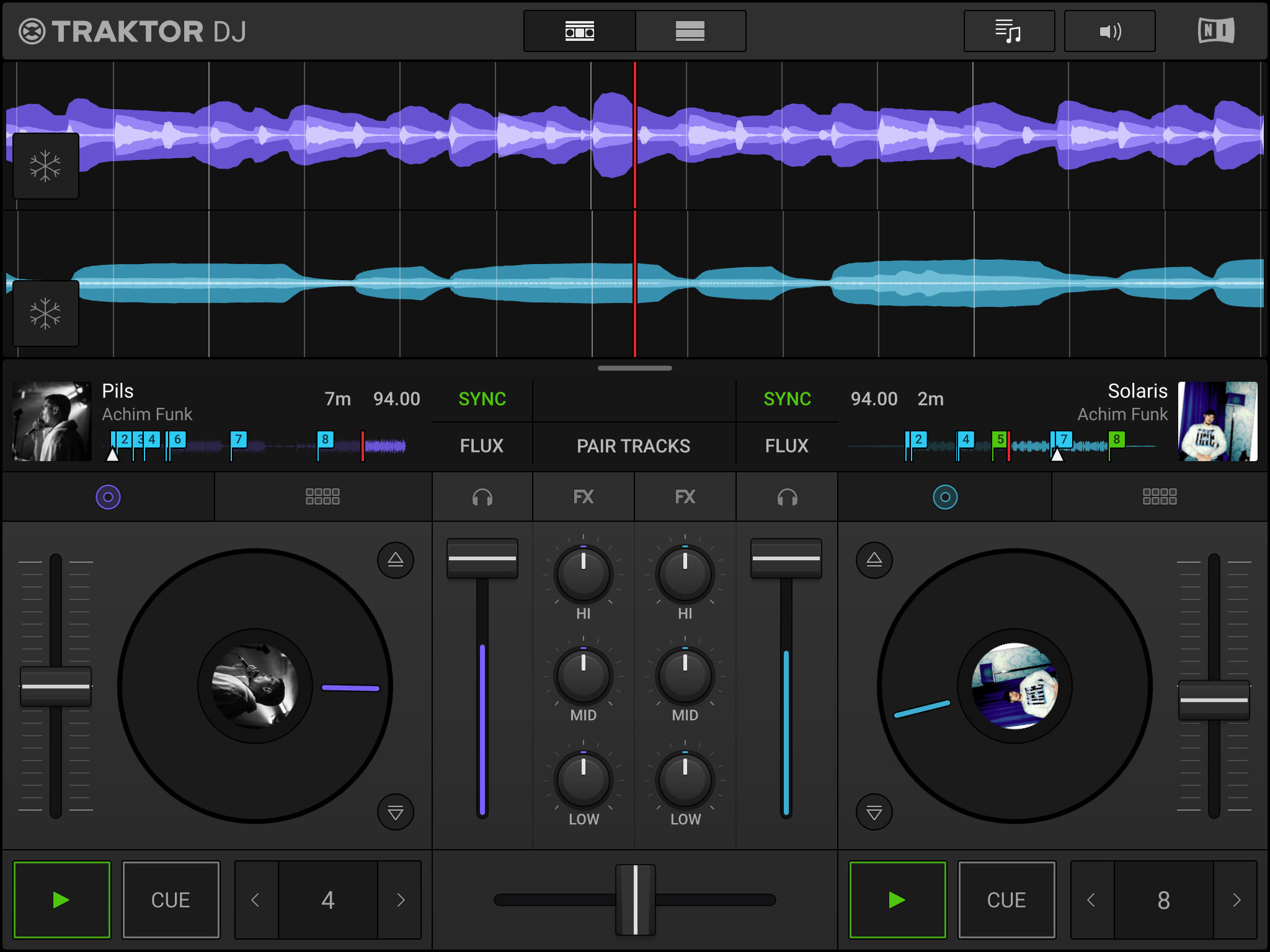
Traktor DJ 2 (click to zoom)
  • App: Traktor DJ 2
  • Developer: Native Instruments
  • Release date: Spring 2019
  • Platform:  iOS, macOS and Windows
  • Price: Final pricing: $8.99 on iOS, $49 on desktop, and free for Traktor Kontrol S2 MK3 owners / new purchases

Worth noting, unlike the original Traktor DJ app, this one is designed with a new code base that enables cross-platform support on iOS, Windows, and Mac devices. Sadly, no mention of Android device support.

The Core Feature Set

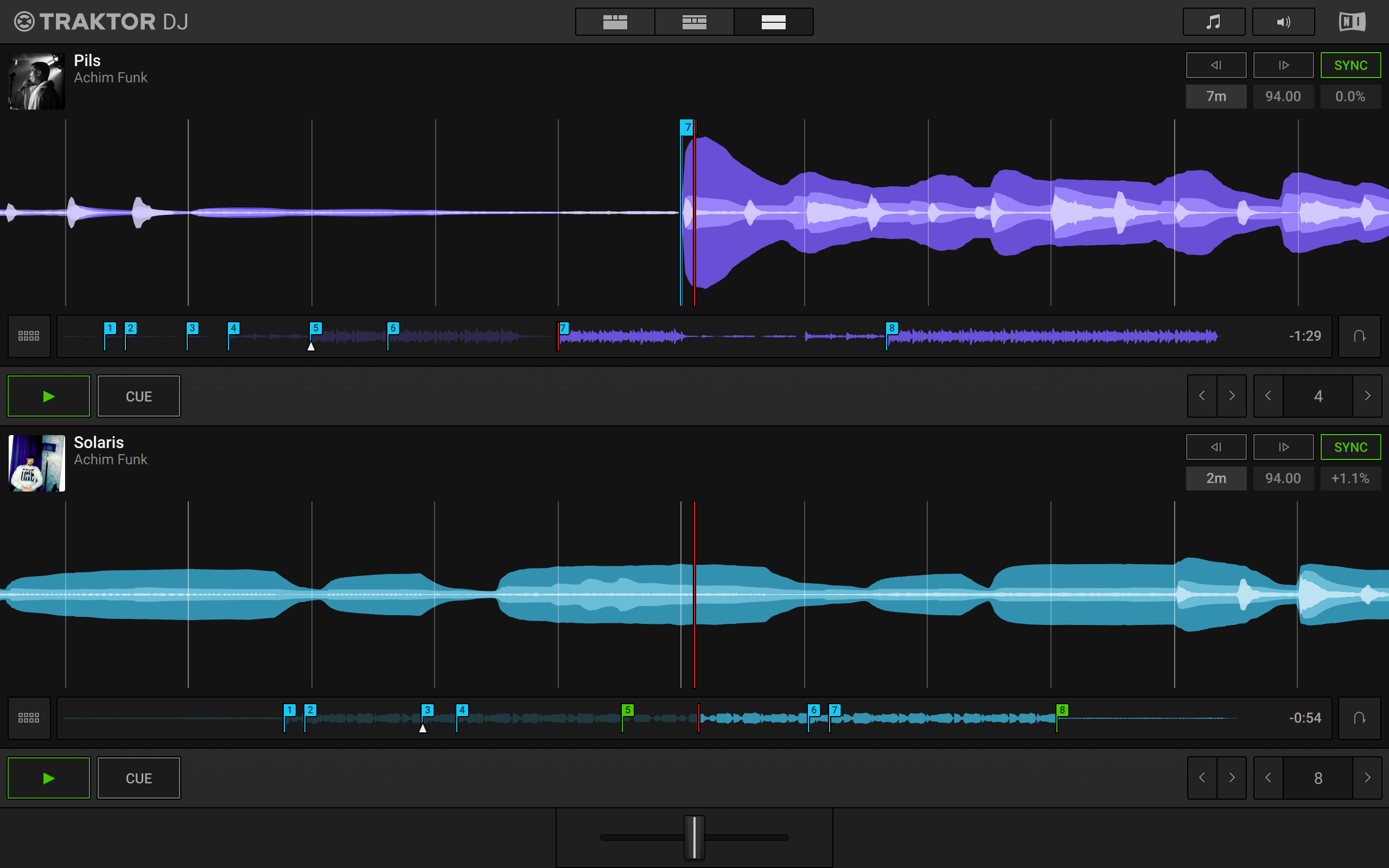
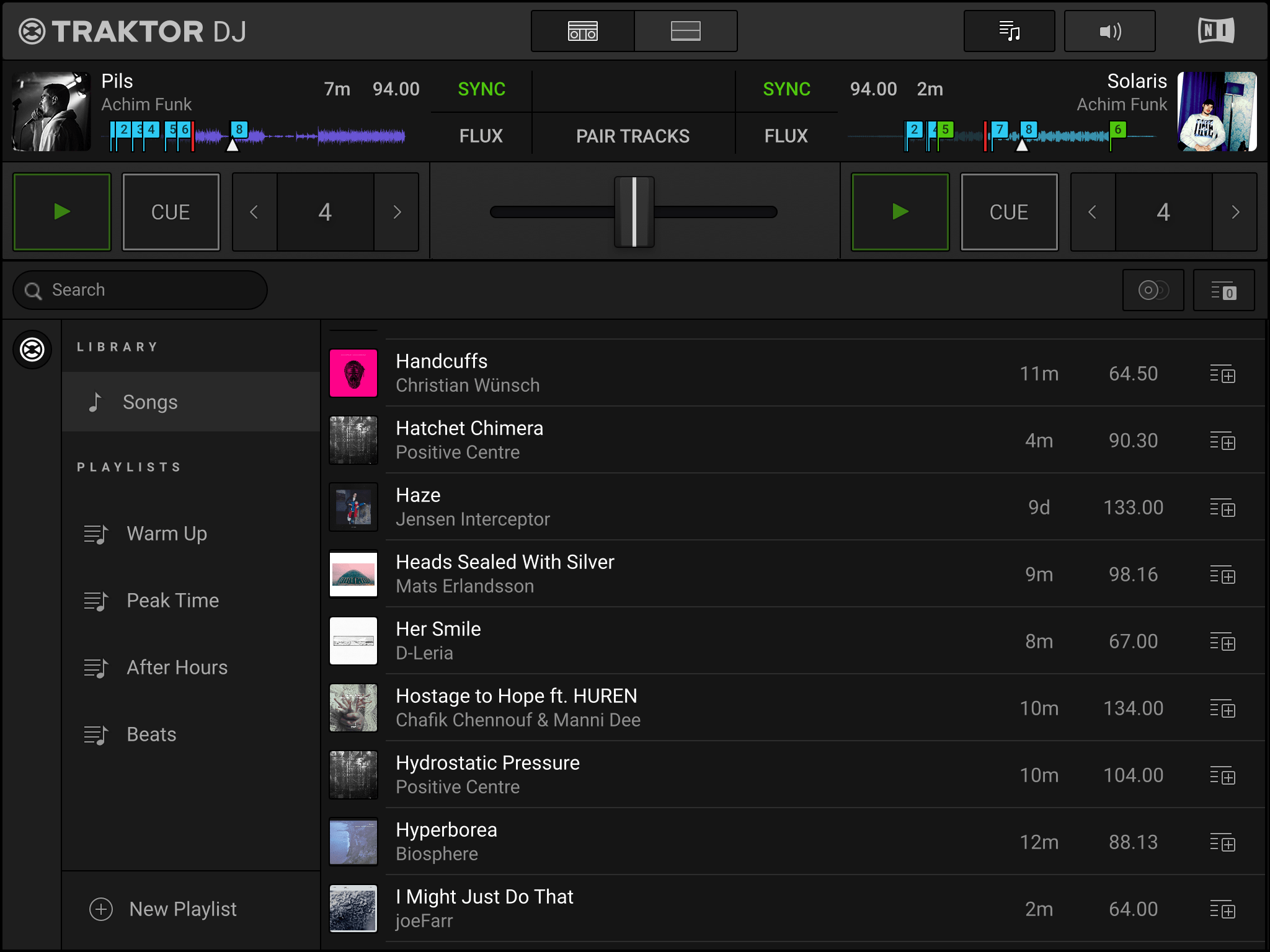
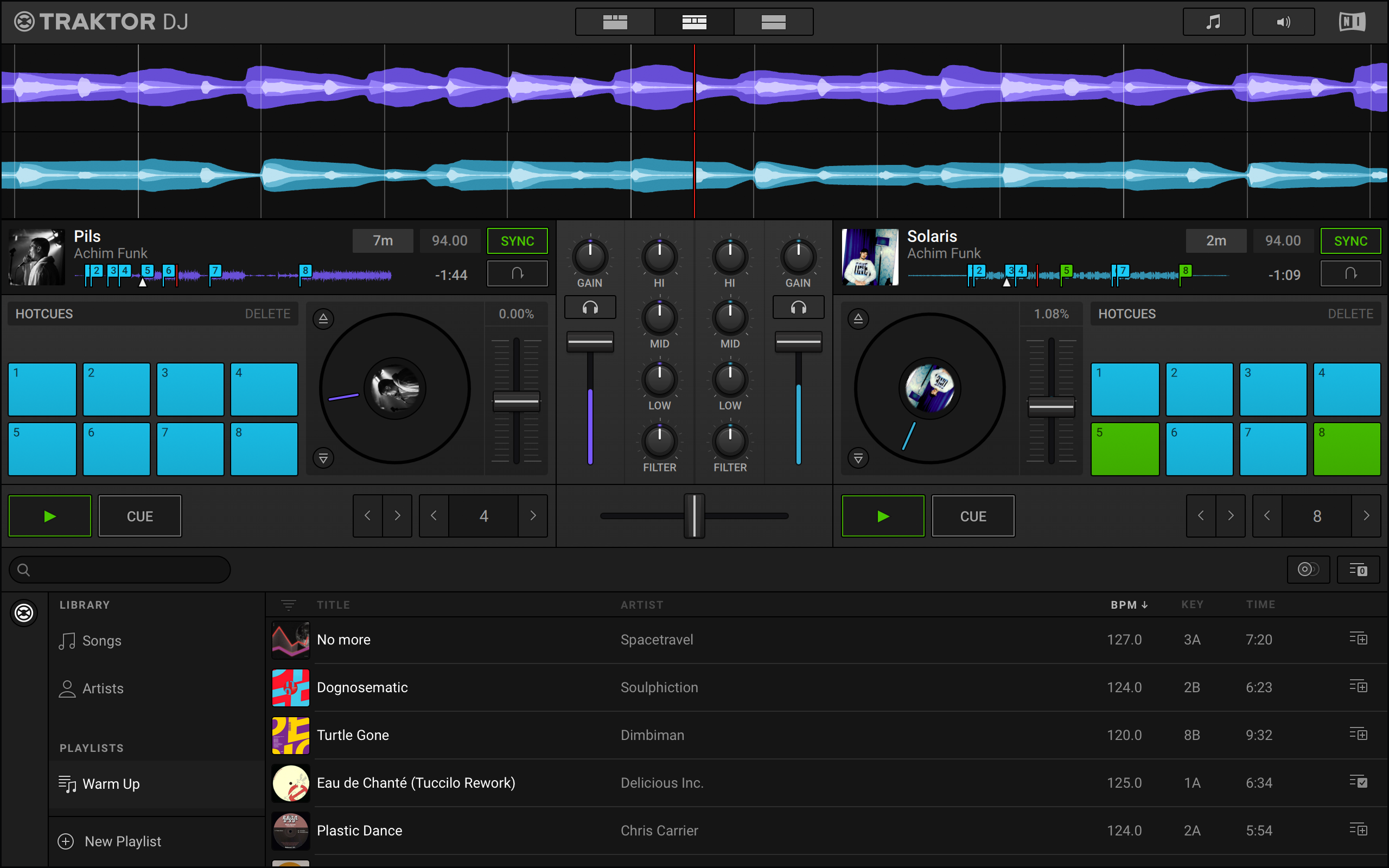
NI hasn’t released a completed feature set of the new app, which will be released sometime this spring, but we can tell a fair amounts about the app by the screenshots that they’ve sent over. It’s a simpler interface than Traktor Pro 3, and honestly it doesn’t differ that much in functional appearance than the original Traktor DJ. Click on any of the screenshots (all on iPad) below to see them full screen.
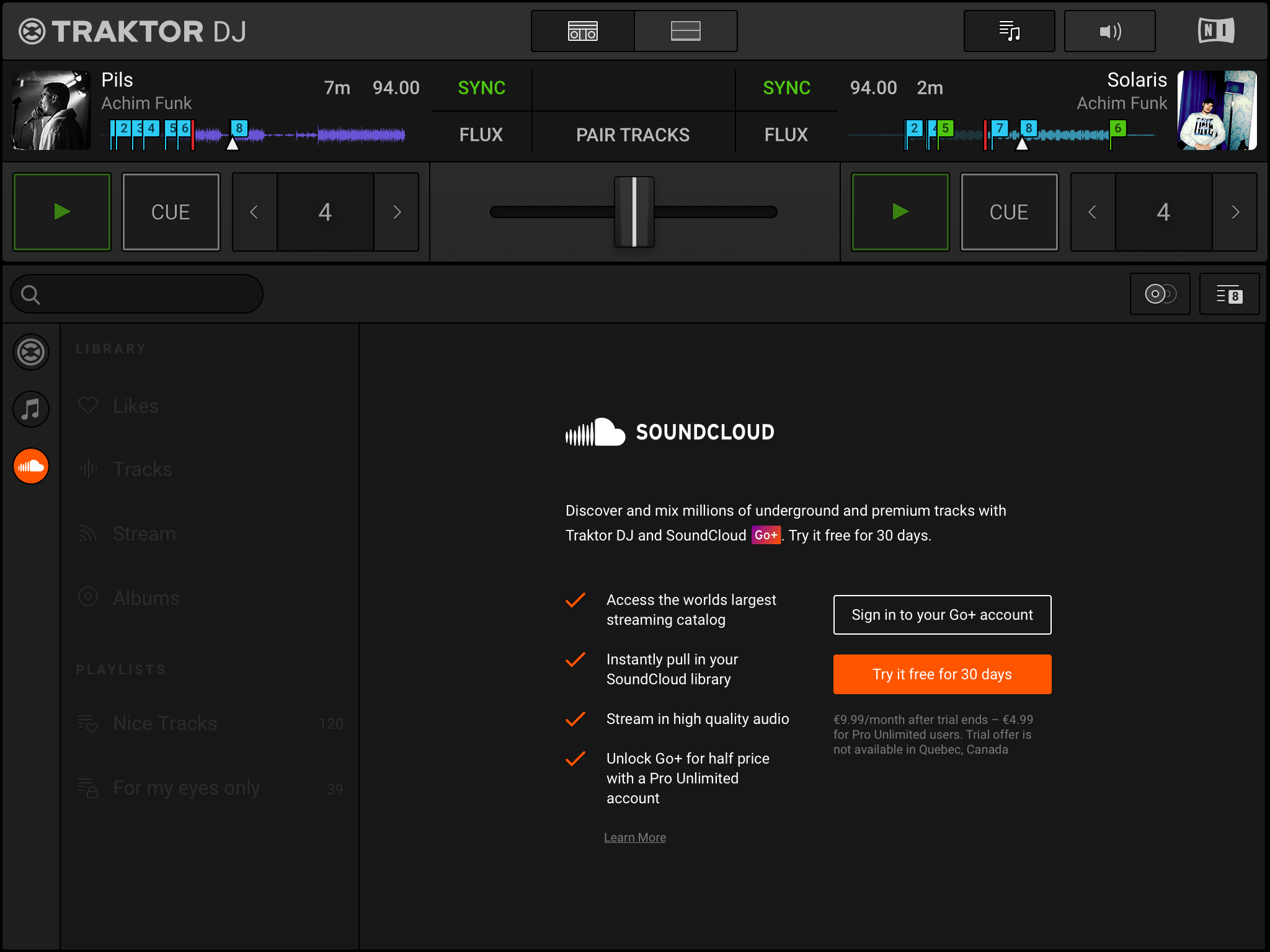
The Soundcloud Go+ integration screen
Library view
Full waveform view
Mixer + Decks view

Here’s what we know about the features of Traktor DJ 2 so far (we will update this list as we learn more) :

  • Platters and Performance Pad modes: The new UI has onscreen platters and 8 buttons for cues, loops, etc. We suspect there might be other performance pad modes, but they are not visible in any of the screenshots.
  • “smart track recommendations” – this was a prominent feature that the original Traktor DJ app had – being able to recommend tracks using metadata based on the playing track. No indication that there’s any new element to this feature in this new launch.
  • SoundCloud GO+ Library – a “never-ending record collection” in the form of SoundCloud’s entire library. If you’ve got a GO+ account, you can load in any track from Soundcloud and it will work just like a normal song in your library. Interesting that we are seeing this in Traktor DJ 2 and not in Traktor Pro 3…
  • “entirely new code base” – this is important not only because of the cross-platform support, but also because it made it easier to implement the new UI design and simplify future development.
  • Freeze Mode: Don’t worry, the incredible touch-based Freeze slicer that was in the original Traktor DJ hasn’t gone anywhere. The snowflake icon on the left side of the waveforms makes it clear that function is here to stay.
  •  “Pair Tracks” button – visible in the screenshots but without a clear explanation from NI in the press release, we suspect this is similar to the Match Tracks button in Rekordbox. Tap the button and the software will remember that you like these two tracks together and show them at the top of the smart track recommendations.

Traktor, Simplified?
Traktor DJ on desktop

The common theme here actually seems to be that Native Instruments views Traktor DJ 2 as a bit of a starter DJ app. Not only is it targeted for and included with the Kontrol S2 MK3, but there’s this very clear quote in their press release:

“Serious DJing, made seriously easy. A DJ app that allows everybody to mix anywhere.”

What would be nice is if this is also coupled with utility for already-experienced DJs, which was a big part of the original pitch for Traktor DJ back in 2013. Remember how there was a whole Dropbox Sync integration that allowed you to prep tracks in Traktor DJ and then keep the beatgrid, cue, and playlist information when you moved it back into the desktop version of the app.

I’m also left wondering about other Kontrol devices beyond the S2 MK3. Will the S4 MK3 be supported? What about MK2 versions, which both worked with the original Traktor DJ iOS app?

There’s a bit more to the story here, which we’re working on crafting an article around. It might be a stretch for some DJs to upgrade now if they already own the old app, but it’s more about what’s coming next. Stay tuned and we’ll share more.

Want more NAMM 2019 news?
Click here for everything we’ve written about so far.
Watch updates on our Facebook page.

Want to reach DJTT's audience here?

Shoot an email to advertising@djtechtools.com

DJTT ads
DJTT newsletter
Midi Fighter
Chat with us
  • ABOUT DJTT
  • CONTACT
  • PRIVACY
  • MIDI FIGHTER HELP
  • ABOUT DJTT
  • JOBS
  • CONTACT US
  • ADVERTISE
  • PRIVACY POLICY
  • ACCESSIBILITY STATEMENT

© 2024 DJ Techtools all rights reserved by DJ TechTools on all content unless otherwise noted.

No Result
View All Result
  • Blog
    • DJ Gear
      • DIY Projects
      • Gear Reviews
      • New Products
      • Controllerism
    • Techniques + Tips
      • Beginner DJ
      • Advanced DJ
      • Producer
      • Finger Drummer
    • News + Culture
      • Editorials + Opinions
      • Artist Interviews
      • Performances + Routines
      • How I Play
    • DJ Software Tutorials
      • Serato Tips
      • CDJ Tips
      • Ableton Live Tips
  • Store
    • Run by real DJs, not a corporation
    • DJ Controllers
      • Midi Fighter Twister
      • Midi Fighter Spectra
      • Midi Fighter 64
      • View All
    • Accessories
      • Chroma USB Drive for DJs
      • Chroma Caps
      • Chroma Cables Audio
      • Chroma Cables USB-A
      • Chroma Cables: USB-C
      • DJTT Gift Card
      • Midi Fighter T-Shirt
      • Keyboard Covers
      • Earplugs by V-Moda
    • Production Gear
    • Soundcards & Mixers
  • Community
    • Popular Forums
      • General Discussion
      • Buy & Sell
      • Reviews
      • Mixes
      • Music Production
      • Show Your Setup
      • Off Topic
    • Handy Links
      • New Posts
      • Private Messages
      • Register
      • Search
    • Midi Maps
      • Traktor
      • Ableton
      • Serato DJ
      • Midi Fighter 3D
      • Midi Fighter Twister
      • Midi Fighter Spectra
  • Midi Fighter
  • Chroma

© 2024 DJ Techtools all rights reserved by DJ TechTools on all content unless otherwise noted.

This website uses cookies. By continuing to use this website you are giving consent to cookies being used. Visit our Privacy and Cookie Policy.