DJ TechTools
  • Blog
    • DJ Gear
      • DIY Projects
      • Gear Reviews
      • New Products
      • Controllerism
    • Techniques + Tips
      • Beginner DJ
      • Advanced DJ
      • Producer
      • Finger Drummer
    • News + Culture
      • Editorials + Opinions
      • Artist Interviews
      • Performances + Routines
      • How I Play
    • DJ Software Tutorials
      • Serato Tips
        • Traktor Tips
      • CDJ Tips
      • Ableton Live Tips
  • Store
    • Run by real DJs, not a corporation
    • DJ Controllers
      • Midi Fighter Twister
      • Midi Fighter Spectra
      • Midi Fighter 64
      • View All
    • Accessories
      • Chroma USB Drive for DJs
      • Chroma Caps
      • Chroma Cables Audio
      • Chroma Cables USB-A
      • Chroma Cables: USB-C
      • DJTT Gift Card
      • Midi Fighter T-Shirt
      • Keyboard Covers
      • Earplugs by V-Moda
    • Production Gear
    • Soundcards & Mixers
  • Community
    • Popular Forums
      • General Discussion
      • Buy & Sell
      • Reviews
      • Mixes
      • Music Production
      • Show Your Setup
      • Off Topic
    • Handy Links
      • New Posts
      • Private Messages
      • Register
      • Search
    • Midi Maps
      • Traktor
      • Ableton
      • Serato DJ
      • Midi Fighter 3D
      • Midi Fighter Twister
      • Midi Fighter Spectra
  • Midi Fighter
  • Chroma
No Result
View All Result
DJ TechTools
  • Blog
    • DJ Gear
      • DIY Projects
      • Gear Reviews
      • New Products
      • Controllerism
    • Techniques + Tips
      • Beginner DJ
      • Advanced DJ
      • Producer
      • Finger Drummer
    • News + Culture
      • Editorials + Opinions
      • Artist Interviews
      • Performances + Routines
      • How I Play
    • DJ Software Tutorials
      • Serato Tips
        • Traktor Tips
      • CDJ Tips
      • Ableton Live Tips
  • Store
    • Run by real DJs, not a corporation
    • DJ Controllers
      • Midi Fighter Twister
      • Midi Fighter Spectra
      • Midi Fighter 64
      • View All
    • Accessories
      • Chroma USB Drive for DJs
      • Chroma Caps
      • Chroma Cables Audio
      • Chroma Cables USB-A
      • Chroma Cables: USB-C
      • DJTT Gift Card
      • Midi Fighter T-Shirt
      • Keyboard Covers
      • Earplugs by V-Moda
    • Production Gear
    • Soundcards & Mixers
  • Community
    • Popular Forums
      • General Discussion
      • Buy & Sell
      • Reviews
      • Mixes
      • Music Production
      • Show Your Setup
      • Off Topic
    • Handy Links
      • New Posts
      • Private Messages
      • Register
      • Search
    • Midi Maps
      • Traktor
      • Ableton
      • Serato DJ
      • Midi Fighter 3D
      • Midi Fighter Twister
      • Midi Fighter Spectra
  • Midi Fighter
  • Chroma
No Result
View All Result
DJ TechTools

DJs using a tool, Aslice, to pay producers whose tracks are featured in their sets

Dan White by Dan White
June 12, 2024
in Business of DJing, News + Culture
Reading Time: 5 mins read
2
DJs using a tool, Aslice, to pay producers whose tracks are featured in their sets
53
SHARES
2.7k
VIEWS
Post on FacebookTweet thisUpvote on Reddit

Meet Aslice: a tool founded in 2022 by DJ + producer DVS1 that aims to equalize the economic disparity between touring DJs who earn fees from their gigs and producers whose tracks they play. The desktop-based software enables DJs to voluntarily allocate a small percentage of their performance fees – recommended at 5% – to those producers, providing them with a direct income stream.

Aslice’s approach dives straight into tackling the longstanding issue in which producers typically earn significantly less than DJs – despite their crucial role as creators of the music DJs integrate into their track selections.


How Aslice works

DJs can utilize Aslice to accurately track and report the music selections they’ve played, which both eliminates the need for manual entry and ensures accuracy and fairness in the distribution of funds (though notably assuming those DJs have metadata correctly attached to their music library).
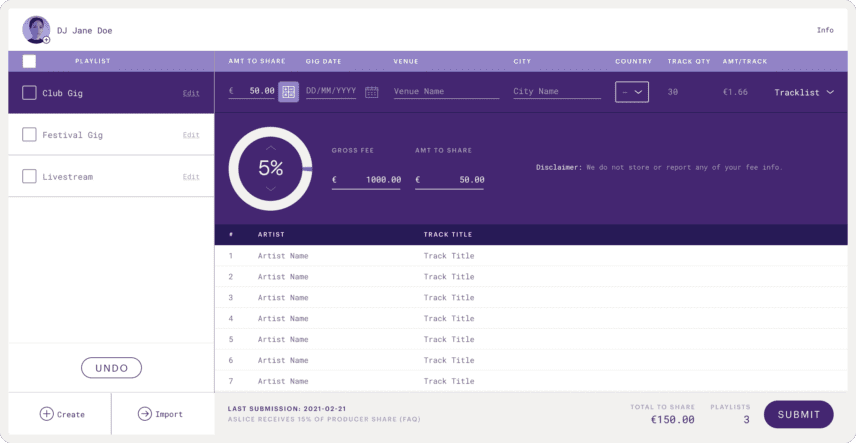
As the company describes:

We match all songs in the DJs playlists against a mix of public and proprietary databases to verify the songs officially attributed producer(s) before distributing payments. This secondary layer of verification ensures that the money the DJs share goes to the right place.

Our intelligent machine learning algorithm has also been designed to recognize typos, misspellings and misattributions, and correct them once a track has been matched.

The software’s workflow is straightforward:

  1. DJ plays a gig
  2. Afterwards, the DJ plugs the USB used at the gig into their computer and imports the playlist history from their set directly into Aslice. The playlist is editable, so you can add in relevant track details as well as vinyl records played. Aslice is compatible with export playlist files from Rekordbox (.txt), Serato (.m3u) and Traktor (.m3u).
  3. The DJ then submits the playlist, and Aslice takes it from there
  4. Using algorithms and machine learning, it matches tracks played with their respective producers
  5. Once identified, Aslice distributes a small percentage of the revenue obtained by the DJ for the gig (as mentioned, they recommend 5%) to the featured producers.
  6. If any tracks are deemed unidentifiable by the program, they’ll donate those funds to a charity chosen via an annual community vote from Aslice users.
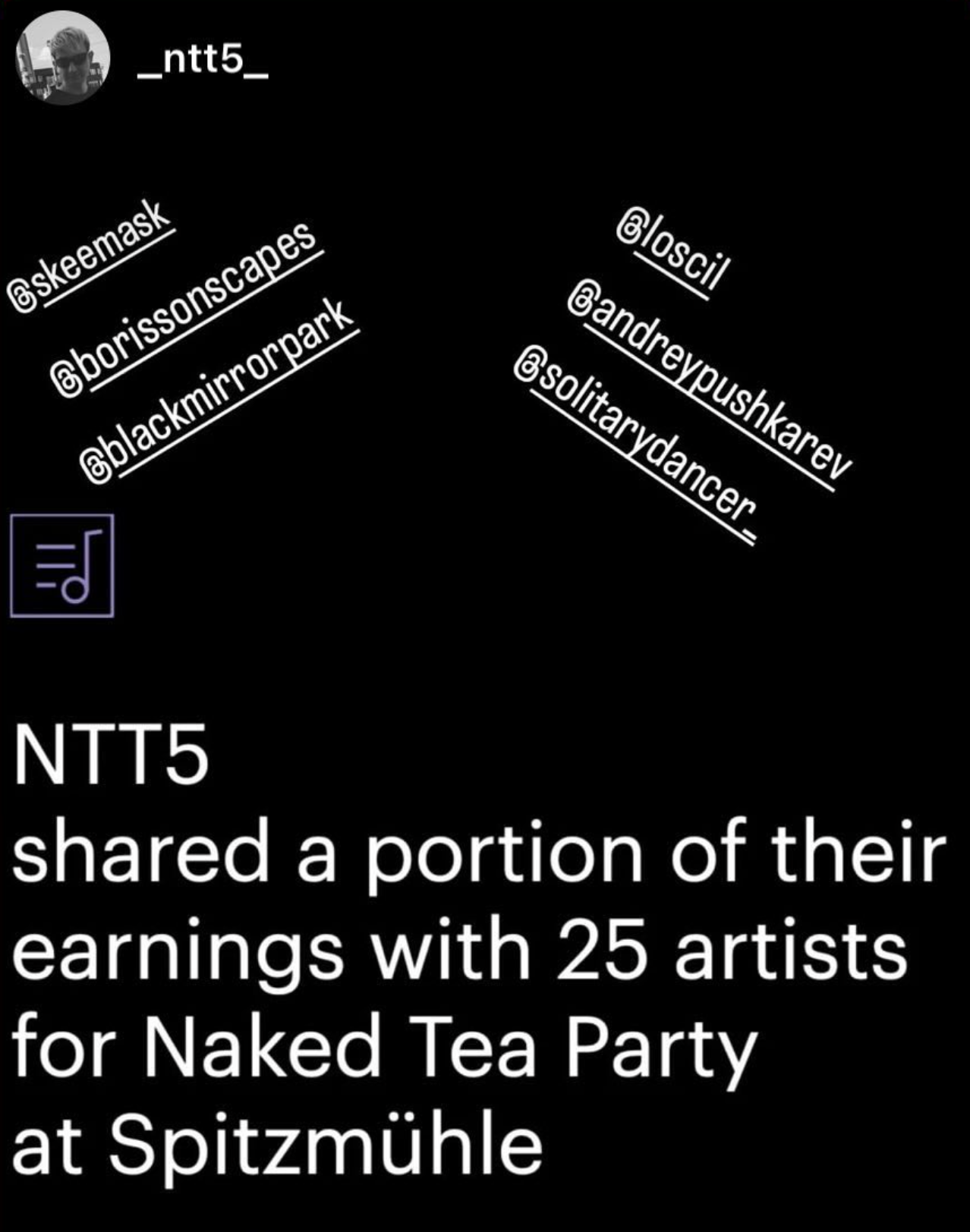
A big part of ASlice’s growth strategy is social sharing of the action of paying out artists – with easy Instagram slides to post and tag the artists DJs played

Fostering a support network for fellow artists

Aslice is more than just a software for financial fairness. It’s a grassroots-inspired, community-oriented environment that cultivates support and respect among DJs and producers in the scene.

Even though a producer may only earn a dollar or two from another artist’s set, this concept at its core of is powerful nonetheless. It makes a point to recognize creators, and that communication is a value much larger than any funds involved. It offers a way to express gratitude towards producers that hasn’t existed so clearly before.
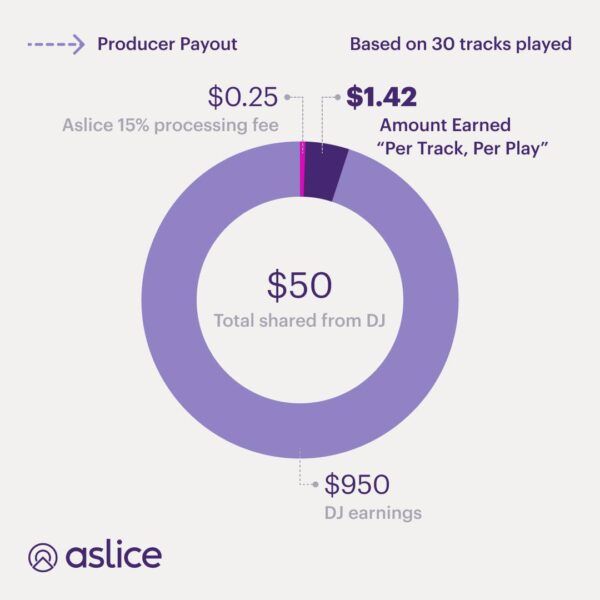
The company is a for-profit corporation, which theoretically allows DJs to deduct money spent with Aslice as a business expense. Remember, though, that for a deduction to have value, you’ll need to have net revenue / profit to deduct it against. While that may be common for major DJs, it’s a stretch for many small-time ones since they’re already able to deduct the cost of purchasing music in the first place – along with every other business expense. Aslice also takes a 15% cut from each fee it collects from DJs.
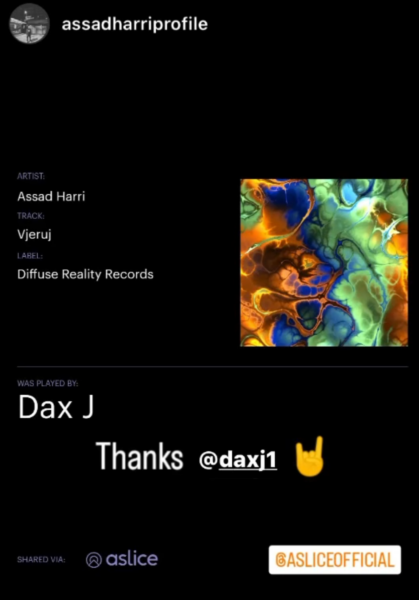
It’s a great way for “smaller” producers to see when big names play their tracks

Tackling the economic disparity between producers and DJs

There’s an interesting premise at the basis of the tool: that DJs earn more than producers overall. While this is certainly true at some ends of the industry spectrum, we have to face reality here: that across both non-touring major DJs and small-time producers, at the end of the day, performers are making a relatively tiny amount of money compared to the bar/club/etc.

One criticism I have of tools like this: they basically shuffle money within a community that is already financially undervalued as a whole. If a smaller DJ earns $200 per gig and gives $10 of that to a producer whose track they played – in addition to already having purchased the song – it feels a bit like rearranging the furniture or shuffling around money. A substantial percentage – if not a majority of DJs make far too little money from DJing to need deductible expenses via Aslice against their income as a DJ.

However, for producers whose works are un-payable via the traditional route of performing rights organizations (for instance, tracks that use other artists’ copy-written elements inside an edit or bootleg release), Aslice certainly offers an opportunity for them to get paid. If an artist feature or remix is identified by the tool, it’s given a 50/50 split between artists. Since most major streaming platforms aren’t likely to make major increases to payment rates for creators anytime soon, Aslice is aiming to fill a gap that needs to be tackled head-on.

The major question here is whether the economic disparity in the music industry is really about performers versus producers. To me, it feels alike there’s a decimal place or two missing from everyone’s earnings in the music industry who isn’t a major label artist or employee – and that’s the true disparity. What do you think? Give us a shout in the comments!


Tags: artist paymentasliceDj softwaredj toolsProducer Apps
Share21Tweet13Share
Previous Post

Is Pioneer DJ’s PLX-CRSS12 the ultimate turntable for DJs?

Next Post

Midi Fighter Utility 2.90 Released

Related Posts

A Prime 4+ and a Kontrol S3 intercut against eachother over a black background
Breaking News

InMusic just bought Native Instruments. So what now for Traktor?

May 8, 2026
Ableton launches Live 12 Suite rent-to-own plan – and it’s not a subscription
Ableton

Ableton launches Live 12 Suite rent-to-own plan – and it’s not a subscription

October 1, 2025
Rekordox Spotify
Breaking News

Spotify (finally) slides into Rekordbox, Serato, and Algoriddim djay (again) – for better or worse?

September 24, 2025
Load More
Next Post
Midi Fighter Utility 2.90

Midi Fighter Utility 2.90 Released

Want to reach DJTT's audience here?

Shoot an email to advertising@djtechtools.com

DJTT ads
DJTT newsletter
Midi Fighter
Chat with us
  • ABOUT DJTT
  • CONTACT
  • PRIVACY
  • MIDI FIGHTER HELP
  • ABOUT DJTT
  • JOBS
  • CONTACT US
  • ADVERTISE
  • PRIVACY POLICY
  • ACCESSIBILITY STATEMENT

© 2024 DJ Techtools all rights reserved by DJ TechTools on all content unless otherwise noted.

No Result
View All Result
  • Blog
    • DJ Gear
      • DIY Projects
      • Gear Reviews
      • New Products
      • Controllerism
    • Techniques + Tips
      • Beginner DJ
      • Advanced DJ
      • Producer
      • Finger Drummer
    • News + Culture
      • Editorials + Opinions
      • Artist Interviews
      • Performances + Routines
      • How I Play
    • DJ Software Tutorials
      • Serato Tips
      • CDJ Tips
      • Ableton Live Tips
  • Store
    • Run by real DJs, not a corporation
    • DJ Controllers
      • Midi Fighter Twister
      • Midi Fighter Spectra
      • Midi Fighter 64
      • View All
    • Accessories
      • Chroma USB Drive for DJs
      • Chroma Caps
      • Chroma Cables Audio
      • Chroma Cables USB-A
      • Chroma Cables: USB-C
      • DJTT Gift Card
      • Midi Fighter T-Shirt
      • Keyboard Covers
      • Earplugs by V-Moda
    • Production Gear
    • Soundcards & Mixers
  • Community
    • Popular Forums
      • General Discussion
      • Buy & Sell
      • Reviews
      • Mixes
      • Music Production
      • Show Your Setup
      • Off Topic
    • Handy Links
      • New Posts
      • Private Messages
      • Register
      • Search
    • Midi Maps
      • Traktor
      • Ableton
      • Serato DJ
      • Midi Fighter 3D
      • Midi Fighter Twister
      • Midi Fighter Spectra
  • Midi Fighter
  • Chroma

© 2024 DJ Techtools all rights reserved by DJ TechTools on all content unless otherwise noted.

This website uses cookies. By continuing to use this website you are giving consent to cookies being used. Visit our Privacy and Cookie Policy.