DJ TechTools
  • Blog
    • DJ Gear
      • DIY Projects
      • Gear Reviews
      • New Products
      • Controllerism
    • Techniques + Tips
      • Beginner DJ
      • Advanced DJ
      • Producer
      • Finger Drummer
    • News + Culture
      • Editorials + Opinions
      • Artist Interviews
      • Performances + Routines
      • How I Play
    • DJ Software Tutorials
      • Serato Tips
        • Traktor Tips
      • CDJ Tips
      • Ableton Live Tips
  • Store
    • Run by real DJs, not a corporation
    • DJ Controllers
      • Midi Fighter Twister
      • Midi Fighter Spectra
      • Midi Fighter 64
      • View All
    • Accessories
      • Chroma USB Drive for DJs
      • Chroma Caps
      • Chroma Cables Audio
      • Chroma Cables USB-A
      • Chroma Cables: USB-C
      • DJTT Gift Card
      • Midi Fighter T-Shirt
      • Keyboard Covers
      • Earplugs by V-Moda
    • Production Gear
    • Soundcards & Mixers
  • Community
    • Popular Forums
      • General Discussion
      • Buy & Sell
      • Reviews
      • Mixes
      • Music Production
      • Show Your Setup
      • Off Topic
    • Handy Links
      • New Posts
      • Private Messages
      • Register
      • Search
    • Midi Maps
      • Traktor
      • Ableton
      • Serato DJ
      • Midi Fighter 3D
      • Midi Fighter Twister
      • Midi Fighter Spectra
  • Midi Fighter
  • Chroma
No Result
View All Result
DJ TechTools
  • Blog
    • DJ Gear
      • DIY Projects
      • Gear Reviews
      • New Products
      • Controllerism
    • Techniques + Tips
      • Beginner DJ
      • Advanced DJ
      • Producer
      • Finger Drummer
    • News + Culture
      • Editorials + Opinions
      • Artist Interviews
      • Performances + Routines
      • How I Play
    • DJ Software Tutorials
      • Serato Tips
        • Traktor Tips
      • CDJ Tips
      • Ableton Live Tips
  • Store
    • Run by real DJs, not a corporation
    • DJ Controllers
      • Midi Fighter Twister
      • Midi Fighter Spectra
      • Midi Fighter 64
      • View All
    • Accessories
      • Chroma USB Drive for DJs
      • Chroma Caps
      • Chroma Cables Audio
      • Chroma Cables USB-A
      • Chroma Cables: USB-C
      • DJTT Gift Card
      • Midi Fighter T-Shirt
      • Keyboard Covers
      • Earplugs by V-Moda
    • Production Gear
    • Soundcards & Mixers
  • Community
    • Popular Forums
      • General Discussion
      • Buy & Sell
      • Reviews
      • Mixes
      • Music Production
      • Show Your Setup
      • Off Topic
    • Handy Links
      • New Posts
      • Private Messages
      • Register
      • Search
    • Midi Maps
      • Traktor
      • Ableton
      • Serato DJ
      • Midi Fighter 3D
      • Midi Fighter Twister
      • Midi Fighter Spectra
  • Midi Fighter
  • Chroma
No Result
View All Result
DJ TechTools

Midi Pipe Tutorial- EQ with a crossfader.

Ean Golden by Ean Golden
July 14, 2008
in Advanced DJ Tips, DIY Project Tutorials, Traktor Tips, VCI-100 SE / Arcade
Reading Time: 3 mins read
0
Midi Pipe Tutorial- EQ with a crossfader.
168
VIEWS
Post on FacebookTweet thisUpvote on Reddit

Lets say you want a single button to select an effect or your crossfader to also act as an EQ fader. These kind of functions are just not possible with 99% of dj midi gear out of the box, but there are a small group of software programs that allow you to customize the way your midi gear works inside the computer. They are called Midi translator’s and today I want to show you how to perform one of the examples above using a translator called “Midi Pipe”. Midi-Pipe is a great tool that is free and easy to use but sadly only runs on Macintosh.

First, the basics.

Here is the basic signal flow for a midi translator.
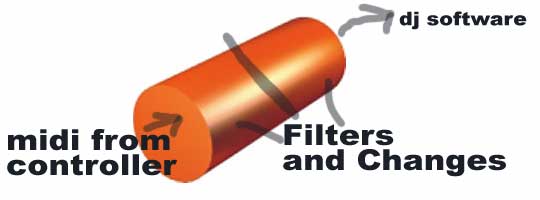
  1. Midi goes into the computer and shows up as a Midi Input (like vci-100)
  2. MidiPipe Highjacks that signal and runs it through some filters
  3. You then tell midipie to send the result back out to a new virtual output
  4. The virtual output shows up in your dj software as an optional input
  5. You select that as your midi source.

In Midi Pipe you have a vertical pipe that follows the same signal flow but you have to put each module into your pipe in the right order. Here is the most basic setup. Each of the modules can be dragged from the list on the left into your blank pipe.
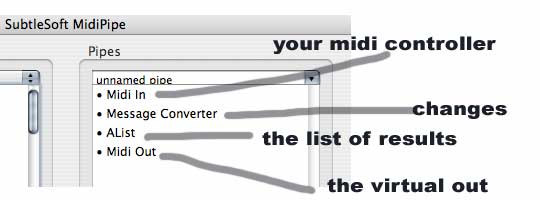
Once you have this working and midi is showing up in your dj software of choice we can start to mess around with the results and make some fun things happen.

Make the crossfader an EQ effect

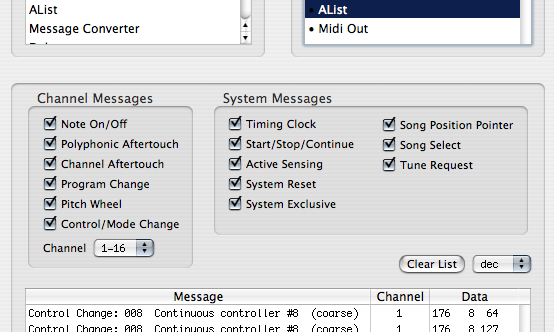
this was requested on the blog and highlights a few basic techniques you can apply to other concepts. First you need to see what message the cross fader is sending out using the Alist. In this case the vci-100 sends out CC # 8.
So we need to duplicate that message using the message converter tool.
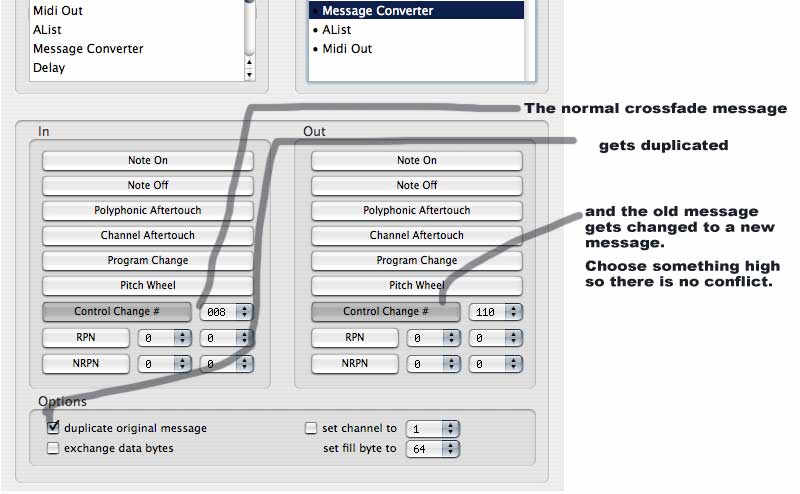
and now using the A-List tool you will see that the crossfader is indeed sending out 2 duplicate messages at the same time.

CHANGE THE RANGE

We want to take the CC #110 and change the range so the cross fader can only turn a EQ up or down by a limited amount. For this you need to use a control split tool and limit the scale of our new message.
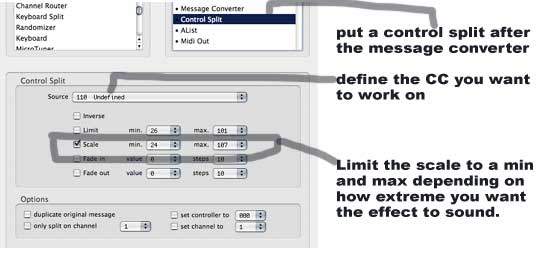
MAKE IT WORK IN TRAKTOR

You will only want to use this effect some of the time, so it makes sense to actually assign your new cross fader function to a single or multiple EQ band on a midi different page. Then use a foot switch or a shift button to activate that page and your fader will now be an FX control. The DJ TT tutorial on using midi pages in Traktor can be found here:

using multiple shift layers in Traktor

once you figure this process out and come up with some interesting ways of using the techniques- post a video on you-tube and show us how you used it!


Tags: Dj Tutorialsmid pipemidi translatorTips
Share1Tweet1Share
Previous Post

Controller’s not perfect? Mod it.

Next Post

DIY Controller- 59 minutes, $99.

Related Posts

Meet the Koala sampler app: a mobile production powerhouse, now with stems
DJ Gear

Meet the Koala sampler app: a mobile production powerhouse, now with stems

February 7, 2023
Tips for DJing in Extreme Cold: DJTT readers share their advice
DJ Techniques / Tips

Tips for DJing in Extreme Cold: DJTT readers share their advice

January 30, 2023
Rekordbox DJ with any jogwheel controller?
Advanced DJ Tips

How To Hack Rekordbox DJ To Use Any Controller’s Jogwheels

May 8, 2017
Load More
Next Post
DIY Controller- 59 minutes, $99.

DIY Controller- 59 minutes, $99.

Want to reach DJTT's audience here?

Shoot an email to advertising@djtechtools.com

DJTT ads
DJTT newsletter
Midi Fighter
Chat with us
  • ABOUT DJTT
  • CONTACT
  • PRIVACY
  • MIDI FIGHTER HELP
  • ABOUT DJTT
  • JOBS
  • CONTACT US
  • ADVERTISE
  • PRIVACY POLICY
  • ACCESSIBILITY STATEMENT

© 2024 DJ Techtools all rights reserved by DJ TechTools on all content unless otherwise noted.

No Result
View All Result
  • Blog
    • DJ Gear
      • DIY Projects
      • Gear Reviews
      • New Products
      • Controllerism
    • Techniques + Tips
      • Beginner DJ
      • Advanced DJ
      • Producer
      • Finger Drummer
    • News + Culture
      • Editorials + Opinions
      • Artist Interviews
      • Performances + Routines
      • How I Play
    • DJ Software Tutorials
      • Serato Tips
      • CDJ Tips
      • Ableton Live Tips
  • Store
    • Run by real DJs, not a corporation
    • DJ Controllers
      • Midi Fighter Twister
      • Midi Fighter Spectra
      • Midi Fighter 64
      • View All
    • Accessories
      • Chroma USB Drive for DJs
      • Chroma Caps
      • Chroma Cables Audio
      • Chroma Cables USB-A
      • Chroma Cables: USB-C
      • DJTT Gift Card
      • Midi Fighter T-Shirt
      • Keyboard Covers
      • Earplugs by V-Moda
    • Production Gear
    • Soundcards & Mixers
  • Community
    • Popular Forums
      • General Discussion
      • Buy & Sell
      • Reviews
      • Mixes
      • Music Production
      • Show Your Setup
      • Off Topic
    • Handy Links
      • New Posts
      • Private Messages
      • Register
      • Search
    • Midi Maps
      • Traktor
      • Ableton
      • Serato DJ
      • Midi Fighter 3D
      • Midi Fighter Twister
      • Midi Fighter Spectra
  • Midi Fighter
  • Chroma

© 2024 DJ Techtools all rights reserved by DJ TechTools on all content unless otherwise noted.

This website uses cookies. By continuing to use this website you are giving consent to cookies being used. Visit our Privacy and Cookie Policy.